
Home/HighLevel/How to/Client onboarding workflow
How to · Agency
Build a client onboarding workflow in GoHighLevel. Every new client, the same great start.
The first week decides whether a client stays. A client onboarding workflow in GoHighLevel makes sure every new client gets the same welcome, the same intake form, a booked kickoff call and tasks for your team, without anyone remembering to do it.
Every new client, the same great start.
The short answer
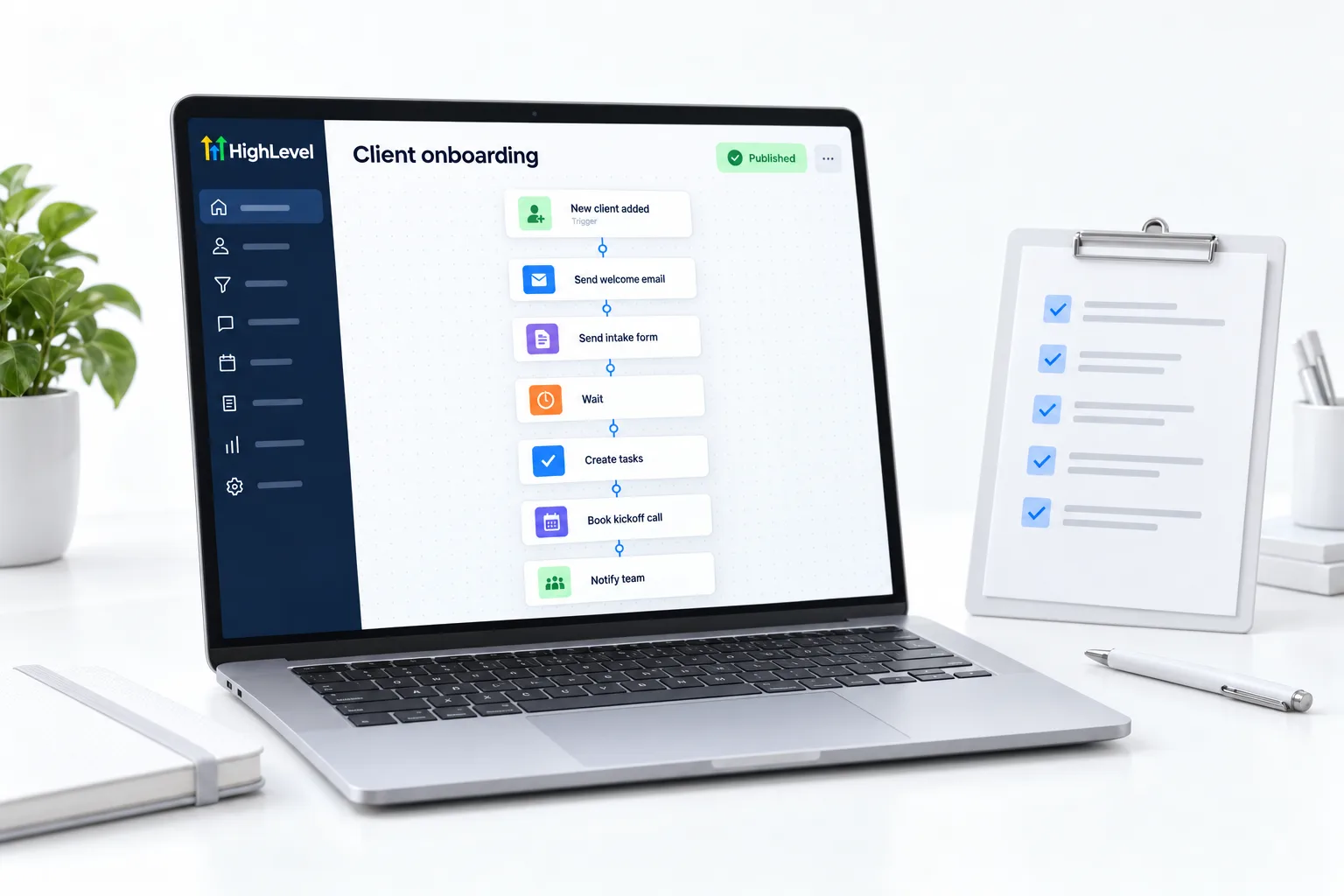
To build a client onboarding workflow in GoHighLevel, trigger it when an opportunity moves to won or an invoice is paid, then send a welcome email and text, an intake form and a kickoff booking link, create tasks for your team, wait for the form to come back, and schedule a day seven check in.
Michael is a sponsored HighLevel affiliate. Links to HighLevel use his partner link at no extra cost to you. HighLevel prices and product facts on this page come from HighLevel's own pricing page and help center, checked on the date above.
Build
How do you build a client onboarding workflow in HighLevel?
- Create a workflow triggered by the opportunity stage changing to won, or by invoice paid.
- Send a welcome email and a short welcome text.
- Send the intake form link, built in Sites, Forms.
- Send the kickoff call booking link.
- Add tasks for your team: create subaccount, load snapshot, start A2P.
- Add a wait until the intake form is submitted, with a reminder if it is not.
- Wait seven days and send a check in.
The intake form
What to ask.
- Business legal name and address, exactly as registered
- EIN or tax ID status for A2P
- Domain and DNS login access
- Logo and brand colors
- Calendar owner email
- Main goal for the first 30 days
Before you start
What do you need before you build a client onboarding workflow?
An onboarding workflow ties together parts you build elsewhere. In HighLevel, or GoHighLevel as many agencies still say, have these ready before you add the first action.
- A sales pipeline with a won stage, or invoices set up, so the trigger has something to listen for
- An intake form built in Sites, Forms. See build a form
- A kickoff calendar with a booking link
- Welcome email and text copy written in your own voice
- A list of the tasks your team does for every new client
The longer version of this build is the onboarding workflow guide, and the business side is in the client onboarding system for agencies. You can build and test the workflow during a 30 day trial through Michael's link. If you are still choosing a platform, see the best HighLevel alternatives.
Test it
How do you test an onboarding workflow?
Run the whole sequence on yourself before a real client ever sees it.
- Create a test contact with your own email and mobile number.
- Move a test opportunity to won, or pay a small test invoice, to fire the trigger.
- Check that the welcome email and text arrive and read well on a phone.
- Submit the intake form and confirm the workflow moves past the wait step.
- Confirm the team tasks were created and assigned to the right person.
- Open the workflow history to see each step the test contact passed through.
Common mistakes
What mistakes should you avoid when you build a client onboarding workflow?
- Two triggers firing for one client. If won deal and invoice paid both start the workflow, a client can get two welcomes. Pick one, or stop contacts from entering twice.
- A wait step with no way out. If the intake form never comes back the client sits there. Add a reminder and a time limit. See fix a workflow stuck on a wait step.
- Asking for A2P details late. Registration is the longest wait in a launch. Ask for the legal name, address and tax ID status on day one.
- Tasks with no owner. A task assigned to nobody does not get done. Assign each one to a named user.
- Skipping the check in. The day seven message is where small problems surface while they are still small.

Collect the A2P details on day one. It is the longest wait in any launch.
Questions
Common questions.
What should trigger a client onboarding workflow?
Trigger it when an opportunity moves to the won stage, or when an invoice is paid. Both mark the moment someone becomes a client, so the welcome goes out without anyone remembering to send it. Test the trigger by moving a test opportunity to won or paying a small test invoice.
What goes in the intake form?
Ask for legal business details, access to the accounts you need, branding, who owns the calendar and the client's goals. Build the form in Sites, Forms and send the link from the workflow. Collect the A2P details on day one, because phone registration is the longest wait in any launch.
Can HighLevel create tasks for my team?
Yes. Add task actions to the workflow and HighLevel creates tasks for your team when a client starts, such as create the subaccount, load the snapshot and start A2P registration. When you test, confirm that each task was created and assigned to the right person.
Should a client onboarding workflow include a check in?
Yes. Add a wait of seven days and then send a check in message. A day seven check in catches problems early, while the client is still paying attention and before small issues grow. Keep the message short and ask one clear question the client can answer in a line.
How long should client onboarding take?
Plan the automated part around the first week: welcome and intake on day one, the kickoff call soon after and a check in on day seven. Phone registration can run longer, which is why you start it first. Tell the client about that wait on day one.
Can I reuse the onboarding workflow for every client?
Yes. Build it once in the account where you sell your services and it runs for every new client. Each client gets the same welcome, intake form, kickoff link and check in. To give clients their own copy of a system, save it in a snapshot.
What if a client never fills in the intake form?
Add a wait for the form with a reminder message, then a task for a team member to call. Do not let the workflow wait forever. A client who has not sent the intake details cannot be set up, so a person should step in once the reminder has gone unanswered.
Next step
See it in your own account. Thirty days, every feature.
Start a trial, build the first system and test it before the first invoice. Usage fees for phone, SMS, email and AI can apply during the trial.
HighLevel has three plans at a flat monthly price, each with unlimited users and contacts. See what each one includes and what it costs.
Compare the PlansStarter, Unlimited and Founder