
Home/HighLevel/Glossary/Workflow
Glossary · Workflow
What is a Workflow in GoHighLevel? Steps HighLevel runs for you.
A workflow is an automation: when a trigger happens, HighLevel runs a set of actions, such as sending a text, waiting a day, then sending an email.
Steps HighLevel runs for you.
The short answer
A workflow in HighLevel is an automation where a trigger, such as a form submission, starts a series of actions, such as sending a text, waiting a day, adding a tag or creating an opportunity, and it stays in draft until you publish it.
Michael is a sponsored HighLevel affiliate. Links to HighLevel use his partner link at no extra cost to you. HighLevel prices and product facts on this page come from HighLevel's own pricing page and help center, checked on the date above.
In practice
How does a workflow work in HighLevel?
A workflow is a set of instructions HighLevel follows for you. In HighLevel, or GoHighLevel as it is still widely known, you build one under Automation, Workflows. Click Create Workflow and start from scratch or from a recipe, which is a working structure you edit.
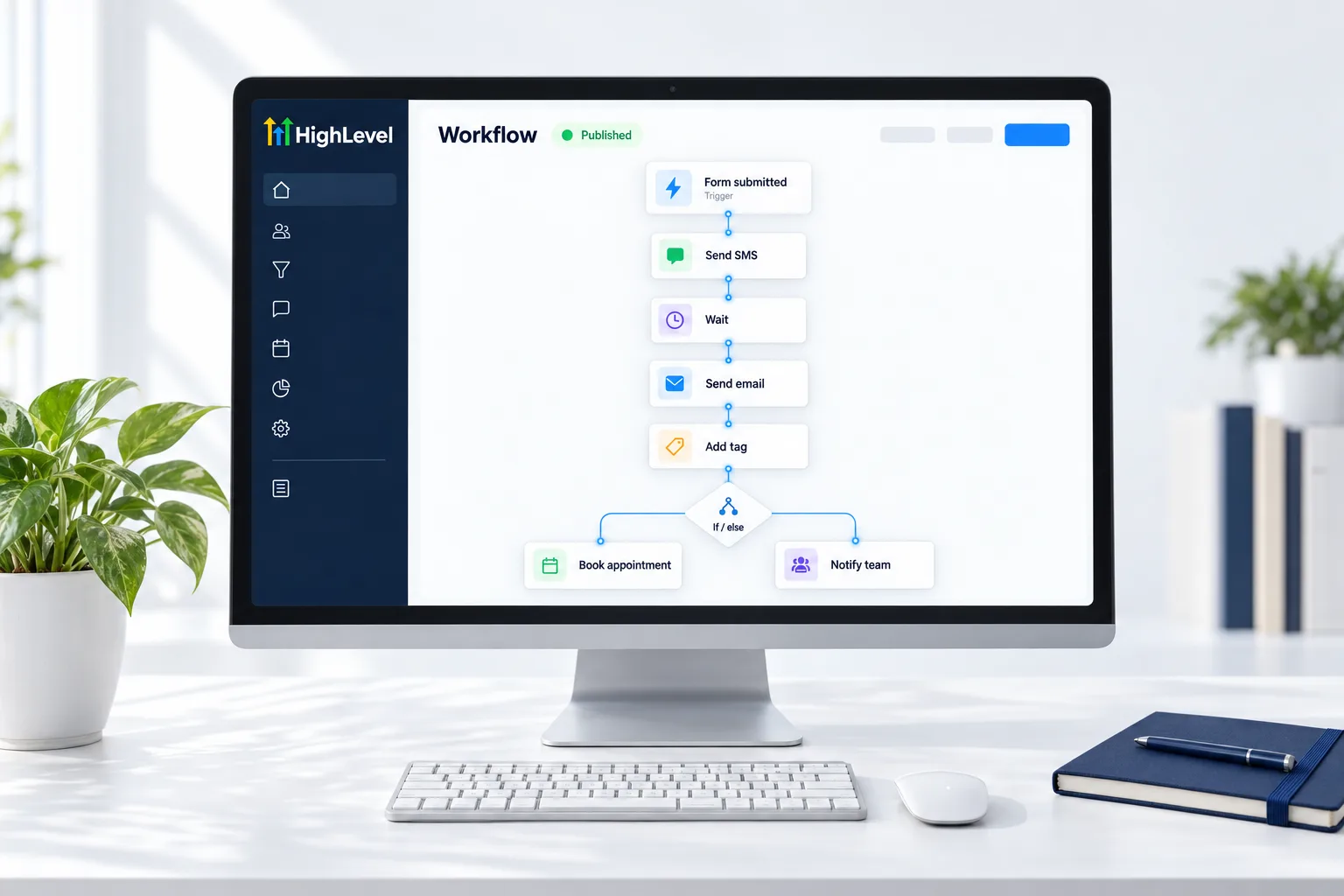
It has a few kinds of parts. A trigger starts it, such as Form Submitted or Contact Created. Actions do things: Send Email, Send SMS, Add Tag, Create Opportunity. A wait pauses between steps. An If/Else branch splits the path, for example replied or did not reply. A goal lets a contact leave the sequence once they do what you wanted, like booking a call.
Nothing runs while it is in draft. You click Publish, then Save. After that, the history shows the path every contact took. The steps are in build your first workflow.
- Built in Automation, Workflows
- Start from scratch or a recipe
- Include waits, if/else branches and goals
- History shows every contact's path
Example
What does a workflow look like in practice?
A form submission triggers a workflow that texts the lead, waits a day, then emails a booking link.
A good first one is boring and useful. Start from the Email Drip Sequence recipe. Set the trigger to Form Submitted and filter it to your form. Edit the emails, add a Send SMS action after the first one, publish and save. Then submit the form with your own details and watch it run in the history.
Watch for
What mistakes do people make with workflows?
Leaving it in draft is the first. It looks finished, but it does not run until it is published.
One giant workflow that does everything is the second. They are hard to fix. Give each workflow one job and name it for what it does.
No exit is the third. Without a goal or exit condition, a lead who already booked keeps getting follow ups. Test with your own contact before real leads go in. Ideas for what to build next are in build a lead nurture workflow and AI workflows.

One job per workflow. They are easier to fix that way.
Questions
Common questions.
What is a Workflow in GoHighLevel?
A workflow in GoHighLevel is an automation. A trigger, such as a form submission, starts a series of actions, such as sending a text, waiting a day, adding a tag or creating an opportunity. Workflows can also branch with If/Else and end with a goal. Nothing runs until you publish it.
Where do I find workflows in HighLevel?
Workflows are under Automation, Workflows in the subaccount. Click Create Workflow and start from scratch or from a recipe, which is a working structure you edit. When the workflow is built, click Publish, then Save. After that, the history shows the path every contact took.
Why is my workflow not running?
It is often still in draft, or the trigger filter does not match. A workflow looks finished in draft but does not run until you click Publish, then Save. Check the trigger filter next, then the history. See the workflow troubleshooting guide for the full list of checks.
What is a workflow recipe?
A workflow recipe is a ready made workflow structure you edit, such as Email Drip Sequence, so you do not start from a blank canvas. Choose a recipe when you click Create Workflow, then change the trigger, messages and waits to fit the business. Give each workflow one job and name it for what it does.
How do I test a workflow?
Run it with your own contact and check the history. Trigger the workflow the way a real lead would, for example by submitting the form, then open the history to see the path your contact took through each step. Test before real leads go in, and confirm a booked lead leaves the sequence.
What is the difference between a trigger and an action?
A trigger starts the workflow, such as Form Submitted or Contact Created. An action is something the workflow does after that, such as Send Email, Send SMS, Add Tag or Create Opportunity. A wait pauses between actions, and an If/Else branch splits the path, for example replied or did not reply.
Next step
See it in your own account. Thirty days, every feature.
Start a trial, build the first system and test it before the first invoice. Usage fees for phone, SMS, email and AI can apply during the trial.
HighLevel has three plans at a flat monthly price, each with unlimited users and contacts. See what each one includes and what it costs.
Compare the PlansStarter, Unlimited and Founder