
Home/HighLevel/How to/Build your first workflow
How to · Automation
How to create a workflow in GoHighLevel. Trigger, actions, publish.
A workflow is a set of steps HighLevel runs for you when something happens. Every workflow has a trigger (what starts it) and actions (what it does). The fastest first workflow is a recipe you edit, not a blank canvas.
Trigger, actions, publish.
The short answer
To build your first workflow in GoHighLevel, go to Automation, click Create Workflow, pick a recipe such as Email Drip Sequence, set a Form Submitted trigger filtered to your form, edit each email and text action, then click Publish and Save and test it by submitting the form yourself.
Michael is a sponsored HighLevel affiliate. Links to HighLevel use his partner link at no extra cost to you. HighLevel prices and product facts on this page come from HighLevel's own pricing page and help center, checked on the date above.
Build it
How do you create a workflow in GoHighLevel?
- Go to Automation in the subaccount.
- Click Create Workflow, then choose a recipe. Email Drip Sequence is a good first one.
- Click the trigger, choose Form Submitted, add a filter for the form and save.
- Open each email action and edit the subject and message. Save each action.
- Add a Send SMS action after the first email if you want a text follow up.
- Click Publish, then Save.
- Submit the form with your own details and watch the workflow run.
The parts
Triggers, actions and waits.
| Part | What it does | Example |
|---|---|---|
| Trigger | Starts the workflow | Form Submitted, Contact Created, Opportunity Created |
| Action | Does something | Send Email, Send SMS, Add Tag, Create Opportunity |
| Wait | Pauses between steps | Wait one day before the next email |
| If/Else | Branches the path | Replied or did not reply |
Habits
Good habits from day one.
- Name workflows by what they do, not by date
- Test with your own contact before publishing to real leads
- Keep one job per workflow
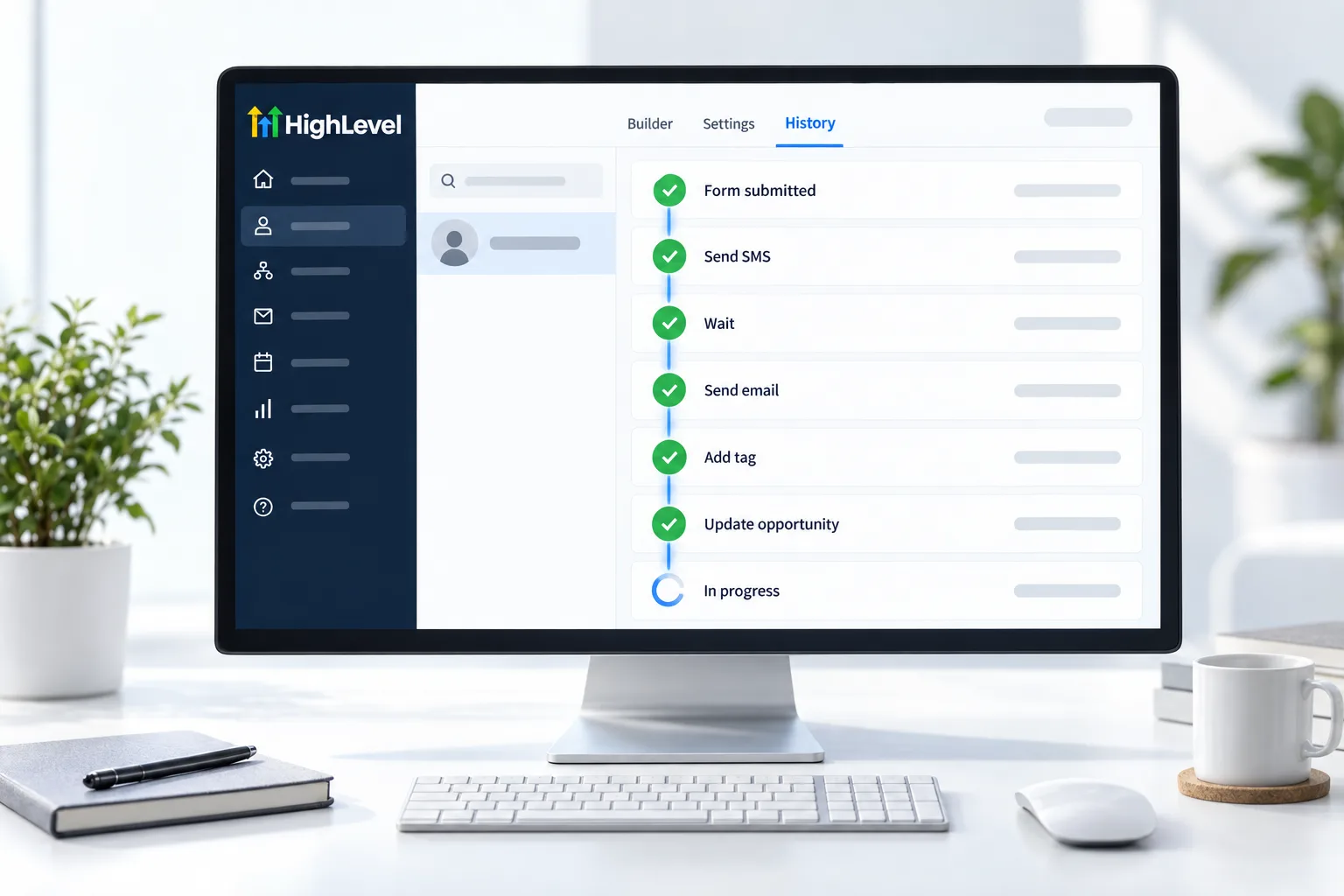
- Check the workflow history when something looks wrong
Before you start
What do you need before you build your first workflow?
Your first workflow needs something to start it and somewhere to send from. In HighLevel (you will also see it written GoHighLevel), set these up first.
- A published form to use as the trigger. See build a form
- An email sending domain
- A phone number if you will add a text, with A2P registration for US numbers
- A test contact with your own details
- A clear name for the workflow that says what it does
For more depth, read the GoHighLevel workflows guide and the short workflow answers. You can build and publish this workflow during a 30 day trial through Michael's link. If you are building a business on automation like this, read what a Founder is.
Test it
How do you test your first workflow?
The test is the last step of the build, not an extra.
- Publish the workflow and click Save.
- Submit the form with your own details.
- Open the workflow history and find your contact.
- Confirm the email arrives and the links work.
- Confirm the text arrives if you added one.
- Remove your test contact from the workflow when you are done.
Common mistakes
What mistakes should you avoid when you build your first workflow?
- Leaving it in draft. A draft workflow does nothing. Publish, then save.
- A trigger with no filter. Without a filter for your form, every form submission starts the workflow.
- Starting from a blank canvas. A recipe gives you a working structure to edit.
- One workflow doing five jobs. Keep one job per workflow. It is easier to fix.
- Not reading the history. When something looks wrong, the history shows where the contact stopped. See fix a workflow not triggering.

Your first workflow should be boring and useful. A form, an email and a text. Fancy comes later.
Questions
Common questions.
How do I create a workflow in GoHighLevel?
Go to Automation in the subaccount and click Create Workflow. Pick a recipe such as Email Drip Sequence or start from scratch. Set the trigger, for example Form Submitted with a filter for your form, edit each email and text action, then click Publish and Save.
What is a workflow trigger?
A workflow trigger is the event that starts the workflow, such as Form Submitted, Contact Created or Opportunity Created. Add a filter so it only fires for the form you mean. If the workflow does not start, a trigger filter that does not match is one of the two most common reasons.
Should I start from a recipe?
Yes for your first one. Recipes give you a working structure to edit, so you are not facing a blank canvas. Email Drip Sequence is a good first recipe. Change the trigger to your form, rewrite each email and add a text if you want one, then publish.
How do I test a workflow?
Run it with your own contact and check the history tab. Publish the workflow and click Save, submit the form with your own details, then open the workflow history and find your contact. Confirm the email and any text arrive, and remove your test contact when you are done.
What is the difference between a trigger and an action?
A trigger is the event that starts the workflow, such as a form submission. An action is something the workflow does, such as sending an email, sending a text, adding a tag or creating an opportunity. Waits pause between actions and If/Else branches split the path.
Why did my workflow not run?
The most common reasons are that it is still in draft or the trigger filter does not match the form you submitted. Check the workflow history first. If your contact is not there, the trigger did not fire, so publish the workflow and check the filter.
What should I build after my first workflow?
A lead nurture workflow or missed call text back. Both are small and useful right away. Keep each new workflow to one job, name it for what it does and test it with your own contact before real leads go in.
What workflow triggers does GoHighLevel have?
Common GoHighLevel workflow triggers include Form Submitted, Contact Created, Opportunity Created, Customer Booked Appointment, a tag being added and the Inbound Webhook, which lets an outside app start a workflow. Each one is an event that starts the workflow. Add a filter so it only fires for one form, one calendar or one tag.
Next step
See it in your own account. Thirty days, every feature.
Start a trial, build the first system and test it before the first invoice. Usage fees for phone, SMS, email and AI can apply during the trial.
HighLevel has three plans at a flat monthly price, each with unlimited users and contacts. See what each one includes and what it costs.
Compare the PlansStarter, Unlimited and Founder