
01Who this is for
- Agency owners who bundle client services and need to reorganize pricing tiers for clarity.
- SaaS Founders managing multiple subscription levels and wanting to shift a plan to a different pricing group.
- Product managers who must adjust plan hierarchy while preserving existing subscriber settings.
02SaaS plan categories, explained
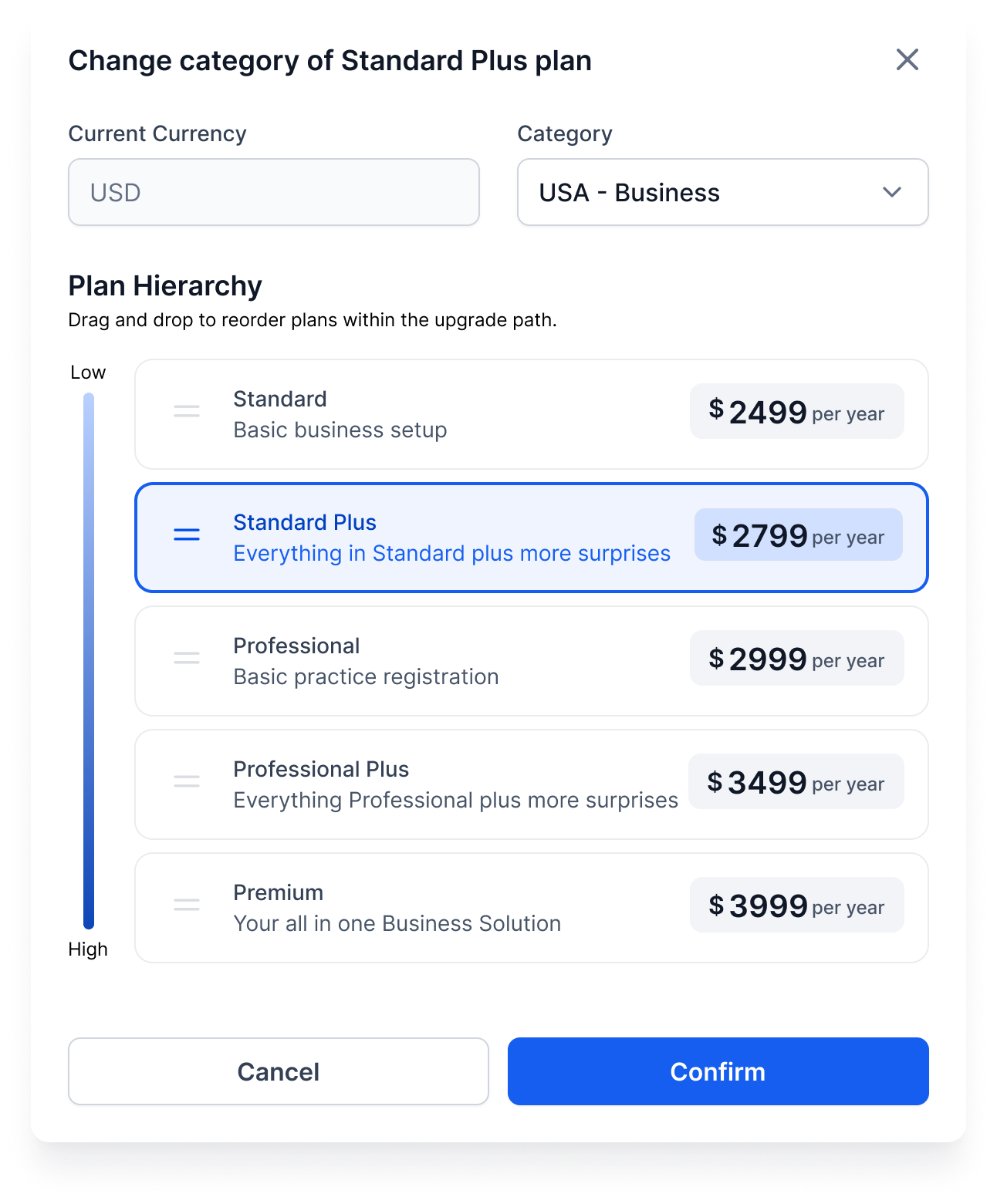
The feature lets you change the group a SaaS plan belongs to and reposition it within that group’s hierarchy. When you edit a plan, you select a new category, only categories that use the same currency appear, and set its order relative to other plans in the category.
These adjustments do not rewrite existing customers’ subscriptions. Their current plans stay unchanged, but the paths they can follow to upgrade or downgrade reflect the new arrangement. Feature inheritance flows upward from the moved plan and downward from the plans below it.
03How businesses use saaS plan category and plan level
- Digital marketing agency. The agency can shift a client facing plan into a higher priced category to align with a new service bundle. Inside HighLevel the user selects the plan, chooses the target category, and saves the change, which updates the upgrade routes for future clients.
- SaaS startup. When launching a new pricing tier, the startup moves an existing plan to a lower priced category and adjusts its level to sit between current plans. The edit is performed via the SaaS Configurator, and the platform automatically reassigns feature inheritance.
- Consulting firm. The firm reorganizes its consulting subscription levels by changing a plan’s hierarchy position. Using HighLevel, they open the plan, edit the category if needed, reorder the level, and save, ensuring that future upgrades follow the new structure.
04How to set up and use saaS plan category and plan level in HighLevel
Modify plan category and level
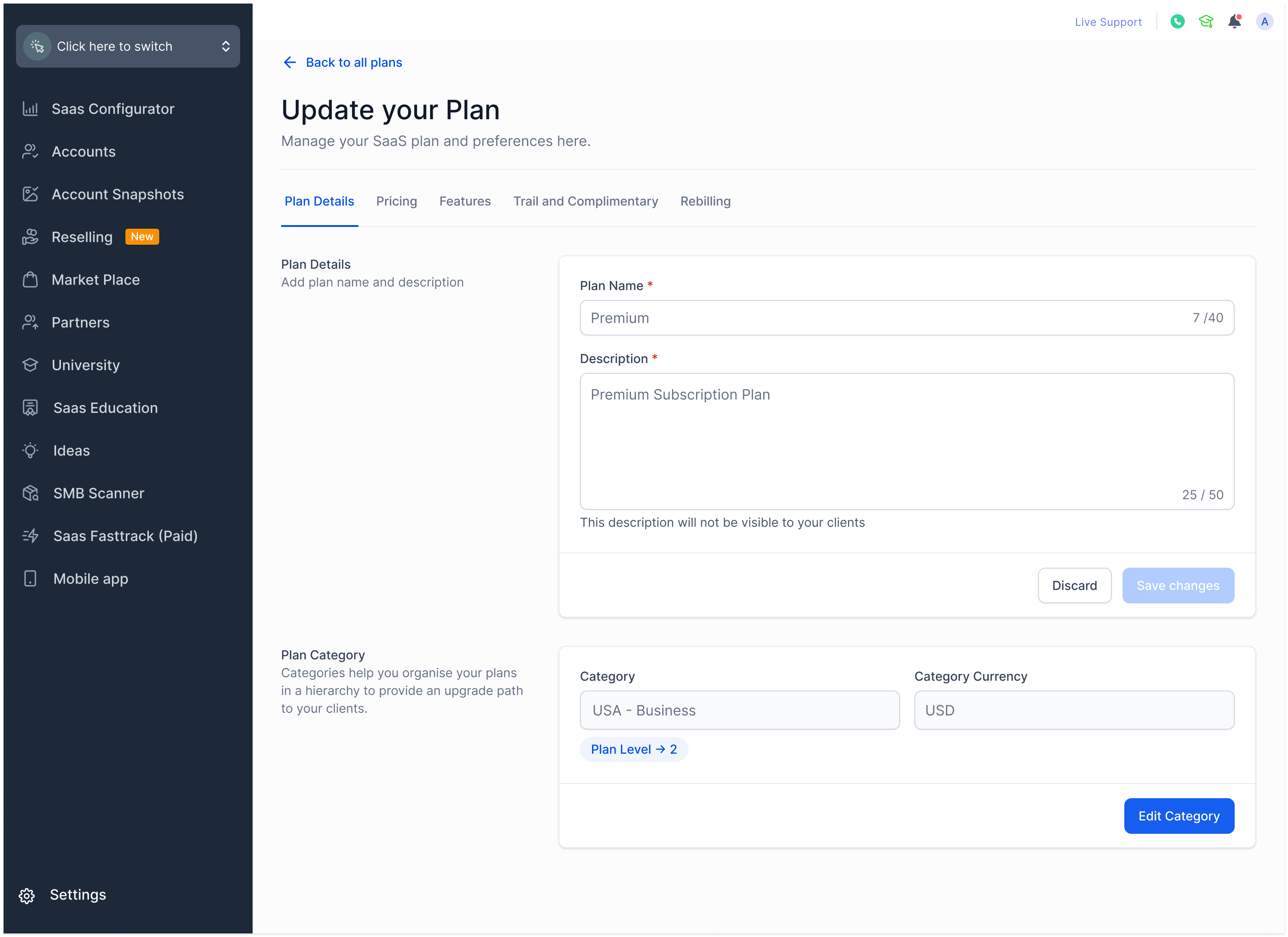
- Navigate to SaaS Configurator and open the Plans section.
- Choose the plan you intend to edit.
- In the Category Settings area, click the Edit option.
- Pick a new category from the dropdown list; only categories using the same currency are shown.
- Adjust the plan’s hierarchy position to set its new level within the chosen category.
- Confirm the new category and level selection.
- Click Save to apply the changes.
- Note that existing customers are not retroactively updated; only upgrade and downgrade paths change.
- Review the list of plans in the new category to see how feature inheritance has been updated.
05What it looks like in HighLevel
06Settings that matter
- Category Settings. Controls which pricing group a plan belongs to and allows adjustment of the plan’s hierarchical order within that group.
07Things to know before you rely on it
- Only categories that share the same currency appear in the selection list.
- Changes do not retroactively modify the subscriptions of existing customers.
- Plans above the moved plan inherit features from it, while the moved plan inherits from plans below it.
- Altering categories or levels can influence pricing and positioning strategy; proceed with caution.
08How it connects to the rest of HighLevel
- All SaaS Configurator features SaaS Configurator overview
- How to upgrade or downgrade a SaaS plan Upgrade/Downgrade guide
- HighLevel pricing and plans Pricing page
Michael's take

Michael ReimerFounder of CRM Pros, HighLevel Commander and Certified Admin
Moving a plan may affect your pricing and positioning strategy, and it does not change any existing subscriber’s current plan.
Get More InformationOpens on HighLevelPublished November 2, 2026 · Updated November 17, 2026