
Home/HighLevel/Features/SaaS Configurator/How to Calculate Email Cost in your SMTP Provider

Agency, Settings and Integrations

How to Calculate Email Cost in your SMTP Provider

In short

Email cost calculators let you determine the price per email by dividing the plan cost by the number of emails included.

AreaSaaS Configurator · SaaS Mode
Used forProvider comparison
Setup steps4 steps in 1 task
Last updatedNovember 3, 2026

01Email cost calculators, explained

To calculate email cost, find how many emails are included in your plan and divide the plan’s cost by that number.

02How businesses use email cost

  • Provider comparison. An agency managing multiple domains can compute per email costs for different providers, such as Mailgun versus LC Email, to choose the most economical option.

03The numbers and rules that matter

  • $35/month Mailgun plan includes 50,000 emails.
  • Email cost for that plan is $0.0007 per email.

04How to set up and use email cost in HighLevel

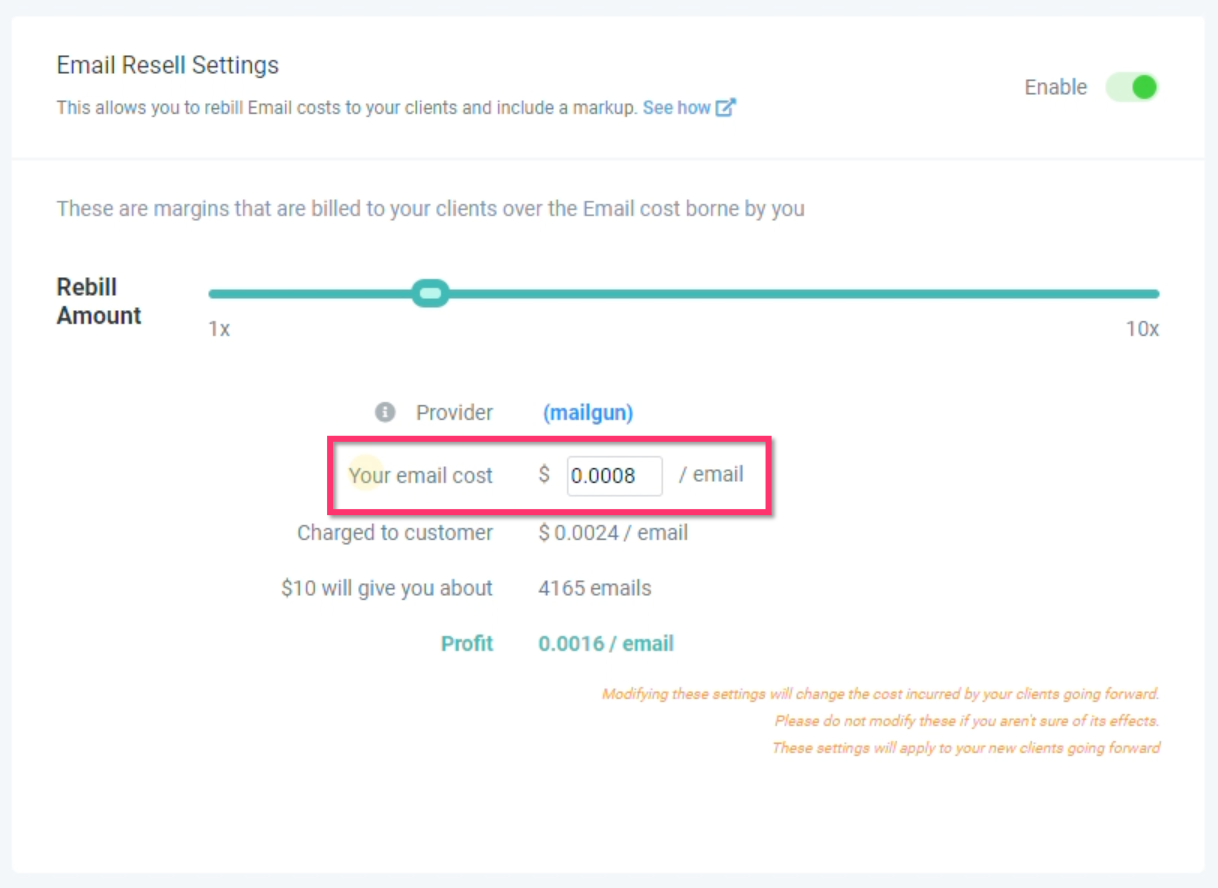
Calculate email cost

  1. Log into your SMTP provider.
  2. Navigate to the Plan or Billing section.
  3. Find the description of how many emails are included in your plan.
  4. Divide the cost of your plan by the number of emails included.

05What it looks like in HighLevel
06Settings that matter

  • LC Email enabled. When LC Email is enabled, you do not need to sign up for Mailgun or another third party email provider.

Michael's take

Michael Reimer
Michael ReimerFounder of CRM Pros, HighLevel Commander and Certified Admin

Counting how much each email costs clears up why your email bill can be surprising. The first thing I would get right is the exact number of emails your plan includes. Grab that figure from the billing page and do the quick division.

If you’re already on LC Email, you can skip the extra Mailgun setup and keep things simple.

Get More InformationOpens on HighLevelPublished November 2, 2026 · Updated November 3, 2026

Common questions

Common questions about email cost.

How do I calculate the cost per email with my SMTP provider?

Find the total emails included in your plan, then divide the monthly price by that number. For example, $35 divided by 50,000 emails equals $0.0007 per email.

Do I need Mailgun if I use LC Email?

No. LC Email is designed to eliminate the need for Mailgun or another third party provider when it is enabled.

Which email provider does HighLevel recommend for tracking opens and clicks?

HighLevel recommends using Mailgun or LC Email for better email statistics tracking.

Next step

Pick the features that matter. Then get the plan that unlocks them.

Explore the features you want, start with the five at the top, and upgrade through my link when you are ready. The bonuses and the team come with it.

The features directory explains every HighLevel feature in plain English. Browse it to see what the platform can do.

Back to the FeaturesSee the full details
⌃

Site preview

Explore the next page

This destination is reserved in the page inventory and is not built yet.