
01Who this is for
- Agency owners who sell SaaS plans need to control how many users each client can add.
- Product managers of SaaS platforms use limits to package different service tiers.
02User Limits for SaaS SubAccounts, explained
User Limits are a setting that restricts the maximum number of subaccount level users a SaaS subaccount may have. By default, SaaS plans allow unlimited users; enabling a limit changes that behavior.
The limit is stored at the plan level and is automatically applied when a subaccount subscribes to or moves onto that plan. Agency level users assigned to the subaccount never count toward the limit.
If a client needs a different allowance, an override can be set directly on that subaccount, taking precedence over the plan’s limit. Changing the subaccount to another SaaS plan removes the override and re applies the new plan’s limit.
03How businesses use User Limits for SaaS SubAccounts
- Marketing agency. The agency creates a SaaS plan that includes a limit of ten users. When a client signs up, the platform automatically enforces that ten user cap for the subaccount.
- Software development firm. The firm needs a premium client to have twenty users instead of the standard fifteen. It sets an individual override on that subaccount, allowing the extra users without altering the base plan.
- Coaching business. The coaching service offers a basic SaaS plan with no user limit. It leaves the limit toggle off, so the subaccount can add unlimited coaches.
04The numbers and rules that matter
- User Limits are supported for SaaS V1 and SaaS V2 plans.
- SaaS plans allow unlimited users by default unless a User Limit is enabled and configured.
- The configured limit applies only to subaccount level users.
- Agency level users assigned to the subaccount do not count toward the limit.
- An individual subaccount override takes precedence over the User Limit configured for its SaaS plan.
- Upgrading to another SaaS plan resets the override and applies the User Limit configured for the new plan.
05Before you start
- The subaccount must be on a SaaS V1 or SaaS V2 plan.
- Access to the SaaS Configurator in Agency View is required.
06How to set up and use User Limits for SaaS SubAccounts in HighLevel
Set up user limit for a SaaS plan
- Open Agency View and select the SaaS Configurator.
- Choose Plans & pricing from the menu.
- Locate the SaaS plan you want to modify.
- Click Edit details for that plan.
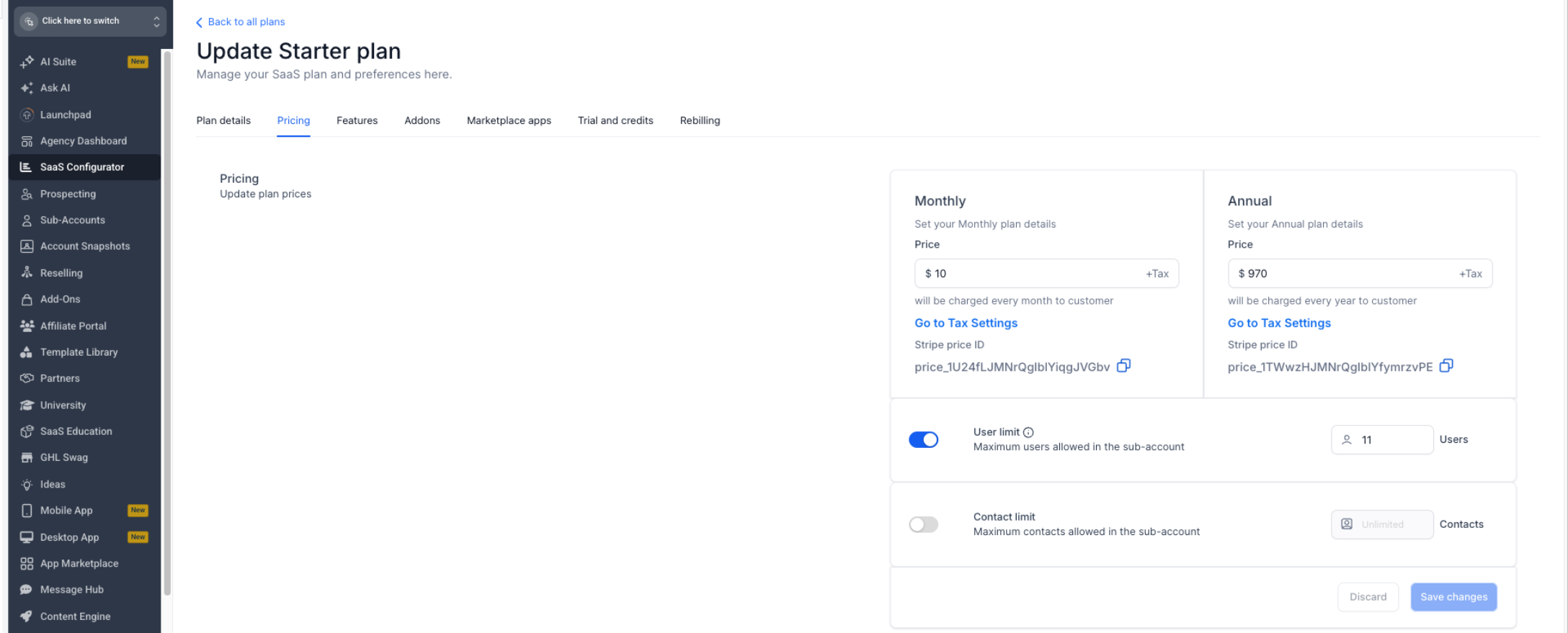
- Open the Pricing tab within the plan details.
- Enable the User limit toggle.
- Enter the maximum number of subaccount users allowed.
- Select Save changes to apply the new limit.
Override the user limit for a specific subaccount
- From Agency View, open the desired subaccount.
- Navigate to Settings > User limit (path may vary; verify the current navigation).
- Enable the User limit toggle for the override.
- Enter the specific number of users to allow for this subaccount.
- Select Save changes.
- Note: The override takes precedence over the plan’s limit, but changing the subaccount to a different SaaS plan will reset the override and apply the new plan’s limit.
07What it looks like in HighLevel

08Settings that matter
- User limit. Controls the maximum number of subaccount level users that can be added to a SaaS subaccount.
09Things to know before you rely on it
- SaaS plans allow unlimited users until a User Limit is enabled.
- Only subaccount level users count toward the limit; agency level users are excluded.
- User Limits are supported for both SaaS V1 and SaaS V2 plans.
- Switching a subaccount to a new SaaS plan clears any individual override and applies the new plan’s limit.
10How it connects to the rest of HighLevel
- All SaaS Configurator features SaaS Configurator overview
- HighLevel pricing and plans Pricing page
- The HighLevel Founder Plan Founder Plan details
Michael's take

User Limits are useful for agencies that need to control how many users a client can add. Agencies that don’t package user allowances or don’t need per client caps can skip this feature.