
01Who this is for
- Agency owners who manage multiple client WordPress sites need instant visibility of billing issues to keep client services running.
- SaaS Founders using WordPress hosting can act quickly on failed payments to avoid service interruptions.
- Ecommerce entrepreneurs with WordPress stores benefit from alerts that prevent downtime due to unpaid hosting fees.
02Payment failure notifications, explained
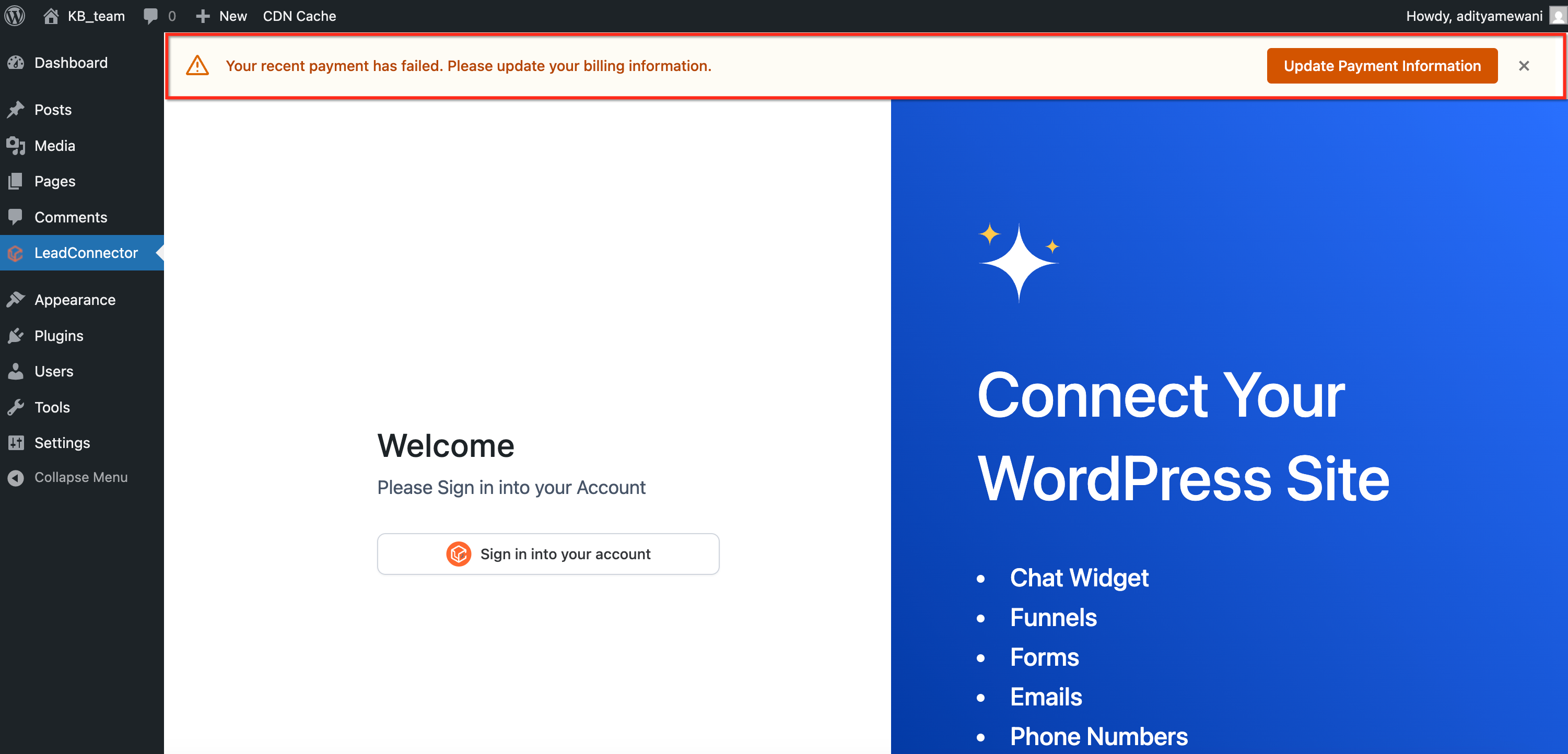
The feature adds a clear banner inside the WordPress admin area each time a hosting invoice does not clear. It relies on the LeadConnector (LC) Plugin, which must be active on the site, and requires no additional configuration beyond the plugin being installed.
When a payment fails, the alert appears immediately. It can be dismissed temporarily, but it returns on the next page reload or login until the issue is resolved. The system grants a three day grace period during which the site remains fully accessible. After three days without payment, a site lock mechanism activates.
An automated email sequence is sent at days 1, 3, 7, 14 and 21 after the failure. If payment is still missing after 21 days, the WordPress subscription is cancelled and the site is deleted. Notification messages are standardized and cannot be customized.
03How businesses use payment failure notifications
- Digital marketing agency. The agency installs the LC Plugin on each client WordPress site. When a client’s hosting payment fails, the agency sees an alert in the client’s wp admin dashboard, allowing the team to contact the client and resolve the bill before the site locks.
- Online course provider. The provider runs a WordPress site for course delivery. After a failed subscription payment, the admin dashboard shows the alert, prompting the provider to reach out to the learner and reactivate access promptly.
- Membership site owner. The owner uses the LC Plugin on their membership WordPress site. Failed renewal payments trigger an admin alert, so the owner can send reminders or update payment details before the three day grace period ends.
04The numbers and rules that matter
- 3 day grace period before site lock.
- Email timeline: Day 1, Day 3, Day 7, Day 14, Day 21.
- Subscription canceled and site deleted after 21 days.
05Before you start
- The LeadConnector (LC) Plugin must be installed and activated on the WordPress site.
- You must have access to the WordPress admin dashboard.
06How to set up and use payment failure notifications in HighLevel
Enable notification alerts
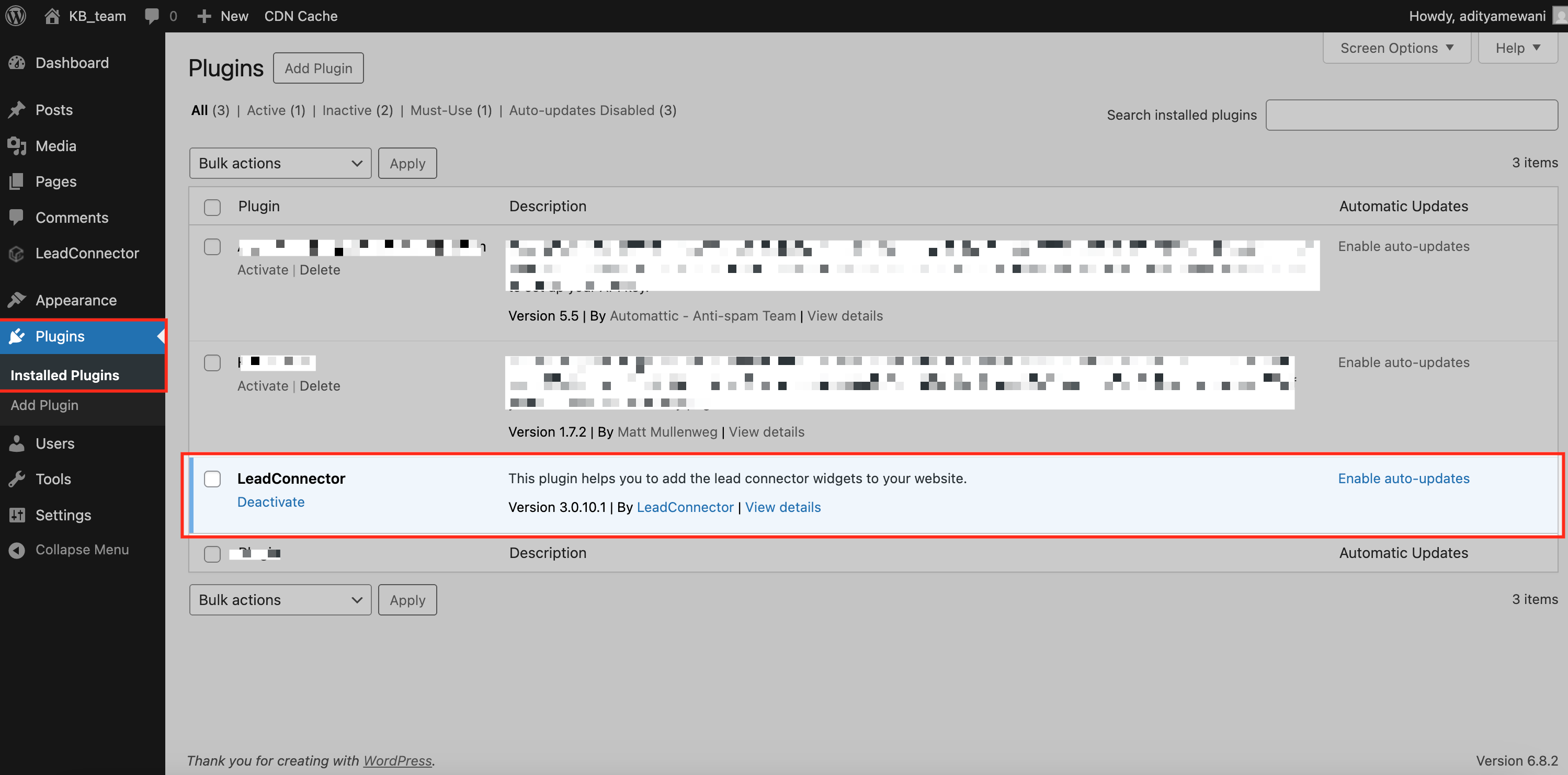
- Log in to the WordPress admin dashboard.
- Open Plugins > Installed Plugins.
- Confirm that the LC (LeadConnector) Plugin is installed and activated; no further setup is required.
07What it looks like in HighLevel
08Things to know before you rely on it
- A three day grace period follows a payment failure; the site stays accessible during this time.
- After three days without payment, a site lock mechanism activates.
- Email reminders are sent on days 1, 3, 7, 14 and 21 after the failure.
- If payment is not received by day 21, the WordPress subscription is cancelled and the site is deleted.
- Notification messages are standard; customization is not available.
09How it connects to the rest of HighLevel
- Manage WordPress plugins and themes in HighLevel Plugin management
- Single sign on to WordPress from HighLevel WP Admin SSO
- HighLevel pricing and plans Pricing
Michael's take

I find payment failure notifications valuable for catching billing problems early.
Don’t forget to keep the LC Plugin active, or the alerts won’t fire.