
01Who this is for
- Agency owners who host client websites can point each client’s domain to its WordPress site, ensuring branded, secure access.
- Consultants who use sub domains for separate service pages can map them without extra SSL steps, keeping navigation tidy.
02Domains, explained
The Domain Management feature connects a purchased domain or sub domain to a WordPress site created in HighLevel. It verifies DNS records, issues an SSL certificate for the primary domain and displays status indicators for verification and SSL issuance.
The tool lives inside the site management area of a subaccount. After opening Sites > WordPress and selecting a site, users find a Manage Your Domain panel where they can add up to five domains or sub domains, choose auto configuration or manual entry, and switch www prefixes.
A dedicated dashboard shows SSL issuance tags, DNS verification tags and options to change the www prefix. The primary domain receives automatic SSL after TXT validation, while sub domains skip that step.
03How businesses use adding domains to WordPress sites
- Digital marketing agency. The agency adds each client’s custom domain to the client’s WordPress site, selects Auto Configure, and lets HighLevel verify DNS. Once records are added, the agency clicks Verify DNS Records and monitors SSL issuance before launching the campaign.
- Service page consultant. The consultant maps a service specific sub domain to a WordPress landing page, enters the sub domain name, chooses Add Manually, adds the supplied CNAME and A records, and verifies DNS to make the page reachable via HTTPS.
- Multi site manager. The manager provisions several WordPress sites under the same subaccount, adds a primary domain to each site, follows the verification steps, and uses the dashboard to keep track of SSL and DNS status across all sites.
04The numbers and rules that matter
- You can add up to 5 domains or subdomains.
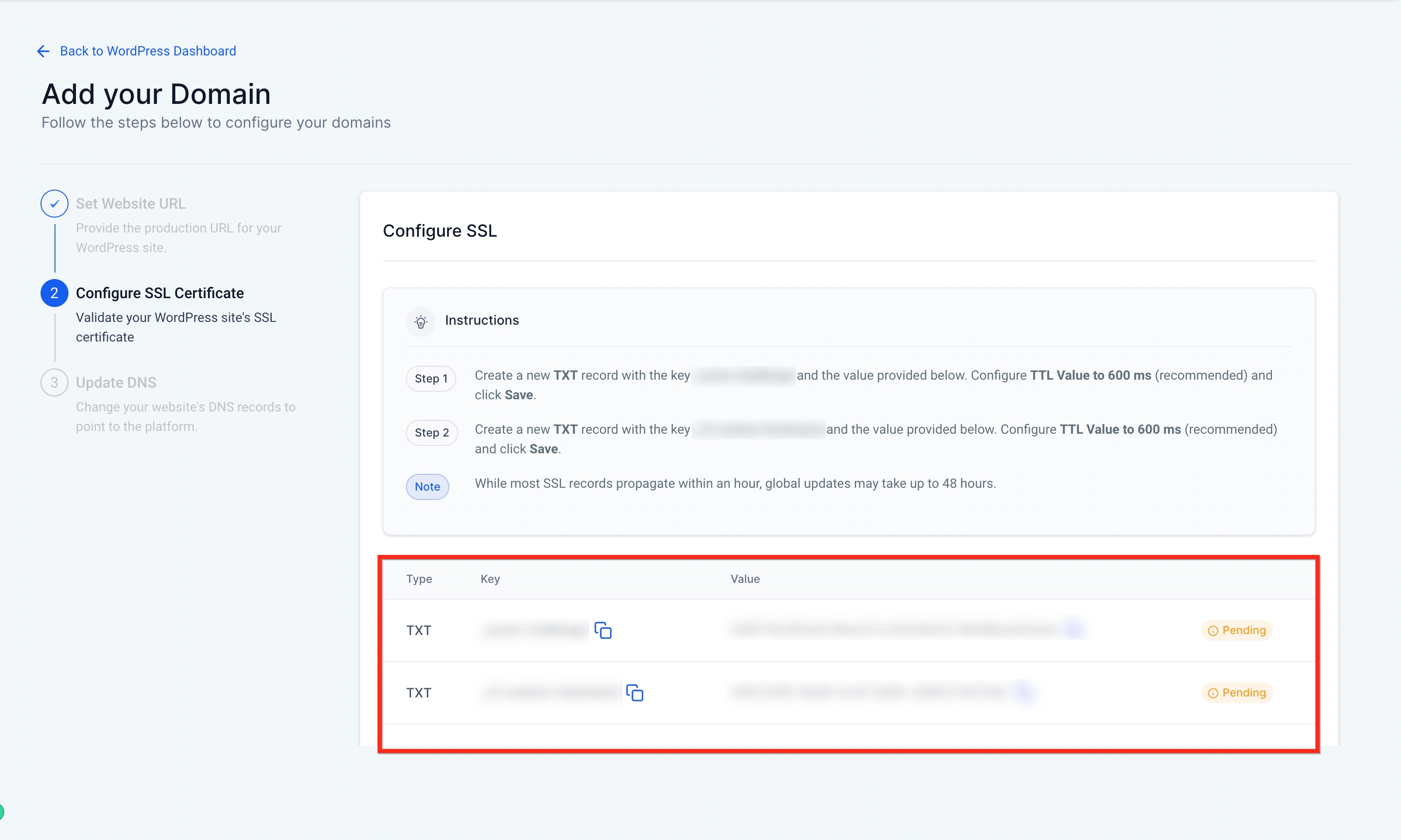
- Configure your TTL Value to 600 ms or the lowest value possible for optimal SSL record propagation.
- While most SSL Records propagate within an hour, global updates can take up to 48 hours.
05Before you start
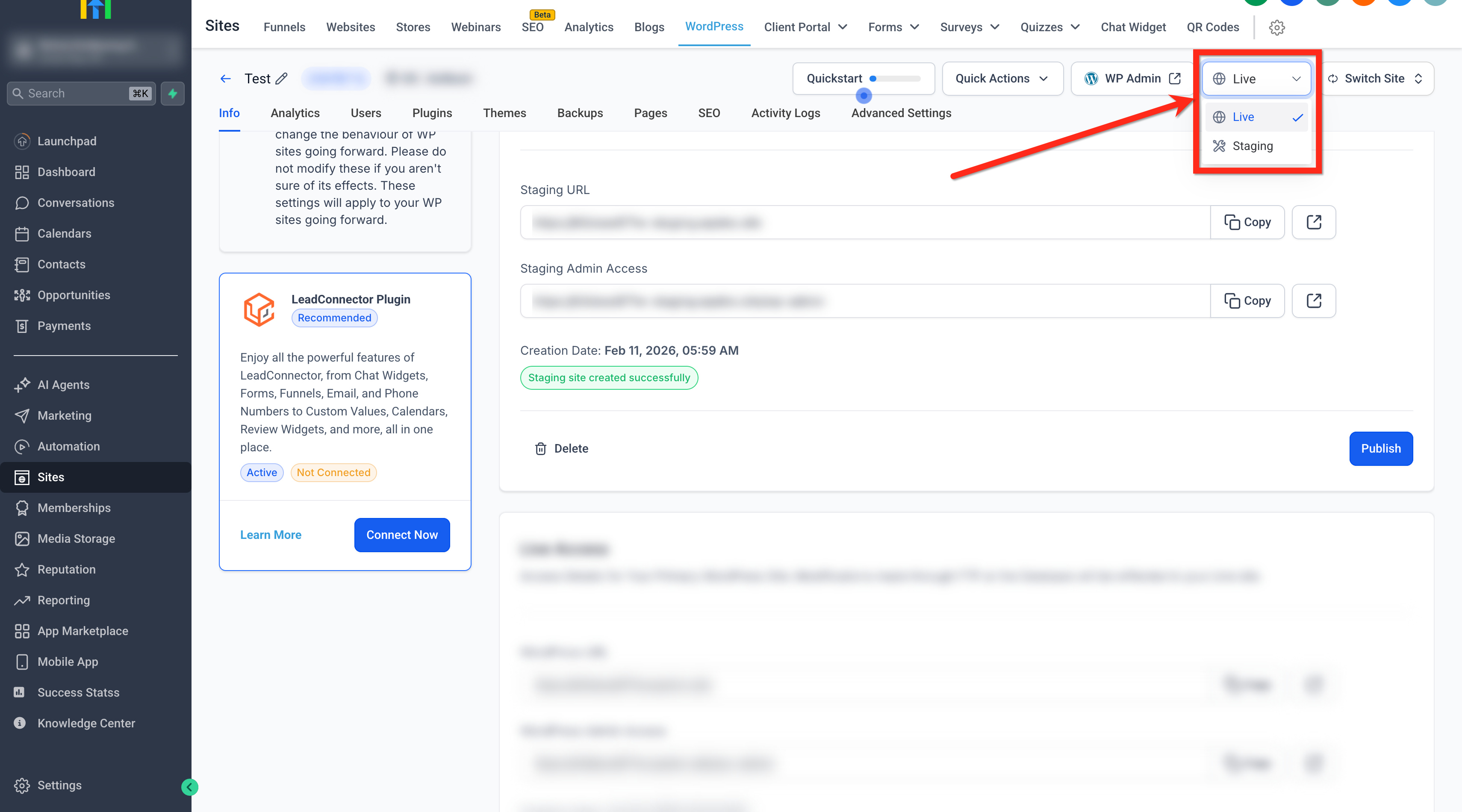
- Work in the Live environment; the domain area is disabled in Staging.
- Provision the WordPress site in the correct subaccount.
- Have access to the domain’s DNS settings at the registrar or DNS host.
- If using Cloudflare, turn off Proxy Settings.
06How to set up and use adding domains to WordPress sites in HighLevel
Add a primary domain to a WordPress site
- Log into the subaccount.
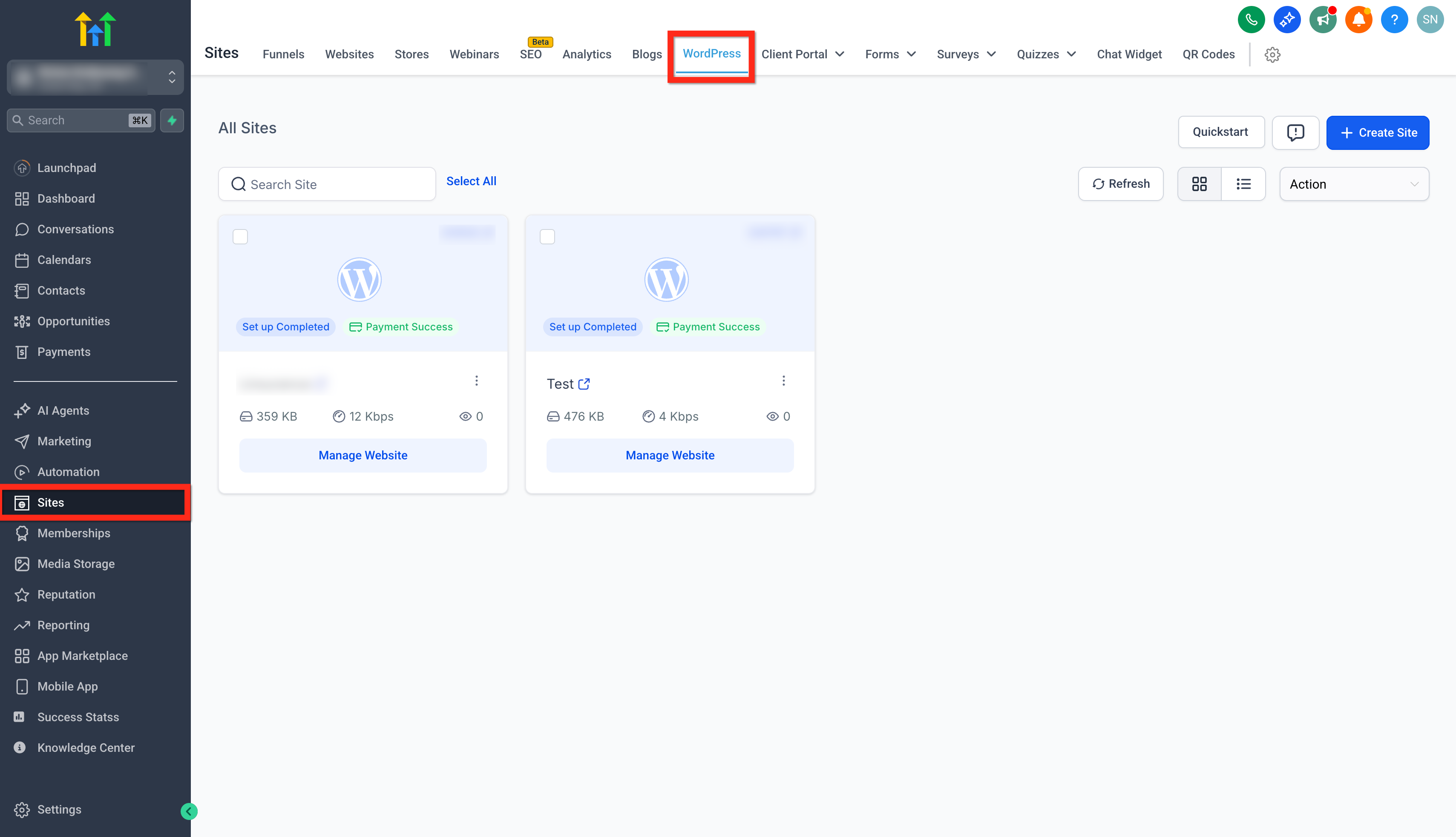
- Navigate to Sites > WordPress.
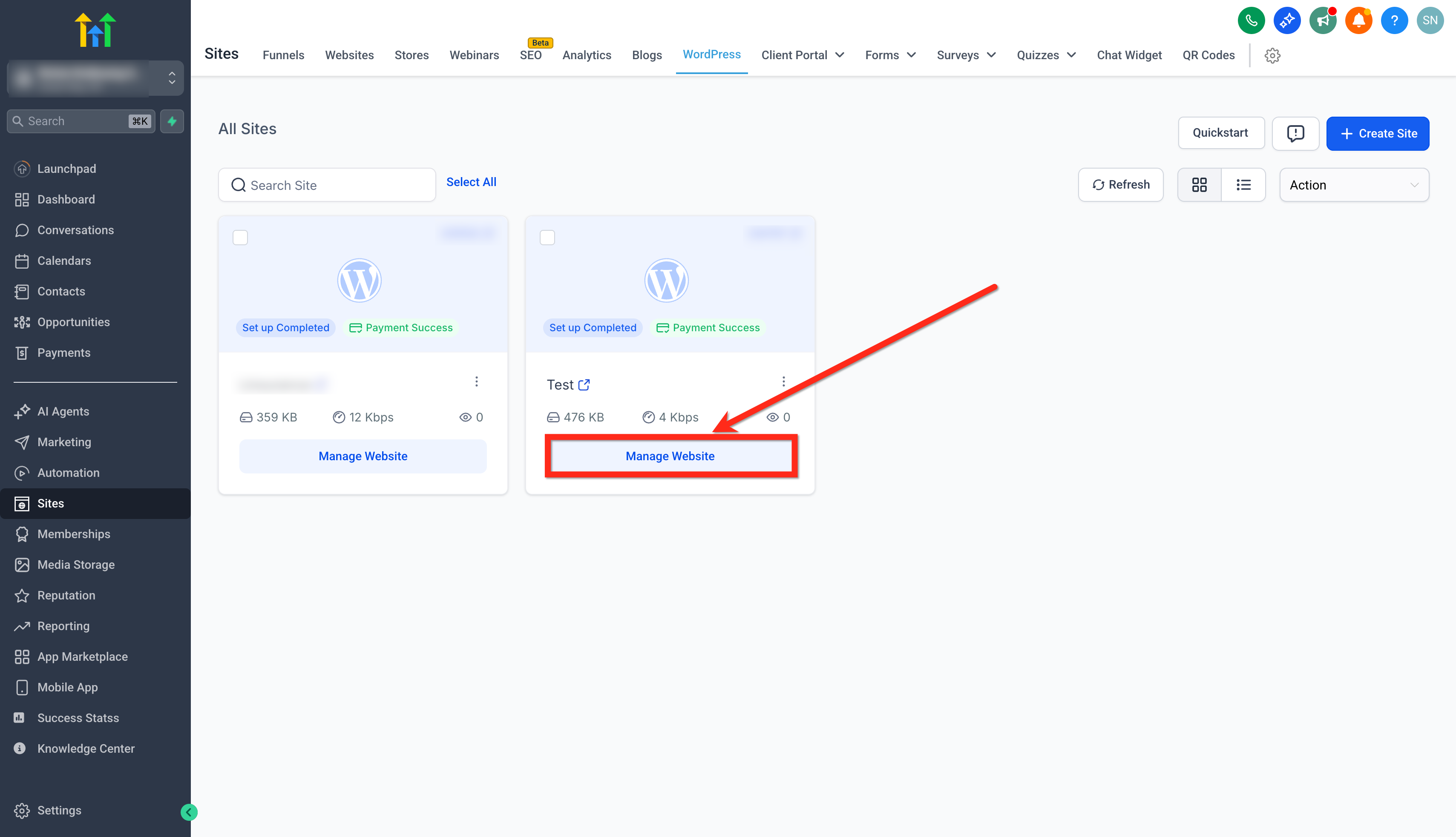
- Click the Manage Website button for the desired site.
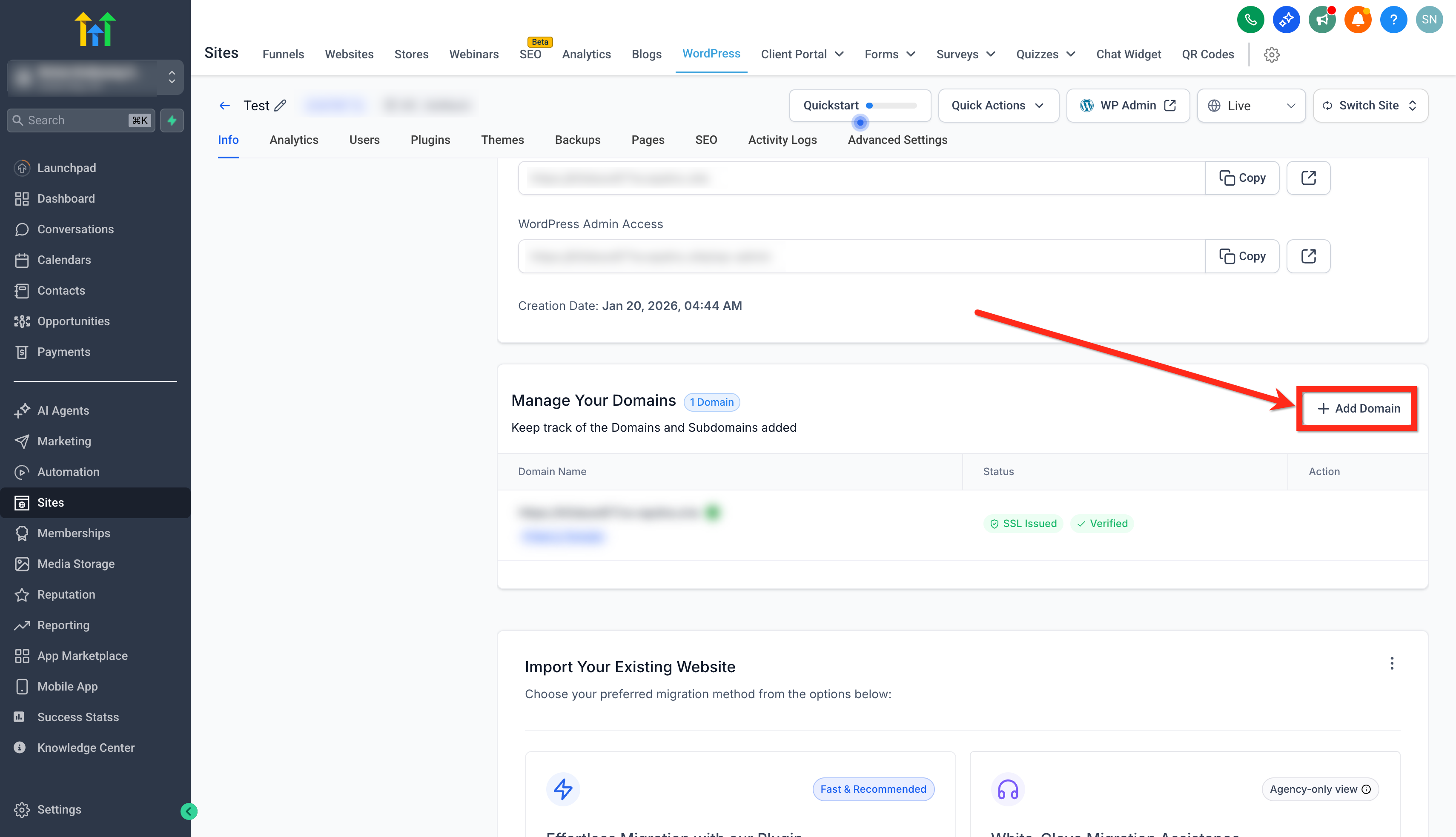
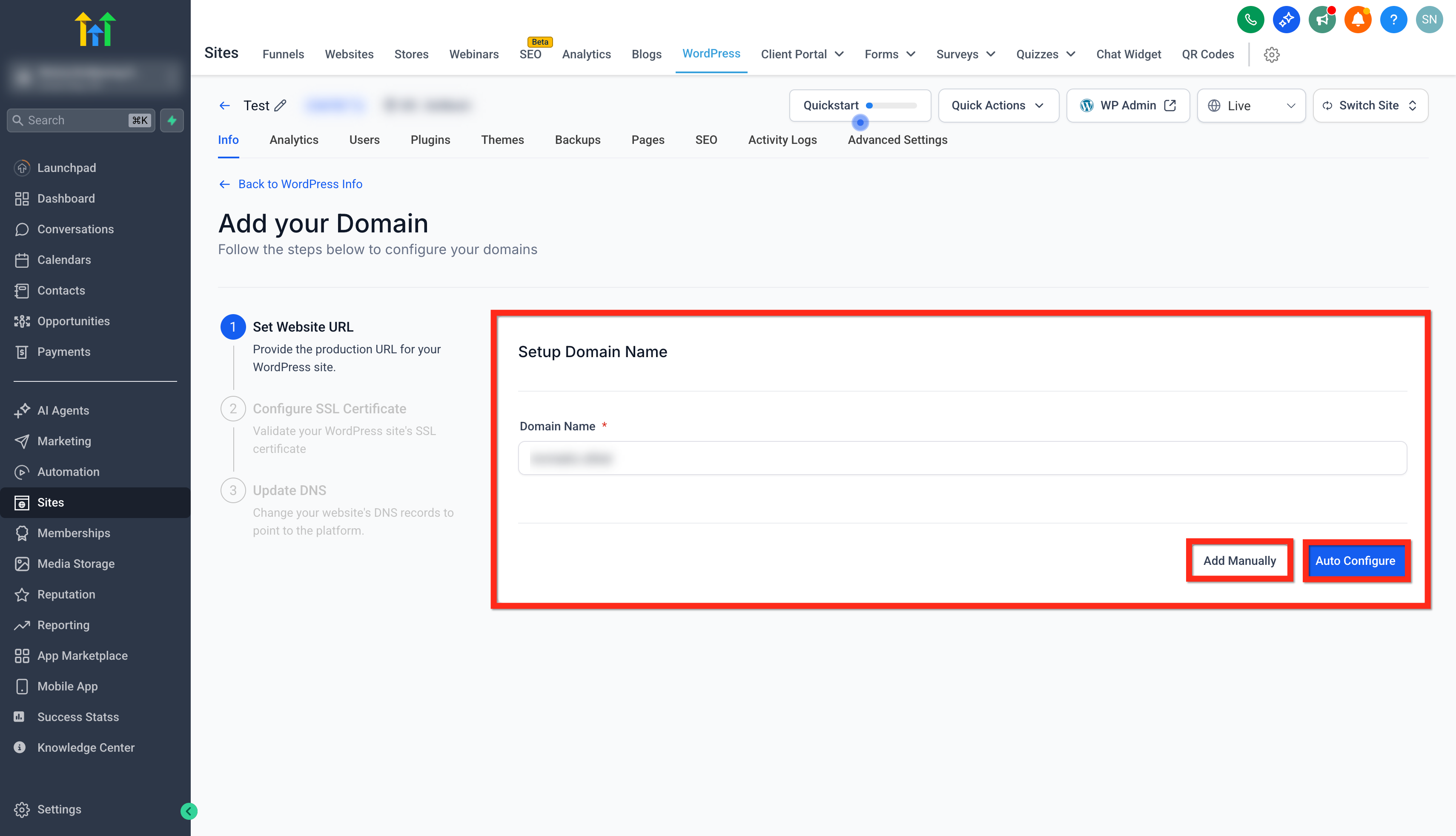
- Open the Manage Your Domain area and select + Add Domain.
- Enter the domain name you want to use.
- Choose Auto Configure or Add Manually.
- Confirm the domain is available and continue.
- Add the SSL TXT records supplied by HighLevel to the DNS provider.
- Set the TTL to 600 seconds or the lowest value possible.
- Add the CNAME and A records supplied by HighLevel to the DNS provider.
- After the domain is verified, configure the SSL certificate as instructed.
- Click the Verify DNS Records button.
Add a sub domain to a WordPress site
- Open the Manage Your Domain area and click + Add Domain.
- Enter the sub domain you wish to map.
- Choose Auto Configure or Add Manually.
- Add the CNAME and A records supplied by HighLevel to the DNS provider.
- Click the Verify DNS Records button.
07What it looks like in HighLevel
08Settings that matter
- Auto Configure or Add Manually. Determines whether HighLevel attempts to set up DNS records automatically or lets the user enter the records by hand.
- TTL Value. Controls the time to live for DNS records; the guide recommends setting it to 600 seconds or the lowest possible to speed up SSL record propagation.
- Change prefix to WWW/ Remove WWW Prefix. Lets the user switch the domain between www and non www formats directly from the domain dashboard.
- Domain Connect option. Offers authentication with supported registrars to auto configure DNS without manually editing records.
09Things to know before you rely on it
- Domain Management is available only in the Live environment; it is disabled in Staging.
- A maximum of five domains or sub domains can be added per site.
- Primary domains require an SSL TXT validation record; sub domains do not.
- SSL record propagation typically takes up to an hour, but global updates may take up to 48 hours.
- When using Cloudflare as the DNS provider, proxy settings must be turned off.
10If something goes wrong
- Domain is already connected to another HighLevel location. Ask the current owner to remove the domain from that location or contact support for assistance.
- DNS verification fails after adding records. Ensure the exact TXT, CNAME and A records provided by HighLevel are entered and set the TTL to the recommended low value.
11How it connects to the rest of HighLevel
- How to set up root domain or subdomain in HighLevel Root and subdomain setup
- HighLevel guide to creating and managing WordPress sites WordPress site setup
- WordPress plugin and theme management in HighLevel Plugin & theme management
Michael's take

Having a custom domain gives a more professional appearance and can build trust with visitors.
If you’re only testing ideas or running short term landing pages, the effort of DNS configuration and SSL verification may outweigh the benefit. In those cases a temporary HighLevel subdomain can get the job done without the extra steps.