
01Who this is for
- Agency owners who sell SaaS V1 subscriptions need to bring Stripe based plans into their selling subaccount for funnel sales.
- Coaches who use recurring memberships can import live Stripe prices to manage billing directly from HighLevel funnels.
- Ecommerce managers with subscription products rely on the import to keep pricing consistent between Stripe and HighLevel.
02Stripe plans, explained
The import function copies an eligible Stripe recurring price into the same HighLevel subaccount where a funnel is built. It creates a product record and a recurring price record that appear under Payments > Products. Only prices that meet the import criteria are available for selection in funnel order forms.
The feature lives inside each subaccount’s Payments area. After a successful import, the product can be attached to any checkout element within a funnel. The system does not automatically sync later changes made in Stripe; a new import is required for updated pricing.
03How businesses use Stripe plans
- Coaching business. The coach opens the subaccount that hosts the funnel, imports the live Stripe recurring price, and then selects that product in the membership order form. The checkout now charges the client on a recurring schedule defined in Stripe.
- SaaS agency (SaaS V1). The agency verifies that the agency level Stripe connection matches the selling subaccount, imports the SaaS plan’s Stripe price, and adds it to the funnel that sells the software. The plan can be offered without rebuilding the subscription inside HighLevel.
- Subscription based online store. The store owner imports a live Stripe subscription price into the subaccount linked to the product page funnel, then selects the imported item in the order form. Customers complete the checkout using the recurring price that originated in Stripe.
04The numbers and rules that matter
- SaaS V1 Stripe connection: Agency and selling subaccount should use the same Stripe account.
05Before you start
- The Stripe price must be a recurring subscription type.
- The price must be in Live mode, not Test mode.
- Metered recurring prices cannot be imported.
- The price must not have been imported already.
- Import must occur in the same subaccount where the funnel lives.
06How to set up and use Stripe plans in HighLevel
Import a Stripe plan for funnel products
- Access the subaccount that will sell the product.
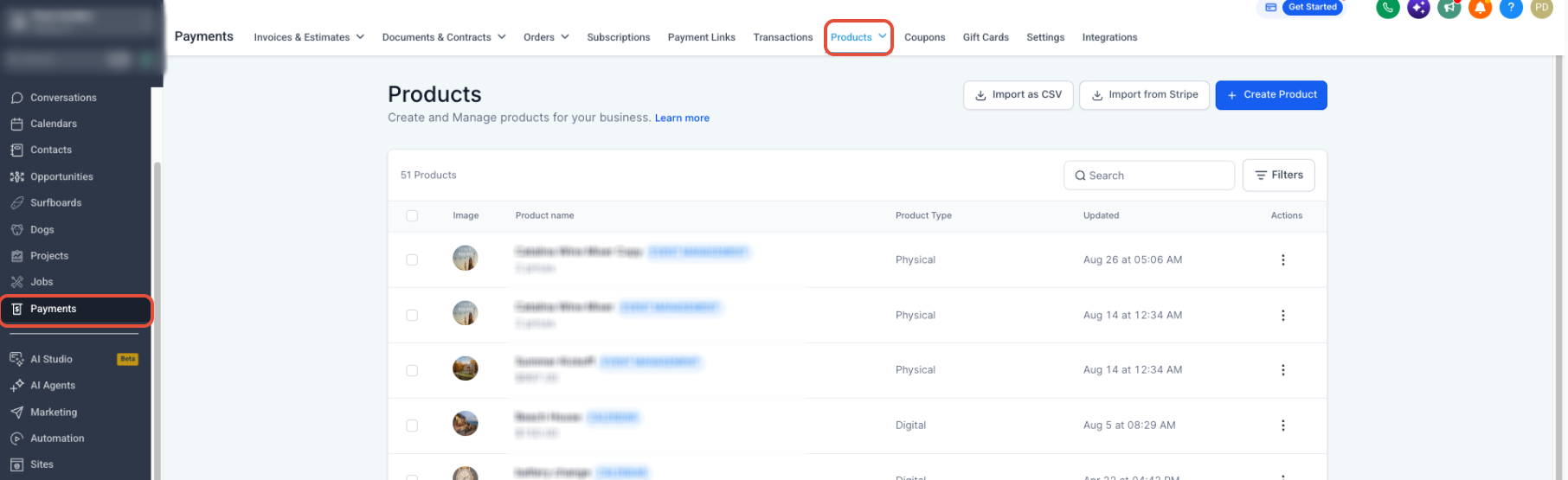
- Go to the Payments section via the left hand menu.
- Choose Products from the Payments submenu.
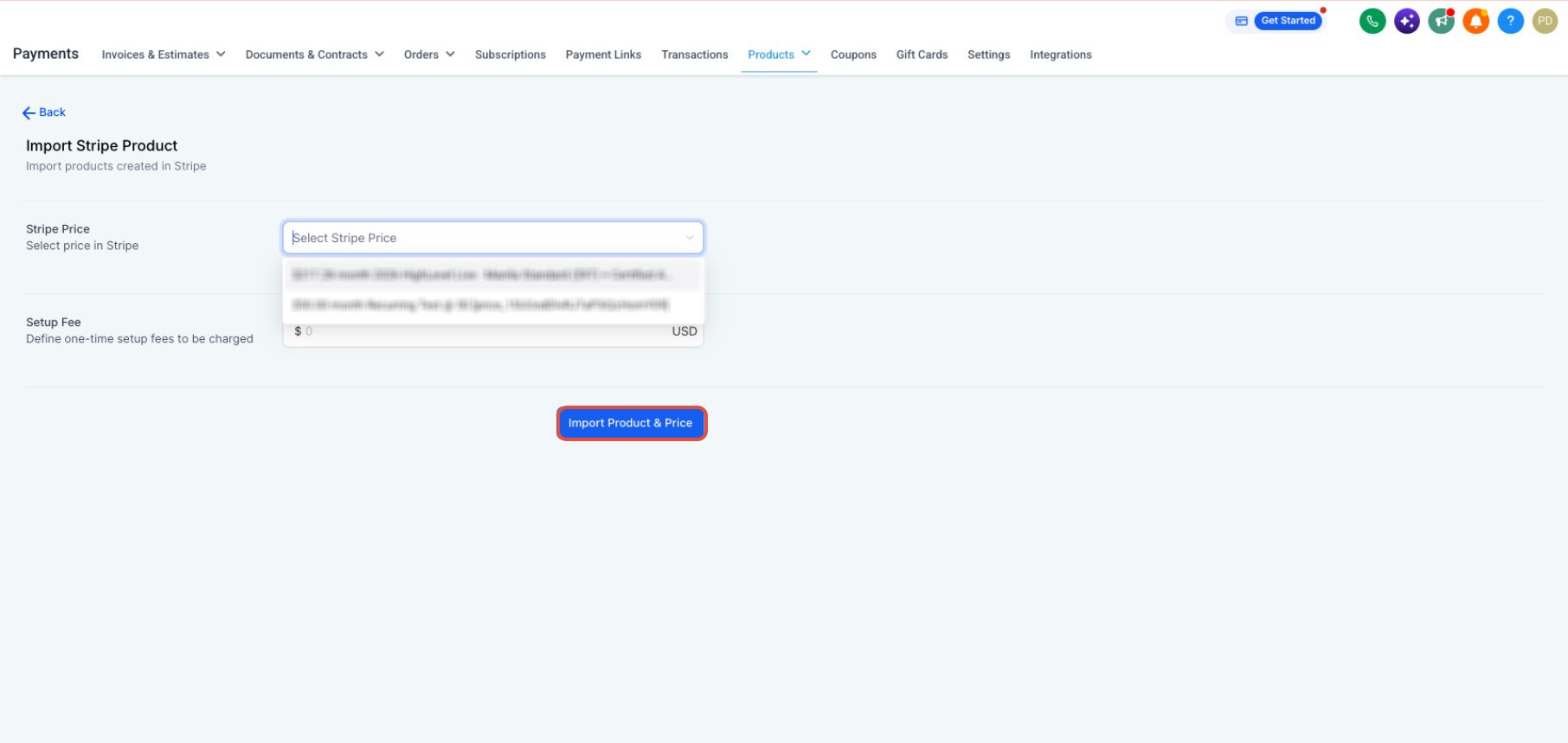
- Press the Import From Stripe button.
- Locate the desired Stripe product using the search field.
- Examine the list of recurring prices shown for that product.
- Pick the qualifying price and its product for import.
- Finish the import process.
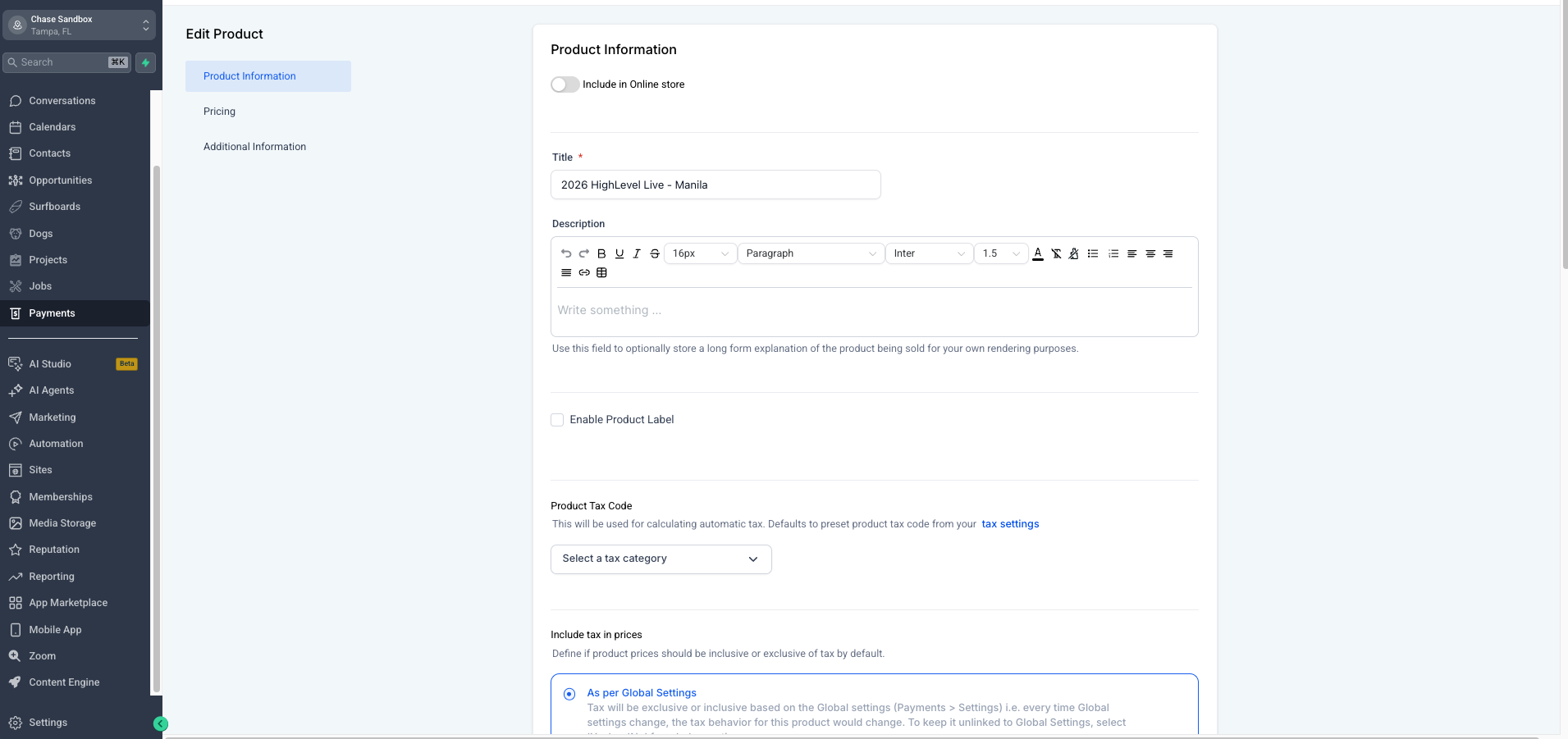
- Verify the new product appears in Payments > Products.
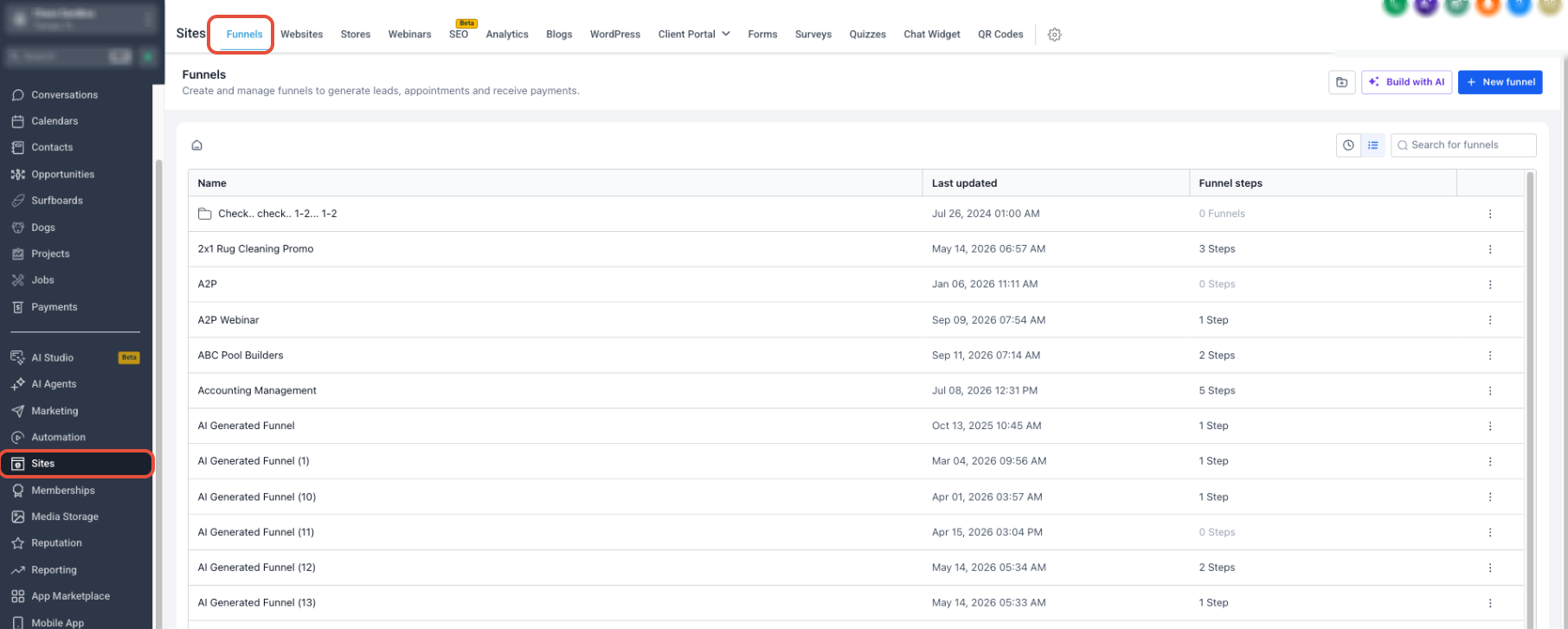
- Navigate to Sites through the left hand menu.
- Select Funnels from the Sites options.
- Open the specific funnel where the product will be offered.
- Enter the order form or product settings inside the funnel.
- Choose the recently imported HighLevel product and its recurring price.
- Save the changes and publish the funnel after testing the checkout.
07What it looks like in HighLevel
08Settings that matter
- Import From Stripe. Initiates the copy of an eligible Stripe recurring price into the current subaccount, creating a matching HighLevel product and price.
09Things to know before you rely on it
- One time Stripe prices are not supported by this import workflow; they must be created directly in HighLevel.
- Metered recurring prices cannot be imported through this process.
- Test mode Stripe prices are excluded; only Live mode prices are eligible.
- A price that has already been imported will no longer appear in the Import From Stripe list.
- The import must be performed in the same subaccount that hosts the funnel.
10If something goes wrong
- Price already imported. Check Payments > Products for the existing record before attempting another import.
- Price is in Stripe Test mode. Switch the Stripe price to Live mode; test mode prices are not shown in the import selector.
- Price is one time. Create a one time product directly in HighLevel instead of using the import workflow.
- Price is metered. Metered recurring prices are not supported; use a standard recurring price for import.
- Importing into the wrong subaccount. Make sure the product is imported into the subaccount that will host the funnel.
- Agency and selling subaccount use different Stripe accounts (SaaS V1). Confirm both the agency view and the selling subaccount are linked to the same Stripe account.
- Price was changed directly in Stripe. Import the updated eligible price as a new HighLevel product; existing records are not auto updated.
- SaaS V1 product created but not imported into selling subaccount. Import the Stripe product into the selling subaccount before adding it to the funnel.
- Using SaaS V2 workflow. Verify the product exists in the selected Agency Subaccount’s Payments area rather than using the Stripe import path.
11Why does my funnel product show 'null' in the Stripe Plan dropdown?
If your Stripe product is showing (null) in front of the product name, it's not a problem and you can change it by following the steps shown in the video.
If your Stripe product is showing (null) in front of the product name, it is not a problem.
12How it connects to the rest of HighLevel
- Add a two step order form to a HighLevel funnel Two step order form guide
- Review overall Sites features for funnel building Sites feature overview
- Explore HighLevel pricing and plans Pricing page
Michael's take

Stripe plan imports are useful only if you need recurring products inside a funnel.
If you never sell recurring subscriptions through funnels, skip this feature.