
01Who this is for
- Outbound sales teams, need higher answer rates for prospect calls.
- Customer support centers, want legitimate calls to reach clients without blocks.
- Marketing agencies, require clean caller ID reputation for campaign success.
02Voice Integrity, explained
Voice Integrity sends your eligible U.S. numbers to First Orion, Hiya and TNS. These analytics platforms evaluate recent call activity and may adjust how carriers label the number. The feature does not guarantee label removal; each carrier decides independently.
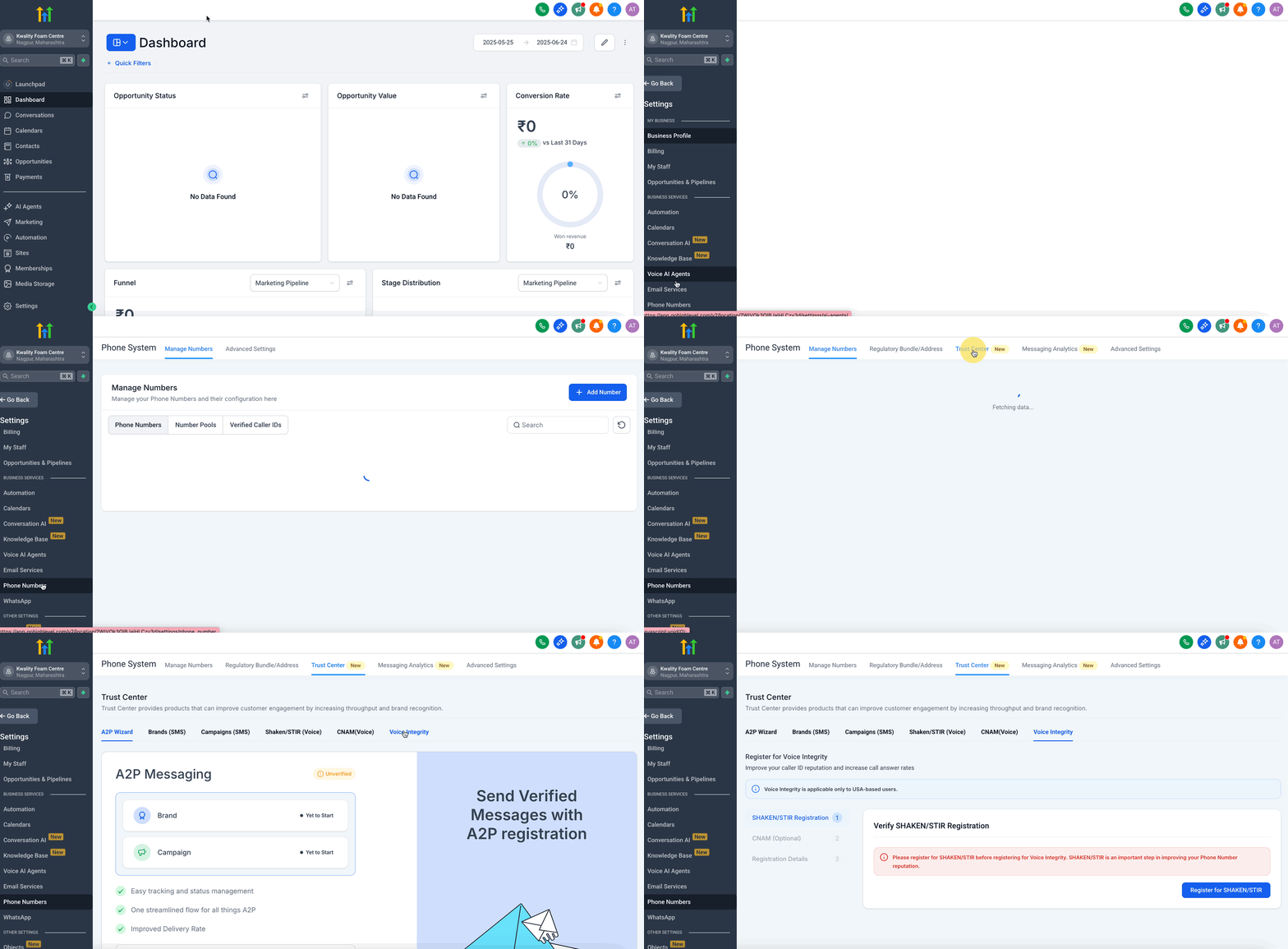
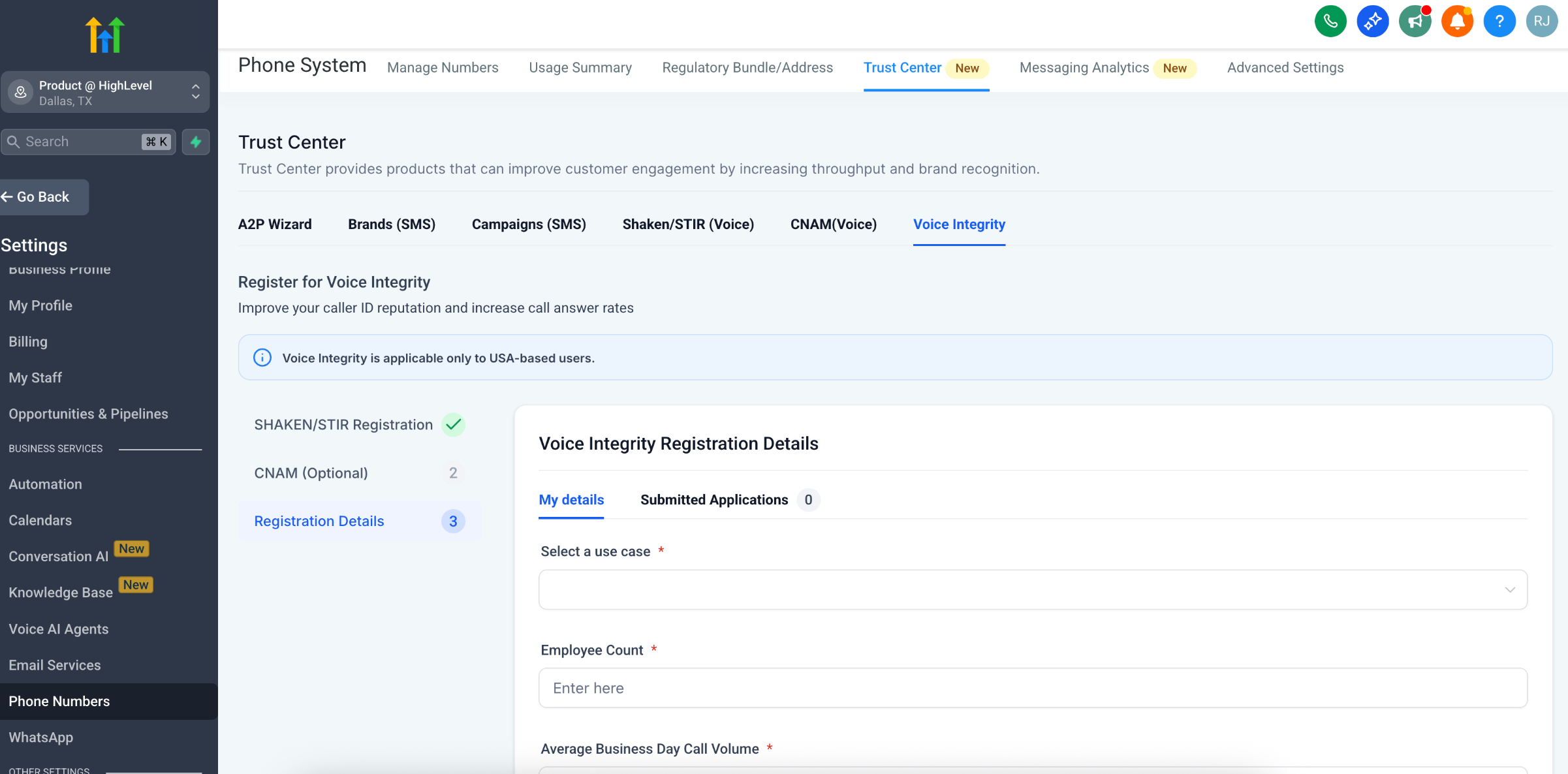
The process lives inside the Trust Center. Under the Voice Integrity tab you fill a short registration form, submit it, and then monitor the application in the Submitted Applications tab. Approval typically occurs within two business days, after which you receive a notification. Subsequent label changes propagate across networks over time.
Before you can register, the account must already have SHAKEN/STIR configured and a valid Employer Identification Number (EIN). CNAM information is optional but can improve trust when provided. Voice Integrity applies only to domestic U.S. numbers.
03How businesses use Voice Integrity
- Real estate brokerage. The brokerage registers its office lines for Voice Integrity after confirming SHAKEN/STIR is set up. It optionally adds a branded CNAM so prospective buyers see the company name when calls appear. The registration helps reduce spam flags that might deter client callbacks.
- Healthcare clinic. The clinic submits its patient service numbers through the Voice Integrity form, providing the expected daily call volume and employee count. With SHAKEN/STIR in place, the clinic aims to improve answer rates for appointment reminders and reduce call blocks.
- Ecommerce store. The store fills out the Voice Integrity registration, selects a sales outreach use case, and includes its average call volume. After submission, it watches the application status in the Trust Center and receives a notification once the numbers are approved, helping order confirmation calls reach customers.
04The numbers and rules that matter
- Submission is typically processed within 2 business days.
05Before you start
- Configure SHAKEN/STIR for the account.
- Provide a valid Employer Identification Number (EIN).
- Ensure the phone numbers you want to register are U.S. numbers.
- Optionally prepare a branded CNAM for the caller name field.
06How to set up and use Voice Integrity in HighLevel
Enable Voice Integrity
- Open the Trust Center and select the Voice Integrity tab.
- Enter the required details in the registration form: use case, employee count, average business day call volume, and optional CNAM.
- Click Submit to send the application.
- Allow up to two business days for the providers to process the request.
- Visit the Submitted Applications tab in the Trust Center to view the current status.
- Wait for a notification that the numbers have been approved.
- Understand that removal of spam labels may take additional time to appear across all networks.
- If an EIN is not available, use the Free Caller Registry as an alternative to improve reputation.
07What it looks like in HighLevel
08Settings that matter
- Use Case. Specifies the type of calls you will be making, such as sales outreach or customer support.
- Employee Count. Indicates the size of your organization for provider review.
- Average Business Day Call Volume. Provides an estimate of how many calls you place each business day.
- CNAM Details. Allows you to submit an optional branded caller name to improve identification.
09Things to know before you rely on it
- Voice Integrity only works with U.S. phone numbers; international numbers are not supported.
- Each analytics provider and carrier makes its own decision on label removal, so results are not guaranteed.
- Spam label removal may take additional time to propagate after approval.
- Voice Integrity does not permanently prevent future spam flags; ongoing call behavior still influences reputation.
10If something goes wrong
- Activating Voice Integrity does not automatically enroll numbers in SHAKEN/STIR.. Make sure SHAKEN/STIR is fully configured on the account before submitting the Voice Integrity form.
- Cannot register without a valid EIN.. Use the Free Caller Registry as an alternative method to improve your number’s reputation.
11How it connects to the rest of HighLevel
- Edit phone number settings in subaccounts Phone number configuration
- Guide to moving phone numbers across accounts Phone number migration
- HighLevel pricing and plans Pricing page
Michael's take

When outbound calls are flagged as spam, it can affect outreach. The first thing I would get right is the SHAKEN/STIR registration because without it the Voice Integrity form won’t even submit.
Once the authentication is set, I’d fill in the simple form, add a clear branded CNAM if you have one, and watch the provider notifications. It can help start cleaning up your number’s reputation, but keep an eye on future call patterns so spam flags don’t creep back in.