
01Who this is for
- Agency Founders who manage inbound call routing need a clear path to secure numbers when inventory is low.
- Sales managers overseeing campaign numbers benefit from knowing how to request specific prefixes or area codes.
- Support teams handling client onboarding can verify number availability and request alternatives without delay.
02Unavailable phone numbers, explained
The feature helps users identify when a desired phone number cannot be found in the platform’s normal catalog. It checks inventory that changes frequently based on provider stock, regulatory rules, and search filters. When a number is truly unavailable, the guide outlines several routes to obtain it.
The process begins in the Phone System settings of a subaccount, where users can adjust filters and explore nearby area codes. If that fails, they can purchase directly from Twilio, submit a private offering request, or open a support ticket with Twilio. Each path requires specific information such as account SIDs or documentation.
All actions are performed inside HighLevel or through Twilio’s console and support channels. The platform does not automatically place orders; users must provide the necessary details and wait for Twilio’s review.
03How businesses use unavailable phone numbers
- Real estate agency. The agency checks its subaccount for a local number in a target market. When none appear, it gathers its account SID, bundle SID, and address SID, then submits a private offering form to Twilio to secure a number with the desired prefix.
- Dental practice. The practice looks for a toll free number in the Phone System settings. If unavailable, it logs into the Twilio console, searches for the toll free option, and purchases it directly to enable patient calls.
- SaaS startup. The startup’s support team opens a ticket with Twilio, attaches the required compliance documents, and notifies Twilio after approval so the team can receive a new international number for onboarding users.
04The numbers and rules that matter
- Inventory for a supported country, area code, or number type may be temporarily unavailable.
- Twilio generally reviews a private offering submission within 3 business days.
- Norway Mobile SMS, $12/month, Expected delivery: 1 to 2 weeks (per HighLevel's help center, checked November 2026).
- Norway Toll Free Voice, $25/month, Expected delivery: 2 to 4 weeks (per HighLevel's help center, checked November 2026).
- Norway Local Voice, $3/month, Expected delivery: 2 to 3 weeks (per HighLevel's help center, checked November 2026).
05Before you start
- Be signed into the correct subaccount within HighLevel.
- Navigate to Settings > Phone System and attempt the normal add number flow before escalating.
- Confirm that the issue is related to inventory and not to regulatory requirements, identity verification, or search filters.
06How to set up and use unavailable phone numbers in HighLevel
Check standard purchasing options
- Open the target subaccount in HighLevel.
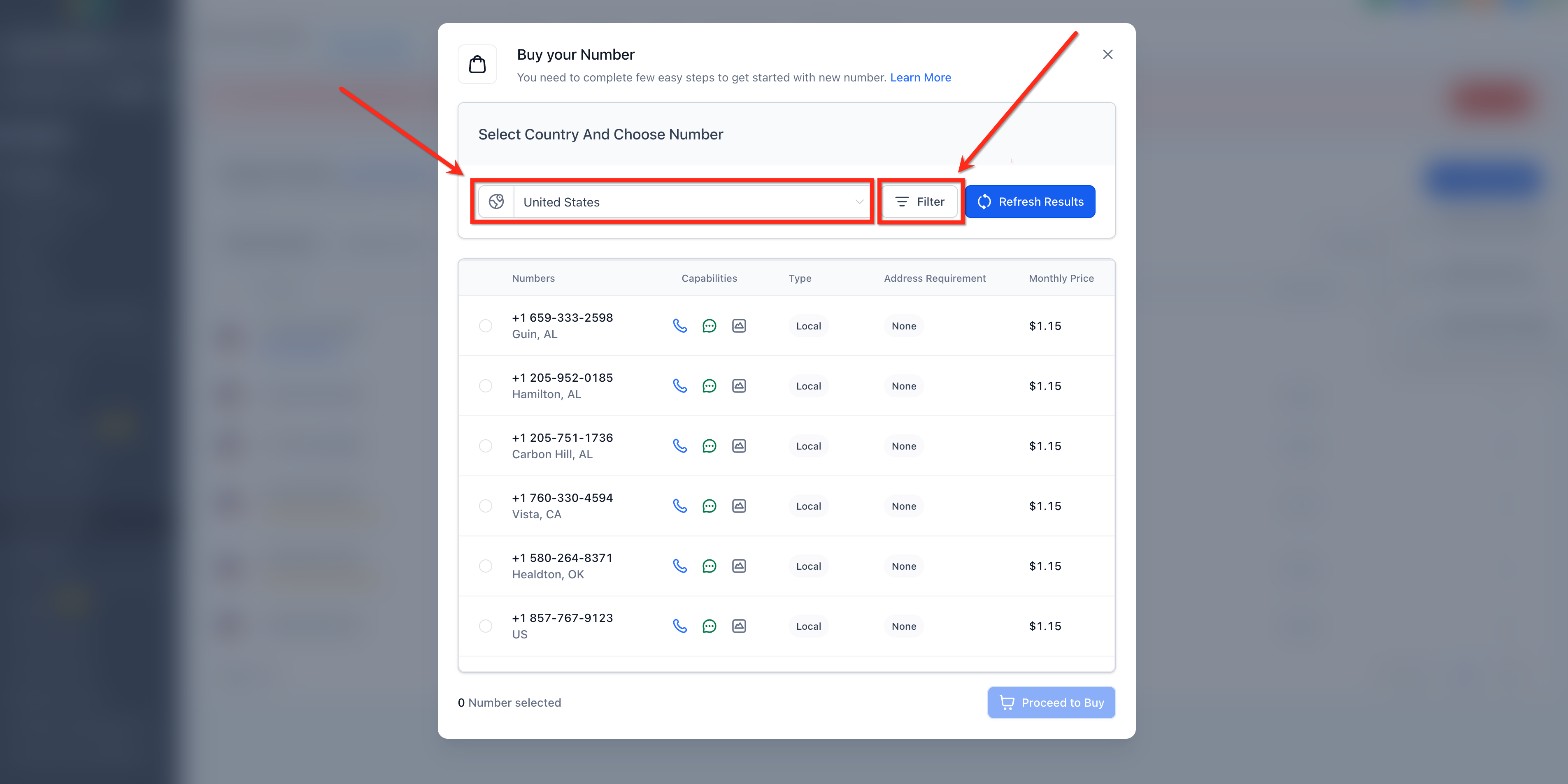
- Select Settings > Phone System.
- Press the + Add Number button and choose Add Phone Number.
- Pick the country where the number is needed.
- Review the list of numbers that appear.
- Modify the filters to match the required number type or other criteria.
- If the exact area code is missing, try nearby or overlay area codes.
Buy a number directly from the Twilio console
- Log in to the Twilio console with the appropriate account.
- Search for the desired phone number using Twilio’s search tools.
- Complete the purchase of the number within the Twilio interface.
Request a private offering through Twilio
- Collect the SID of the account that will own the number.
- Collect the SID of the bundle to associate with the number.
- Collect the SID of the address linked to the number.
- Provide the required prefix, quantity, and type of phone numbers in the private offering form.
Request a ticket with Twilio support
- Open a support ticket with Twilio describing the unavailable number.
- Submit any required compliance documents for review.
- After review, inform Twilio that the documents are approved so they can place the order.
07What it looks like in HighLevel
08Things to know before you rely on it
- Phone number inventory changes frequently; a search that returns nothing does not mean the country is unsupported.
- Twilio reviews private offering requests and support tickets within three business days.
- If the location uses LC Phone, users must contact HighLevel support rather than Twilio.
- Pricing examples for Norway numbers: Mobile SMS $12 per month, Toll Free Voice $25 per month, Local Voice $3 per month. Expected delivery times range from 1 to 2 weeks to 4 weeks (per HighLevel's help center, checked November 2026).
09How it connects to the rest of HighLevel
- Review the normal purchase flow before requesting a number. How to Purchase a Phone Number
- Learn how to move numbers between subaccounts if needed. Moving numbers between subaccounts
- Check Twilio’s international availability for supported countries. Phone number configuration options
Michael's take

People often think they can wait for the exact number they saw earlier to stay available. In reality the inventory moves fast and that number can vanish the minute you refresh. I’d first run through the normal purchase flow, adjust filters, and try nearby area codes before reaching out for help.
If I needed a unique number, I’d jump straight to the private offering request when my agency uses Twilio. Gather the account, bundle, and address SIDs, specify the prefix, and let Twilio’s review process do its thing. For LC Phone, a quick ticket to HighLevel support gets the ball rolling.