
01Who this is for
- Agency owners who manage multiple client locations need to keep numbers tied to the correct location.
- Marketing managers using a dedicated Twilio account can assign new numbers without manual imports.
- Support team leads can ensure incoming calls route to the proper HighLevel location by purchasing within the correct subaccount.
02Twilio numbers, explained
The feature lets agencies that have their own Twilio account linked to HighLevel buy phone numbers directly in the Twilio Console. Each HighLevel location is paired with a Twilio subaccount, and buying a number from that subaccount automatically links the number to the matching location. Numbers are selected from Twilio’s inventory, filtered by capabilities such as voice, SMS, MMS, or fax, and can be local, mobile, or toll free where available. After purchase, HighLevel pulls the new number into the location’s Phone Numbers list, where further routing or compliance settings are applied. The process lives partly in HighLevel (to find the correct Account SID) and partly in the Twilio Console (to search, filter, and purchase). Syncing occurs automatically once the number is bought from the proper subaccount.
03How businesses use buying a Twilio number
- Digital marketing agency. The agency locates the Account SID for a client’s campaign location in HighLevel, opens the matching Twilio subaccount, searches for a local number with voice and SMS, purchases it, and then verifies the number appears in the client’s HighLevel phone number settings.
- Real estate brokerage. A broker identifies the subaccount tied to a new office location, selects a toll free number with SMS capability in Twilio, buys it, and confirms it shows up in the office’s HighLevel phone number list for lead capture.
- Healthcare clinic. The clinic’s admin checks the Twilio subaccount linked to its patient portal location, filters for a mobile number that supports MMS, purchases the number, and then completes any required routing and compliance steps in HighLevel.
04Before you start
- Your agency must have its own Twilio account connected to HighLevel.
- You need access to Agency View in HighLevel.
- You must be able to log in to the connected Twilio account.
- Your Twilio permissions must include phone number purchase rights.
- You should know which HighLevel location will receive the new number.
05How to set up and use buying a Twilio number in HighLevel
Find the location's Twilio subaccount
- Log in to HighLevel and switch to Agency View.
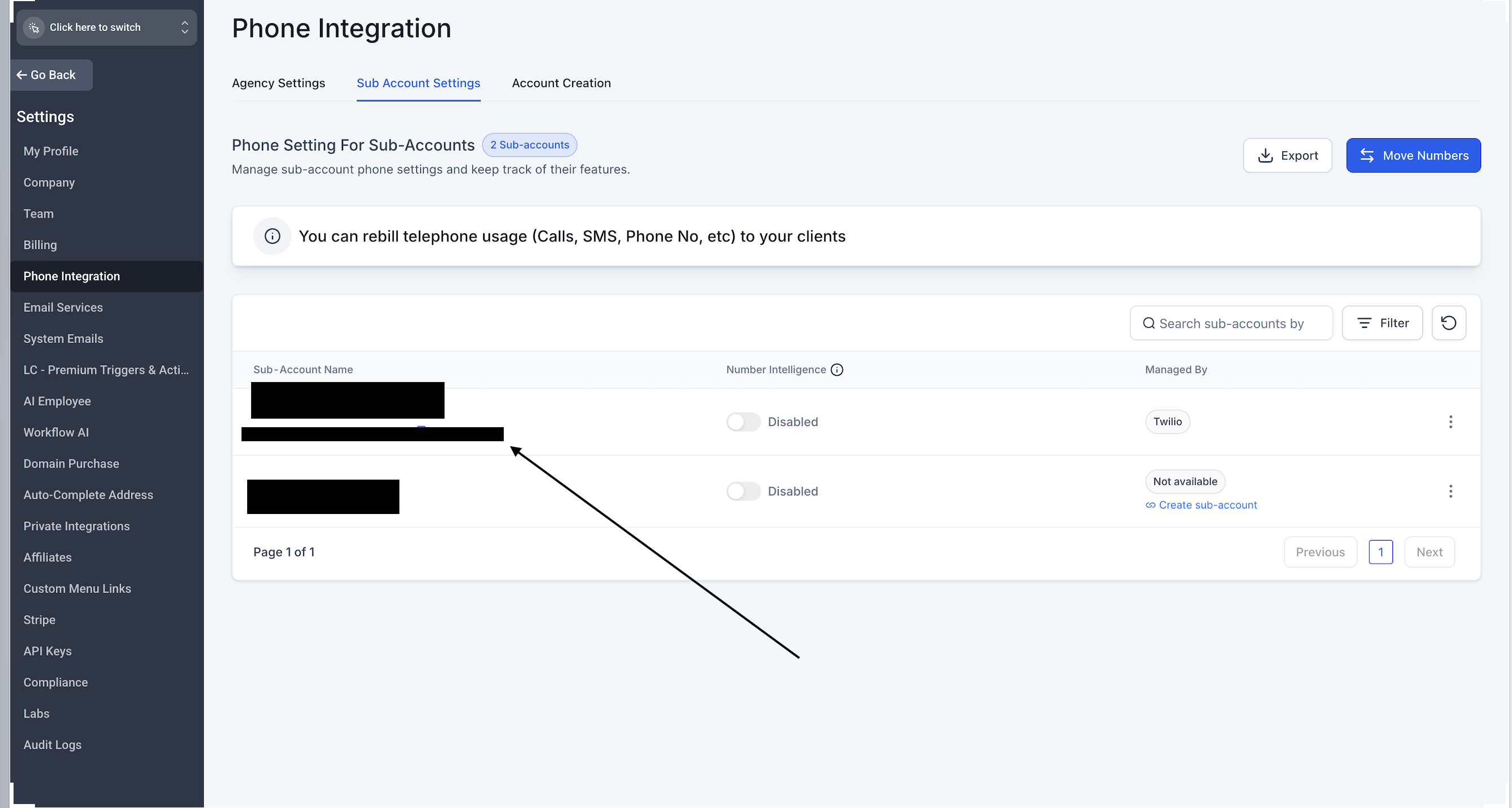
- Navigate to Settings > Phone Integration.
- Select Subaccount Settings.
- Locate the destination HighLevel location.
- Verify that Twilio appears under Managed By for that location.
- Copy or note the Twilio Account SID shown.
Open the correct Twilio subaccount
- Log in to the Twilio Console.
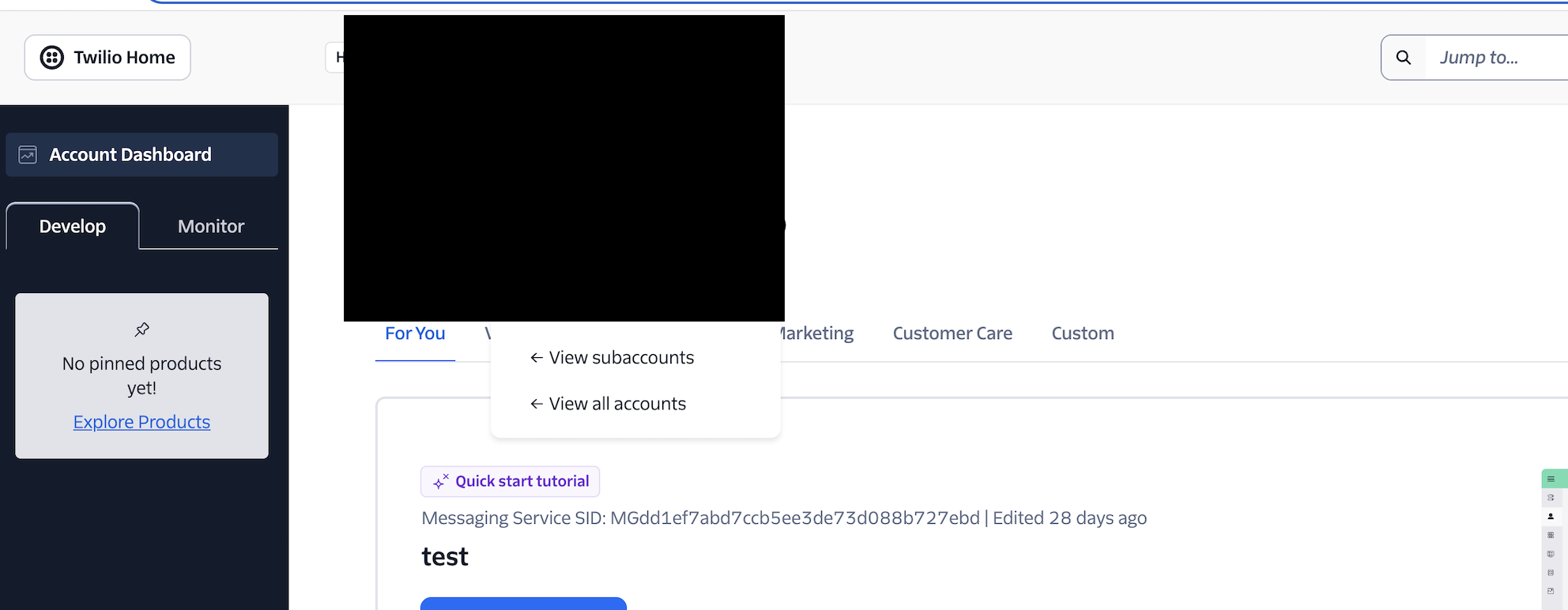
- Click the account switcher icon.
- Choose View subaccounts or View all accounts.
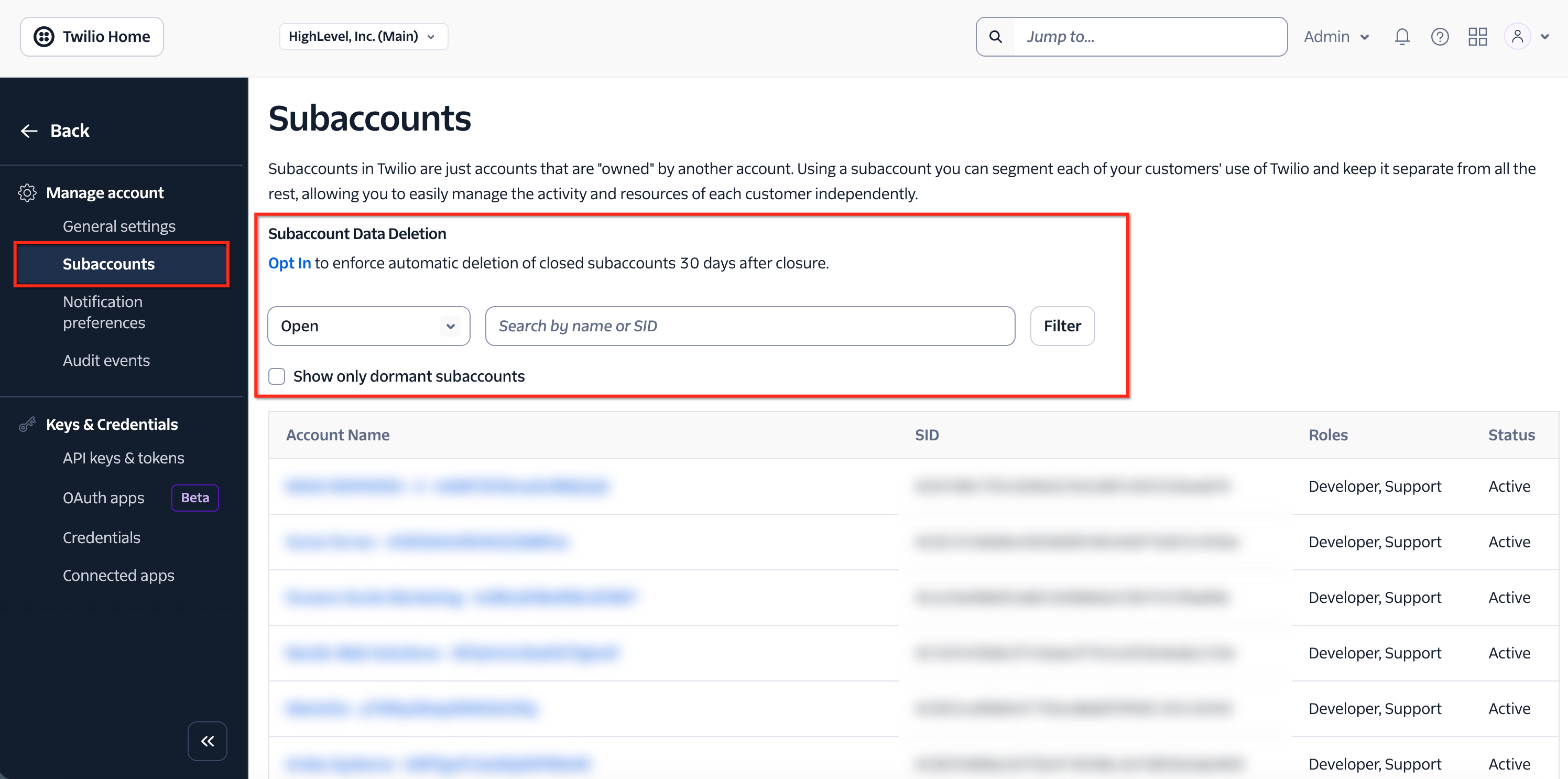
- Open the Subaccounts page.
- Search by the account name or Account SID.
- Match the SID with the one recorded from HighLevel.
- Open the matching Twilio subaccount.
Open the Buy a Number page
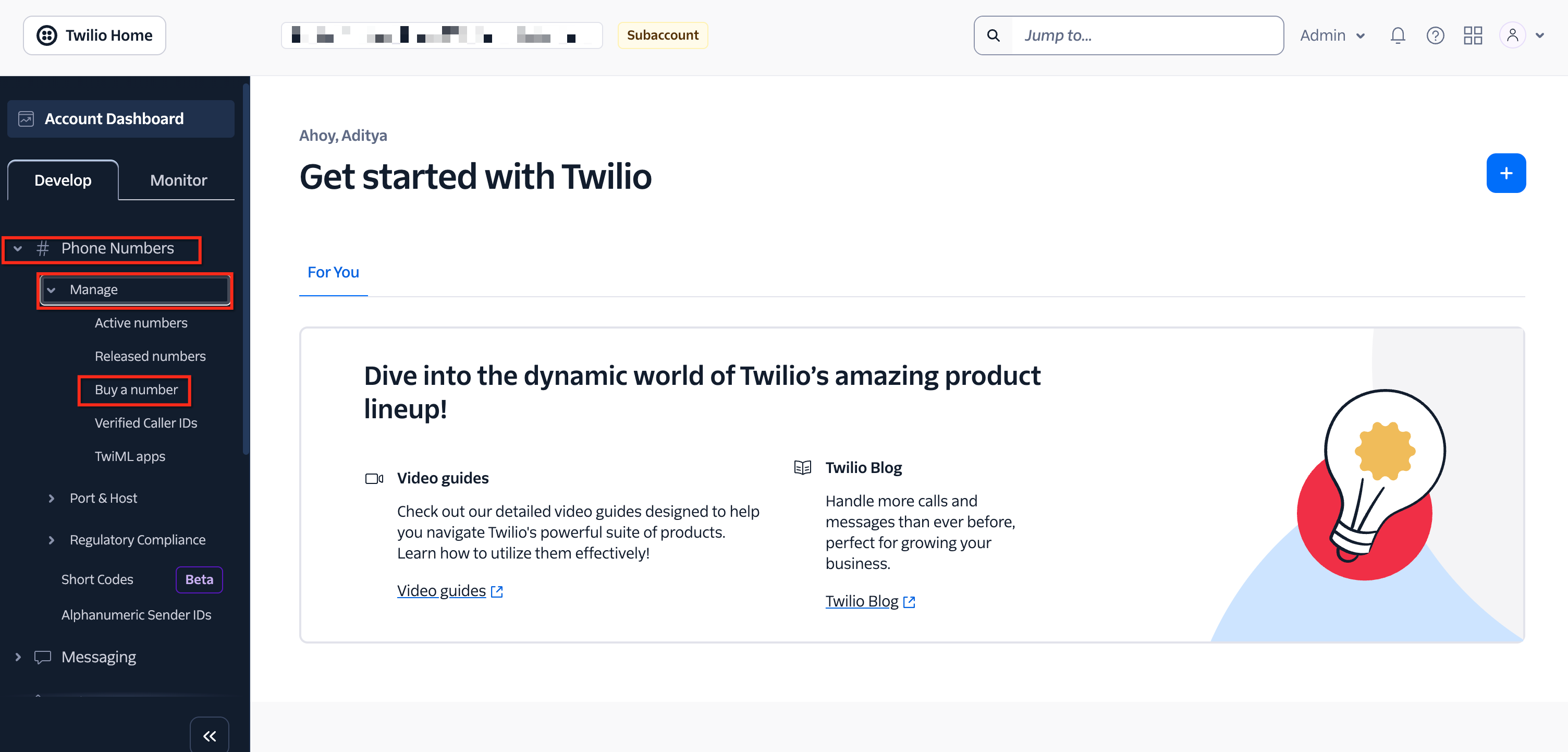
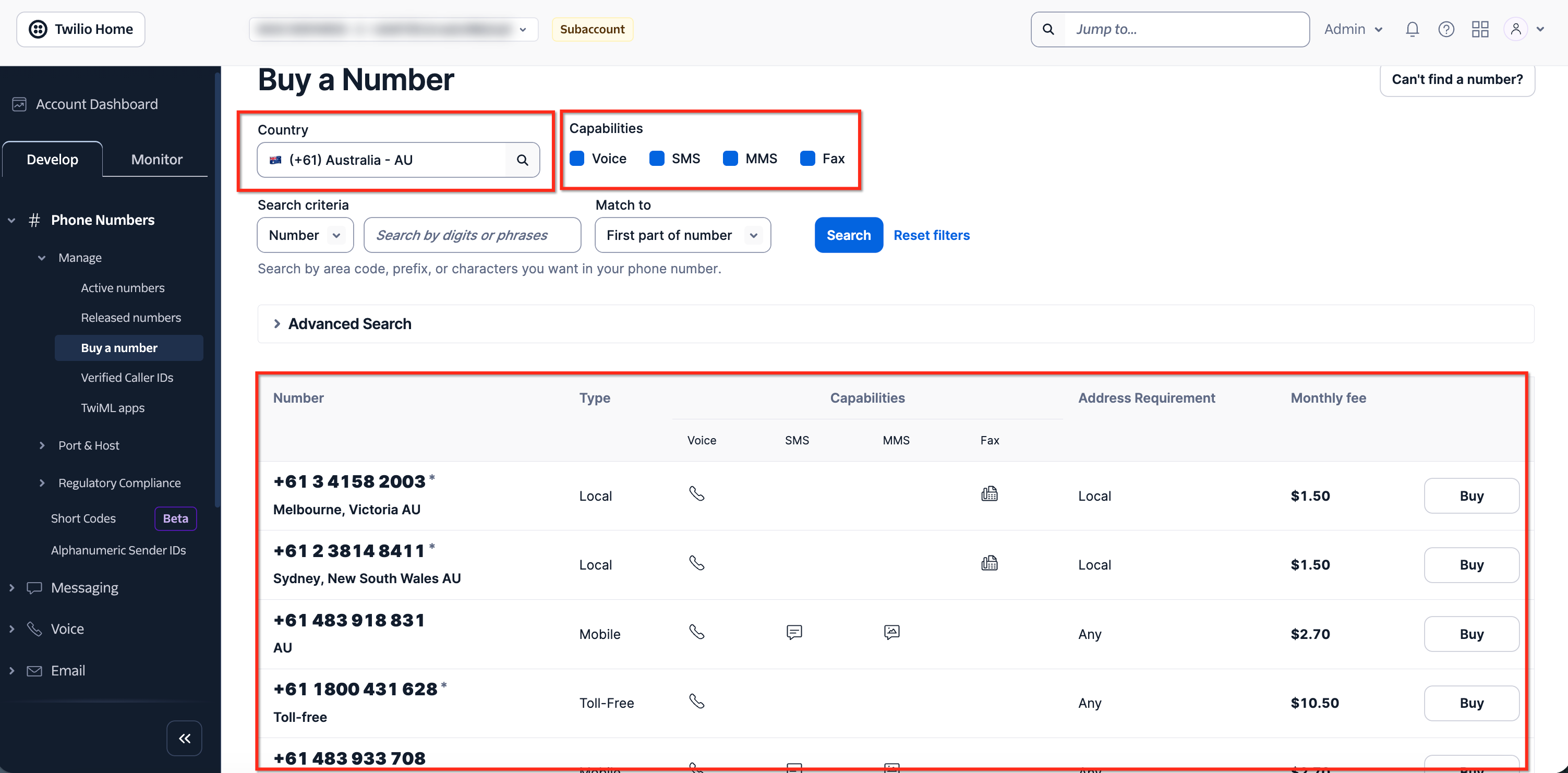
- From the Twilio Console sidebar go to Develop > Phone Numbers > Manage > Buy a number.
Search for an available number
- Select the desired country.
- Select the required capabilities such as Voice, SMS, MMS, or Fax.
- Enter an area code, digits, or phrase when needed.
- Click Search.
- Review the available numbers, number type, capabilities, address requirements, and monthly fee.
Refine the number search
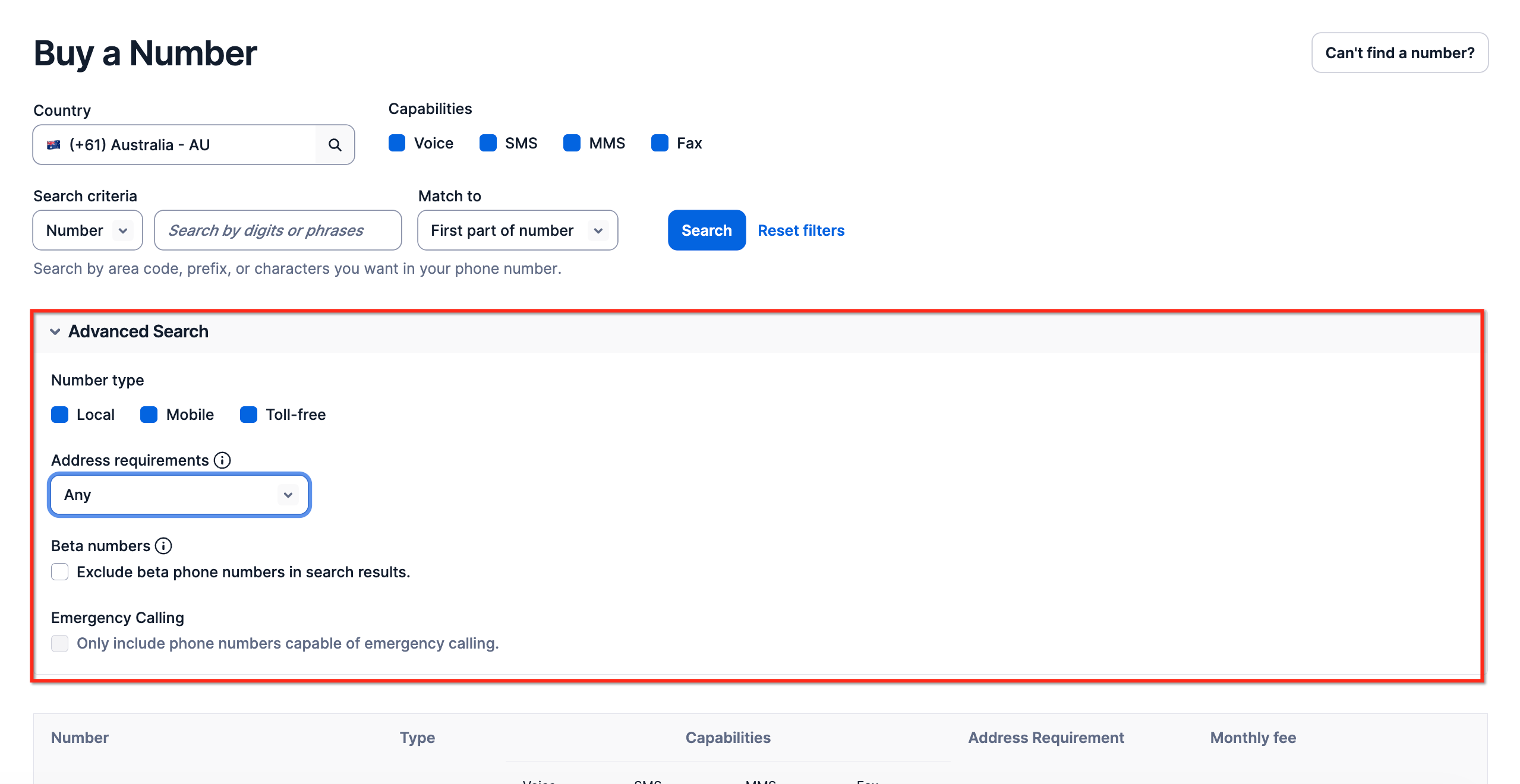
- Expand Advanced Search.
- Select the preferred number type: Local, Mobile, or Toll free.
- Check the Address requirements filter.
- Apply any extra filters you need.
- Run the search again to update results.
Purchase the number
- Review the selected number’s capabilities and monthly fee.
- Click Buy next to the chosen number.
- Read any regulatory, address, or emergency calling notices.
- Accept any required terms.
- Confirm the purchase to complete it.
Verify the number in HighLevel
- Return to the HighLevel location identified earlier.
- Open Settings > Phone Numbers.
- Refresh the page if the new entry is not visible.
- Confirm that the purchased number appears in the list.
- Open the number’s settings to finish routing, forwarding, user assignment, or compliance configuration.
06What it looks like in HighLevel
07Settings that matter
- Managed By. Shows which provider (Twilio) is handling phone services for the selected HighLevel location.
- Account SID. Unique identifier that links a HighLevel location to its corresponding Twilio subaccount.
08Things to know before you rely on it
- Number availability, capabilities, pricing, and regulatory rules differ by country and number type.
- Some numbers may require extra identity, address, regulatory, messaging, or emergency calling configuration before full use.
- The process applies only to agencies that have connected their own Twilio account to HighLevel; no provider dropdown selection in HighLevel is needed.
09If something goes wrong
- The newly purchased number does not appear in the intended HighLevel location.. Confirm the number is listed under Phone Numbers > Manage > Active numbers in Twilio. Verify the Twilio subaccount SID matches the Account SID connected to the HighLevel location. Ensure the purchase was made in the correct subaccount. Refresh Settings > Phone Numbers in HighLevel. Sign out and back in if the page does not update.
- The number still does not appear after confirming the correct subaccount.. Contact HighLevel Support for further assistance.
10How it connects to the rest of HighLevel
- Step by step guide to buying any phone number in HighLevel. Purchase a phone number guide
- Details on configuring number routing, forwarding, and compliance in subaccounts. Edit phone number settings
- Instructions for moving a number between agency subaccounts if bought in the wrong place. Move numbers between subaccounts
Michael's take

Buying a Twilio number through your agency’s connected subaccount gives you direct access to Twilio’s inventory while keeping the number linked to the right HighLevel location, which is a clear win for any small agency that needs fresh numbers without manual imports.
The biggest mistake is buying the number from the main Twilio account or the wrong subaccount, which can prevent the number from appearing in HighLevel.