
01Who this is for
- Agency owners who manage multiple affiliates benefit from a single automated payment hub.
- Ecommerce Founders can ensure timely affiliate commissions without extra accounting steps.
- Coaches with referral partners save time by using the bulk Pay button for payouts.
02PayPal auto payouts, explained
The feature integrates PayPal’s Payouts API with HighLevel. It provides an Auto Payouts option inside Affiliate Manager that moves approved commissions to PayPal with a single action. Only PayPal is supported for automatic disbursement; other methods stay manual.
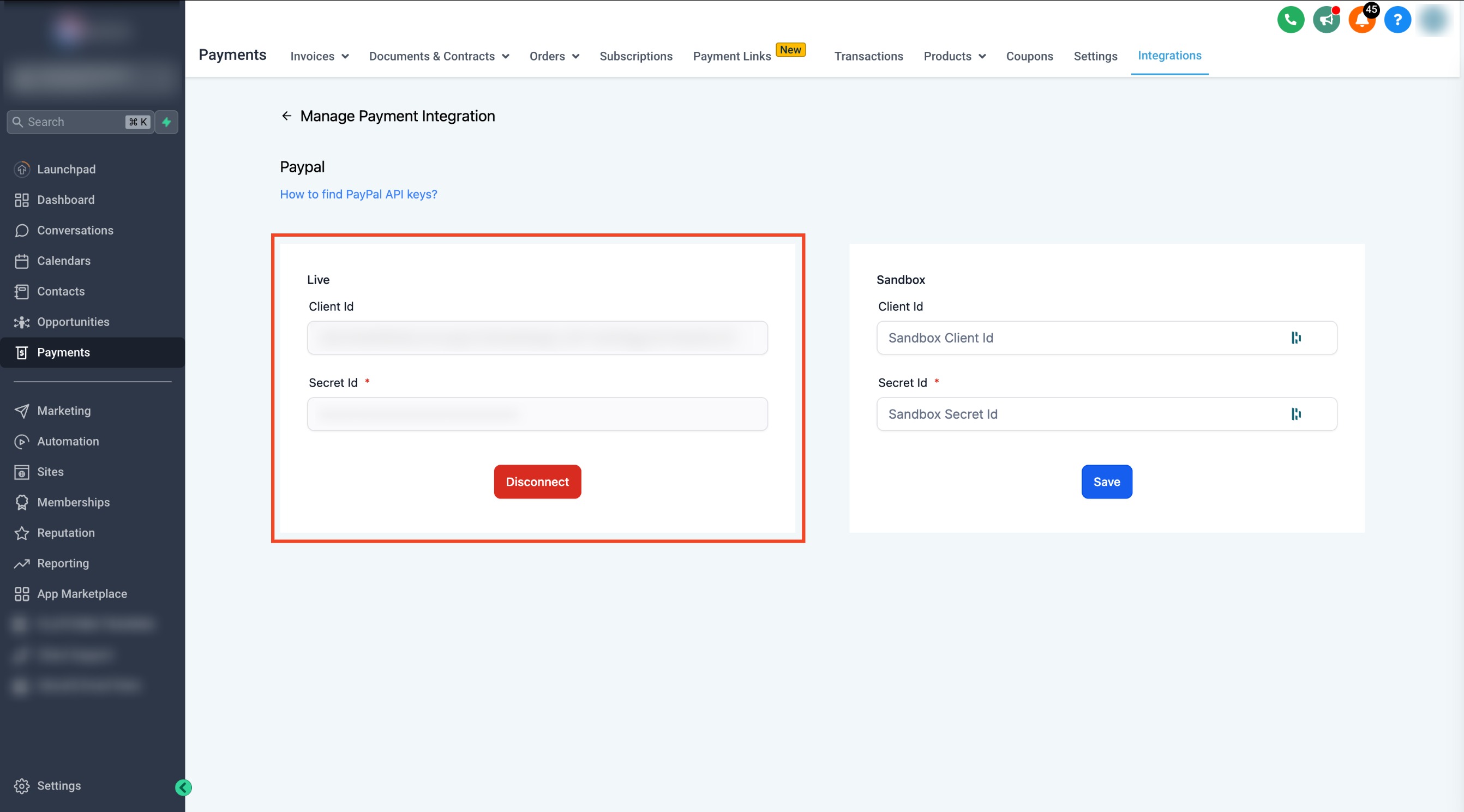
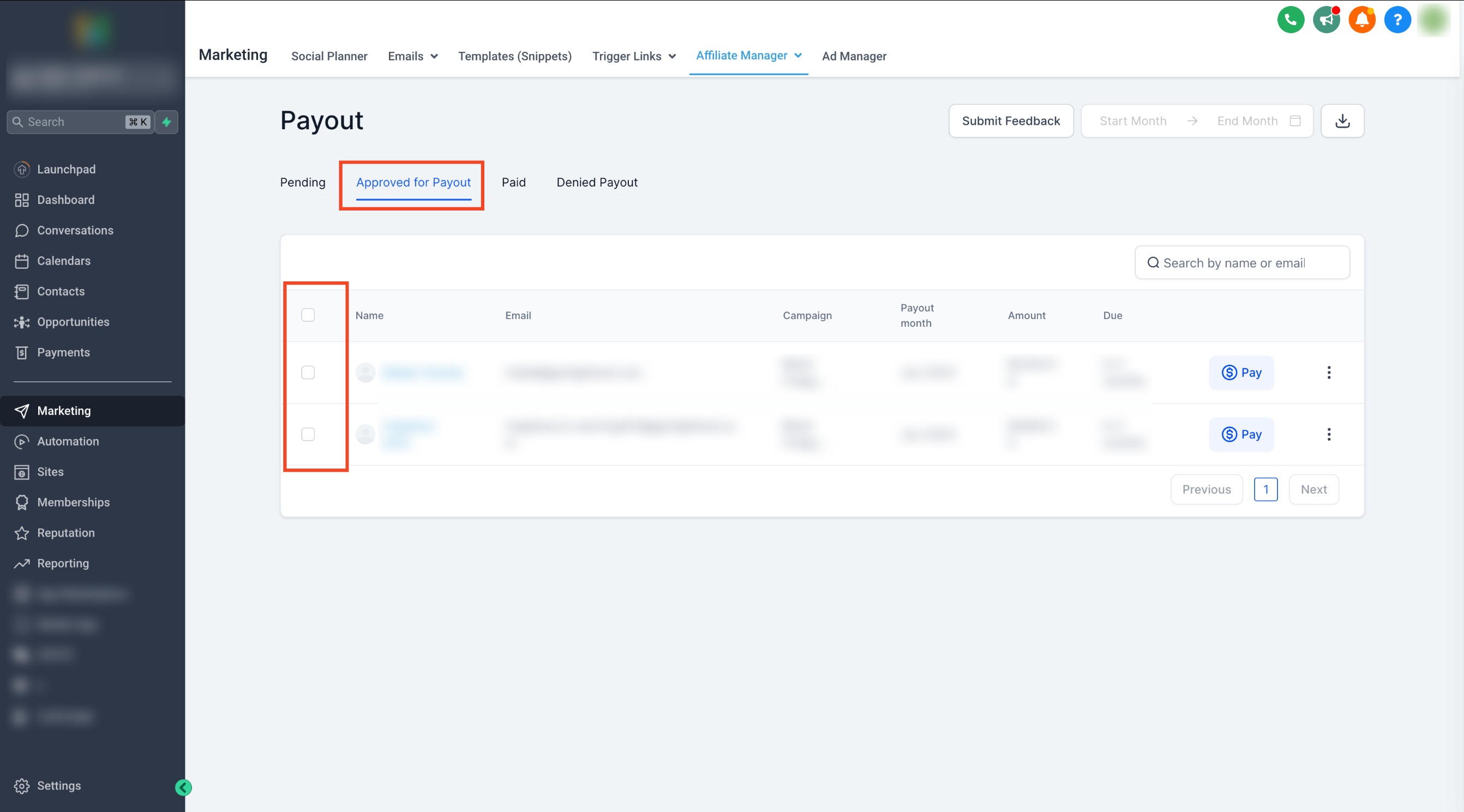
The setup lives in two places. First, you configure a Live app in the PayPal Developer portal and capture the Client ID and Secret Key. Second, you paste those credentials into HighLevel under Payments > Integrations, selecting PayPal as the gateway. Once linked, the Payout page in Affiliate Manager shows pending, approved, and paid tabs.
When you initiate a payout, HighLevel sends the request to PayPal. Successful payouts appear under the Paid tab, and both the admin and the affiliate receive confirmation emails. PayPal may still show a processing state while the transfer finalises.
03How businesses use PayPal auto payouts
- Digital marketing agency. The agency adds its PayPal Business credentials in Payments > Integrations, then approves affiliate commissions on the Approved for Payout tab and clicks Pay Now to settle multiple partner fees at once.
- Online course creator. The creator enables PayPal payouts, adds each affiliate’s PayPal email in Affiliate Manager, and uses the blue Pay icon to right away reward a single referral after a sale.
- Subscription box startup. The startup checks the Approved for Payout list weekly, selects all qualifying affiliates, and uses the bulk Pay button to trigger a single PayPal batch payment.
04Before you start
- A PayPal Business account must exist.
- Payouts must be enabled in the PayPal account.
- Affiliates need a valid PayPal payout method recorded in Affiliate Manager.
05How to set up and use PayPal auto payouts in HighLevel
Set up PayPal for Auto Payouts
- Open the PayPal Developers site and log into the developer dashboard.
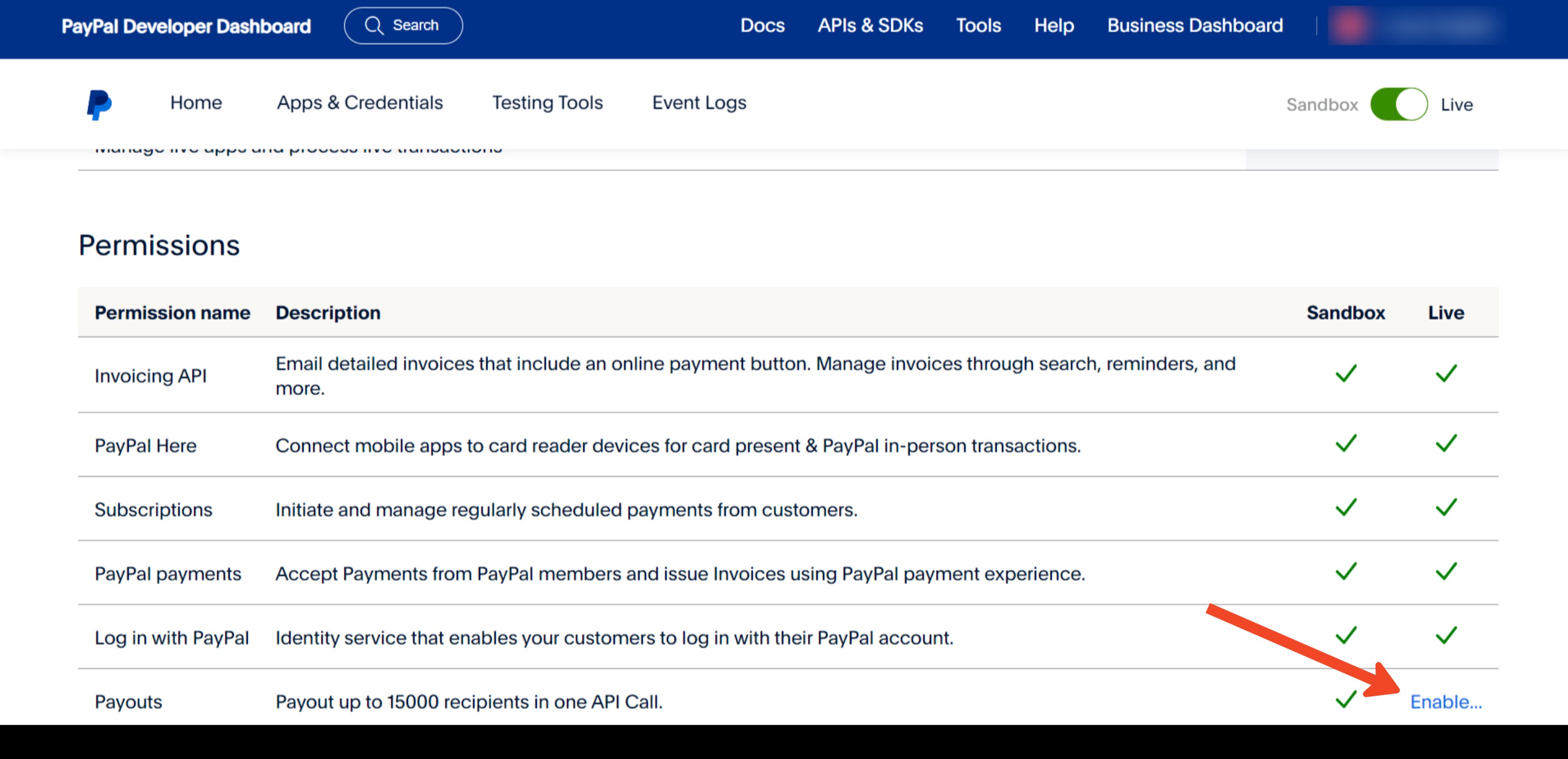
- In My Account, verify that the Payouts permission shows a green check; enable it if missing.
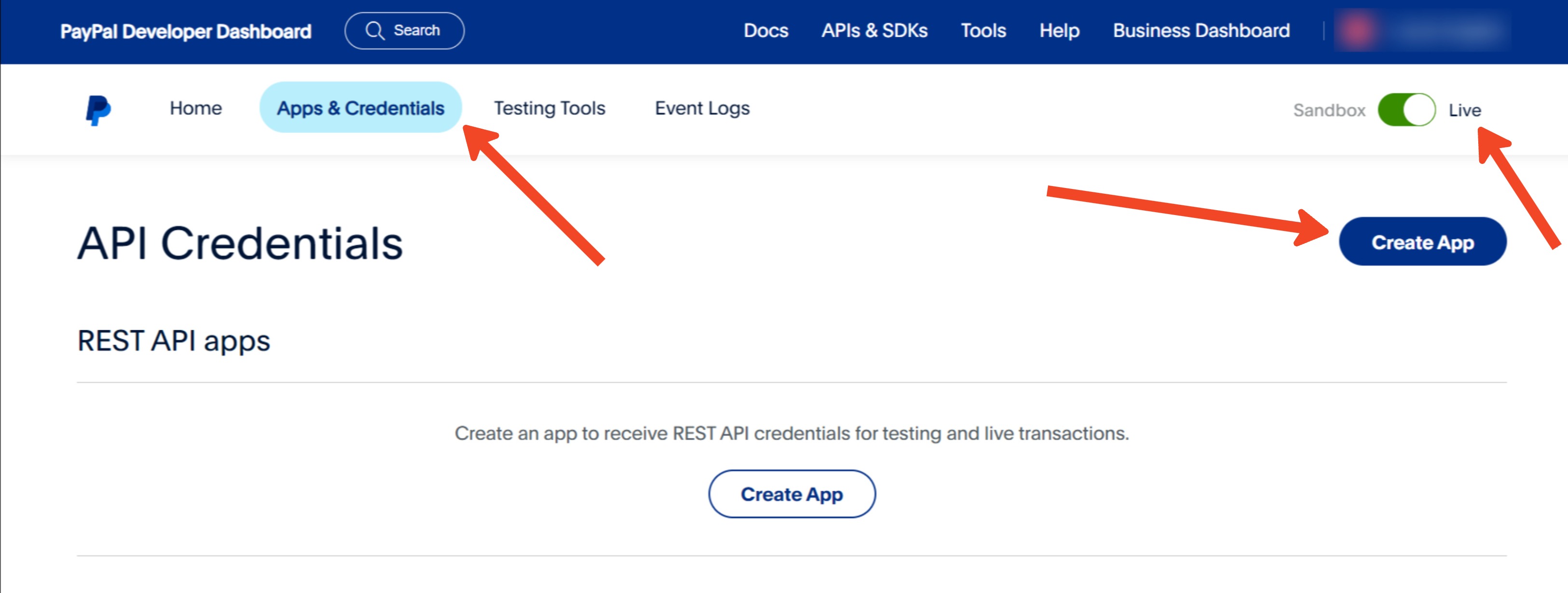
- Navigate to Apps and Credentials, select Live, and create a new app named for HighLevel.
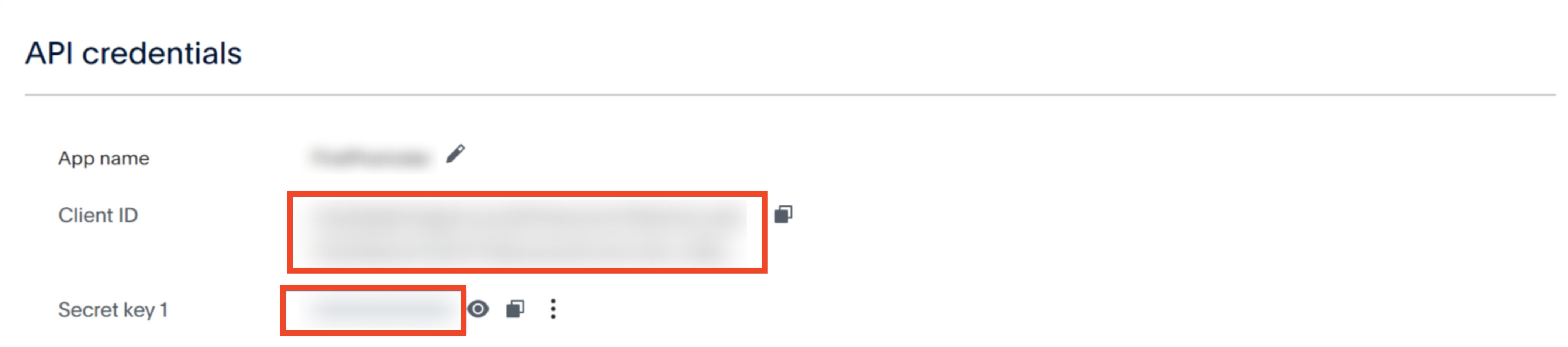
- Copy the generated Client ID and Secret Key from the app details.
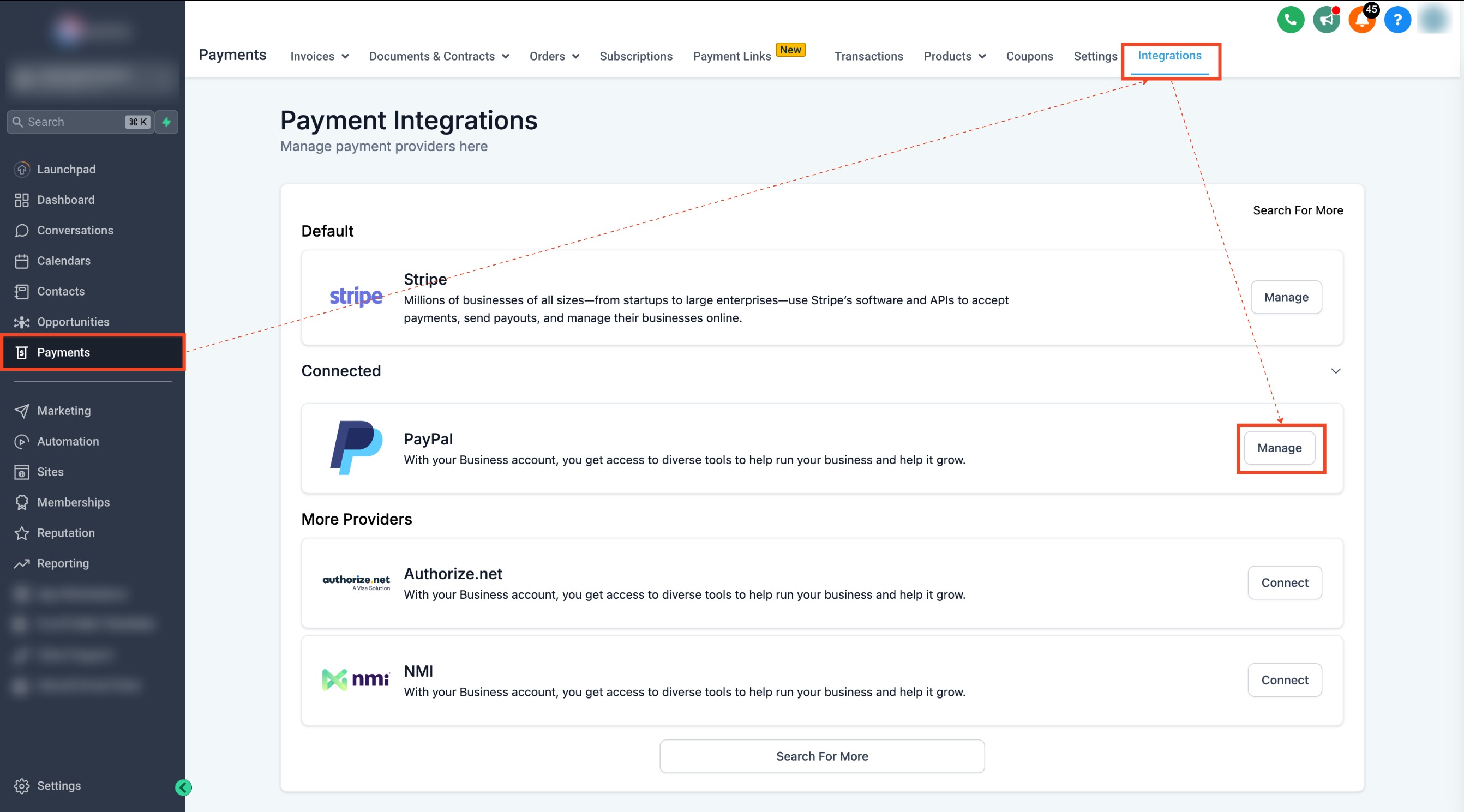
- In HighLevel go to Payments > Integrations, choose PayPal, and enter the Live Client ID and Secret Key.
- If testing, repeat the integration with sandbox credentials and select Sandbox mode.
Pay affiliates using auto payouts
- Open Affiliate Manager and go to the Payout page.
- Switch to the Approved for Payout tab to view eligible payments.
- Check the boxes next to the affiliates you want to pay.
- Click the Pay button or the blue Pay icon next to an affiliate to start the payout.
- Review the summary and press Pay Now to complete the transfer.
06What it looks like in HighLevel
07Settings that matter
- Pay Affiliate Manager Payout. Controls whether the Pay button appears for users initiating affiliate payouts.
- Live Client ID. Identifies the HighLevel app to PayPal’s live environment for payout requests.
- Secret Key. Authenticates the HighLevel PayPal connection for secure payout transactions.
08Things to know before you rely on it
- Only PayPal is supported for automated affiliate payouts; other methods remain manual.
- The Pay Affiliate Manager Payout permission is required; without it the Pay actions are hidden.
- PayPal does not validate an affiliate’s email address through the API, so accurate entry is essential.
09If something goes wrong
- Error prompts to link a PayPal Business account when clicking Pay Now.. Link the PayPal Business account in Payments > Integrations using the correct Live Client ID and Secret Key.
10How it connects to the rest of HighLevel
- How to pay your Affiliates Pay affiliates guide
- Adding and managing payout methods in HighLevel Payout methods
- Integrating supported payment gateways Supported gateways
Michael's take

Affiliate programs often stall because the admin spends hours manually sending money. PayPal auto payouts solves that by letting you approve commissions and click a single button to move funds. The first setting I would lock down is the PayPal Business account integration. Get the Client ID and Secret entered correctly in Payments > Integrations.
Once the link is solid, the rest of the flow runs smoothly. I would run a tiny test payout to a trusted email before scaling up, just to confirm the confirmation emails and the Paid tab behavior.