
01Who this is for
- Affiliate managers need a simple way to monitor partner sales when URLs are not practical.
- Marketing teams can use coupons to provide controlled discounts while still capturing attribution data.
02Affiliate coupons, explained
The coupon feature lives inside the Marketing > Affiliate Manager area. It adds a Coupon tab to the campaign customization window where a code can be generated and tied to an affiliate. The code can be percentage based, fixed value, or set to 0% to record a sale without changing the price.
When a customer enters the code during checkout, the platform logs the transaction under the selected affiliate. All creation and edits occur in a pop up window that appears after selecting an affiliate’s campaign.
03How businesses use affiliate coupons
- Fitness studio. The studio creates a 0% coupon for each trainer who promotes classes on social media. Trainers share the easy to type code, and the studio tracks sign ups without altering the class price.
- Online course provider. The provider generates a 20% fixed value coupon for a partner blog. When readers apply the code, the sale is recorded for the blog’s affiliate account while giving buyers a discount.
- Software SaaS business. The SaaS business sets a 100% coupon for a beta tester affiliate to grant free access. The platform logs each free subscription as a sale attributed to that affiliate.
04The numbers and rules that matter
- Discount range can be set from 0% to 100%.
- A 0% discount is used solely for tracking purposes.
05Before you start
- Important: Ensure the coupon code is user friendly and easy for affiliates to share, and review codes regularly to keep them aligned with your promotional strategy.
06How to set up and use affiliate coupons in HighLevel
Set up affiliate coupon
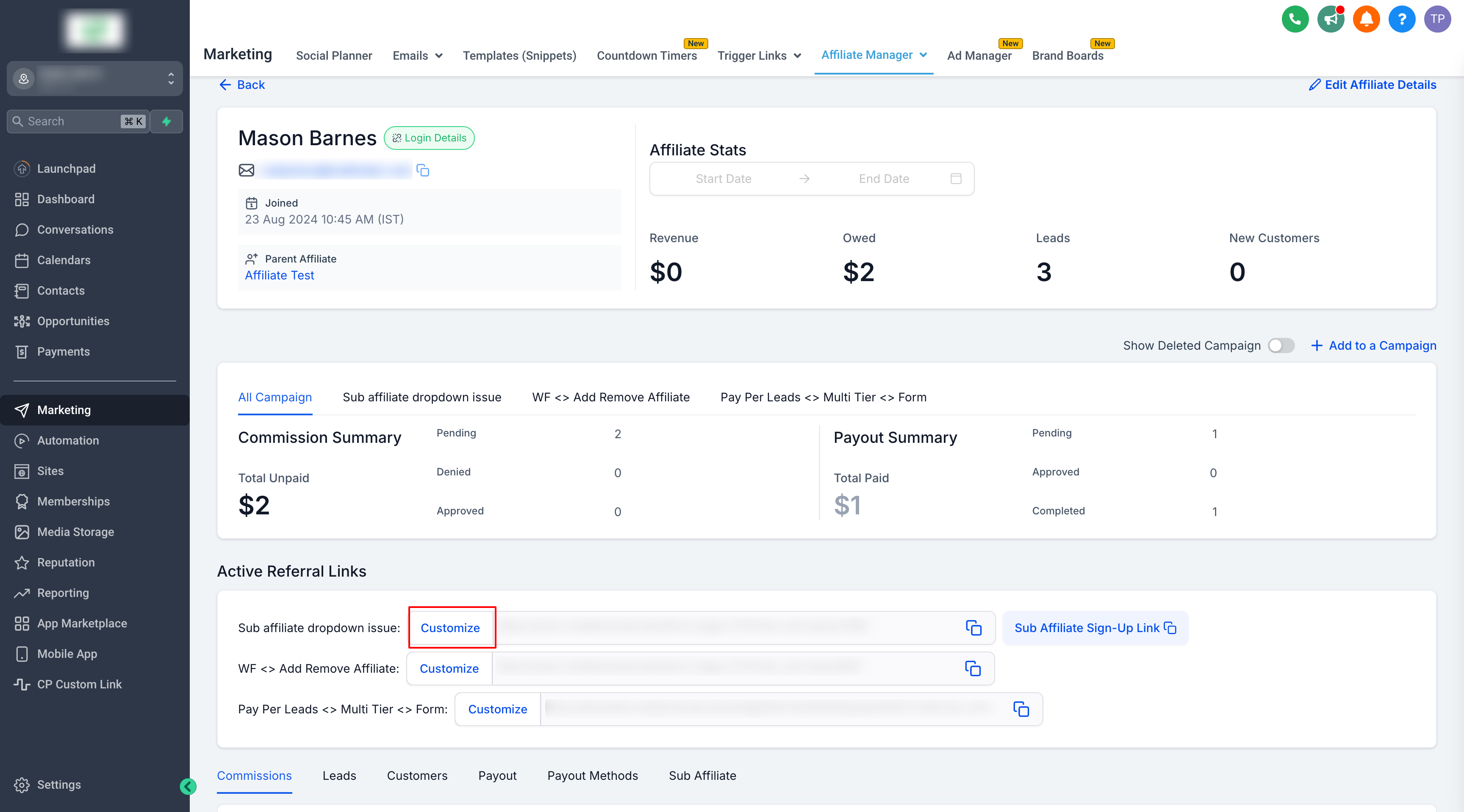
- Open Marketing > Affiliate Manager.
- Select the Affiliate/Promoter section and choose the affiliate you want to configure.
- Scroll to Active Referral Links and locate the campaign you wish to track.
- Click the Customize button for that campaign.
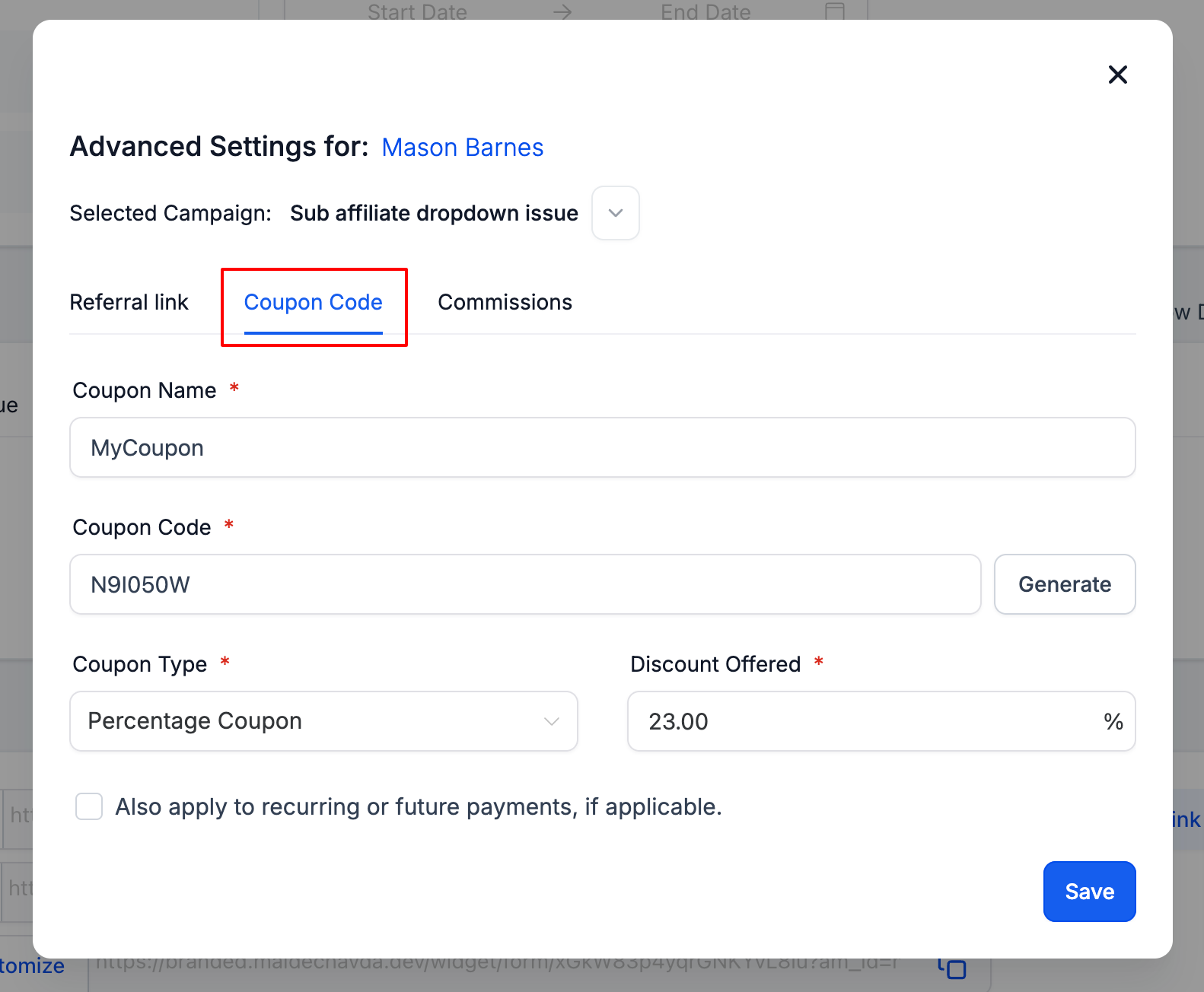
- Switch to the Coupon tab in the customization window.
- Choose the coupon type, either Percentage or Fixed.
- Enter a user friendly coupon name.
- Click Generate Code to produce the coupon code.
- Set the discount amount between 0% and 100%; use 0% to track only or 100% for a free service.
- Click Save to finalize and store the coupon code.
07What it looks like in HighLevel
08Settings that matter
- Coupon type. Determines whether the discount is calculated as a percentage of the order total or as a fixed monetary value.
- Coupon name. A readable label for the code that affiliates can share with their audience.
- Discount. Specifies the reduction applied to the order, ranging from 0% (tracking only) to 100% (free service).
09Things to know before you rely on it
- The discount percentage can be set from 0% to 100%.
- A 0% coupon records the sale without changing the purchase price.
10How it connects to the rest of HighLevel
- Add affiliates in the Affiliate Manager Add affiliates
- Add manual sales attribution Manual sales
- Configure custom affiliate commissions Custom commissions
Michael's take

A coupon code can be a handy alternative when sharing a referral link is clunky or impossible, and it still gives you attribution in HighLevel.
Starting with a 0% coupon for each promoter lets you track who drives sales without affecting prices, and keeping the codes short makes them easier to share.