
01Who this is for
- Affiliate managers who need to bring historic affiliate data into one platform, keeping contact records clean.
- Founders of SaaS companies that run their own affiliate program and want all marketing and data together.
- Digital marketers who rely on referral tracking and need a single place to manage campaigns, commissions and tracking scripts.
02FirstPromoter migrations, explained
The migration feature connects directly to FirstPromoter, pulls supported campaign information, affiliates, historical referrals and commission records, and creates matching items inside HighLevel Affiliate Manager. It flags any affiliate email that already exists in the system so you can merge or skip those records before they are imported.
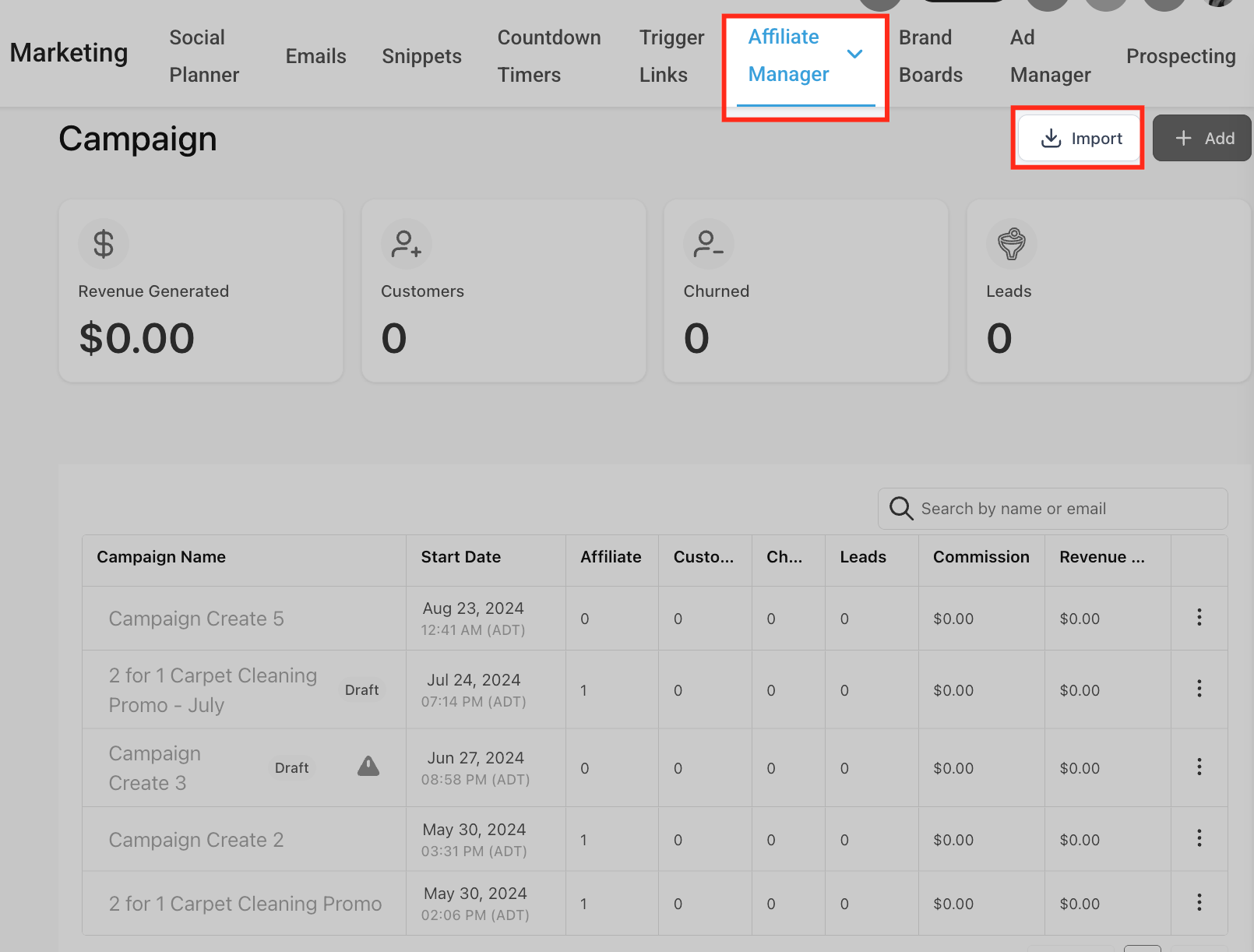
The importer lives under Marketing > Affiliate Manager > Campaigns. After you start the import, HighLevel processes the data in the background and notifies you when it is finished. Once the records appear, you must set the campaign type to External Website, add the provided tracking script to the destination site, and verify that affiliate links work before turning off FirstPromoter.
03How businesses use firstPromoter migrations
- SaaS startup. The Founder opens the import tool, connects with FirstPromoter credentials, selects the active referral campaigns, chooses to bring pending commissions, and runs the import. After the import, the Founder verifies the campaign is an External Website type and adds the tracking script to the product landing page.
- Online course business. The marketing team imports the course affiliate campaign, resolves any email conflicts by merging them with existing student contacts, and then installs the tracking script on the course checkout page to keep affiliate attribution functional.
- Ecommerce store. The store manager runs the migration, selects the sales affiliate program, enables pending commissions, and after import sets the campaign as External Website and adds the script to the storefront site so affiliate clicks are recorded in HighLevel.
04The numbers and rules that matter
- Supported data: Campaigns, affiliates, historical referrals, commission history, pending commissions (optional).
05Before you start
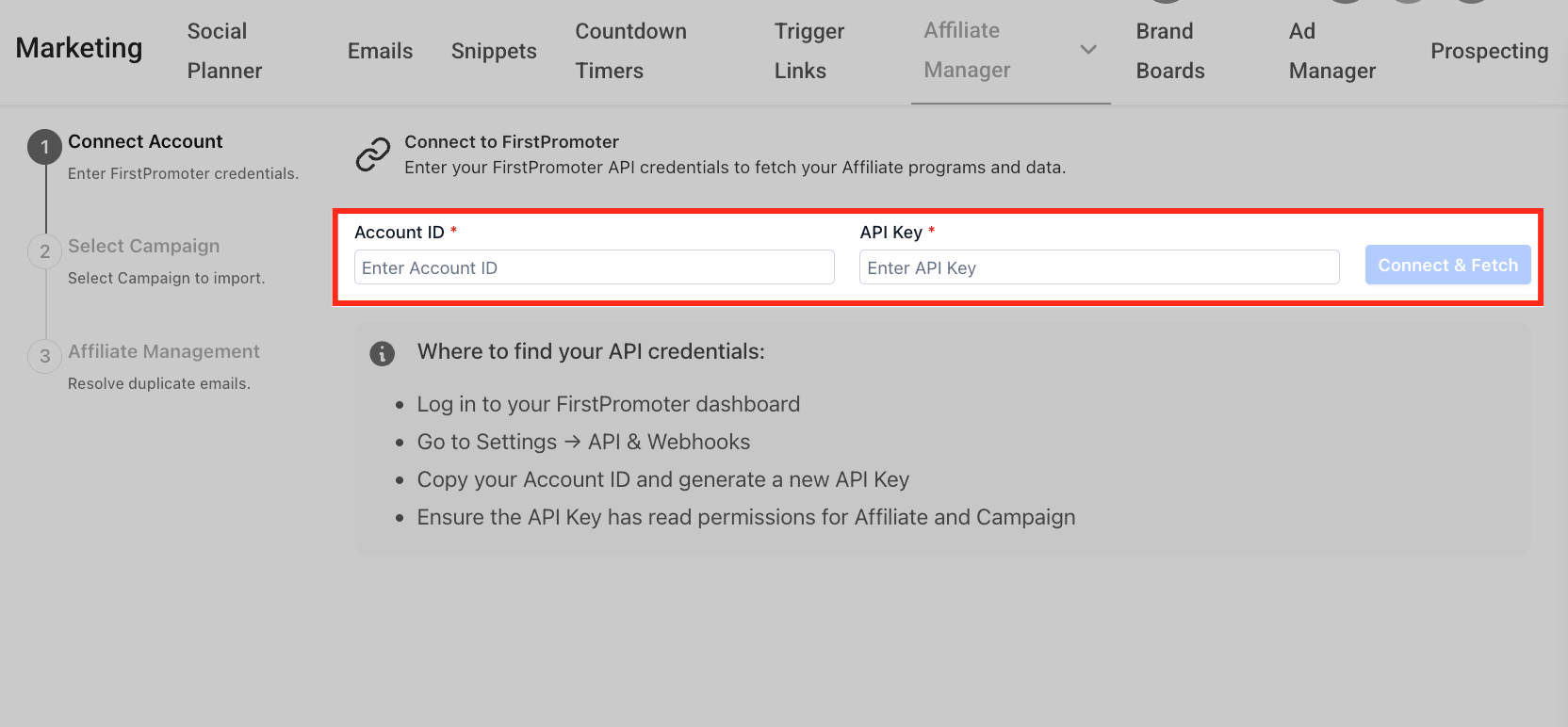
- FirstPromoter Account ID
- FirstPromoter API Key with read permission for affiliate and campaign data
- List of campaigns to migrate
- Current affiliate links for post migration comparison
- Existing commission and cookie duration settings
- Decision on whether to import pending commissions
- Preferred payout terms for HighLevel
- Access to the website, Funnel or Website where the tracking script will be placed
06How to set up and use firstPromoter migrations in HighLevel
Run FirstPromoter migration
- Open Marketing > Affiliate Manager > Campaigns in HighLevel.
- Select the Import option.
- Enter the FirstPromoter Account ID and API Key.
- Click Connect & Fetch to retrieve data.
- Choose the FirstPromoter campaigns you wish to move.
- Review the campaign details, including status, affiliate count, commission configuration and cookie life.
- Adjust the migration preferences as needed.
- Enable Pending Commissions if you want unpaid commissions imported.
- Select the desired Payout Terms for the imported commissions.
- Proceed to the Affiliate Management screen.
- Examine affiliates that have email conflicts with existing contacts.
- For each conflict, decide to Merge the records or Skip the affiliate.
- Verify that all email conflicts have been addressed.
- Press Start Import to begin the migration.
- Check the import summary that lists the campaigns, affiliates and referrals queued.
- Allow the import to run; you may leave the page while it processes and HighLevel will alert you on completion.
- Open each imported campaign and ensure it is set as an External Website campaign.
- Confirm the correct destination website URL for the campaign.
- Copy the Affiliate Manager tracking script and add it to the destination site, Funnel or Website.
- Test the affiliate journey before activating the migrated program.
- Do not fully decommission FirstPromoter until you have validated campaigns, affiliates, commissions, tracking script and affiliate links.
07What it looks like in HighLevel
08Settings that matter
- Pending Commissions. Controls whether unpaid FirstPromoter commissions are brought into HighLevel during the migration.
- Payout Terms. Defines when the imported commissions become due inside Affiliate Manager after the migration.
09Things to know before you rely on it
- Product based commission rules are not recreated by the import and must be set up manually afterward.
- Only supported data types (campaigns, affiliates, referrals, commission history, optional pending commissions) are transferred; anything else requires a different method.
- The guided importer can be run again for additional items, and previously imported records will not be duplicated.
10How it connects to the rest of HighLevel
- Watch step by step video walkthroughs for setting up Affiliate Manager. Video walkthroughs
- Read how the Affiliate Manager works and how campaigns are structured. Affiliate Manager overview
- Learn how to import FirstPromoter campaigns, affiliates and commissions. FirstPromoter import guide
Michael's take

You keep history, avoid reentering affiliates, and get all the reporting inside HighLevel, which speeds up decision making and reduces admin time. If the program is tiny, the effort of planning the migration, resolving conflicts and installing tracking may outweigh the benefit. In that case staying with FirstPromoter or using a CSV upload for a few affiliates might be simpler.