
01Who this is for
- Business owners who want to expand their reach through affiliate partnerships.
- Marketing managers who need to monitor affiliate driven leads, commissions, and payouts.
02Affiliate Manager, explained
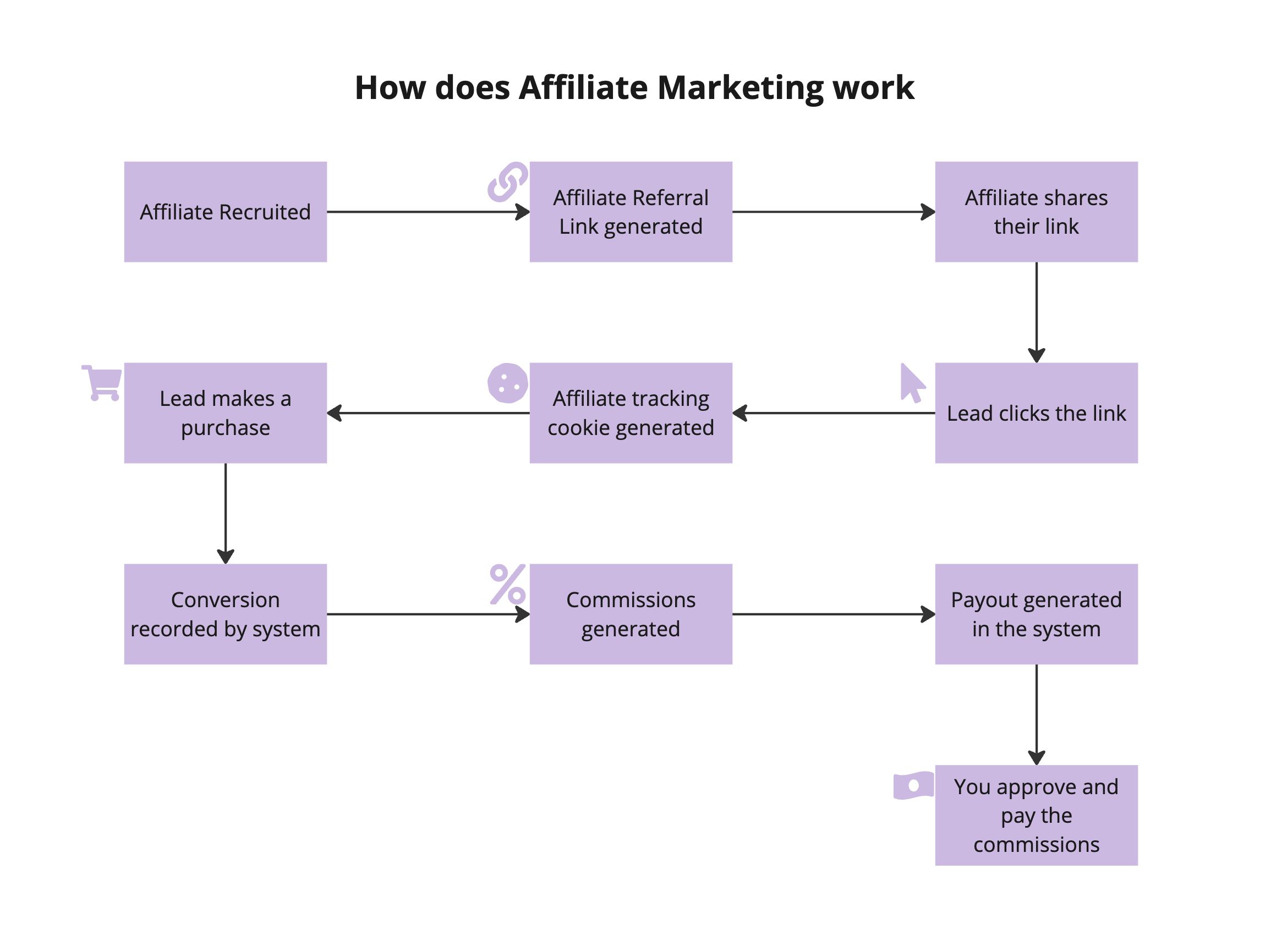
HighLevel’s Affiliate Manager is a module that creates and runs affiliate campaigns. Admins set a campaign source, choose a commission model, define tracking rules and add affiliates. Once a campaign is active, each affiliate receives a unique referral link that the platform uses to attribute leads or purchases.
The system records affiliate attributed contacts when they complete an eligible action such as a form submission, survey response, or calendar booking. When a qualified sale occurs, HighLevel calculates the commission based on the campaign’s settings and allows admins to approve and pay the affiliate either automatically via PayPal or manually through a chosen payment method.
03How businesses use the Affiliate Manager
- Online course provider. The provider sets up a Pay Per Sale campaign, adds instructors as affiliates, and gives them referral links. When a student purchases a course through a link, the platform logs the sale, calculates the instructor’s commission, and the admin can approve a PayPal payout.
- Local service business. The business creates a Pay Per Lead campaign targeting form submissions for service quotes. Affiliates share their links, and any quote request submitted through the link is recorded as an affiliate lead. The owner can manually assign additional leads to affiliates if needed.
- Digital marketing agency. The agency builds a campaign with a flat fee commission for each booked calendar appointment. Affiliates promote the agency’s free audit link; when a prospect books the audit, the system attributes the appointment and the agency processes a manual payout via Stripe.
04The numbers and rules that matter
- Commission models: Pay Per Lead, Pay Per Sale.
05How to set up and use the Affiliate Manager in HighLevel
Create first campaign
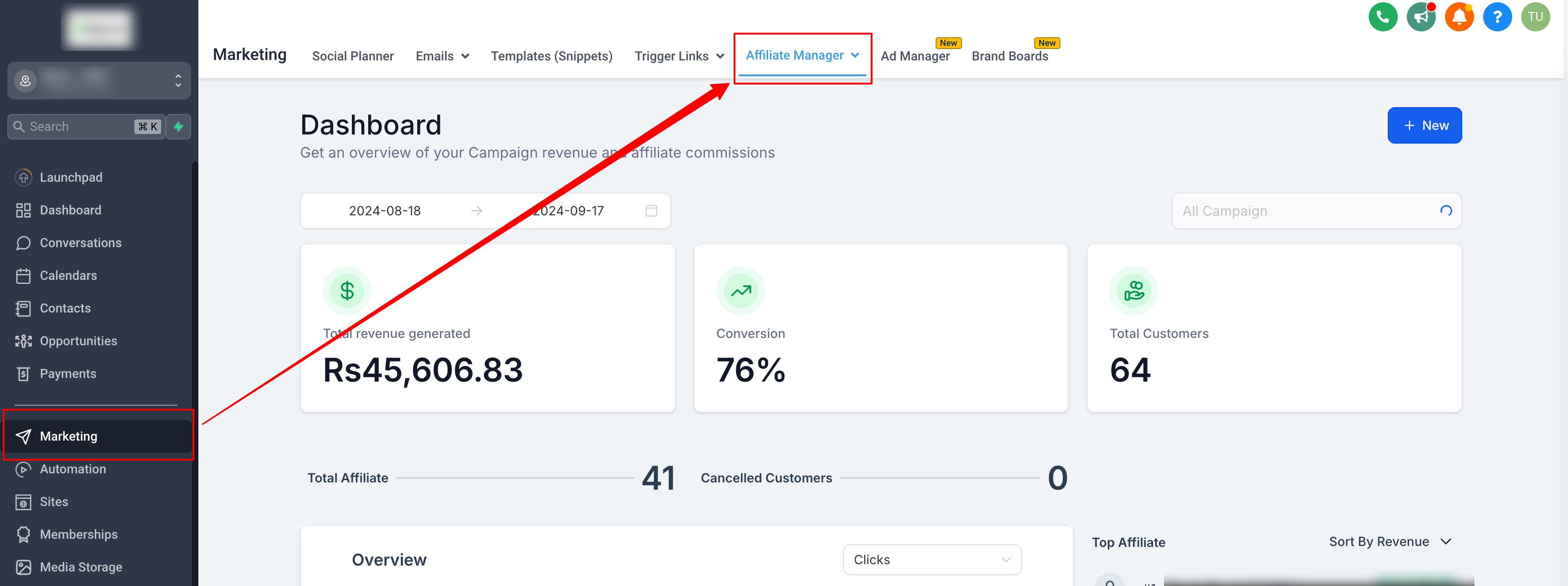
- Open Affiliate Manager and start a new campaign.
- Select the appropriate campaign source.
- Configure the commission model for the campaign.
- Set any relevant products or tracking options.
- Add the affiliates who will participate in the campaign.
Track leads
- Distribute each affiliate’s unique referral link.
- Capture leads when contacts complete an eligible action through that link.
- If needed, add or assign leads manually to an affiliate.
Lead to Customer conversion
- When an affiliate attributed lead completes a qualifying purchase, the system attributes the sale to the affiliate.
- The contact is then recorded as a customer linked to that affiliate.
Commission calculation and payout approval
- HighLevel calculates the commission based on the campaign’s commission settings.
- Admins review the calculated amounts and approve each payout.
Process payouts
- Choose to automate the payout with PayPal or to process it manually.
- Execute the payment using the selected method such as Stripe, bank transfer, Wise, or check.
06What it looks like in HighLevel
07Settings that matter
- Commission model. Determines whether affiliates earn based on leads, sales, flat amounts, percentages, or recurring charges.
- Commission settings. Specifies the exact rules for calculating each affiliate’s commission within a campaign.
- Tracking rules. Define which actions (form submission, survey, calendar booking, etc.) qualify as affiliate attributed leads or sales.
- Campaign source. Identifies the origin of the affiliate campaign, influencing which commission model is available.
08How it connects to the rest of HighLevel
- Quick video walkthroughs for setting up Affiliate Manager Video walkthroughs
- Guide to managing multiple affiliate campaigns in HighLevel Multiple campaigns
- Affiliate Manager public API overview and endpoints Public API
Michael's take

Want to know if a referral program is worth the effort? The Affiliate Manager lets you hand out custom links, watch the traffic turn into leads or sales, and pay commissions on a schedule you set, all from one dashboard.
If I were setting it up, I’d first define a simple Pay Per Lead rule and run a few test referrals to confirm the tracking works. Once the numbers line up, I’d expand the commission structure to include recurring percentages for longer term value.