
01Who this is for
- Affiliate managers, receive instant alerts when their partners bring in new leads.
- Marketing teams, automate email outreach to affiliates without manual steps.
02Affiliate manager workflows, explained
The Lead Created trigger fires a workflow each time an affiliate attributed lead is entered into the platform. You can keep the trigger active for every campaign or add a filter to limit it to a single campaign. After the trigger runs, you can attach actions such as sending an email to the affiliate or notifying internal staff.
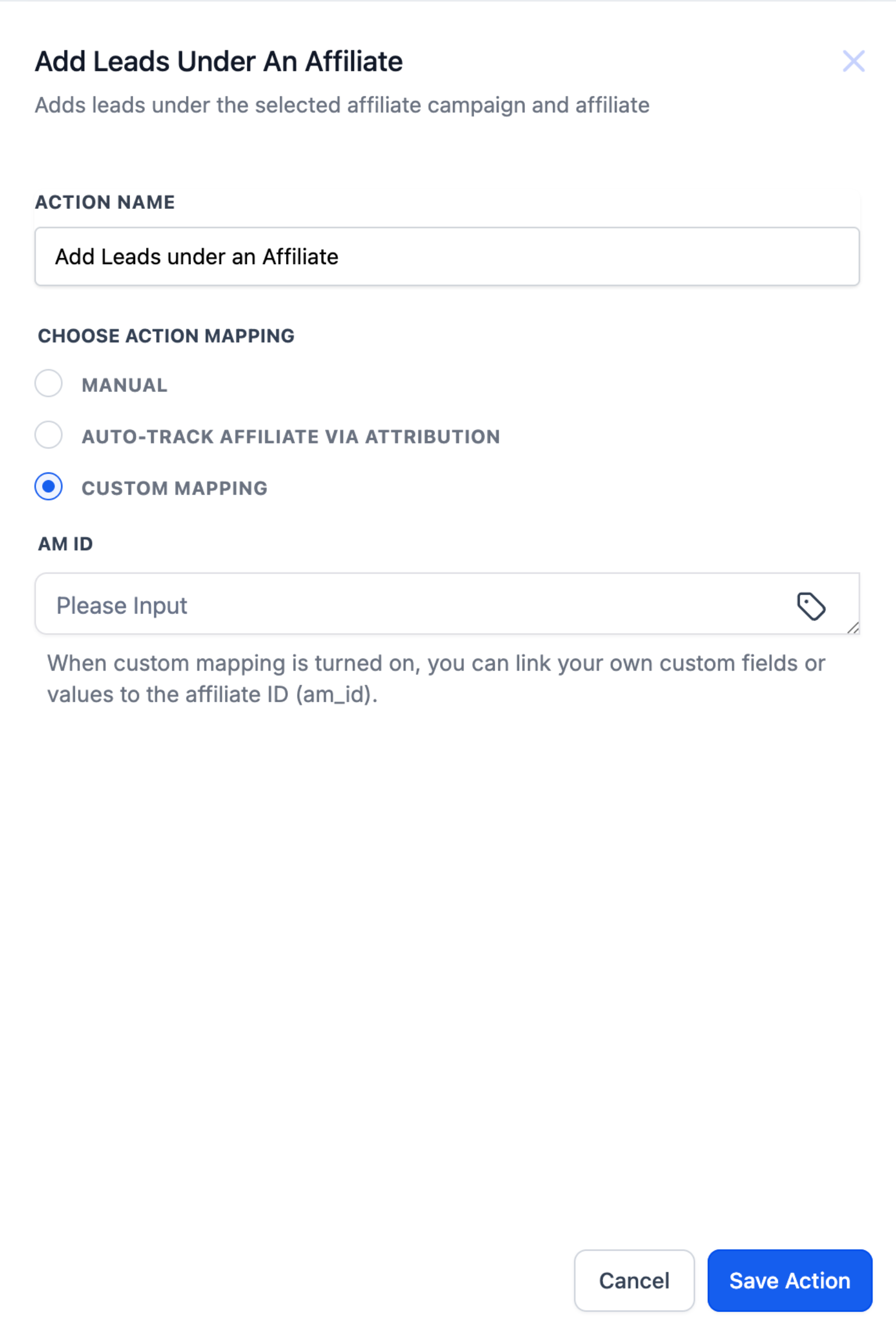
Inside the same workflow you can add the "Add Leads under an Affiliate" action. This step assigns the contact to a chosen affiliate and the campaign they belong to. Three assignment methods are offered, Manual, Auto (Attribution via URL), and Custom Mapping, letting you decide how the affiliate is identified.
Both the trigger and the assignment action are created in Automation > Workflows from the Subaccount view. After configuring the steps, you save and publish the workflow so it runs in real time whenever a lead is created.
03How businesses use affiliate manager workflows
- Ecommerce retailer. The retailer sets up a Lead Created workflow that emails affiliates when their links generate a lead. Using the auto attribution method, the system reads the am_id in the URL and links the lead to the correct affiliate for commission tracking.
- SaaS startup. The startup adds the Add Leads under an Affiliate action with the manual method, selecting a specific affiliate and campaign for each inbound trial sign up. This routes the lead to the affiliate’s account for personalized follow up.
- Real estate brokerage. The brokerage stores the affiliate identifier in a hidden form field, then chooses the Custom Mapping method. The workflow reads that custom field value and assigns the lead to the matching affiliate, ensuring accurate referral reporting.
04Before you start
- Access to a Subaccount where Automation is available.
- Affiliate campaigns and affiliates must already be defined in Affiliate Manager.
- For Auto attribution, the funnel URL must contain the am_id parameter before the workflow runs.
05How to set up and use affiliate manager workflows in HighLevel
Create a Lead Created workflow that fires on new affiliate leads
- Open the Subaccount view, go to Automation > Workflows, and click the + Create Workflow button.
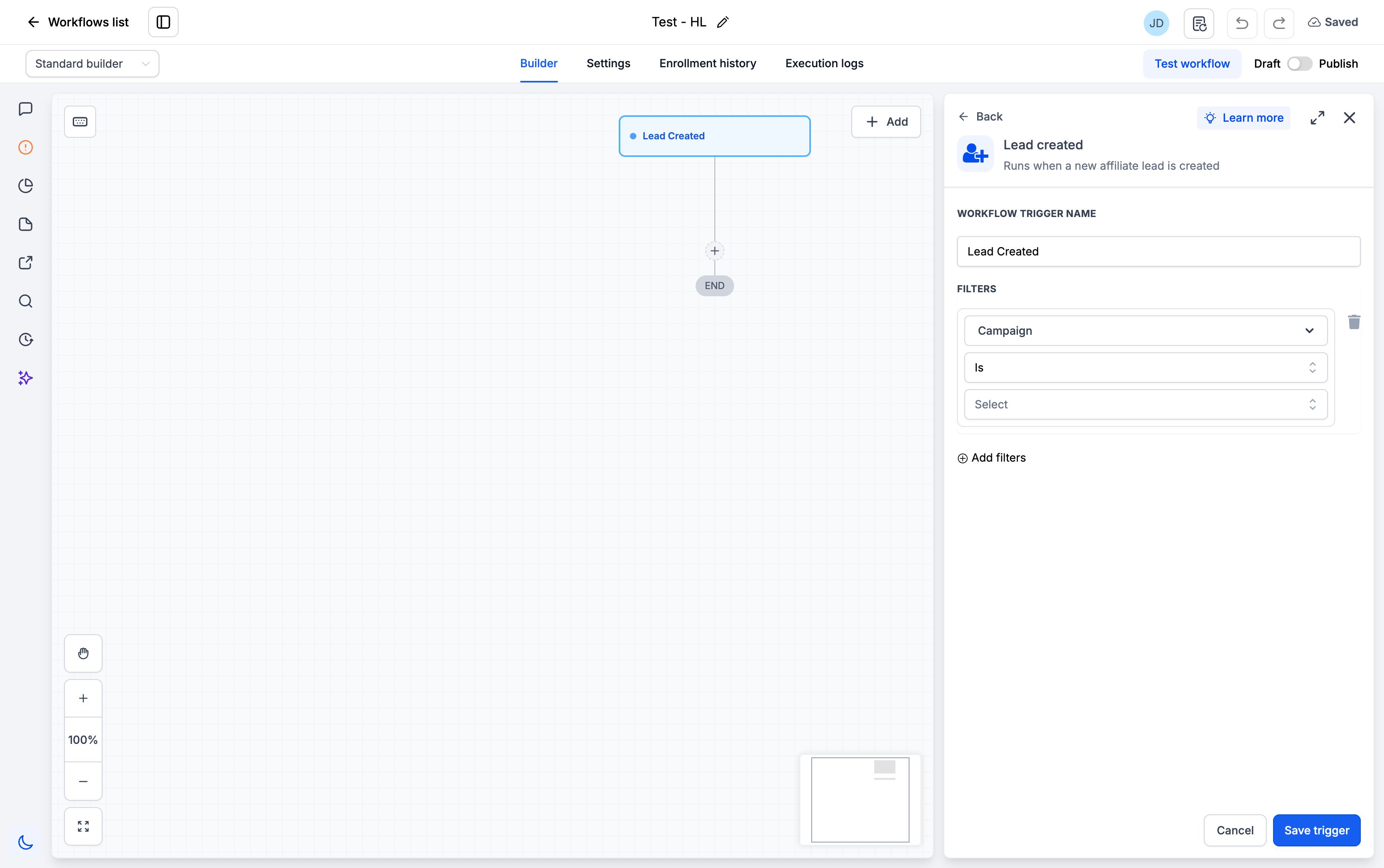
- Select Lead Created as the workflow trigger.
- Optionally add a filter: click Add filters, choose Campaign, set the condition to Is, pick the desired campaign, then Save Trigger.
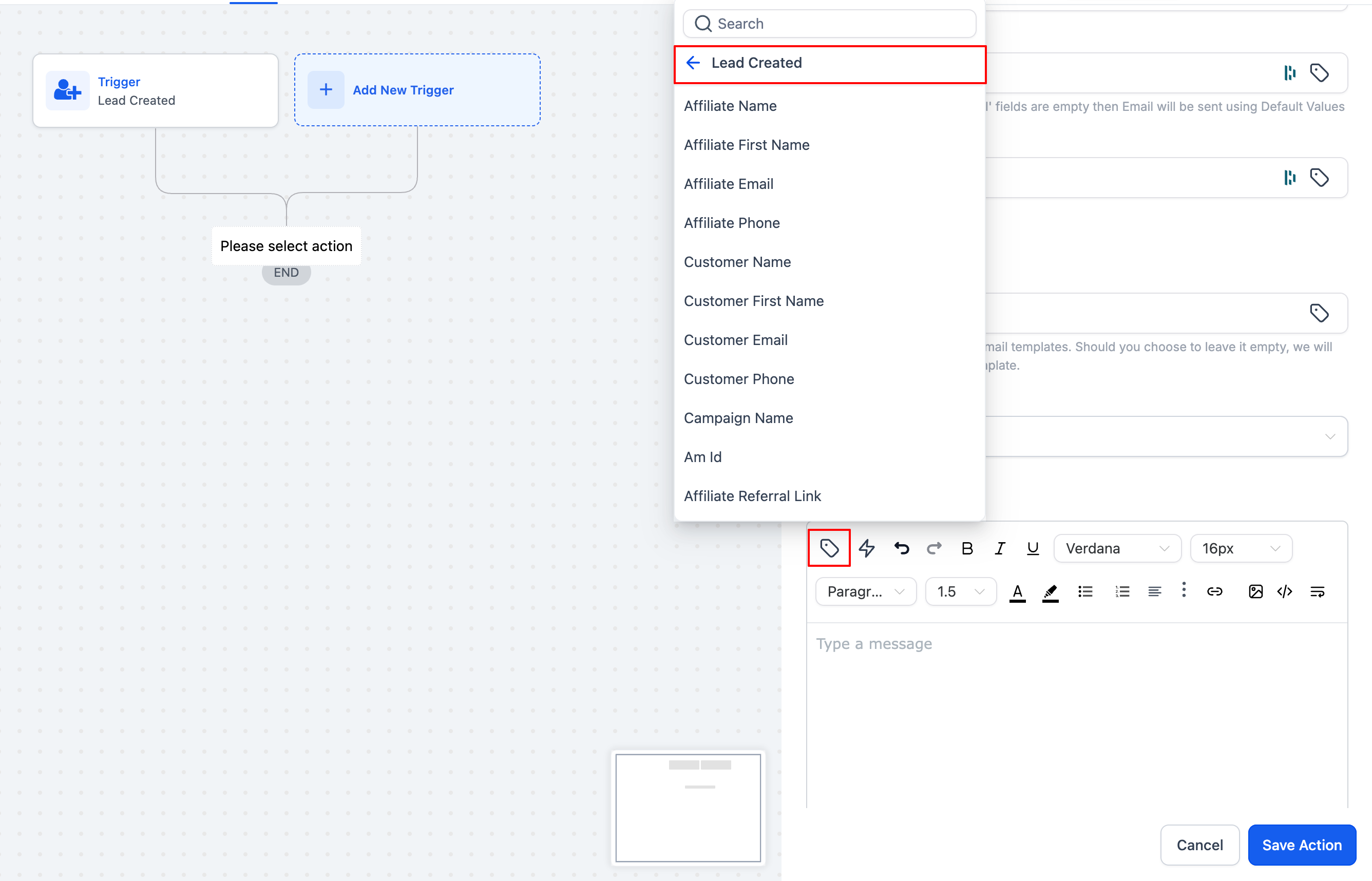
- Add an email action that sends a message to the affiliate.
- Add a notification action that alerts the internal team.
- Save the workflow and publish it.
Add an Assign Lead action to associate contacts with affiliates
- Within the workflow, insert the Add Leads under an Affiliate action.
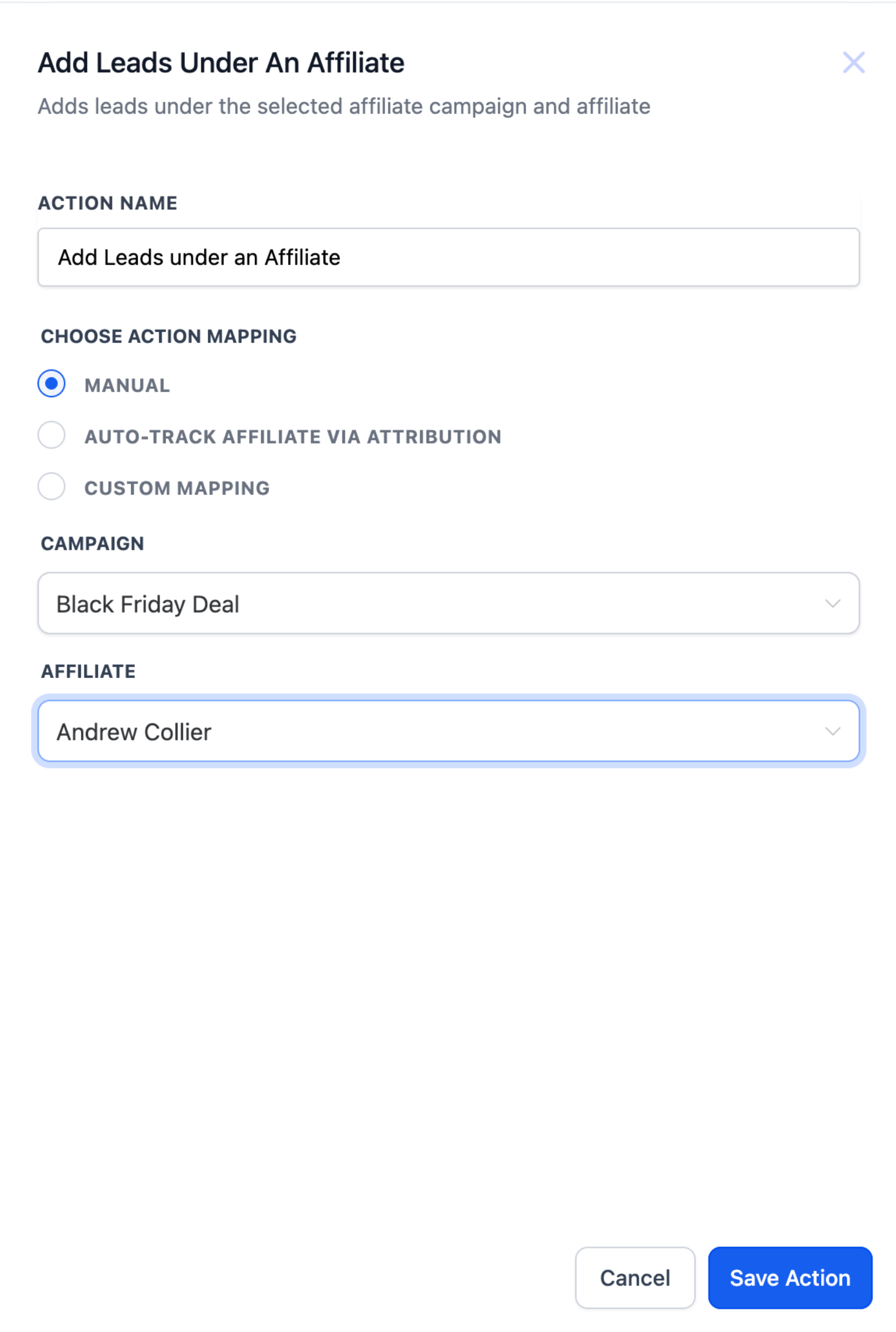
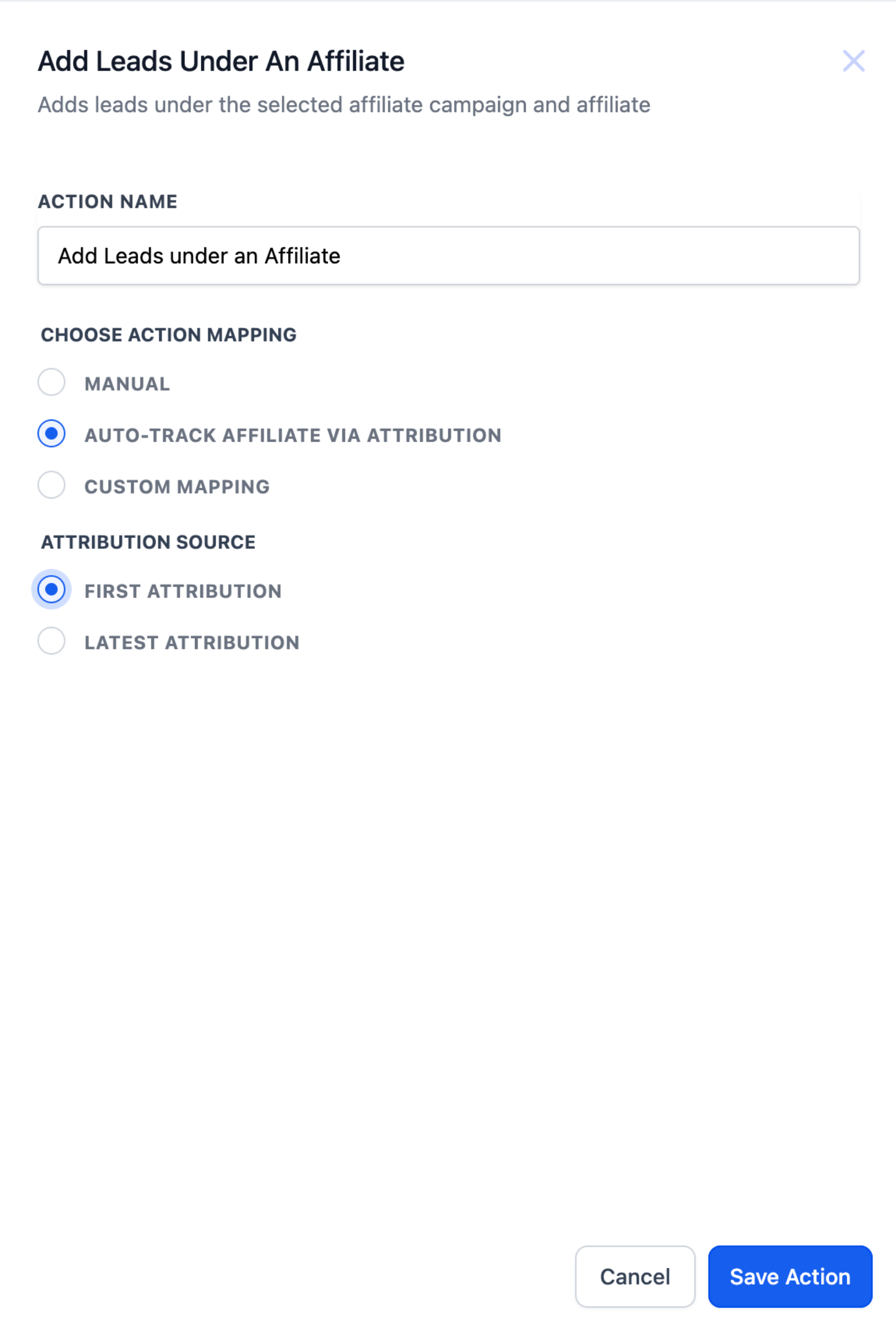
- Choose one of the three assignment methods: Manual, Auto (Attribution), or Custom Mapping.
- If you choose Manual, select the campaign and then select the affiliate from the list for that campaign.
- If you choose Auto (Attribution), select the Attribution Method (First or Last) and ensure the am_id parameter is passed earlier in the funnel.
- If you choose Custom Mapping, select the mapping source (custom field or workflow value) that contains the affiliate identifier.
- Enter any additional fields required for the selected method.
- Save the workflow and publish it.
06What it looks like in HighLevel
07Settings that matter
- Lead Created trigger. Starts the workflow whenever an affiliate attributed lead is added.
- Campaign filter. Limits the trigger to leads originating from a specific affiliate campaign; leaving it blank applies to all campaigns.
- Assignment method. Determines how the contact is linked to an affiliate: Manual, Auto (Attribution), or Custom Mapping.
- Attribution Method. Specifies whether the first click or the last click URL parameter (am_id) should be used to assign the affiliate.
- Mapping source. Selects whether a custom field or a workflow value provides the affiliate identifier for Custom Mapping.
08Things to know before you rely on it
- Auto attribution works only if the am_id parameter is present earlier in the funnel.
- Custom Mapping requires the affiliate ID to be stored in a custom field or as a workflow value.
- Three assignment methods are offered to cover manual routing, URL based attribution, and custom data sources.
- The campaign filter is optional; if omitted, the trigger applies to every campaign.
09How it connects to the rest of HighLevel
- Set up the Affiliate Created trigger Affiliate Created trigger
- Configure the Affiliate Enrolled in Campaign trigger Affiliate Enrolled trigger
- Add manual sales in an affiliate workflow Add manual sales
Michael's take

I would begin with adding the Add Leads under an Affiliate step, pick the assignment method that matches how you capture the am_ID, and then layer the notification actions on top.
Once the lead crediting is solid, I’d test a single funnel: Submit a form with an am_ID in the URL, watch the workflow assign the lead, and confirm the affiliate receives the congratulatory email.