
01Who this is for
- Affiliate managers can automatically notify affiliates after each sale, keeping partners informed.
- Marketing teams can tag customers acquired through affiliates for future campaign segmentation.
- Finance staff can use the trigger to remind affiliates to complete payout or tax information, reducing delays.
02New affiliate sale triggers, explained
The New Affiliate Sale trigger fires each time an affiliate records a sale, whether the transaction is a one time purchase, a recurring subscription, or a manually entered sale. When the trigger fires, a workflow begins on the buyer’s Contact record by default. Standard contact actions such as Send Email or Send SMS will therefore reach the buyer unless you add affiliate specific actions.
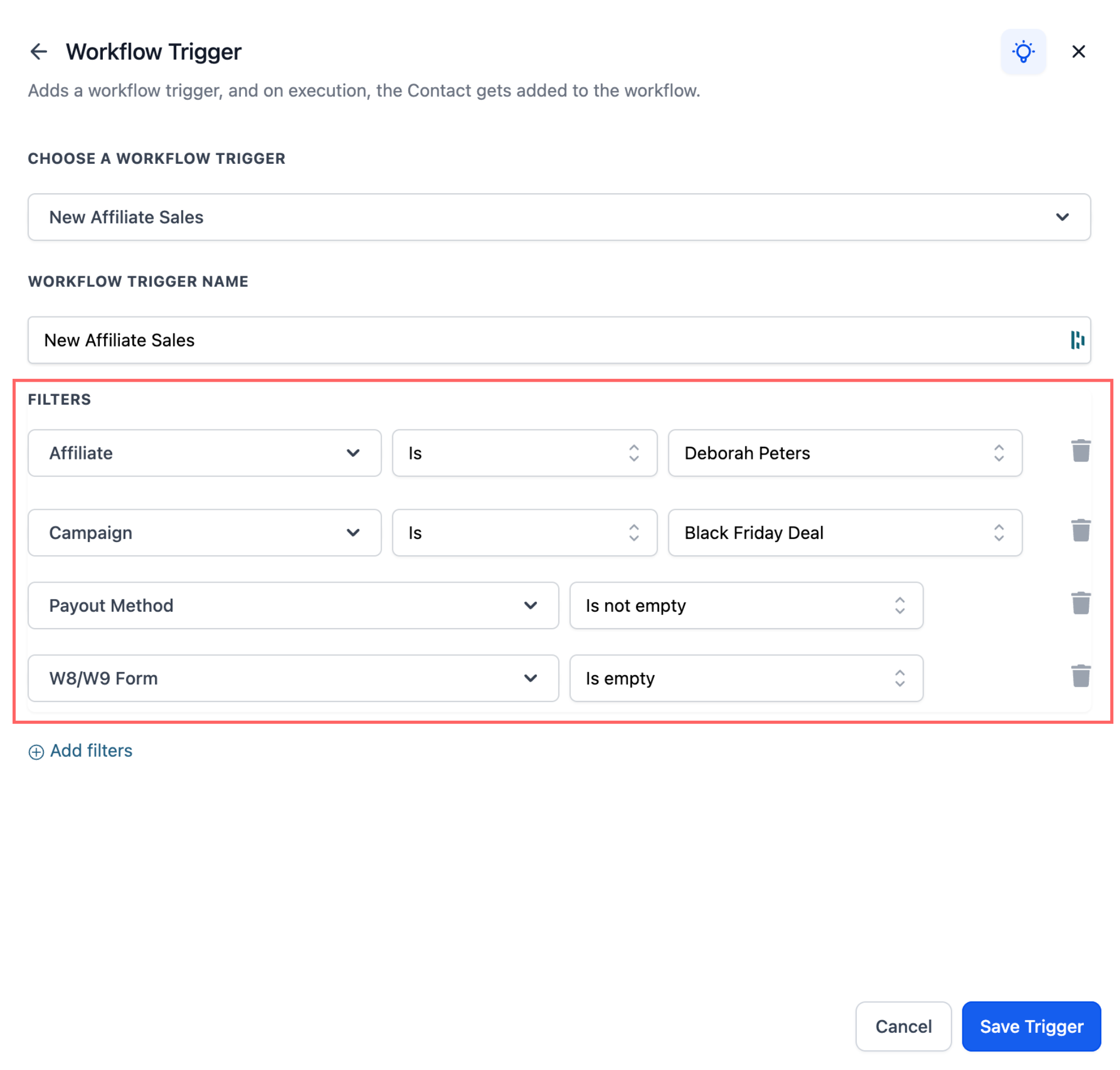
The trigger resides in the Workflow builder under Automations. After adding it, you can limit activation with optional filters for specific affiliates, campaigns, payout method status, or tax form status. Once the workflow starts, you can attach any supported actions, notifications, tags, reminders, or community point awards, to run automatically.
03How businesses use new affiliate sale trigger
- Ecommerce store. Add the New Affiliate Sale trigger to a workflow, filter for the store’s affiliate program, and then attach an internal notification action so the sales team sees each affiliate sale. Tag the buyer as "Affiliate Customer" to segment future promotions.
- SaaS company. Configure the trigger with the Payout Method Status filter to catch affiliates without payment details, then add a Send Email to Affiliate action that reminds them to update their payout method, keeping commissions flowing.
- Digital marketing agency. Use the Campaign filter to run the trigger only for a high performing affiliate campaign, then add a tag action that labels the buyer contact, enabling the agency to create targeted follow up campaigns.
04How to set up and use new affiliate sale trigger in HighLevel
Set up the New Affiliate Sale trigger
- Navigate to Automations > Workflows.
- Create a new workflow or open an existing workflow.
- Add the New Affiliate Sale trigger to the workflow.
- Choose any optional filters you need, such as Affiliate(s), Campaign, Payout Method Status, or Tax Form Status.
- Add the workflow actions you want to run after the trigger.
- Click Save to activate the workflow.
05What it looks like in HighLevel
06Settings that matter
- Affiliate(s). Limits the workflow to sales generated by the selected affiliates.
- Campaign. Limits the workflow to sales that come from the chosen affiliate campaign.
- Payout Method Status. Starts the workflow only when the affiliate’s payout method status matches the selected condition.
- Tax Form Status. Starts the workflow only when the affiliate’s tax form submission status matches the chosen condition.
07Things to know before you rely on it
- The workflow runs on the buyer’s Contact record, so standard Send Email or Send SMS actions will contact the buyer unless you use affiliate specific actions.
- The trigger does not automatically switch the primary record to the affiliate’s community profile, so awarding community points may require a separate workflow that runs on the affiliate record.
08If something goes wrong
- Standard email or SMS actions message the buyer instead of the affiliate.. Use affiliate specific communication actions, such as Send Email to Affiliate, immediately after the trigger.
- Workflow does not award community leaderboard points to the affiliate.. Design the automation so the workflow runs on the affiliate’s community group member before applying the Grant community group leaderboard points action.
09How it connects to the rest of HighLevel
- Learn how to set up the Affiliate Created trigger for other affiliate events. Affiliate Created trigger
- Explore the Affiliate Enrolled in Campaign trigger for campaign specific automations. Affiliate Enrolled in Campaign trigger
- See how to automate lead assignment and notifications within Affiliate Manager workflows. Affiliate manager notifications
- Read about adding manual sales for an affiliate workflow action. Add manual sales
- Get an overview of why and when to use affiliate automations in HighLevel. Affiliate automations overview
Michael's take

Great for businesses that run affiliate programs and need automated follow ups.
Skip it if you have no affiliates or don’t need to automate postsale communication.