
01Who this is for
- Agencies that manage multiple client domains need separate subdomains to keep inbound routing isolated for each client.
- SaaS Founders who send transactional emails from their own domain and want replies captured in HighLevel without disturbing a corporate inbox.
- Consultants running cold email campaigns who require a subdomain for inbound routing while keeping their primary email with Google Workspace.
02Mailgun inbound email, explained
The inbound email feature captures messages addressed to a domain that is set up in Mailgun. Once received, Mailgun can forward the mail to another address, push it to a webhook, or log it for workflow automation inside HighLevel. Because a domain can hold only one MX record set, the feature works best when a dedicated subdomain, such as mg.yourdomain.com, is used for Mailgun while the root domain stays linked to an existing inbox provider.
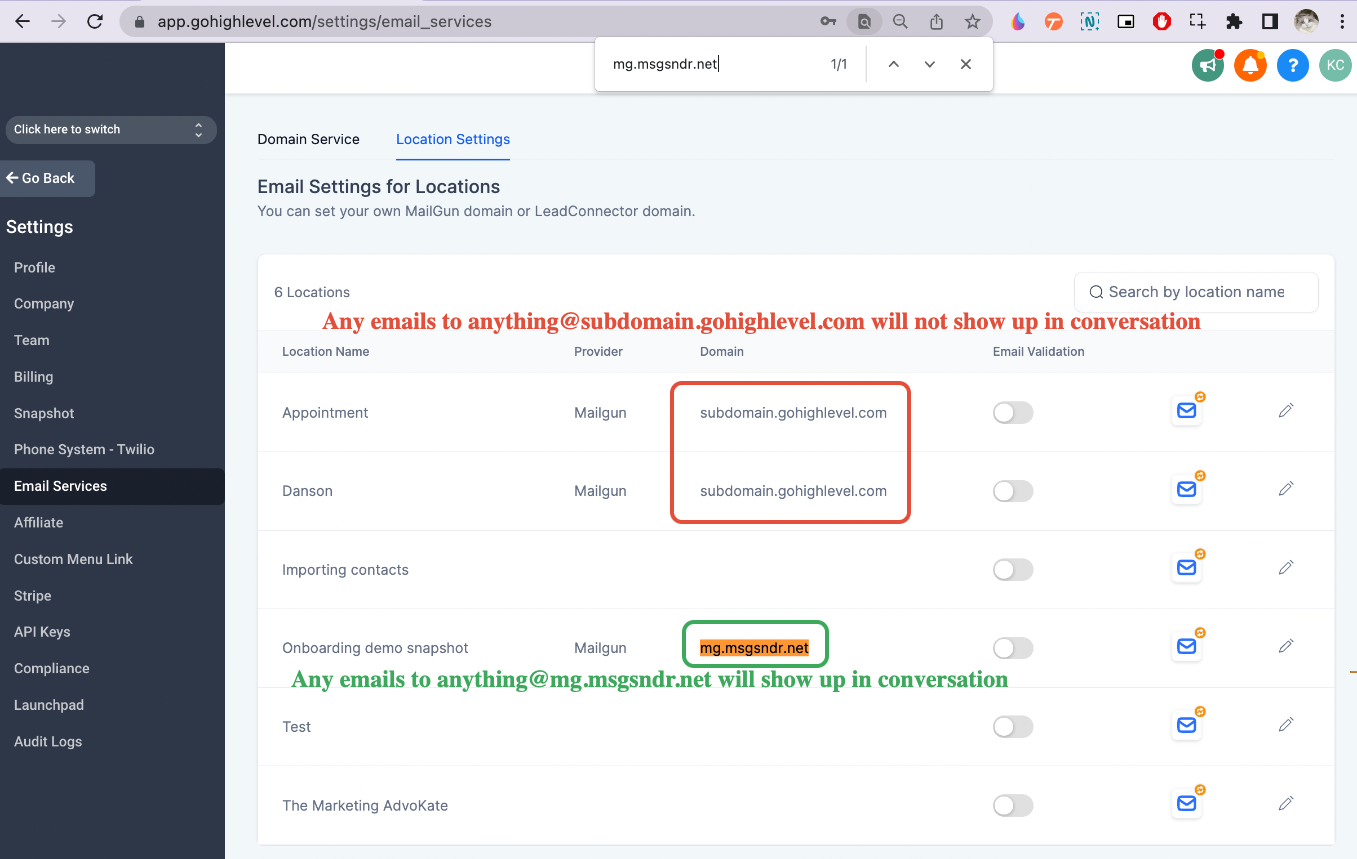
Configuration lives in the HighLevel UI under Agency View > Settings > Email Services > Location Settings. From there you map a Mailgun domain or subdomain to a single HighLevel subaccount, ensuring that all inbound messages are routed to the correct account. After mapping, you can test receipt by sending an email to an address on the configured domain or subdomain and confirming it appears in the Conversation tab.
03How businesses use Mailgun inbound email
- Marketing agency. Create a unique Mailgun subdomain for each client, map it to the client’s subaccount in HighLevel, and let inbound replies feed directly into the client’s conversation history.
- SaaS startup. Set up mg.startup.com in Mailgun, bind it to the startup’s HighLevel subaccount, and capture user replies to support emails without affecting the primary corporate inbox.
- Real estate brokerage. Use a subdomain like mg.brokerage.com for inbound leads, map it to the brokerage’s subaccount, and have reply emails appear in HighLevel so agents can follow up in the same system.
04How to set up and use Mailgun inbound email in HighLevel
Set up Mailgun
- Create or select a Mailgun account and add the desired domain or subdomain, such as agency.com or mg.agency.com.
- Add the required DNS records provided by Mailgun to the domain’s DNS host.
- Verify the domain in Mailgun to confirm that DNS changes are correct and the domain is active.
Map Mailgun domain to one subaccount only
- Open Agency View, go to Settings, then Email Services, and select Location Settings.
- Choose the Mailgun domain or subdomain you just verified and assign it to a single HighLevel subaccount.
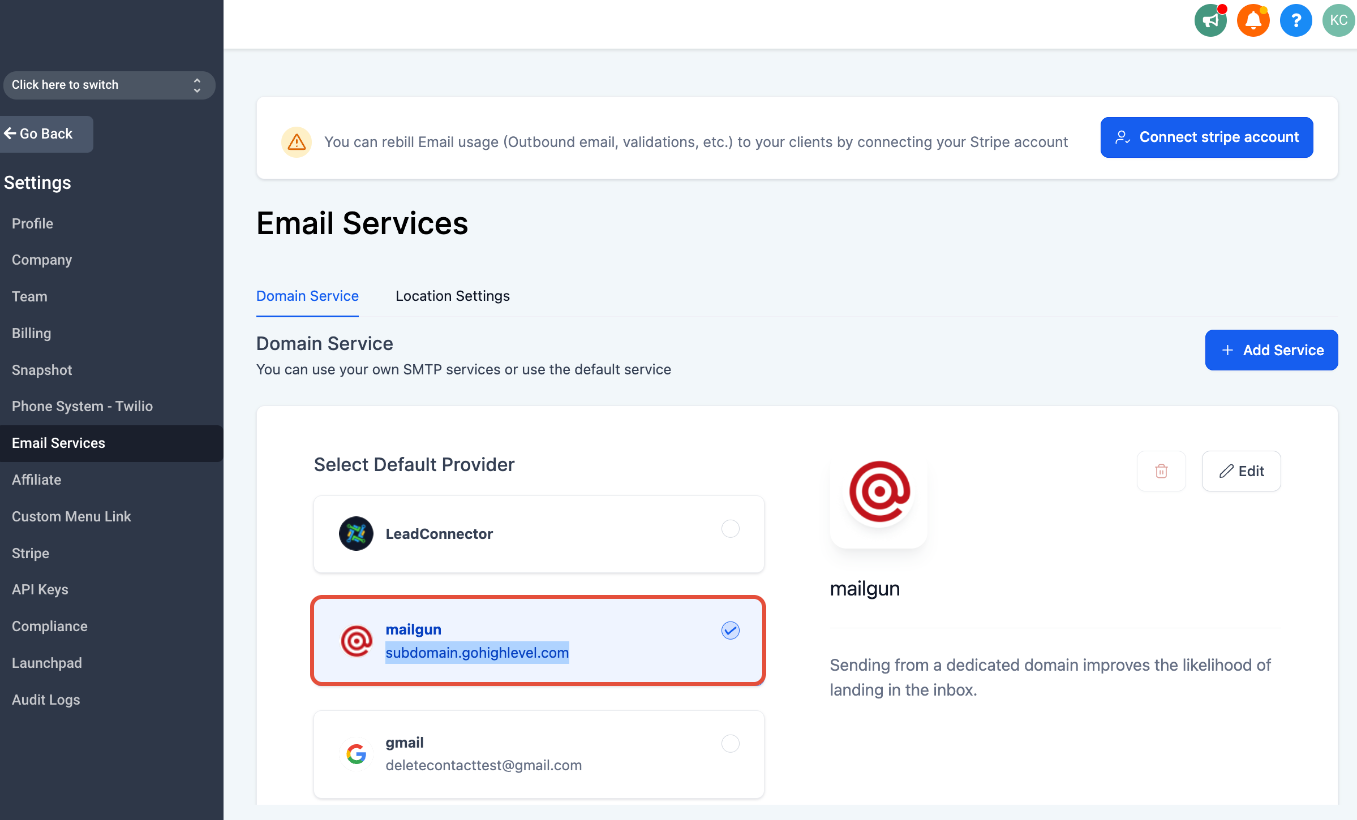
- Confirm that the same domain is not listed under the Domain Services tab for another subaccount.
- If a deleted subaccount previously used the same Mailgun domain, contact support to clear the lingering mapping.
Test inbound email
- Send a test message to an address on the configured domain (for example, testing@agency.com) or subdomain (for example, anything@mg.agency.com).
- Open the Conversation tab in HighLevel and verify that the inbound email appears.
- If the message does not show, double check the MX record pointing to Mailgun and the subaccount mapping.
05What it looks like in HighLevel
06Settings that matter
- Location Settings. Determines which HighLevel subaccount a Mailgun domain or subdomain is linked to, ensuring inbound emails route to the correct account.
07Things to know before you rely on it
- A domain can hold only one set of MX records, so you cannot use Mailgun and another email provider for inbound on the same domain.
- Mailgun does not provide a mailbox; it only routes, forwards, or processes incoming messages.
- Using the root domain for Mailgun will disable any existing inbox (for example, Gmail or Outlook) because MX records are redirected to Mailgun.
08How it connects to the rest of HighLevel
- Mailgun overview and pricing Mailgun overview
- Domain and DNS setup guide for Mailgun Mailgun DNS guide
- How to configure Mailgun reply handling in HighLevel Mailgun replies
- HighLevel pricing and plans Pricing page
- Start a 30 day HighLevel trial Free trial
Michael's take

Most people add Mailgun MX records to their root domain and end up losing their Gmail or Outlook inbox. The conflict between MX records means inbound mail stops arriving where they expect it.
I would create a dedicated subdomain for Mailgun, point the MX records only there, and leave the root domain tied to the existing inbox. That keeps sending via Mailgun while preserving normal email flow.