
01Who this is for
- Developers who build apps for the HighLevel Marketplace need a way to set prices and collect payments directly from the platform.
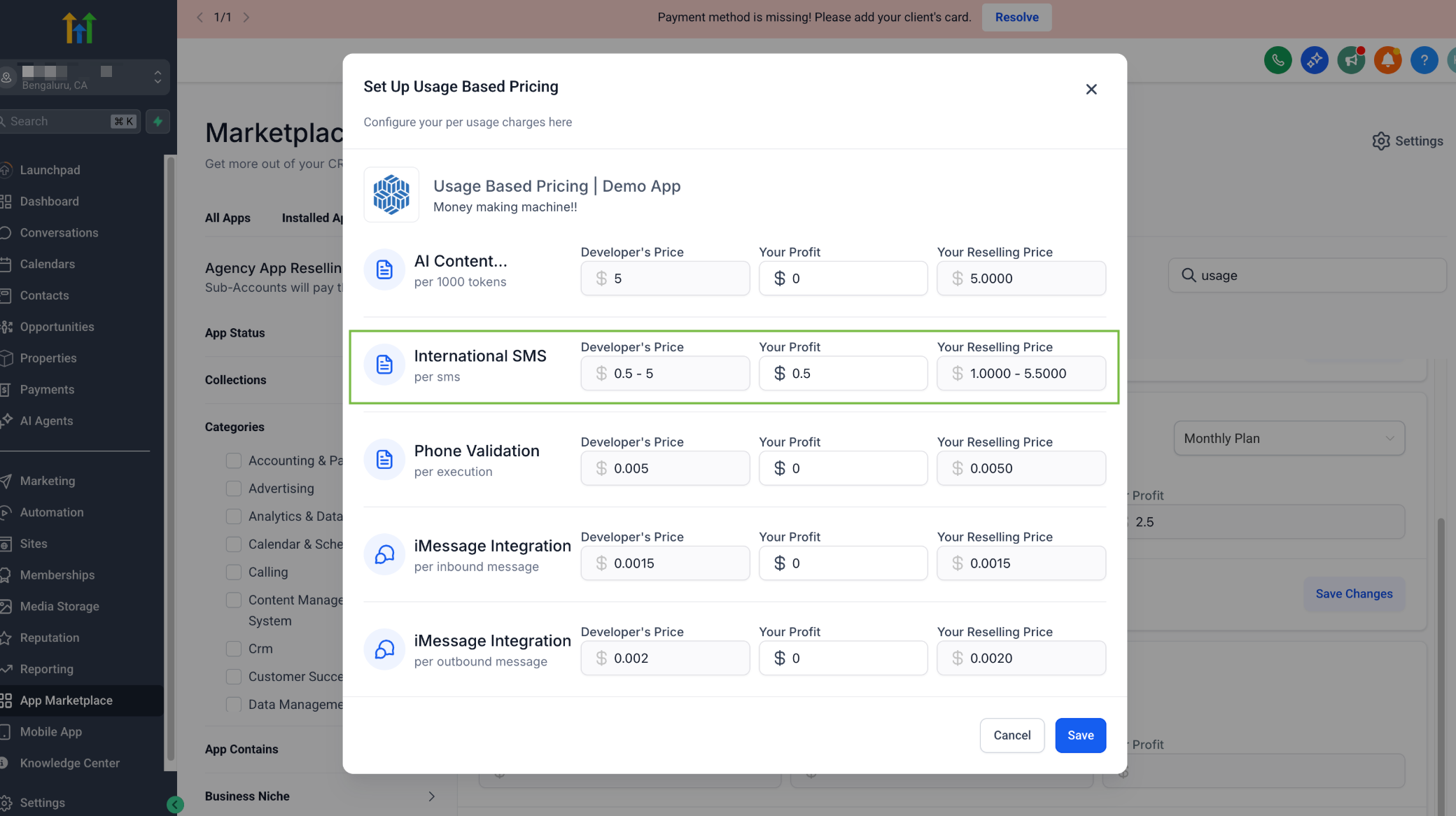
- Agencies that resell Marketplace apps require pricing controls and the ability to add mark ups for subaccounts.
- Founders of SaaS products looking to monetize through the HighLevel ecosystem benefit from transparent earnings dashboards.
02Marketplace app pricing, explained
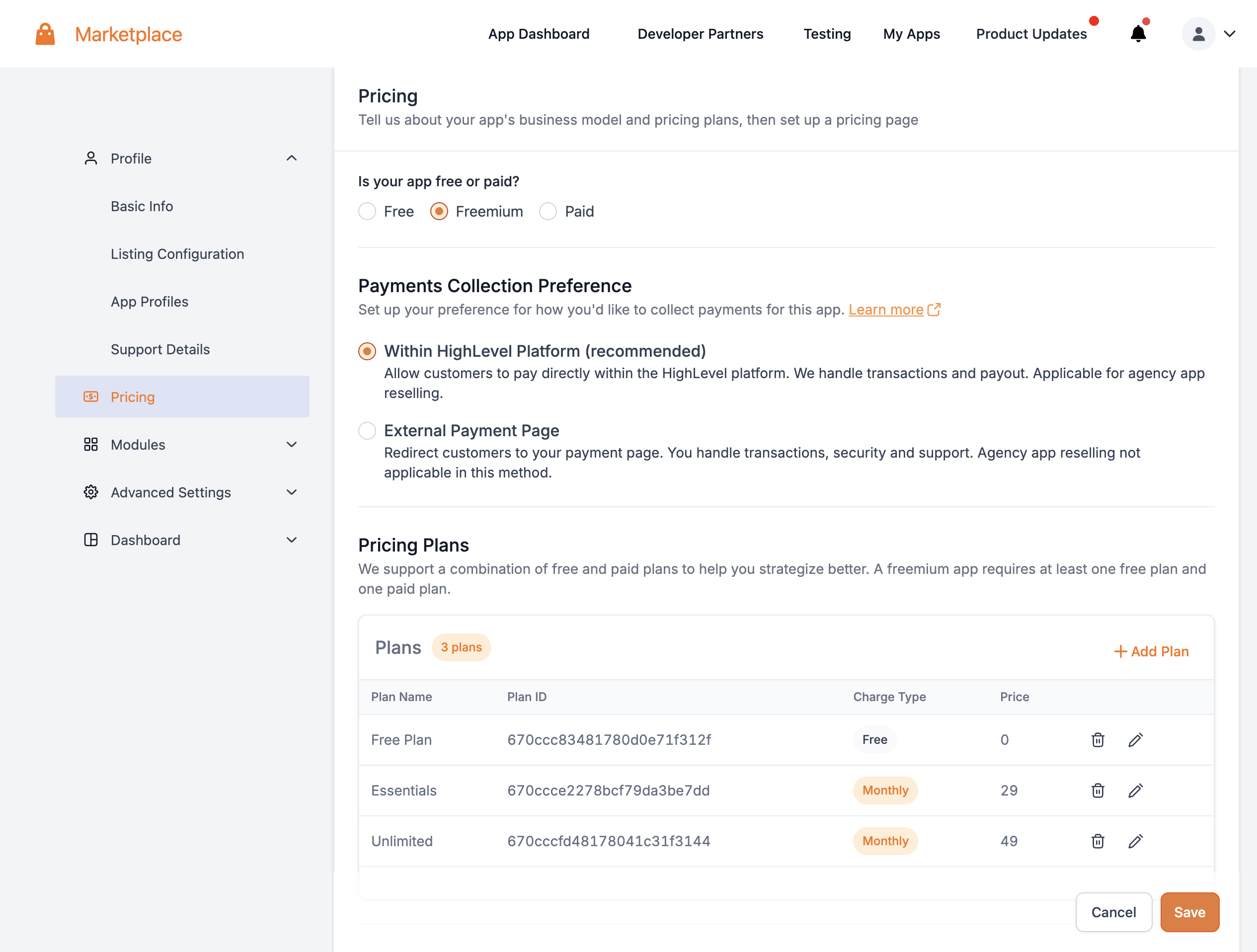
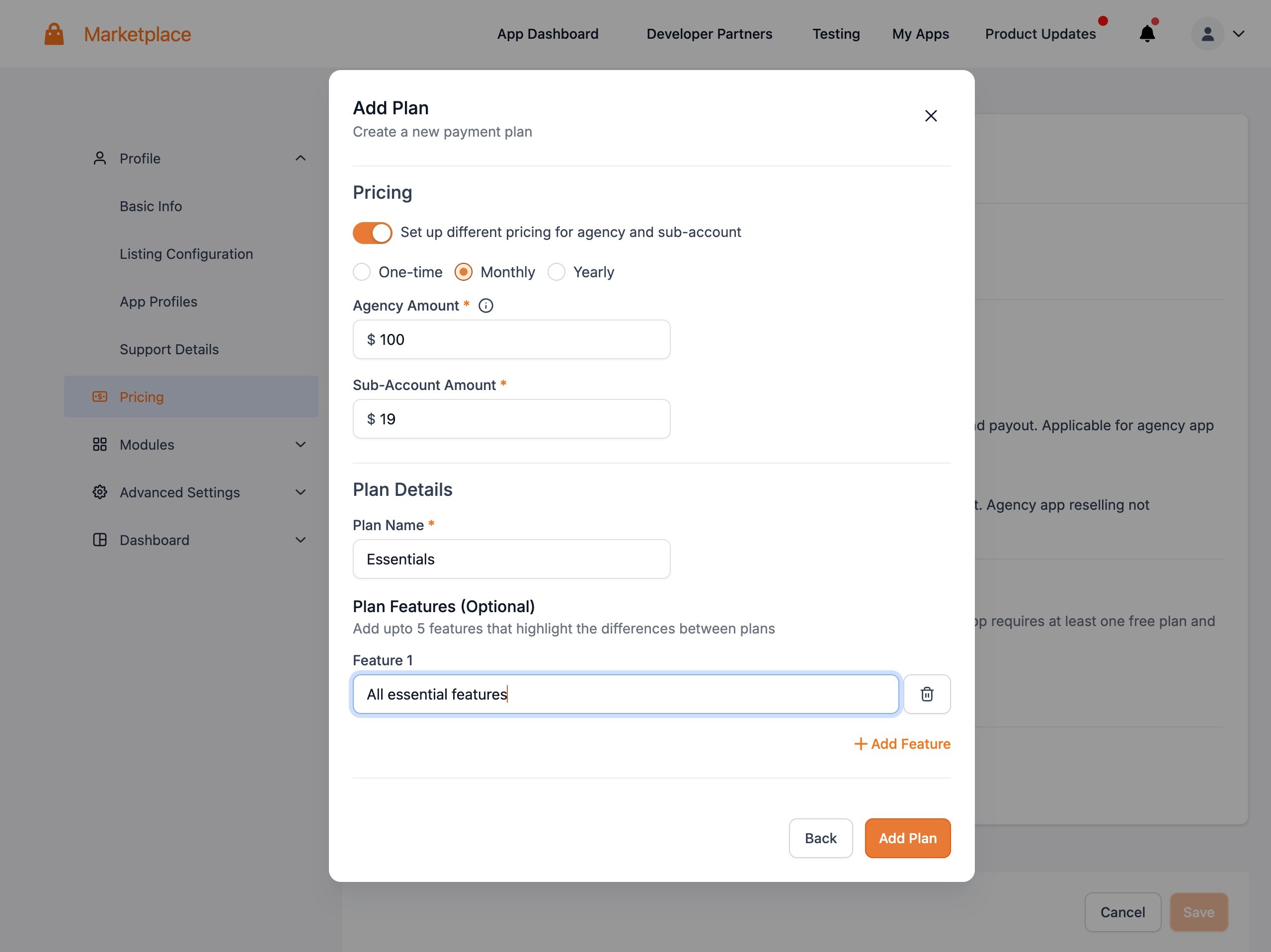
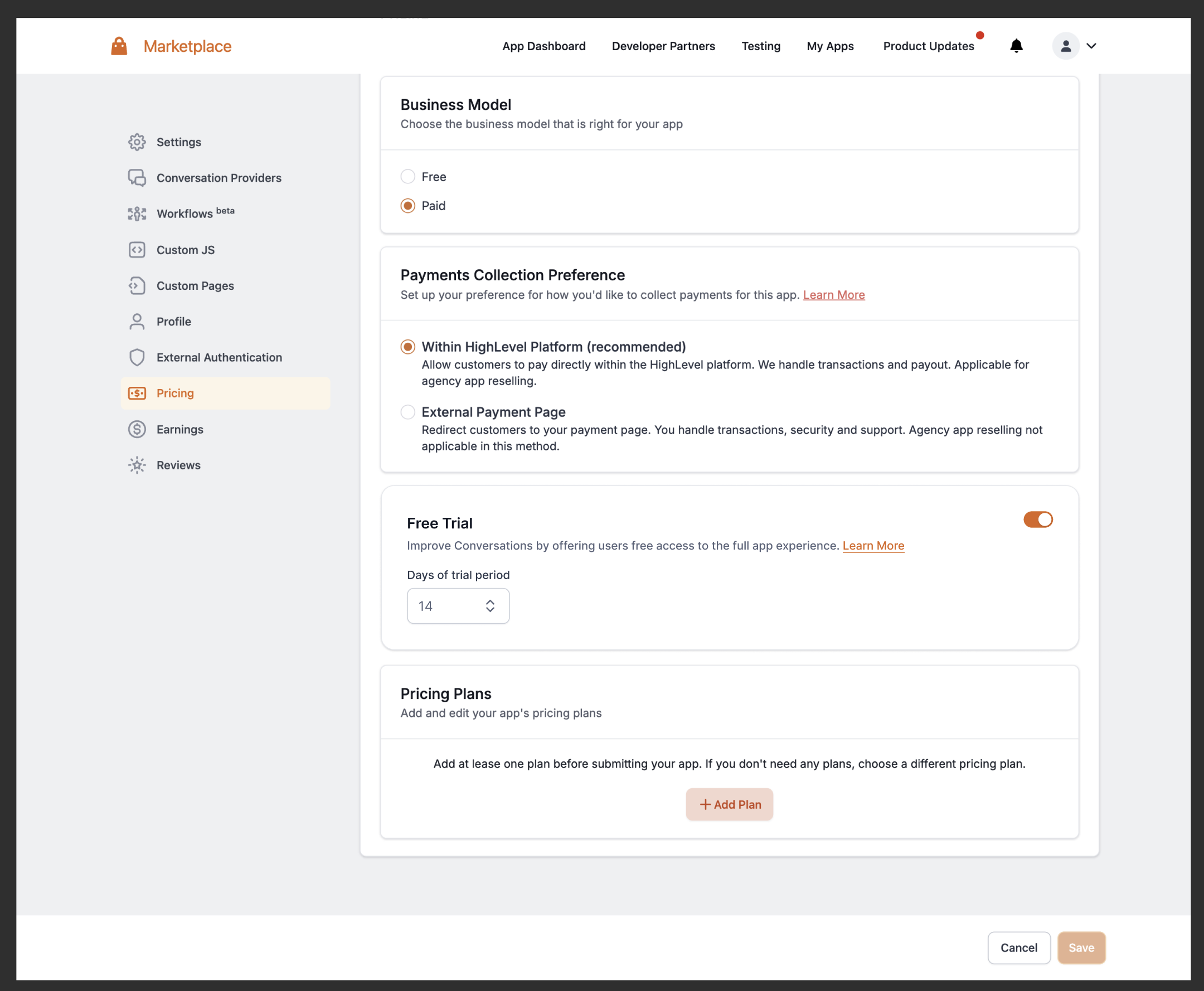
Pricing for a Marketplace app is managed from the app's Pricing section in the Developer account. The menu offers two collection options: an internal HighLevel payment flow, which handles processing and payouts, or an external payment page where users are redirected to a URL you provide. The internal option also lets agencies re sell the app to their subaccounts.
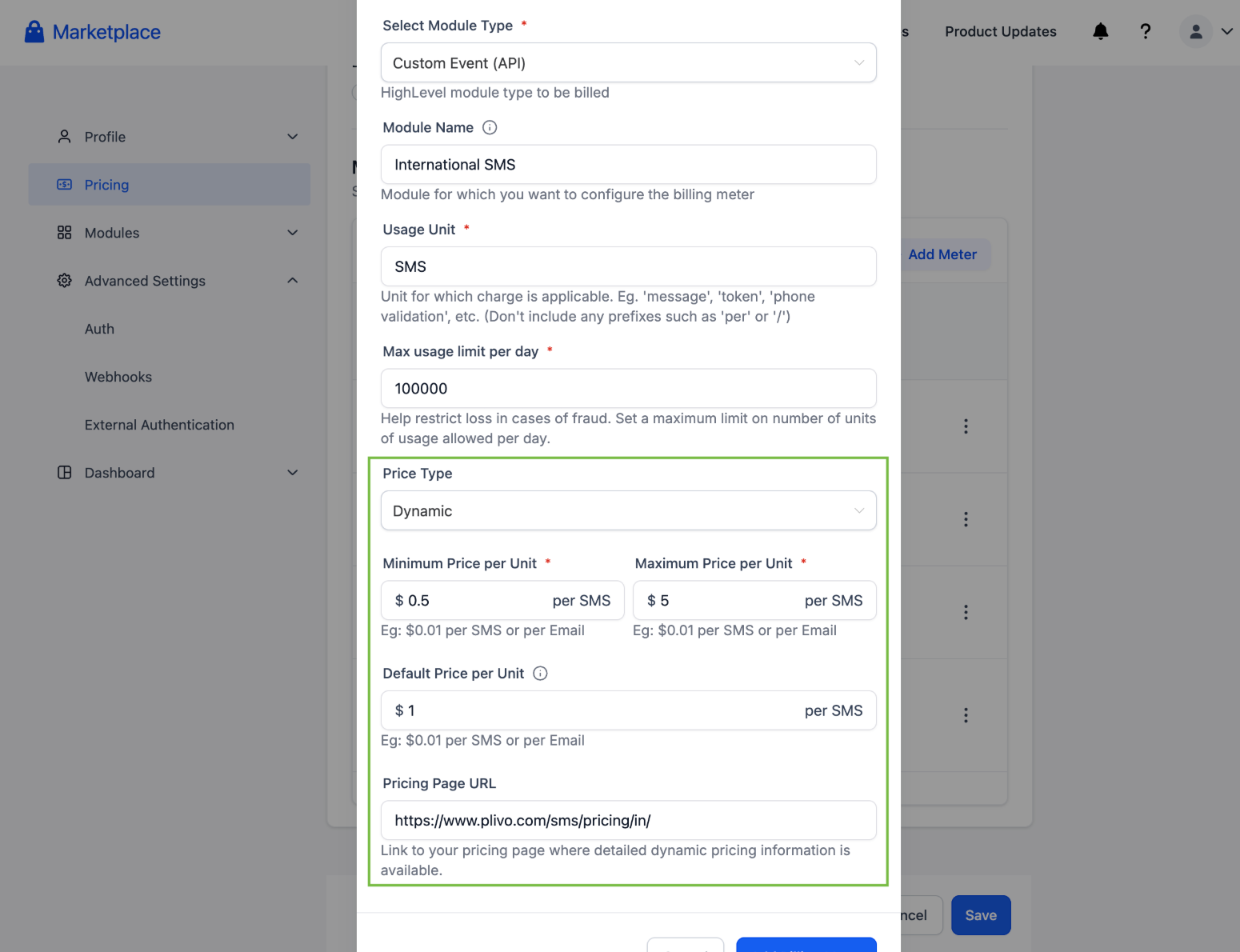
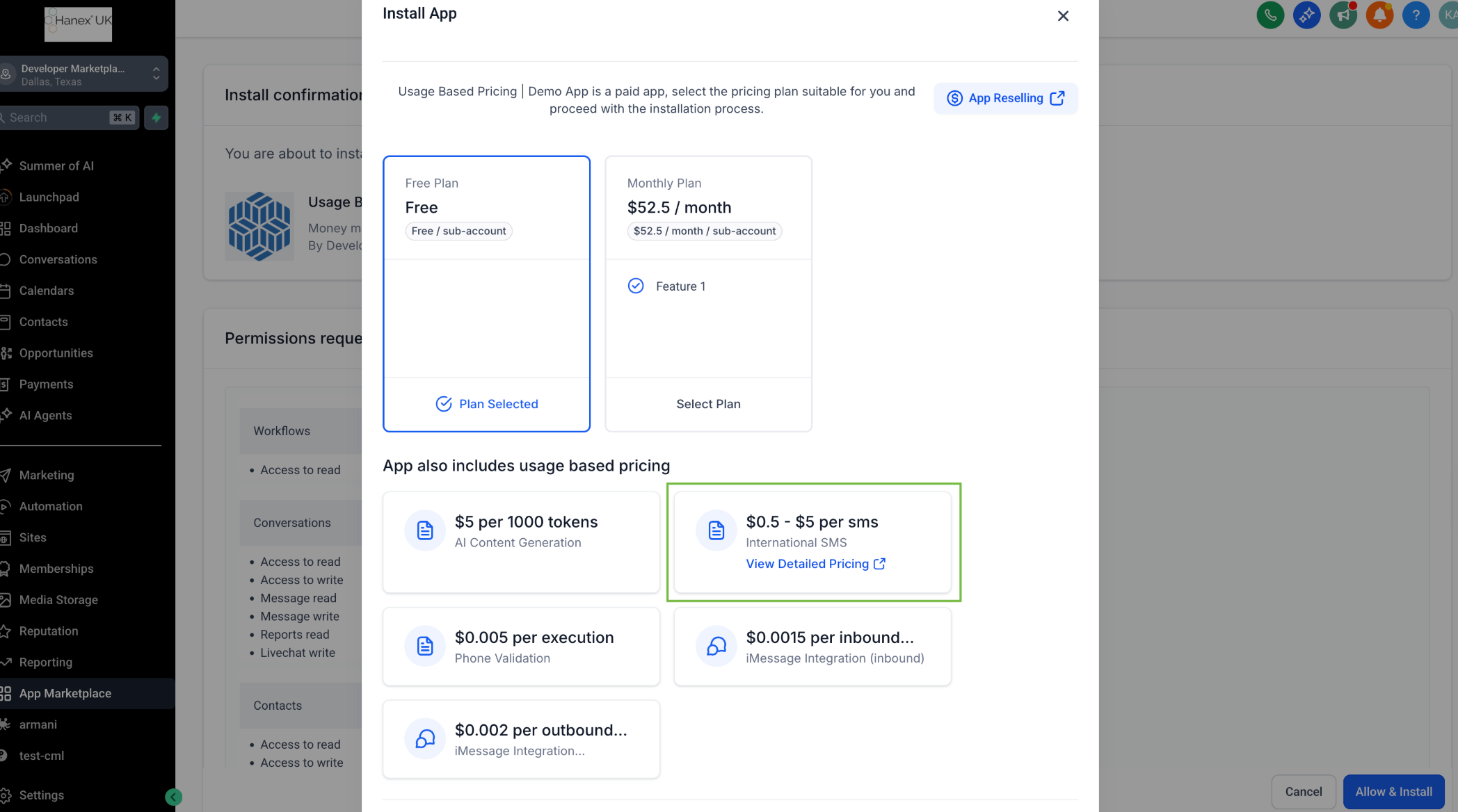
Dynamic usage based pricing uses billing meters. A meter records a custom event triggered via API and can be set to a price range. When the meter is called, the API can supply a specific price per unit; otherwise the default price per unit you saved is applied. The meter details, minimum, maximum, default price, and a public pricing page URL, are visible to agency admins during installation.
Free trial periods of one to ninety days can be enabled for any pricing model. After the trial ends, the subscription starts automatically. If a payment fails, HighLevel provides a thirty day grace window with automatic retry attempts before the app is uninstalled.
03How businesses use marketplace app pricing
- SaaS analytics provider. The developer creates a billing meter with a dynamic price type, sets a price range for API calls, and adds a pricing page URL. When a client’s usage event occurs, the provider calls the Create Wallet Charge API and includes the current unit price.
- Digital marketing agency. The agency installs a paid Marketplace app that uses internal payment collection. It configures a flat per unit markup in the app’s reselling settings, allowing subaccounts to see the final price while the pricing page URL remains hidden from them.
- Telephony service startup. The startup offers a freemium model with a free tier and a paid subscription tier. It also enables a free trial for new users, letting them test the service before the subscription automatically begins.
04The numbers and rules that matter
- 30 day grace period for failed charges with automatic retries.
- Free trial can be set between 1 and 90 days.
- A user can avail a free trial only once per app within a 90 day period.
- Users receive a 24 hour notification before the trial ends.
- Payouts are monthly on the 15th for earnings from the previous month.
- Payouts are processed via Tipalti and may arrive within 1 to 3 days depending on the chosen method.
05Before you start
- A Marketplace Developer account must exist and you must be logged in.
- The app you want to price must already be created in the Marketplace.
06How to set up and use marketplace app pricing in HighLevel
Configure app pricing
- Log in to your Marketplace Developer account.
- Select your app from the list.
- Choose the ‘Pricing’ option in the left navigation.
Set up a billing meter
- Navigate to App > Pricing > Billing Meters.
- Create a new meter or edit an existing one.
- Set Module Type to Custom Event (API).
- Choose Price Type as Dynamic.
- Enter a Minimum price value.
- Enter a Maximum price value.
- Add a Pricing Page URL for transparency.
- Define the Default Price per Unit and save.
Charge wallet via API
- Call the Create Wallet Charge API endpoint.
- Include the optional price field to set a dynamic per unit charge.
- If the price field is omitted, the meter’s Default Price per Unit is applied.
07What it looks like in HighLevel
08Settings that matter
- Module Type. Determines the source of the billing event; set to Custom Event (API) for developer controlled charges.
- Price Type. Selects whether the meter uses a fixed or dynamic price; dynamic enables a price range.
- Minimum price. Defines the lowest possible per unit charge for the meter.
- Maximum price. Defines the highest possible per unit charge for the meter.
- Pricing Page URL. Provides a link to a public page that explains pricing; visible only to agency admins.
- Default Price per Unit. Used when the API call does not supply a price; serves as the fallback charge per unit.
09Things to know before you rely on it
- Switching from an external payment page to the internal HighLevel payment flow requires deleting and recreating the app.
- Apps using an external payment page cannot be resold by agencies.
- Free trial duration can be set between 1 and 90 days and each user may receive only one trial per app within a 90 day window.
- If a payment fails after a free trial, the platform retries for three consecutive days before uninstalling the app.
- Dynamic pricing requires setting a price range; the system shows the range to agencies but hides the Pricing Page URL from subaccounts.
10How it connects to the rest of HighLevel
- Review HighLevel pricing and plan options. HighLevel pricing
- Start a 30 day trial to test Marketplace app features. 30 day trial
- Learn about the Founder Plan for developers. Founder Plan
Michael's take

Most people think they can start with an external payment page and later switch to HighLevel’s internal processing. In reality, you can change from external to internal later, but once you go live with internal collection you can’t switch to an external page without deleting and recreating the app, and you lose agency resale potential.
If I were setting up a new marketplace app, I’d begin with internal payment collection, enable a modest free trial, and configure a dynamic billing meter so I can adjust prices as usage changes. I’d also verify the Tipalti payout setup early to ensure a smooth payout process.