
01Who this is for
- Sales managers who need the same follow up visible on both contact and opportunity records, so they can track progress without creating separate tasks.
- Customer success teams that handle accounts spanning multiple companies, allowing a support task to show up on each related company record.
- Operations leaders who coordinate projects across custom objects, using one task to keep all stakeholders aligned.
02MultiObject Task Associations, explained
Multi object task associations expand the native HighLevel task capability beyond a single contact. When you create a task you can attach it to contacts, opportunities, companies or any custom object, with a limit of ten records per object type. The task then appears in the Associated Objects panel of each linked record, providing instant visibility.
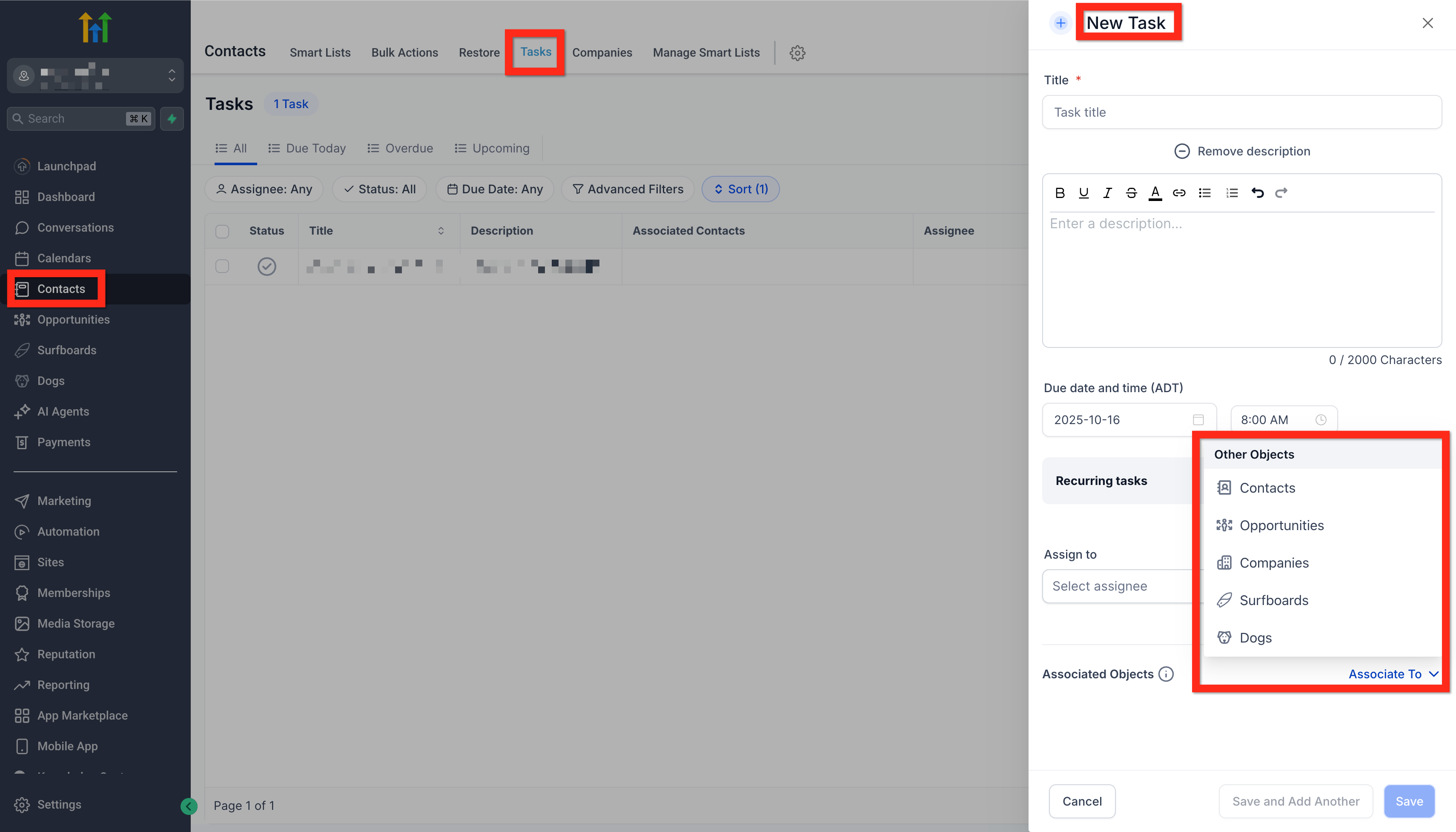
The feature lives on the Tasks page and within each record’s task panel. The Associate To field shows any prelinked records based on where you started the task, and you can add or remove links at any time using the + Add Association control. Filters on the Tasks page can also reference these associations, letting you slice task lists by linked record, status or assignee.
03How businesses use multiObject Task Associations
- SaaS startup. A sales rep opens an opportunity, clicks + Add Task, and adds the primary contact and its company via the default associations. The rep then clicks + Add Association to link two additional contacts involved in the deal. The single task now appears on all three contacts and the company.
- Property management firm. A property manager creates a maintenance task from a custom object representing a work order. Using + Add Association they attach the tenant contact, the property’s company record and a second custom object for the service vendor. The task shows in each related record.
- Digital marketing agency. A project lead opens a client company record, adds a task for a creative review, and links the task to three contacts (account manager, designer, copywriter) and the related campaign opportunity. All team members see the same task in their own views.
04The numbers and rules that matter
- Up to 10 associations per object type.
05How to set up and use multiObject Task Associations in HighLevel
Create a task with multiple associations
- Navigate to a Contact, Opportunity, Company, Custom Object, or open the main Tasks page.
- Click the + Add Task button.
- Review the default records in the Associate To field and modify them if needed.
- Optionally click + Add Association to select extra records, up to ten per object type.
- Fill in the remaining task details such as title, assignee and due date.
- Click Save to create the task.
- To change associations later, open the task, click the pencil icon next to Associated Objects, adjust the links, and click Save.
06What it looks like in HighLevel
07Settings that matter
- Associate To. Controls which records are initially linked to the new task; you can edit or add more associations from this dropdown.
08Things to know before you rely on it
- A single task can be linked to a maximum of ten contacts, ten opportunities, ten companies and ten custom objects.
- The ten per object type limit is enforced across the platform and cannot be increased.
- Recurring task instances inherit all associations from the original task.
09If something goes wrong
- Existing tasks only show the original contact link.. Open the task, click the pencil icon next to Associated Objects, add the needed links, and save.
- Need more than ten associations for a single object type.. Create additional tasks and distribute the extra records among them.
10How it connects to the rest of HighLevel
- Learn how notes can be linked across contacts and opportunities. Notes association
- Set up associations between opportunities, companies and custom objects. Object associations
- Explore searchable fields configuration to find linked records faster. Searchable fields
Michael's take

When used wisely, the feature reduces duplication, aligns sales, customer success and ops around the same actions, and makes reporting simpler. I would begin with auditing a few high visibility tasks and linking the core records they truly impact.