
01Certificates, explained
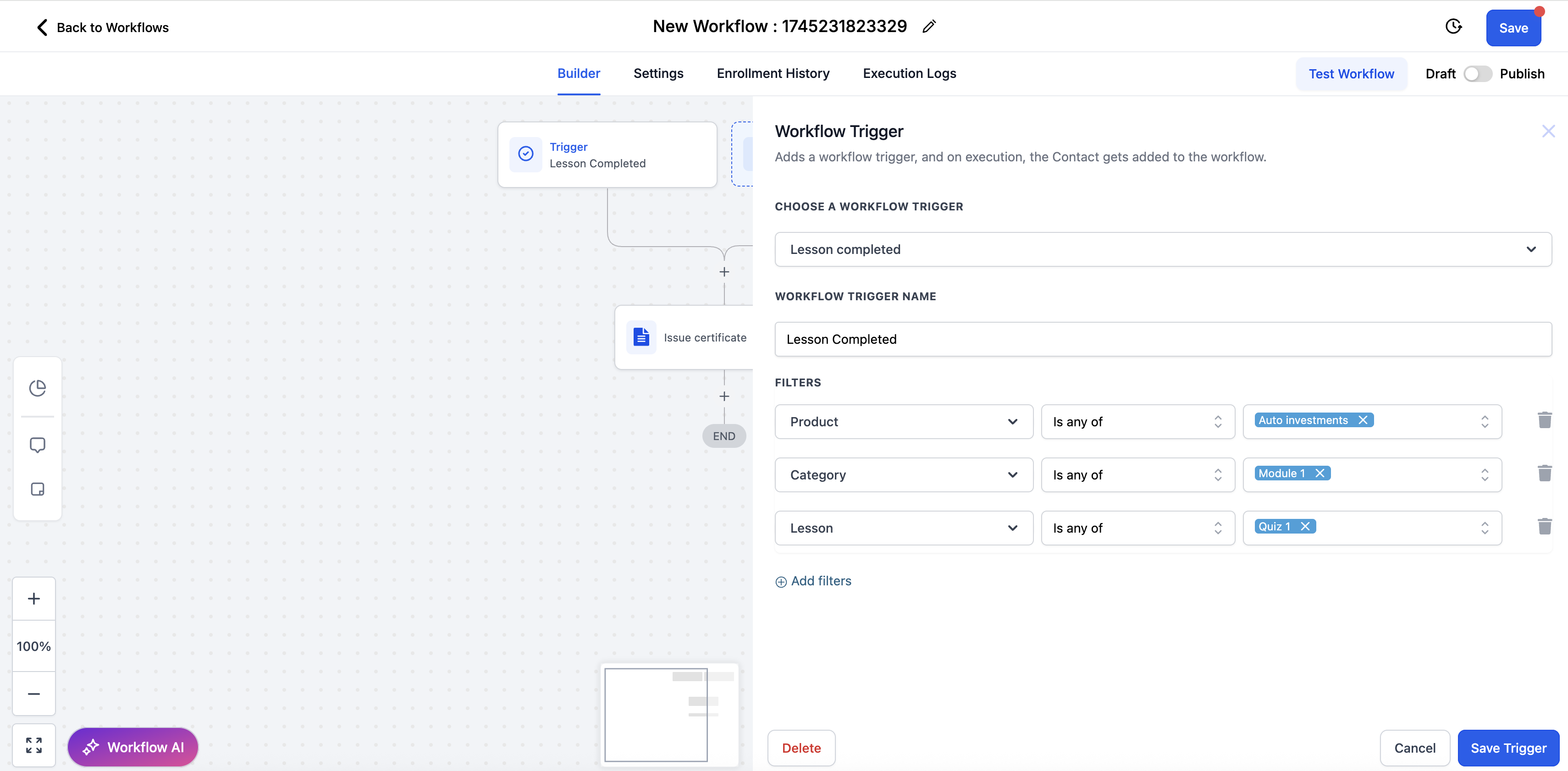
HighLevel can issue a certificate without any manual steps once a learner finishes a designated quiz or assignment. The system uses a Lesson Completed trigger and then runs the actions you set up.
You control exactly which quiz or assignment triggers the certificate by adding filters for the course, module, and lesson. When those conditions match, the chosen certificate template is sent to the learner.
02How to set up and use the certificate in HighLevel
Set up certificate automation
- In your workflow, click Add Trigger.
- Choose Lesson Completed.
- Apply filters: Product. Select your Course; Category. Choose the module/section where your quiz lives; Lesson. Select the specific quiz or assignment.
- Click the + icon under the trigger.
- Select Issue Certificate from the list of actions.
- Select the certificate template of your choice.
03What it looks like in HighLevel
Michael's take

Getting a certificate to the learner at the exact moment they pass a quiz removes the manual step of chasing down completions. It keeps the momentum going and gives the student a tangible reward right when they’ve earned it. The first thing I would get right is the filter that points to the exact quiz. That ensures only the intended test triggers the certificate.
Once the filter is spot on, the rest of the flow is straightforward. I’d watch a few test completions to confirm the right template fires, then let the automation run for the whole class.