
01Who this is for
- Sales teams that schedule discovery calls can right away review prospect answers without leaving the calendar view.
- Service providers using custom intake forms can reference client details before appointments, speeding preparation.
02Custom form submissions, explained
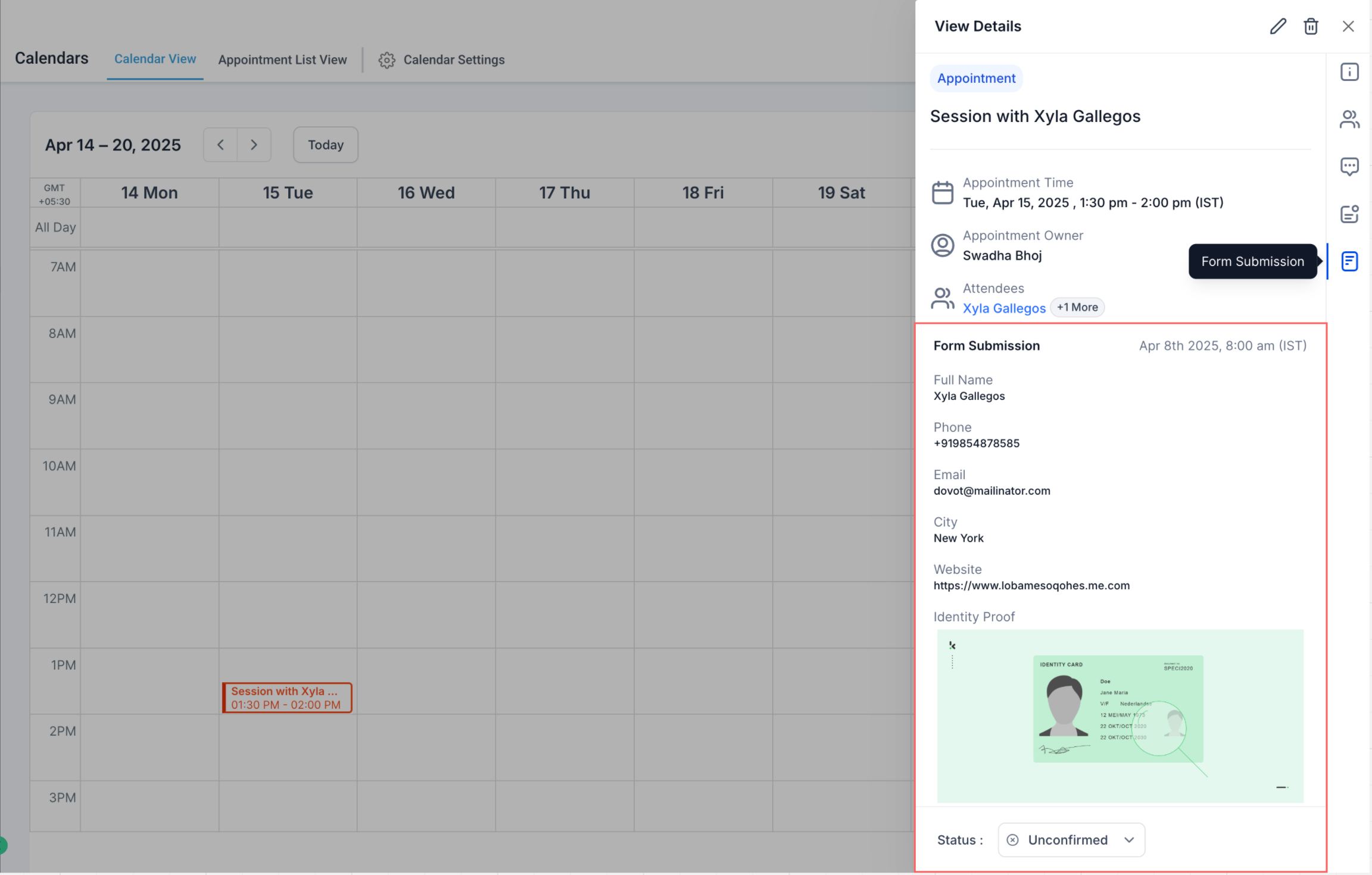
The feature adds a Forms tab to the Appointment Modal whenever an appointment includes a custom form submission. The tab displays the submitted answers in the same structured format used by the Forms module, making the information easy to read.
You access the view from any Calendar, Contacts, or Conversations view by clicking an appointment. If a custom form was part of the booking flow, the Forms tab appears; otherwise it is hidden. Clicking the tab shows the full submission details.
03How businesses use custom form submissions
- Dental practice. When a patient books a cleaning with a custom intake form, the dentist opens the appointment modal, selects the Forms tab, and reviews the patient’s answers before the visit.
- Coaching business. A coach schedules a strategy session, opens the appointment modal, and uses the Forms tab to read the prospect’s goals and challenges submitted in the booking form.
- Real estate agency. An agent books a property showing, opens the appointment modal, and checks the Forms tab to see the buyer’s preferences entered via a custom form.
04The numbers and rules that matter
- Form submissions appear only for appointments created on or after April 9, 2025.
05Before you start
- A custom form must be attached to the booking flow.
- The appointment must be created on or after April 9, 2025.
06How to set up and use custom form submissions in HighLevel
View custom form submissions
- Go to the Calendars view and click a recent appointment.
- Open the appointment modal by selecting the appointment card.
- Look for a Forms tab; it appears only if a custom form was submitted.
- Click the Forms tab to read the structured view of the submission.
07What it looks like in HighLevel
08Things to know before you rely on it
- Only custom forms added to the booking flow are shown.
- Form submissions are visible only for appointments made on or after April 9, 2025.
- Default booking fields (Name, Email, Phone) do not appear in the Forms tab.
- Support for default form submissions inside the Forms tab is planned for a future release.
09How it connects to the rest of HighLevel
- Learn how to add and manage appointment notes across records. Appointment notes
- See how to manually book calendar appointments. Manual booking
- Explore the workflow action for creating appointment notes automatically. Appointment note workflow
Michael's take

Seeing custom form answers right inside the appointment window saves a small business countless clicks and keeps the conversation focused on what matters. It’s a quick win for anyone who runs intake forms and wants to stay on the same screen.
Don’t expect the default name, email, and phone fields to show up in the Forms tab yet.