
01Who this is for
- Founders of SaaS businesses benefit because MCP lets their AI agents pull data from internal APIs, improving automated support.
- Customer support managers gain control over which external tools agents can use, ensuring safe and relevant assistance.
- Marketing agencies can connect voice agents to campaign platforms, allowing real time data retrieval during calls.
02Model context protocol integrations, explained
MCP is an integration layer that connects Voice AI agents to any external API following the Model Context Protocol standard. When enabled, agents discover tools hosted on MCP servers, understand each tool's purpose, and can trigger them based on the dialog.
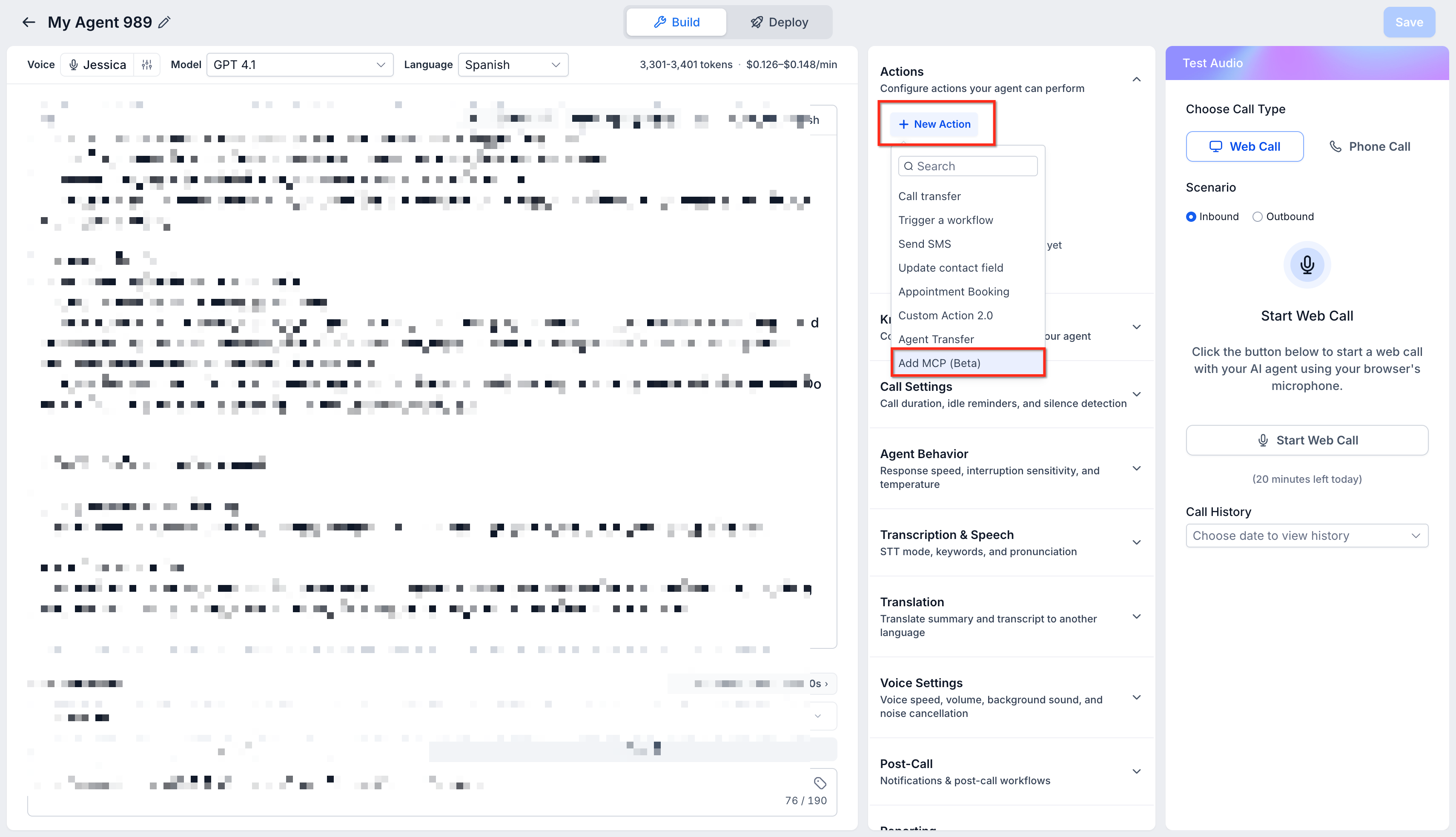
The feature lives under the Labs section of agency settings where a toggle activates MCP support. Once active, each Voice AI agent has a tool management screen where servers are added and specific tools are assigned.
Agents use the defined execution conditions to decide when a tool should run, keeping the conversation natural while performing actions like pulling calendar entries or sending data to a CRM.
03How businesses use model context protocol integration
- Real estate brokerage. The brokerage adds an MCP server that exposes a property listing API. The voice agent is given access to the "search listings" tool and instructed to run it when a caller asks about available homes. The agent retrieves matching properties and reads them aloud.
- Dental practice. A dental office creates an MCP server for its appointment scheduling system. The voice agent receives the "book appointment" tool and is set to trigger it after confirming patient details, allowing callers to secure slots without human intervention.
- Subscription software provider. The provider configures an MCP server that connects to its billing platform. The agent is granted the "check subscription status" tool and runs it when a user inquires about renewal dates, delivering up to date payment information.
04The numbers and rules that matter
- Tool execution conditions are defined per assigned tool.
05Before you start
- Enable Voice AI - MCP Support from the Labs section in your agency settings.
- Obtain the MCP server URL, authentication headers, and any required query parameters from the server administrator.
06How to set up and use model context protocol integration in HighLevel
Enable Model Context Protocol integration for a Voice AI agent
- Switch on the MCP support toggle in the Labs area of agency settings.
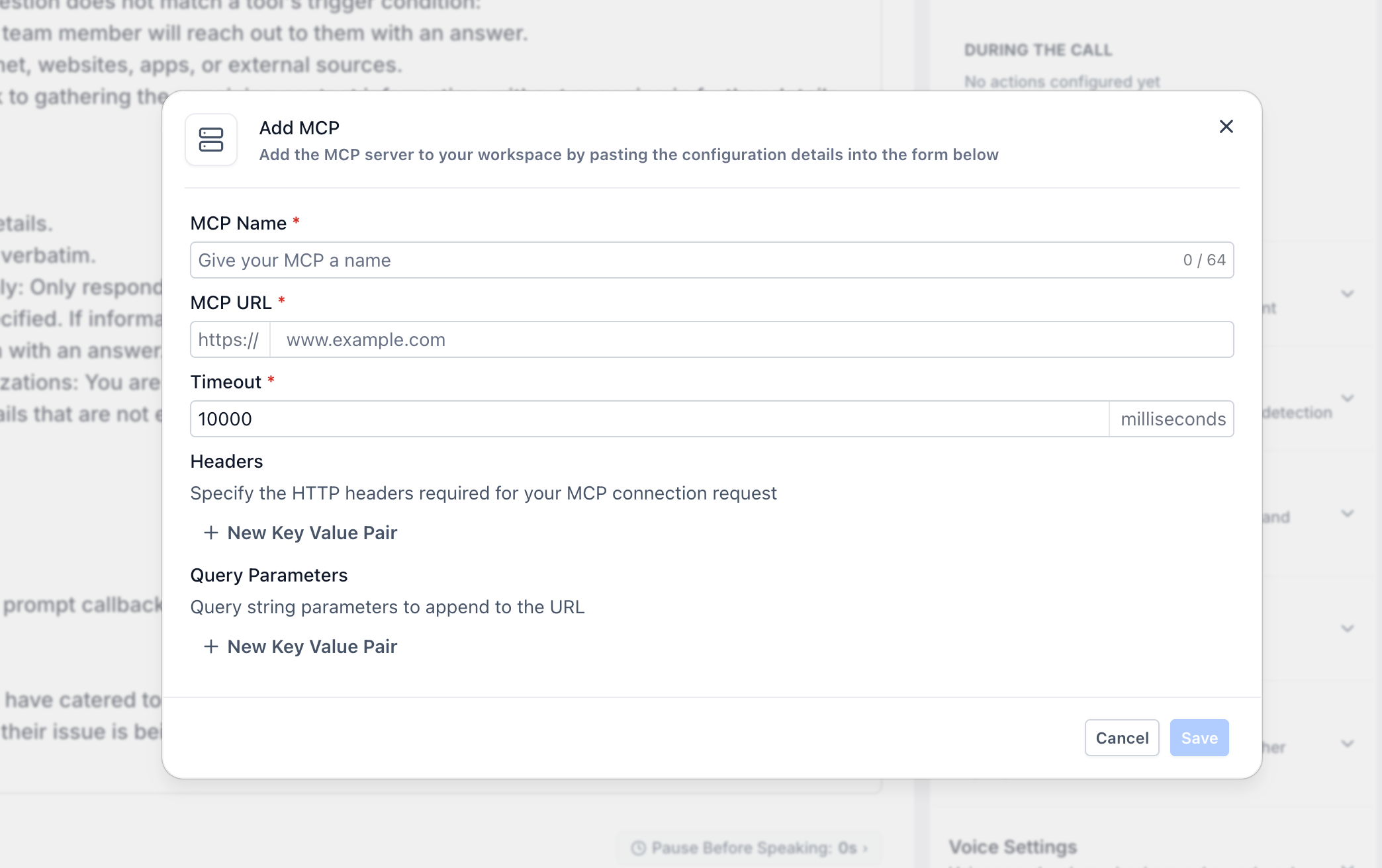
- Enter the server name, endpoint URL, authentication headers, and optional query parameters to register the MCP server.
- Select the desired tools from the server and describe the conditions that should trigger each tool.
- Test the integration by having a conversation that meets the execution conditions and verify the expected tool responses.
07What it looks like in HighLevel
08Settings that matter
- Voice AI - MCP Support. Turns on the ability for Voice AI agents to use Model Context Protocol integrations.
- MCP Name. A label you assign to identify the MCP server within HighLevel.
- Server URL. The address where the MCP server receives requests from the platform.
- Headers. Key value pairs used for authentication or other required request information.
- Query Parameters (Optional). Additional URL parameters that may be needed for server communication.
09Things to know before you rely on it
- MCP is offered as a Labs feature, meaning it is in active development and could change.
- You may configure multiple MCP servers and assign different tool sets per agent.
10If something goes wrong
- The MCP server cannot be reached during a conversation.. The agent will continue the dialog but will not execute any tool that depends on the unavailable server. Verify server uptime and network accessibility.
11How it connects to the rest of HighLevel
- Learn how to create a Voice AI agent before adding MCP integration. Create Voice AI agents
- Set up inbound call flows that route callers to your Voice AI agents. Configure inbound call flow
- Define working hours for your Voice AI agents so they respond only during business times. Set working hours
Michael's take

Most people try to bolt MCP onto an existing voice flow without first mapping the exact moments a tool should be called. The result is an agent that either overreacts or never uses the new capability. Instead, I would begin with writing clear, concise execution conditions for each tool. Think of them as trigger phrases that match the natural conversation.
Once the conditions are set, I would add the MCP server, assign only the needed tools, and run a few scripted dialogs to watch the agent call the external APIs. Seeing the tool fire at the right moment confirms the integration is solid before scaling it to live traffic.