
01Who this is for
- Agency owners on the Founder plan who need to give their team members AI capabilities without extra usage charges.
- Marketing teams that require Ask AI for content creation and AI Studio for workflow automation inside their subaccounts.
- Consultants managing multiple client subaccounts who want a simple, flat rate AI option for each client.
02AI Employee Starter plan, explained
The Starter offering adds Ask AI and AI Studio to a selected subaccount for a set monthly price of $20/month per subaccount (per HighLevel's help center, checked November 2026). It is a per subaccount subscription and does not include other AI products that may charge per use.
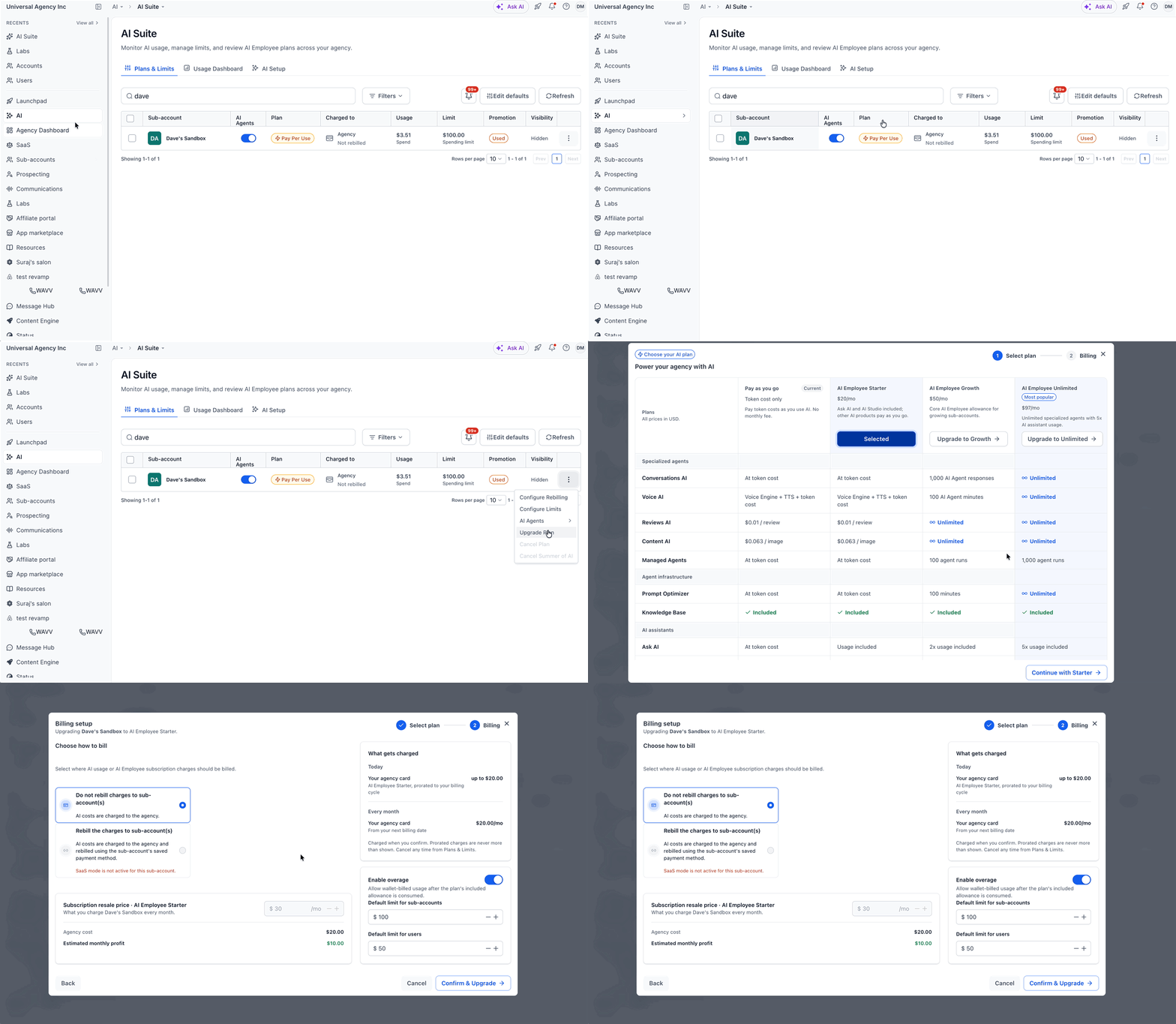
The upgrade is performed from the agency view within the AI Suite. After choosing the target subaccount, the plan can be switched to the Starter tier and the billing flow completed.
Free AI credits belong to the agency. If those credits run out while a subaccount uses the Starter plan, the subaccount’s own allowance continues to cover activity, subject to the platform’s fair use policy.
03How businesses use AI Employee Starter plan
- Digital marketing agency. The agency logs into the platform, opens the AI Suite, selects a client subaccount and upgrades it to the Starter plan. This grants the client’s team immediate access to Ask AI for copywriting and AI Studio for automations.
- Real estate brokerage. A brokerage manager visits the AI Suite, locates the agent’s subaccount, and switches it to the Starter tier. The agent can then use Ask AI to draft property descriptions and AI Studio to generate follow up sequences.
- Ecommerce store network. The network’s owner accesses the agency view, chooses each store’s subaccount, and upgrades them to the Starter plan. Store staff gain AI driven product recommendation tools and workflow builders without separate pay per use fees.
04The numbers and rules that matter
- $20/month per subaccount (per HighLevel's help center, checked November 2026).
- $497 Founder Plan required (per HighLevel's help center, checked November 2026).
05Before you start
- Important: The agency must be subscribed to the $497 Founder plan (per HighLevel's help center, checked November 2026) to be eligible for the Starter upgrade.
06How to set up and use AI Employee Starter plan in HighLevel
Upgrade a subaccount to the AI Employee Starter plan
- Sign into HighLevel and change to Agency View.
- Open the left hand navigation and select AI then AI Suite.
- In the Plans & Limits section locate the desired subaccount and open its three dot menu.
- Choose the option to Upgrade Plan.
- Identify the AI Employee Starter entry and press Continue with Starter.
- Proceed to the billing screen, verify the subscription information and follow the on screen prompts to purchase.
- Click Confirm & Upgrade to finish the process.
07What it looks like in HighLevel
08Settings that matter
- Plans & Limits. Displays current plan details for each subaccount and provides the controls to change a subaccount’s AI subscription.
09Things to know before you rely on it
- Only agencies on the $497 Founder plan (per HighLevel's help center, checked November 2026) can select the AI Employee Starter plan for subaccounts.
- Free AI credits are subject to a fair use policy; higher tier agency plans receive larger allowances.
- Additional AI products may incur separate pay per use fees beyond the Starter plan price.
10How it connects to the rest of HighLevel
- AI product pricing details AI pricing
- View AI usage metrics Usage dashboard
- Founder plan information and pricing Founder plan
Michael's take

If I were handling this, I’d open Agency View, verify the plan status, and then follow the upgrade steps step by step. I’d double check the billing preview before confirming, so there are no surprises on the invoice.