
01Who this is for
- Founders of small businesses that want a phone based AI for lead capture, because the visual flow lets them map each call step.
- Call center managers seeking to split calls among specialized AI agents, enabling clear handoffs within one conversation.
- Service providers needing appointment booking through voice, as the builder can link to calendar actions and APIs.
02Flow based builder for Voice AI, explained
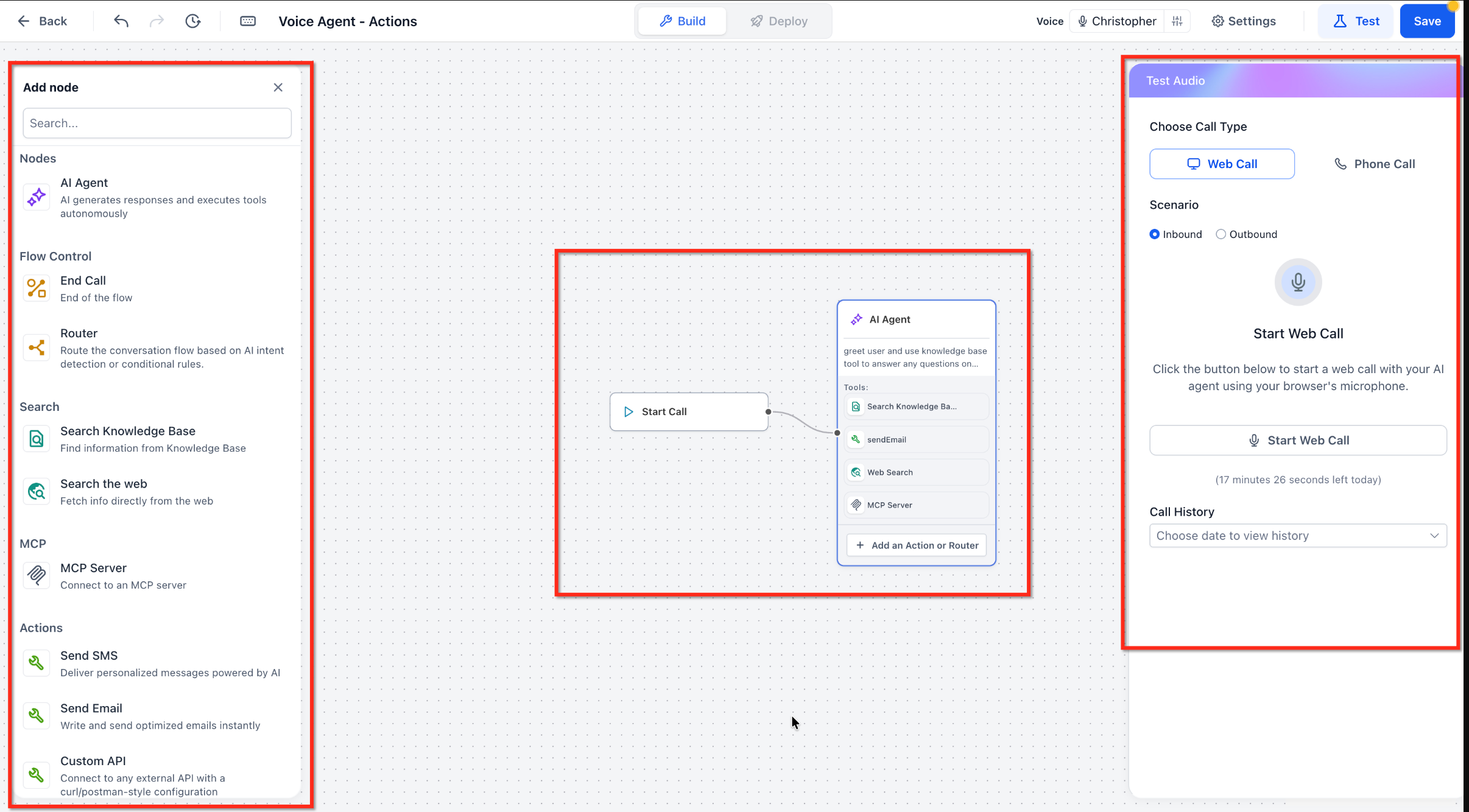
The Flow Based Builder is a node driven interface that lets you craft Voice AI calls on a single canvas. Each node performs a distinct task such as greeting, qualifying, routing, or executing an action like sending an SMS.
You add nodes from the library, connect them on the canvas, and configure each node’s settings. The flow can include multiple AI Agent nodes, each with its own prompt, model, and tools, while Router nodes decide which path to follow.
The builder lives inside the Voice AI section of a HighLevel subaccount. After creating an agent, you choose the Flow Based Builder option, design the flow, test it with web or phone calls, and then deploy the conversation.
03How businesses use flow based builder for Voice AI
- Dental practice. A dental office creates a flow where a Greeter agent welcomes callers, a Qualification agent gathers patient information, and a Booking agent links to the calendar via native actions. The visual nodes let staff adjust each step without rewriting prompts.
- Real estate agency. The agency builds a lead qualification flow with a Greeter node, a Qualification agent that asks property preferences, and a Router that sends qualified leads to a record updates action. Each agent can use a different AI model.
- Ecommerce support. An online store sets up a Customer Support flow that starts with a Greeter, routes callers based on issue type, and hands off to a Support agent node. Actions such as sending order status via SMS are added directly in the flow.
04The numbers and rules that matter
- Supported nodes: Start Call, AI Agent, Router, End Call, Search Knowledge Base, Search the Web, MCP Server, Actions.
- Native actions initially included: Send SMS, Send Email, Custom API.
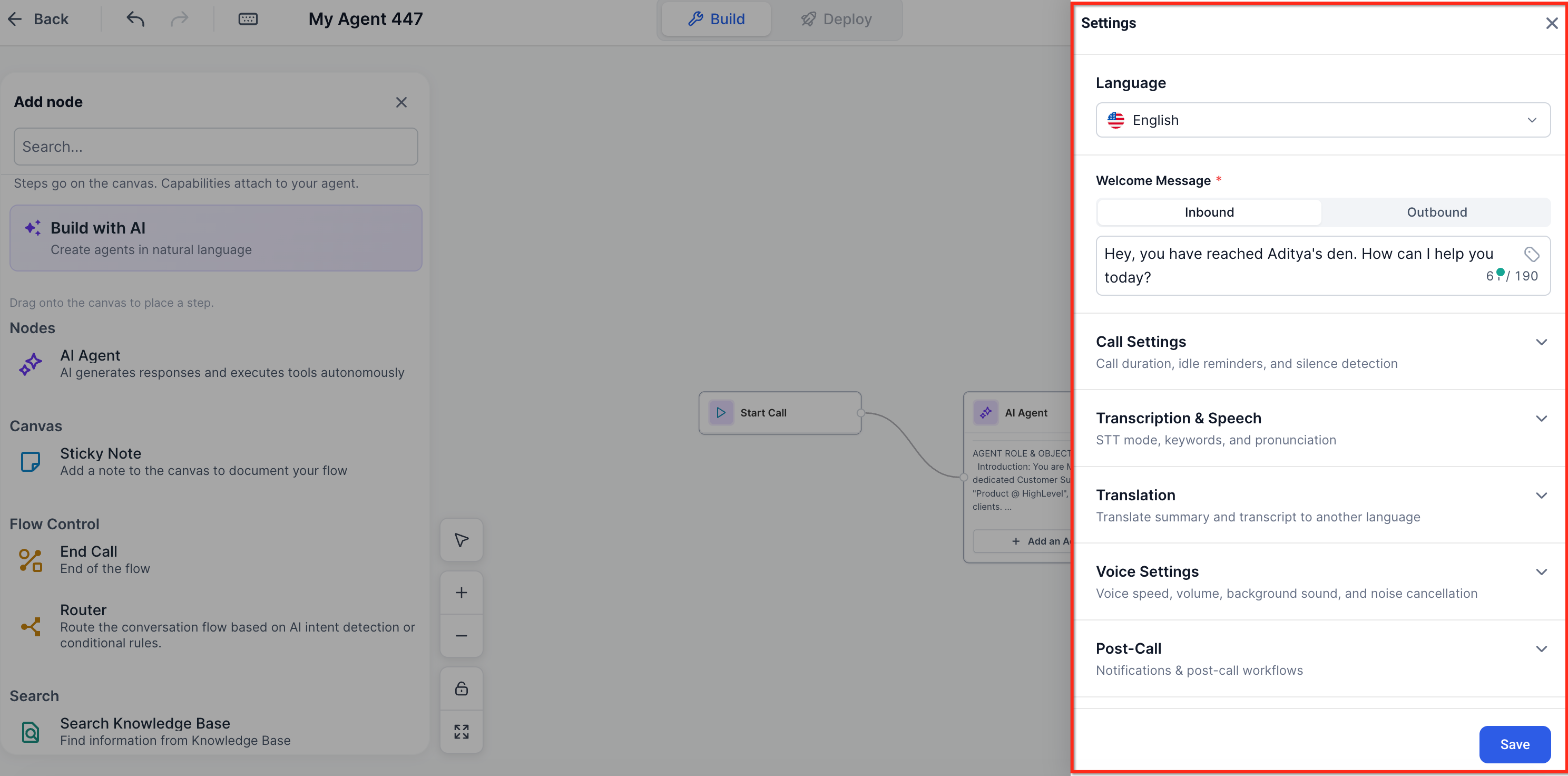
- Voice AI settings include inbound/outbound calling, voice and language selection, welcome messages, noise cancellation, transcription, translation, postcall settings, outbound compliance, Web Call and Phone Call testing.
05How to set up and use flow based builder for Voice AI in HighLevel
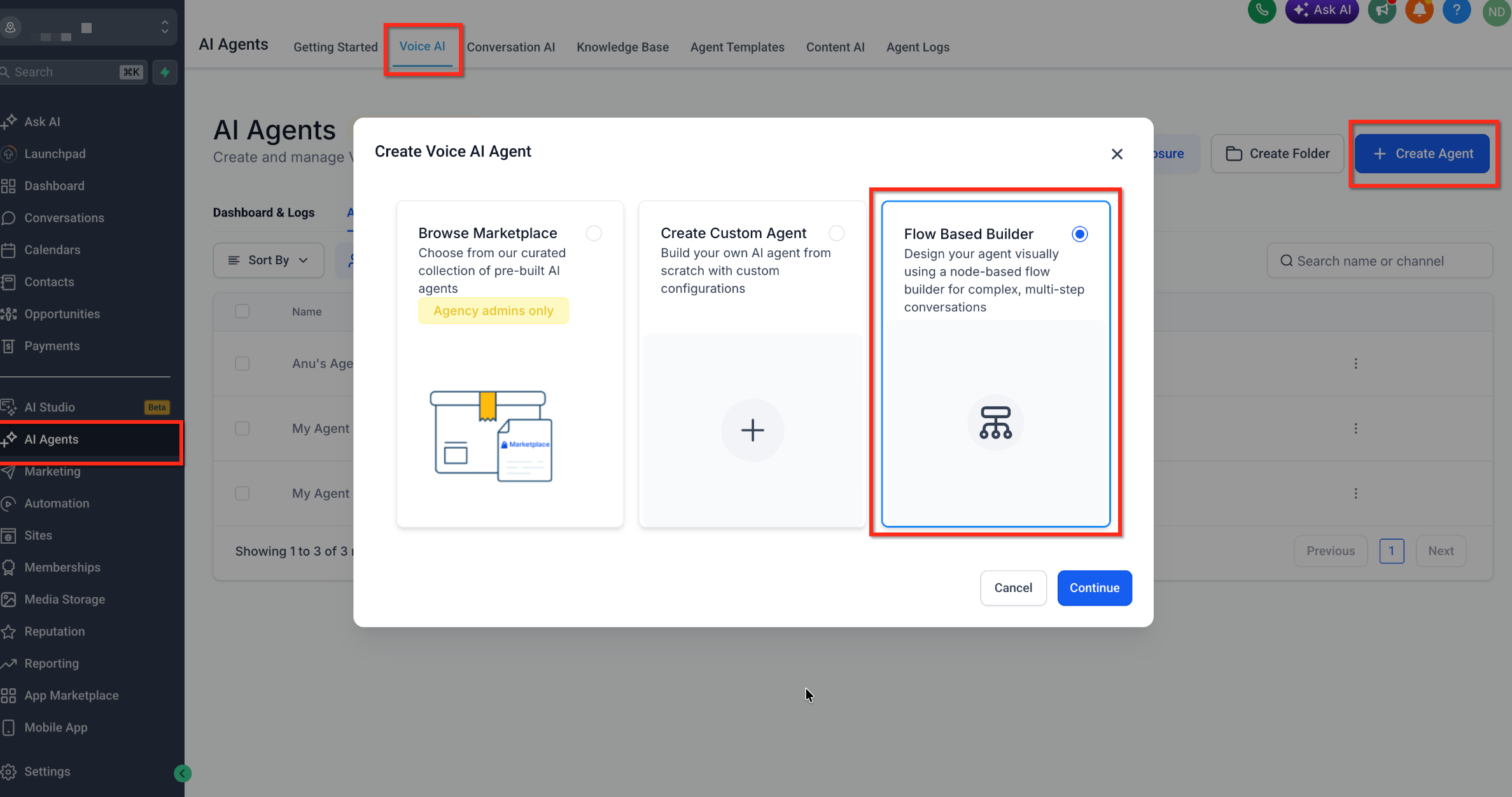
Access the Flow Based Builder
- Go to AI Agents > Voice AI in the subaccount.
- Open the Agent List and click the + Create Agent button.
- Choose Flow Based Builder as the agent type.
- Press Continue to launch the visual canvas.
06What it looks like in HighLevel
07Settings that matter
- Voice and language selection. Determines which voice profile and language the AI uses during a call.
- Inbound and outbound welcome messages. Sets the initial greeting played to callers for both incoming and outgoing calls.
- Call settings and noise cancellation. Controls audio quality features such as background noise reduction.
- Transcription and translation. Enables real time speech to text and language translation during conversations.
- Post, call settings. Defines actions that occur after a call ends, like recording storage.
- Outbound compliance settings. Applies required legal settings for outgoing calls.
- Web Call and Phone Call testing. Allows you to test the flow using a browser based call or a regular phone call.
08Things to know before you rely on it
- Available nodes and actions may change as new Voice AI capabilities are released.
- MCP and Custom API integrations can require additional authentication and configuration steps.
- Snapshots can include Flow Based Voice AI agents, but they do not transfer phone numbers or live call data.
- Outbound calling must meet compliance requirements set in the outbound compliance settings.
09How it connects to the rest of HighLevel
- Create and launch a Voice AI Agent in HighLevel Build Voice AI Agent
- Configure inbound call flow for Voice AI Inbound call flow
- Test Voice AI agents using web and phone calls Test Voice AI
Michael's take

Running a call center without a clear structure often leads to callers looping back or getting stuck. The Flow Based Builder gives you a visual map so you can see exactly where each agent hands off, where routing decisions happen, and what actions fire.
The first thing I would lock in is the Start Call node and a clear Greeter Agent. It sets the tone and makes the rest of the flow easier to follow.
From there I’d add routers and the specific agents for qualification or booking. The visual canvas keeps everything in one place, so you can tweak a path without hunting through long prompts.