
01Who this is for
- Agency owners who operate internal sales teams, because they can generate leads and sync them without leaving the Subaccount.
- Marketing managers within agencies, because they can trigger workflows and campaigns right after a prospect is created.
- Small agencies on the $497 Agency plan (per HighLevel's help center, checked November 2026), because they gain prospecting capabilities without purchasing a Premium add on.
02Prospecting free tier in agency subaccounts, explained
The Prospecting Free Tier adds core prospecting functions, business search, audit report creation, and CRM integration, inside Subaccounts that are flagged as agency owned. Once the Subaccount is marked, users can run the same lead generation and reporting tools they would find in the Agency view, but everything stays in the Subaccount where contacts, pipelines and automations already exist.
Prospects generated inside a Subaccount automatically become Contact records and Opportunity entries in that Subaccount’s CRM. Those records can immediately fire workflows, email campaigns or SMS follow ups, allowing the agency to act on leads without switching contexts.
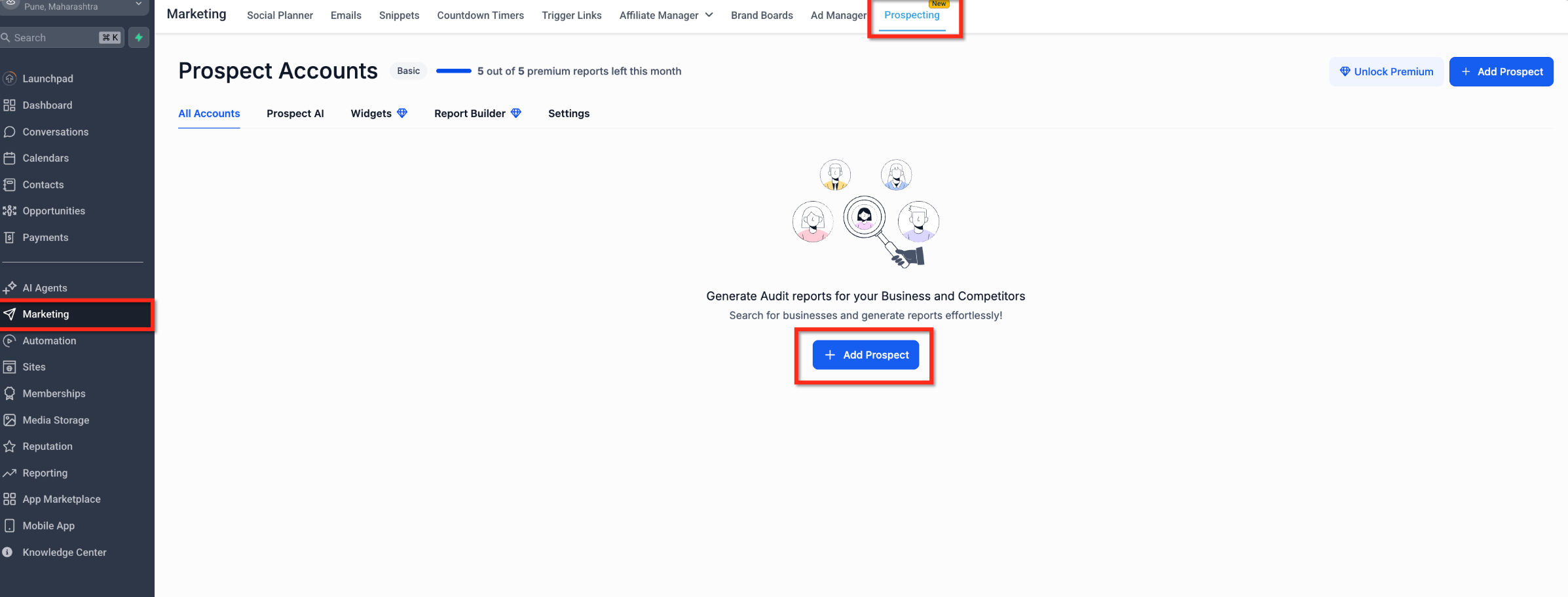
The feature is located under the Marketing menu of each Subaccount. After opening a Subaccount, navigate to Marketing > Prospecting and click “Add Prospect” to start searching for businesses or creating audit reports.
03How businesses use prospecting free tier in agency subaccounts
- Digital marketing agency. The agency marks its internal Subaccount as agency owned, then uses the Prospecting tab to search for new business leads. After adding a prospect, the lead appears as a Contact and an Opportunity, and the agency’s existing email and SMS workflows run automatically.
- SaaS startup. The startup designates its sales Subaccount as agency owned, generates prospect audit reports, and syncs the results into its CRM. The synced contacts trigger nurturing sequences already built in the Subaccount.
- Real estate brokerage. The brokerage sets a Subaccount as agency owned, runs prospect searches for property owners, and adds each prospect directly to the Contacts list. Immediate SMS follow ups are launched via the brokerage’s pre configured automation.
04The numbers and rules that matter
- Requires $497 Agency Plan to mark Subaccounts as agency owned (per HighLevel's help center, checked November 2026).
05Before you start
- The Subaccount must be marked as an Agency Subaccount.
- The Labs toggle that enables Prospecting must be turned on.
- The agency must be on the $497 Agency Plan (per HighLevel's help center, checked November 2026) to designate Subaccounts as agency owned.
06How to set up and use prospecting free tier in agency subaccounts in HighLevel
Mark Subaccount as Agency Subaccount
- In Agency View, open the Subaccounts list.
- Locate the Subaccount you want to change.
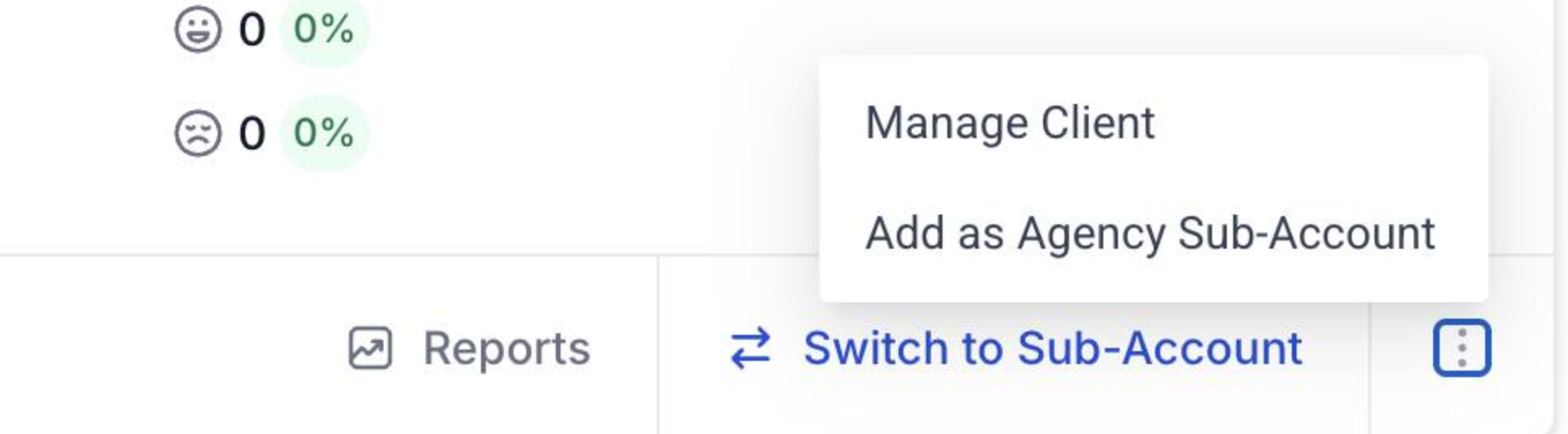
- Click the three dot menu at the bottom right of that Subaccount.
- Select “Add as Agency Subaccount” from the menu.
- Confirm the Subaccount now shows as an Agency Subaccount.
Access Prospecting in Subaccount
- Open the Subaccount that was marked as Agency Subaccount.
- Navigate to Marketing > Prospecting.
- Click “Add Prospect” to start generating leads or audit reports.
07What it looks like in HighLevel
08Settings that matter
- Labs toggle. Controls whether the Prospecting Free Tier is available in Agency Subaccounts.
09Things to know before you rely on it
- Only Subaccounts marked as Agency Subaccount can use the feature.
- The feature is not enabled by default for all Subaccounts.
- Marking a Subaccount as agency owned requires the $497 Agency Plan (per HighLevel's help center, checked November 2026).
- Free Tier is intended for internal agency prospecting; Premium Prospecting is still needed for client facing and advanced use cases.
- Enabling the feature does not replace Premium Prospecting.
10If something goes wrong
- Prospecting does not appear in a Subaccount. Make sure the Subaccount is marked as an Agency Subaccount and that the Labs toggle is enabled.
11How it connects to the rest of HighLevel
- How to use Prospecting within Subaccounts Prospecting in subaccounts
- Enable, locate and engage prospects in HighLevel Enable prospecting
- Migrate prospects from agency view to a Subaccount Prospect migration
Michael's take

Prospecting free tier in Agency Subaccounts is a practical way for agencies to keep lead work inside the tools they already use.
Agencies that don’t run internal prospecting or that rely solely on client facing Premium Prospecting can skip it.