
01Who this is for
- Agency owners who need to recover usage costs from client subaccounts while controlling profit margins.
- Founders on the $297 Unlimited or $497 Founder plans who want to automate wallet reloads and stay informed of high usage (per HighLevel's help center, checked November 2026).
- Finance managers of SaaS agencies who must monitor and reconcile service charges across multiple client wallets.
02Rebilling, reselling, and wallets, explained
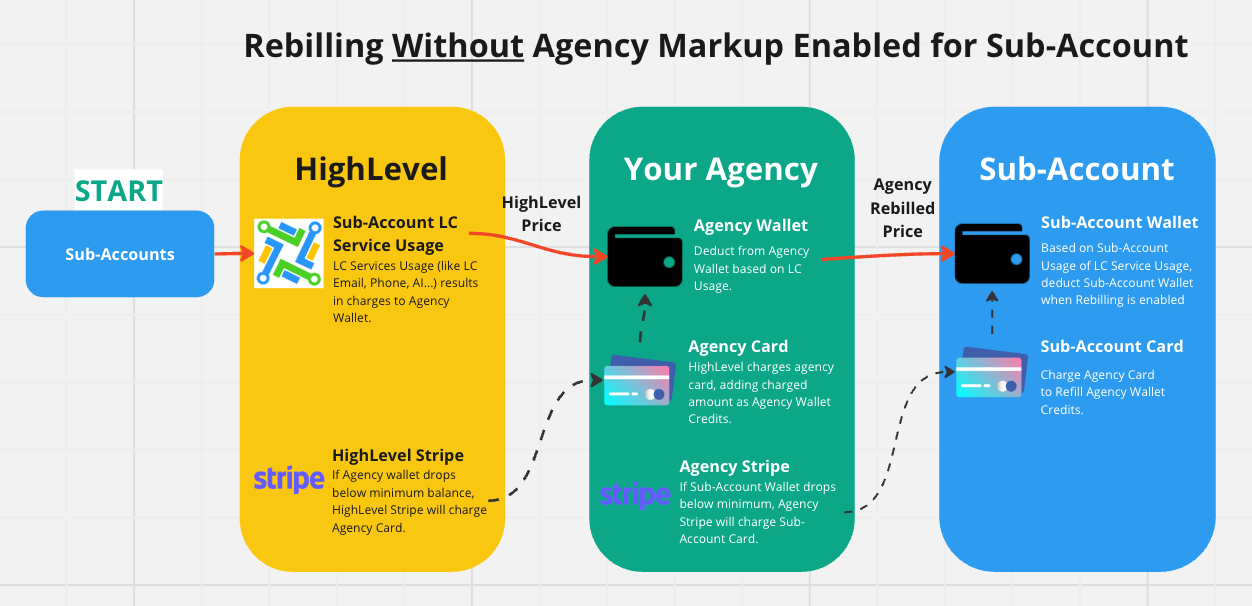
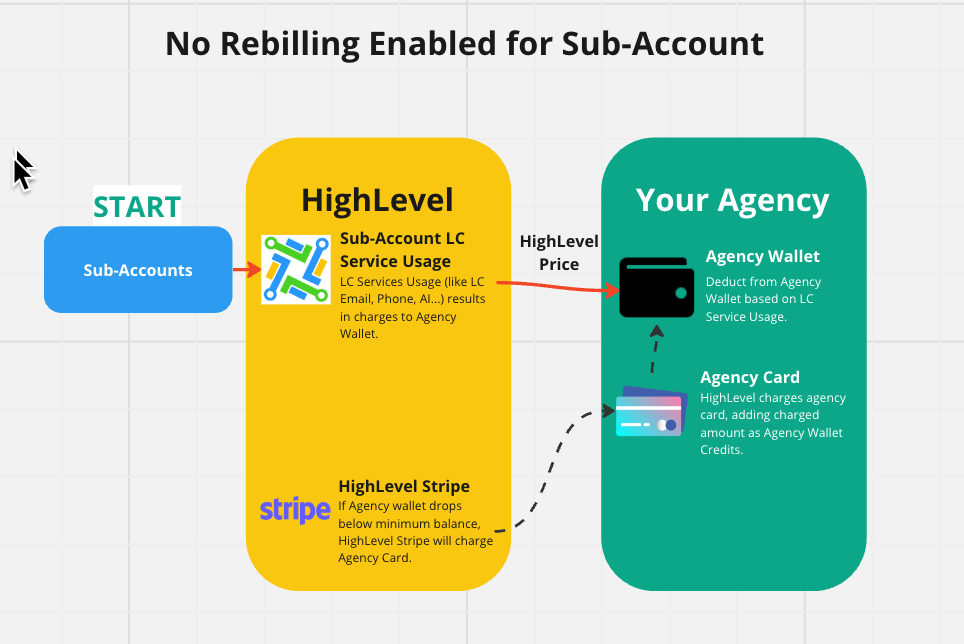
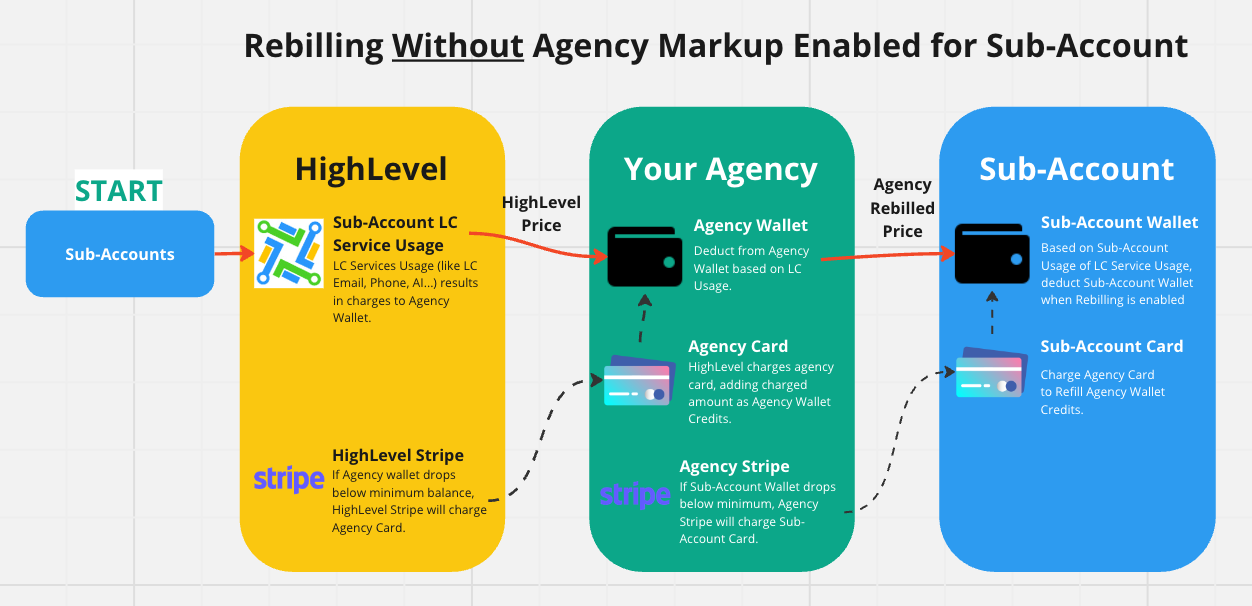
Rebilling is the mechanism that charges a client subaccount for any usage based service after the agency has paid the wholesale price. When markup is enabled, the agency adds a margin to the amount billed to the client. The feature lives in the Agency View under Subaccounts and in each Subaccount’s Manage Client > Rebilling tab.\n\nWallets are prepaid credit balances attached to the agency and to each subaccount. Credits are deducted as services are consumed. When a wallet’s balance drops below a defined minimum, the system automatically charges the card on file for a preset reload amount. Wallet settings are edited in Agency View > Settings > Company Billing.\n\nAgency wallet usage notifications let the agency set a usage threshold for any subaccount. When a subaccount exceeds that threshold, the agency receives a single email alert per day. The notification settings are found at Agency View > Billing > Notifications > Wallet.
03How businesses use rebilling, reselling, and wallets
- Digital marketing agency. The agency enables rebilling without markup for existing client subaccounts so that each client reimburses the exact usage cost of email and SMS services. The agency monitors wallet thresholds and receives alerts when a client’s usage spikes.
- SaaS product reseller. The reseller activates rebilling with agency markup on new subaccounts, allowing the business to add a profit margin to phone and AI usage charges. They use the wallet notifications to avoid unexpected large bills that could affect client satisfaction.
- Consulting firm offering client communications. The firm turns on direct deployment for WhatsApp, which charges only the agency’s card. They keep the agency wallet funded automatically and set usage alerts to stay aware of high consumption across their client accounts.
04The numbers and rules that matter
- Rebilling without markup is available only on the $297 and $497 plan (per HighLevel's help center, checked November 2026).
- Rebilling with agency markup is available on the $497 plan only (per HighLevel's help center, checked November 2026).
- Agency wallet autorecharge adds a preset amount when balance drops below the minimum threshold.
05Before you start
- Add your Agency Stripe account if it is not already connected.
- Ensure the subaccount has a valid payment method attached in its Company Billing settings.
- Be subscribed to the $297 Unlimited or $497 Founder plan for the rebilling option you plan to use. (per HighLevel's help center, checked November 2026)
06How to set up and use rebilling, reselling, and wallets in HighLevel
Enable rebilling without markup
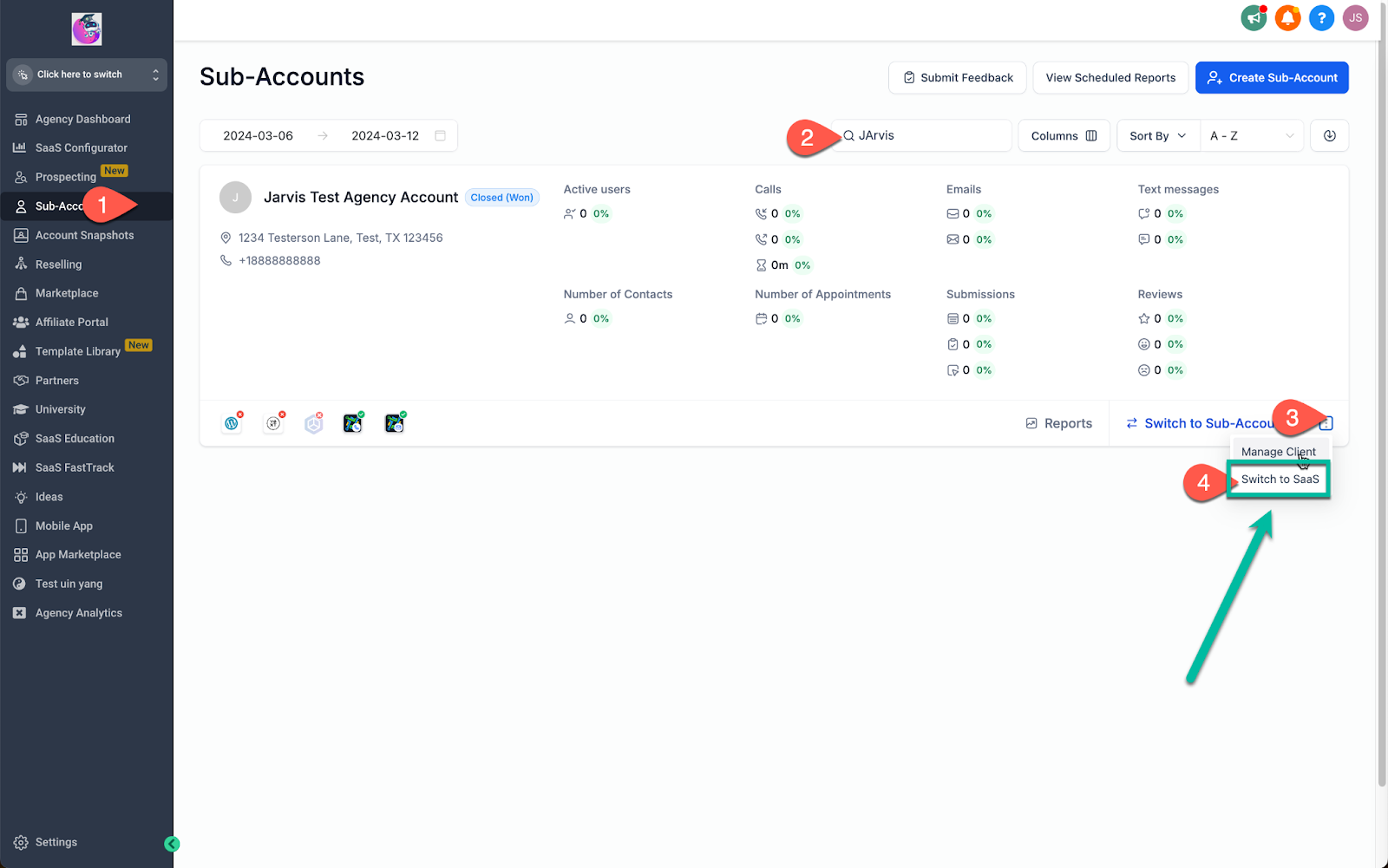
- Open Agency View > Subaccounts and locate the target subaccount.
- Click the three dot menu on the subaccount card and choose "Switch to SaaS."
- Add your Agency Stripe account if it is not already present. (per HighLevel's help center, checked November 2026)
- After the subaccount has a valid card added in Subaccount > Settings > Company Billing, scroll to the rebilling toggle and enable it.
Enable rebilling with agency markup for existing subaccounts
- Navigate to Agency View > Subaccounts.
- Find the desired subaccount, open Manage Client, and select the Rebilling tab.
- Verify the Agency Stripe account is connected; add it if needed. (per HighLevel's help center, checked November 2026)
- Activate rebilling with markup and save the configuration.
Remove rebilling while it is on hold
- From Agency View, select Subaccounts.
- Locate the affected subaccount, open the three dot menu, and choose Manage Client.
- Open the Rebilling tab where the On Hold banner appears.
- Click the Remove rebilling button.
- Review the confirmation modal.
- Select both acknowledgement checkboxes.
- Click Remove rebilling again to confirm.
Set up agency wallet usage notifications
- Go to Agency View > Billing > Notifications > Wallet.
- Turn on the notification feature if it is disabled.
- Click Add a condition.
- Define the usage threshold and select the notification frequency.
- Optionally add additional admin email addresses; the owner is notified by default.
07What it looks like in HighLevel
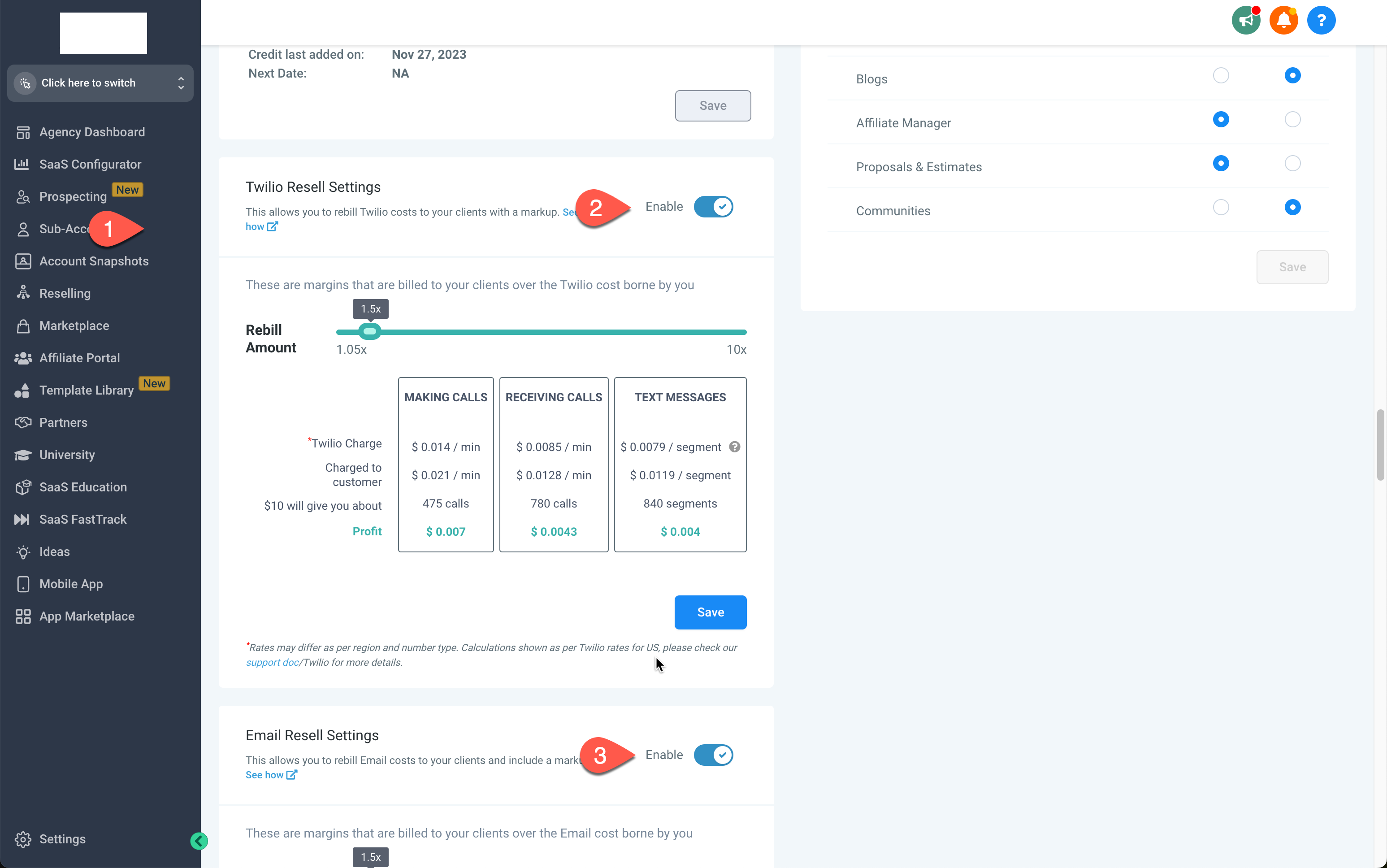
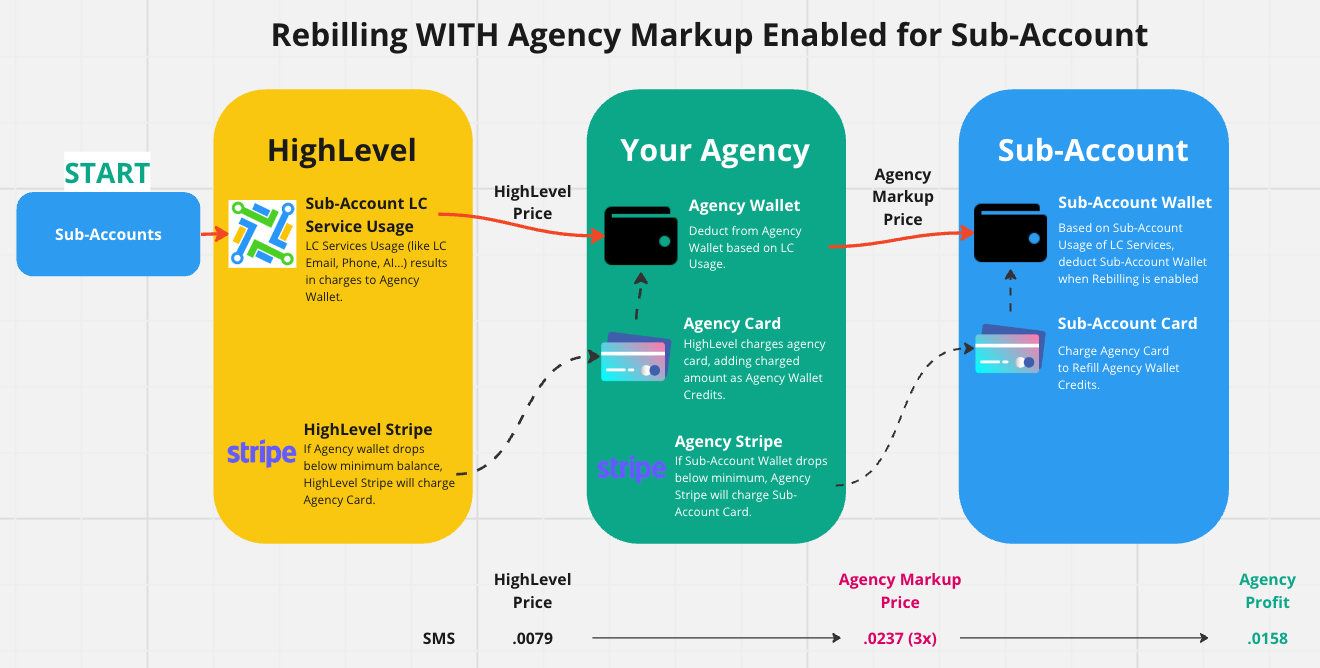
08Settings that matter
- Minimum balance to trigger reload. Sets the wallet credit level at which the system automatically charges the card on file to add more credits.
- Reload amount. Determines how much money is added to the wallet each time an auto recharge event occurs.
09Things to know before you rely on it
- Rebilling without markup is available only on the $297 and $497 plan. (per HighLevel's help center, checked November 2026)
- Rebilling with agency markup is available only on the $497 plan. (per HighLevel's help center, checked November 2026)
- The Remove rebilling option appears only while the rebilling configuration is in an On Hold state and has not been activated.
- Wallet auto recharge depends on a valid card; failures require contacting Stripe or the bank.
10If something goes wrong
- Wallet not reloading. Check the card on file for correct address and information, then contact Stripe or the issuing bank to resolve the payment failure.
- Subaccount payment method fails. Verify the subaccount’s card details in Subaccount View > Settings > Company Billing and ensure the Agency Stripe account is active.
11How it connects to the rest of HighLevel
- Enable email rebilling on Unlimited and Founder plans Email rebilling guide
- Managing SaaS wallet credits Wallet credit management
- All SaaS Configurator features overview SaaS Configurator list
- HighLevel pricing and plans Pricing page
- Start a 30 day HighLevel trial Free trial
Michael's take

From my experience, the autorecharge wallet can be convenient when you have many clients using SMS or AI.
If you only have a few accounts or low usage fees, setting up thresholds and markup may feel like extra overhead, so direct deployment can feel simpler.