
01Who this is for
- Founders running agency websites can quickly produce first draft landing pages without hiring designers.
- Small business owners who need a fast way to add promotional pages can generate, edit and publish them in minutes.
02AI Powered WordPress page builder, explained
The feature lives inside the Sites area of HighLevel. After opening a WordPress site you can select AI Generated Pages and launch a wizard that creates a new page based on a natural language prompt. The AI builds the layout, copy, tone and initial images.
Generated pages are saved as drafts. You can use the Customizations panel to edit text, refine copy, change tone, replace or upload images, and switch color palettes. All changes preview live. When satisfied, you can publish the page or unpublish it later. For deeper design work you can open the page in Elementor.
Draft, preview, publish and unpublish functions depend on LeadConnector plugin version 4.0.3 or later. Each site receives twelve AI page generation credits per month.
03How businesses use AI Powered WordPress page builder
- Dental practice. The practice generates a new appointment landing page by describing the service and desired tone. After the draft appears, they edit the copy, swap the hero image with a clinic photo, and choose a calm color palette before publishing.
- Real estate agency. Agents create a property listing page by prompting the AI with property details. They refine the description, replace the automatically generated image with a high resolution photo, and adjust the tone to friendly before making the page live.
- Ecommerce store. The store produces a promotional sales page, selects a confident tone, uploads a banner image, and switches the palette to a vibrant theme. After previewing, the page is published to drive the campaign.
04The numbers and rules that matter
- LeadConnector plugin version 4.0.3 or later is required for Draft, Preview, Publish and Unpublish support.
- 12 AI page generation credits are included per site per month.
- Supported image formats: JPEG, PNG, WebP, GIF.
- Maximum image file size: 10 MB.
- Available color palettes: Default, Marine, Nature, Earth.
- Available tone options: Professional, Friendly, Compelling, Confident.
05Before you start
- LeadConnector plugin version 4.0.3 or later must be installed.
06How to set up and use AI Powered WordPress page builder in HighLevel
Generate a new AI page
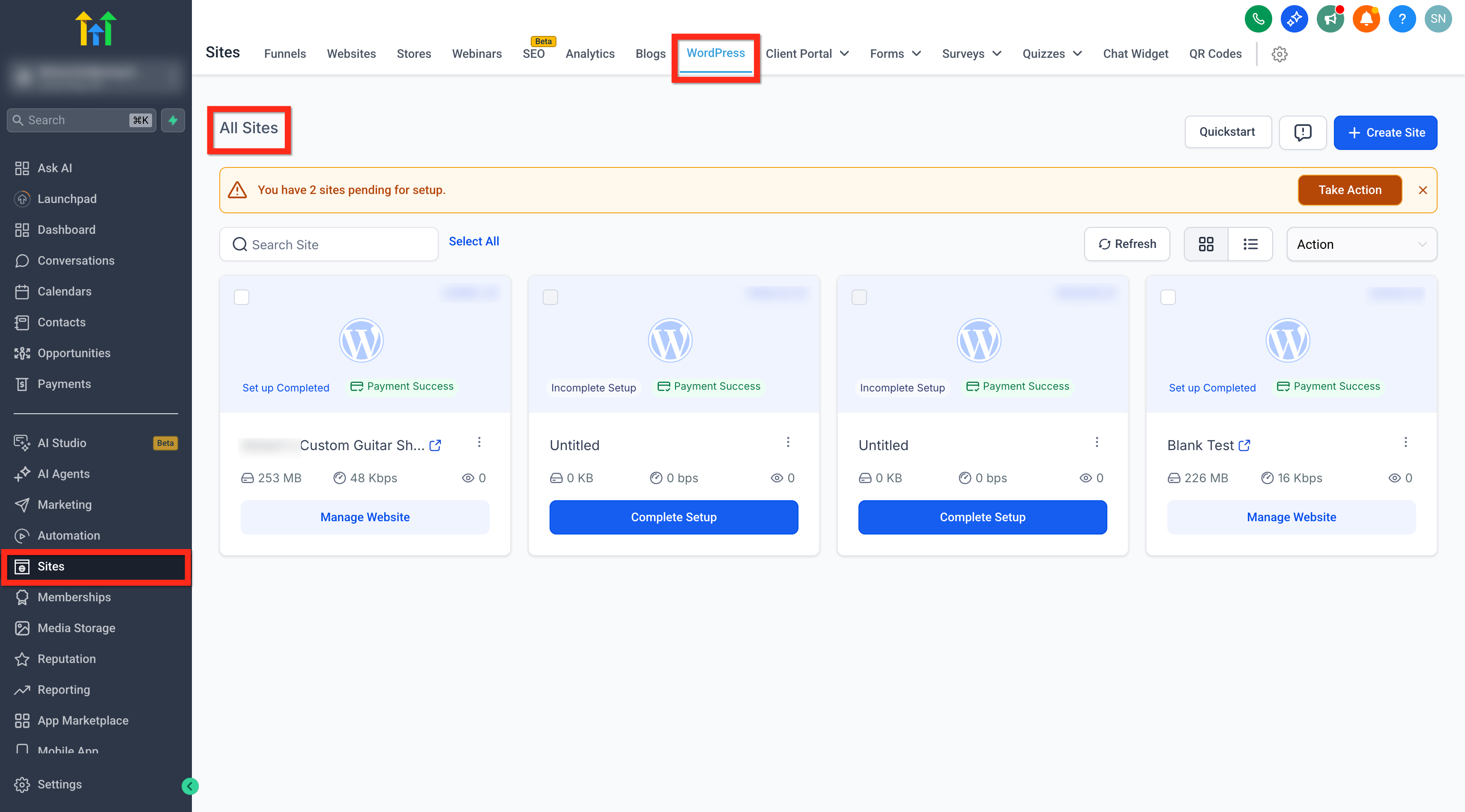
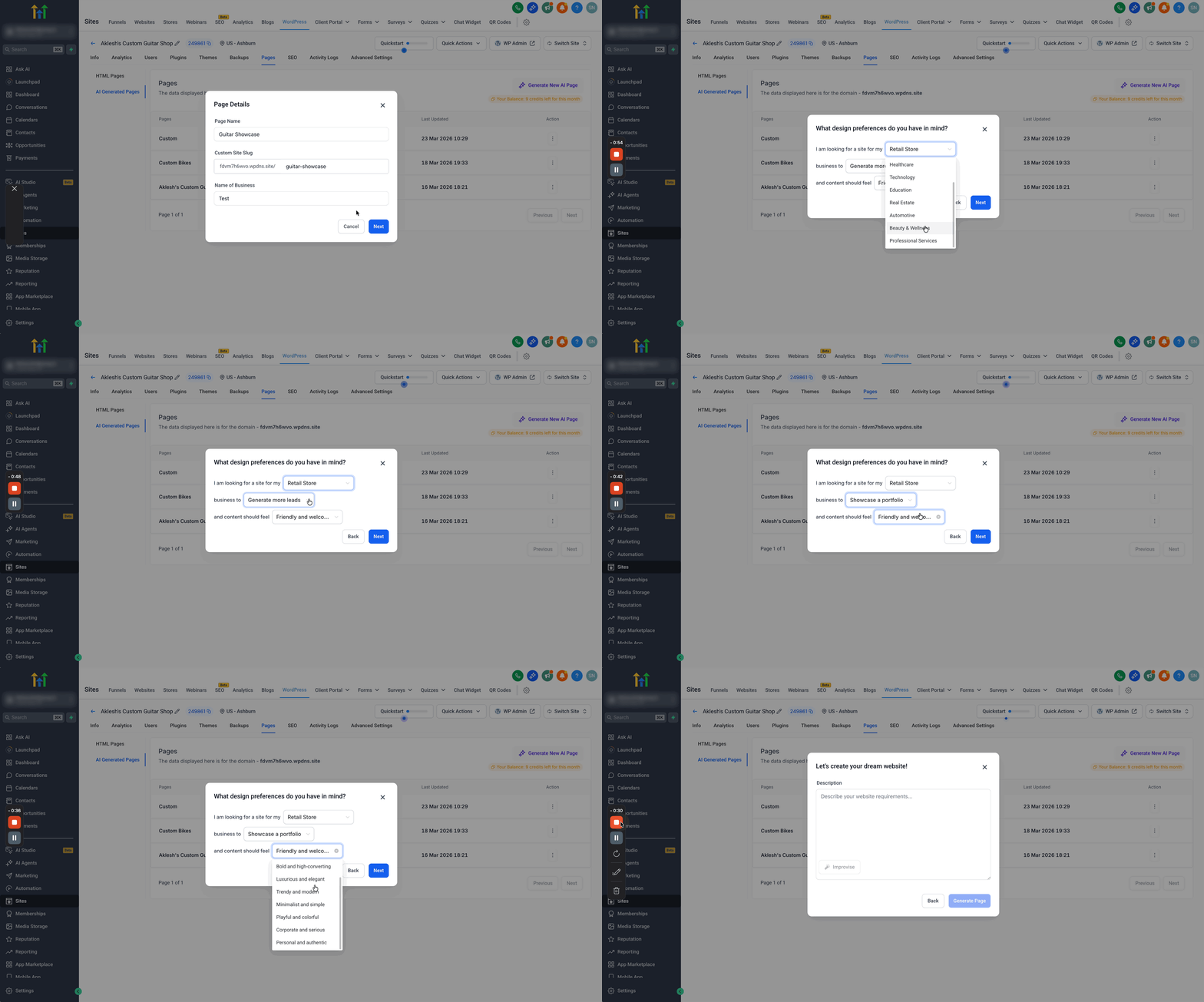
- Open Sites > WordPress > All Sites.
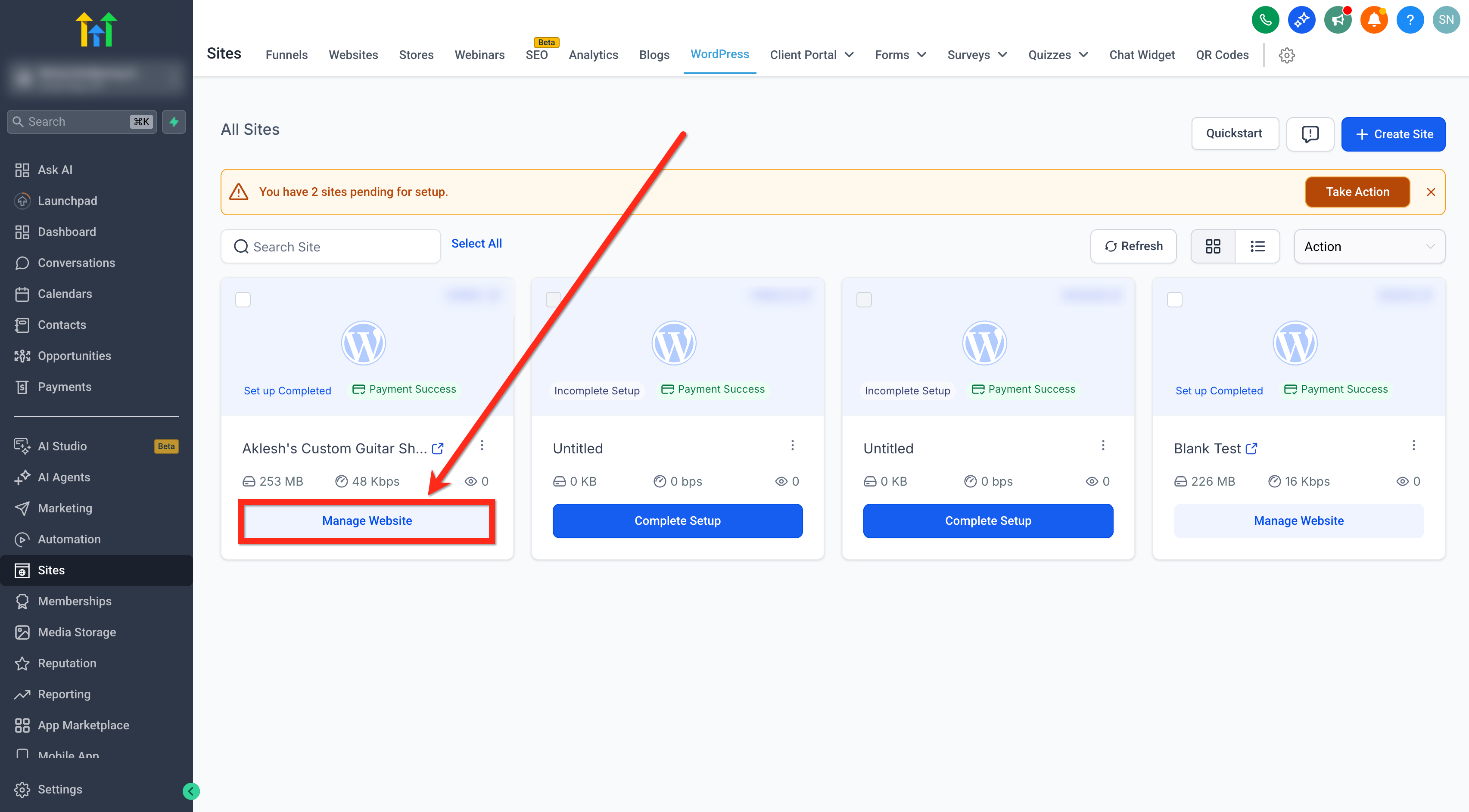
- Click Manage Website.
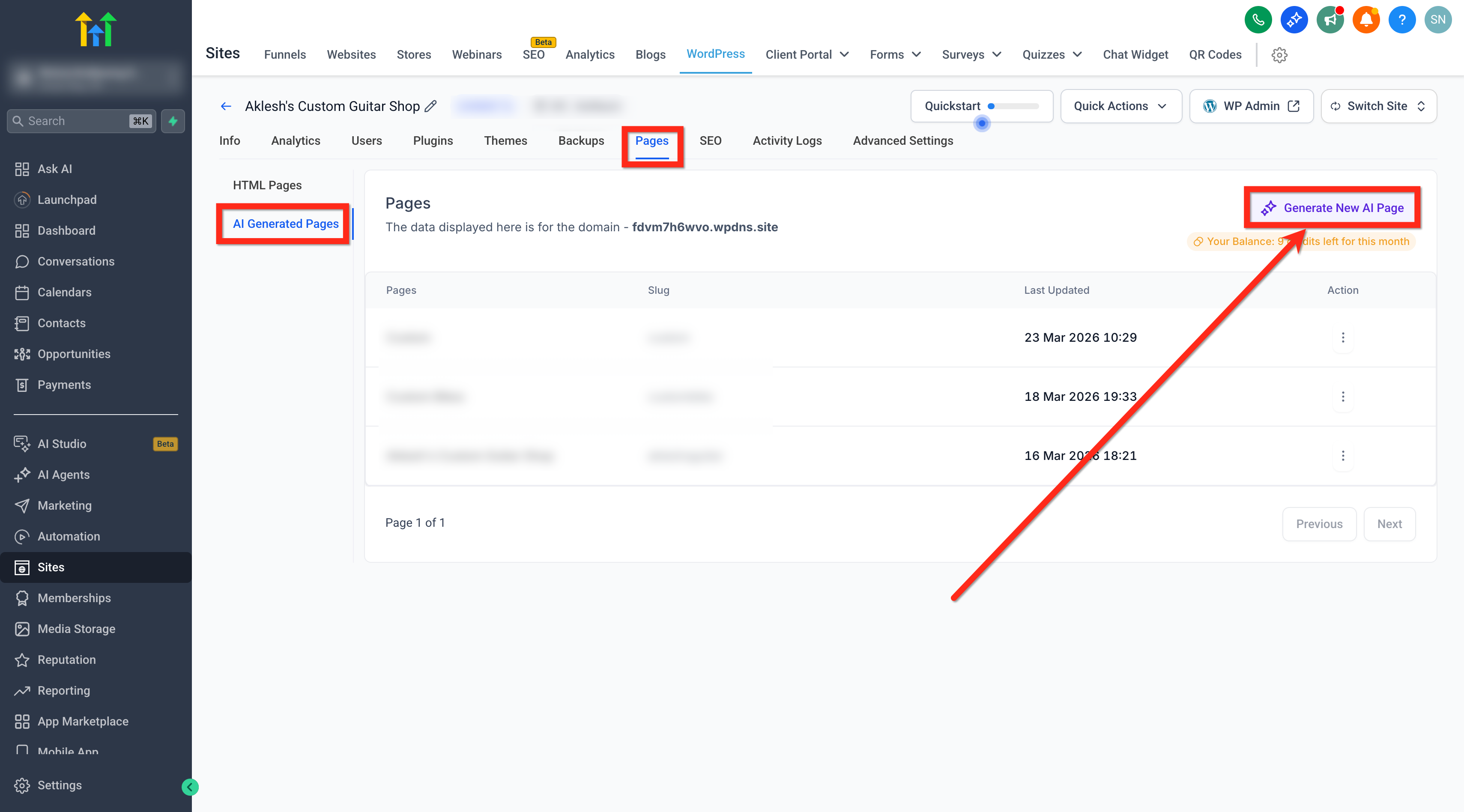
- Select Pages.
- Choose AI Generated Pages.
- Click Generate New AI Page.
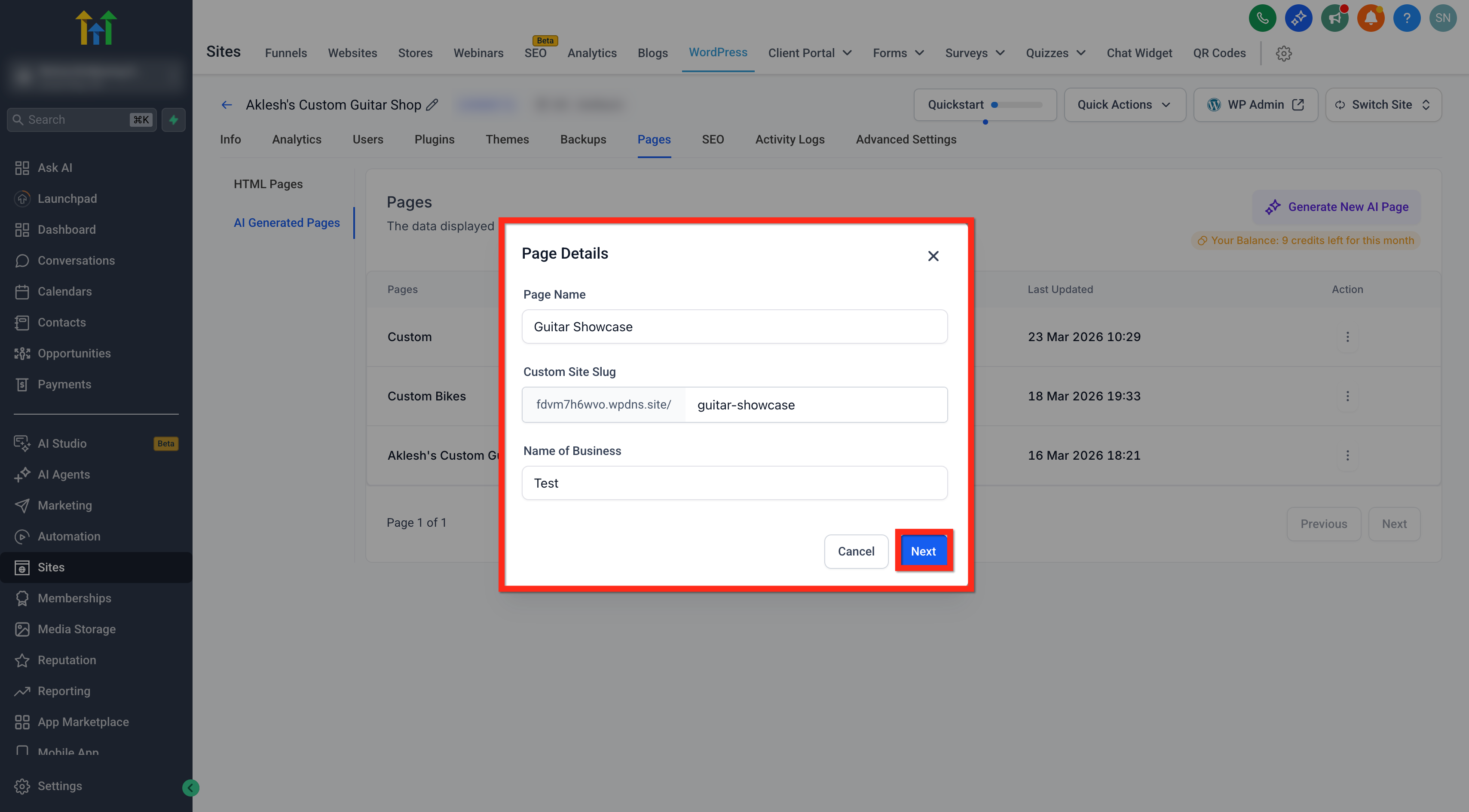
- Enter the Page Name.
- Enter the Custom Site Slug.
- Enter the Name of Business.
- Click Next.
- Select design preferences for niche, goal, and tone.
- Click Next.
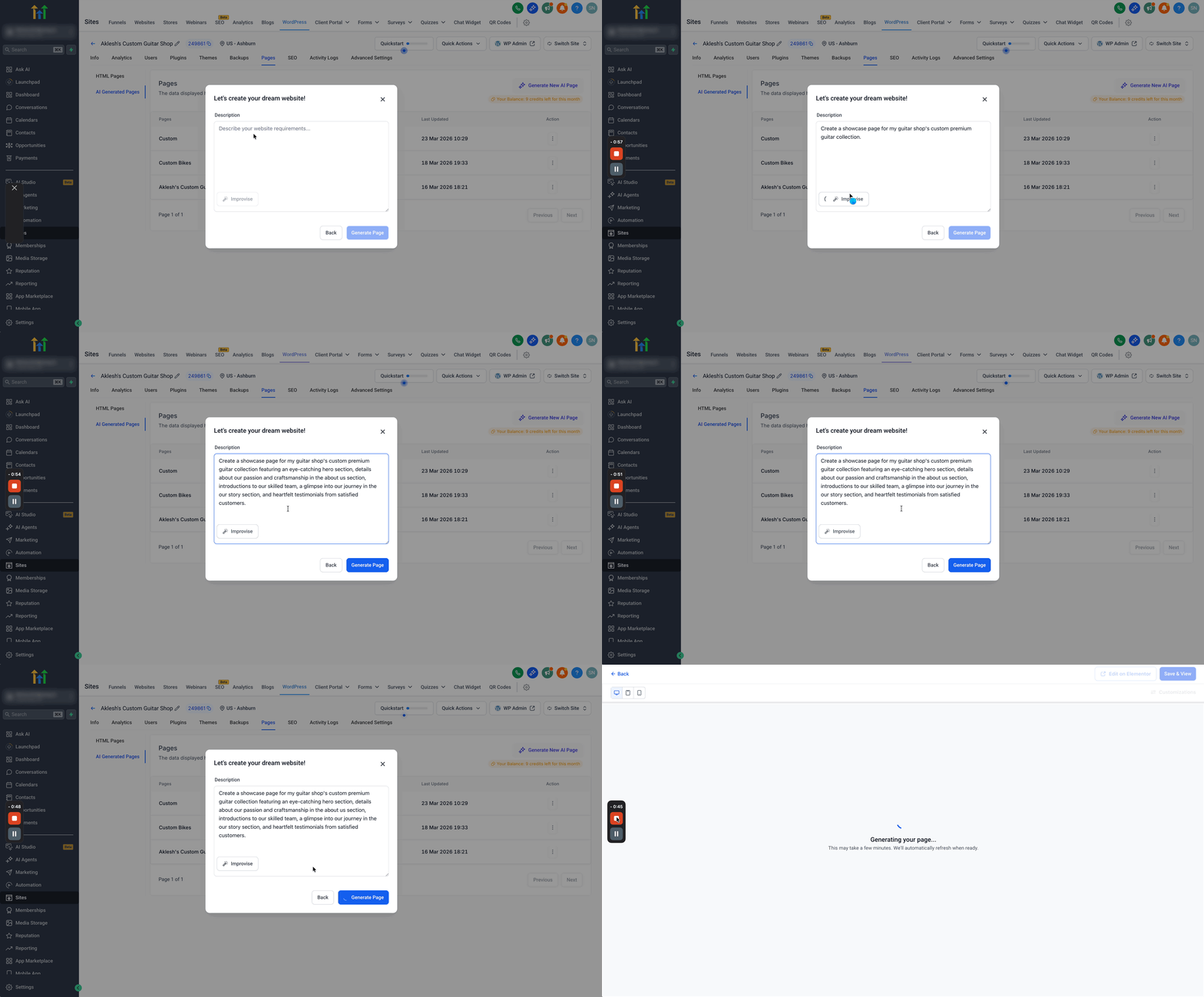
- Provide a plain language prompt.
- Click Improvise if you want HighLevel to improve your prompt.
- Click Generate Page.
Preview, publish and unpublish an AI generated page
- In AI Generated Pages, open the three dot menu for the draft and choose Preview Page.
- Review the page in the preview window.
- Select Publish from the three dot menu or click Save & Publish.
- To remove the page, select Unpublish from the three dot menu.
Provide feedback on an AI generated page
- Open the AI generated page in preview mode.
- Click Give feedback.
- Pick a rating that reflects how well the page matches your intent.
- Optionally type suggestions in the text box.
- Click Submit.
07What it looks like in HighLevel
08Things to know before you rely on it
- Twelve AI page generation credits are included per site each month.
- Image uploads must be JPEG, PNG, WebP or GIF and not exceed 10 MB.
- Draft mode is applied automatically to new AI pages.
- LeadConnector plugin version 4.0.3 or later is required for draft, preview, publish and unpublish features.
- Color palette changes preview live but are saved only after clicking Update Page.
09How it connects to the rest of HighLevel
- Set up WordPress hosting and manage sites in HighLevel. WordPress hosting guide
- Ensure the required LeadConnector plugin version is installed and managed. Plugin and theme management
- Clone an existing WordPress site to reuse layouts and content. Clone WordPress sites
Michael's take

Wondering if AI Powered WordPress Page Builder is worth the effort? It helps you create a first draft quickly, and you keep full control. Tweak copy, switch tones, swap images and pick a color scheme before you hit publish.
If I were setting up a new campaign, I’d generate the page, fine tune the headline with the Refine tool, and then jump into Elementor for any final layout tweaks. Test the draft in preview mode first so you know how it will appear to visitors.