
01Who this is for
- Agency owners benefit because they can access the premium White Glove Migration Assistance for client sites.
- Client subaccounts gain a simplified view with only the standard migration methods, avoiding confusion about unavailable features.
02Migration view, explained
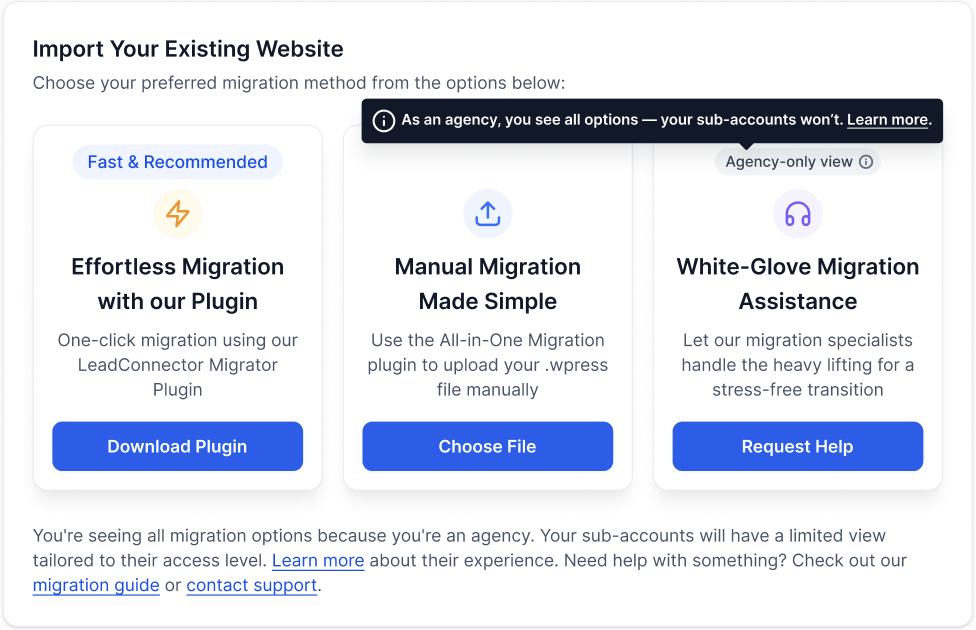
In the WordPress Hosting dashboard, HighLevel presents migration options. Agency users see three choices: a one click plugin migration, a manual upload of a .wpress file, and a White Glove Migration Assistance form that lets specialists perform the migration.
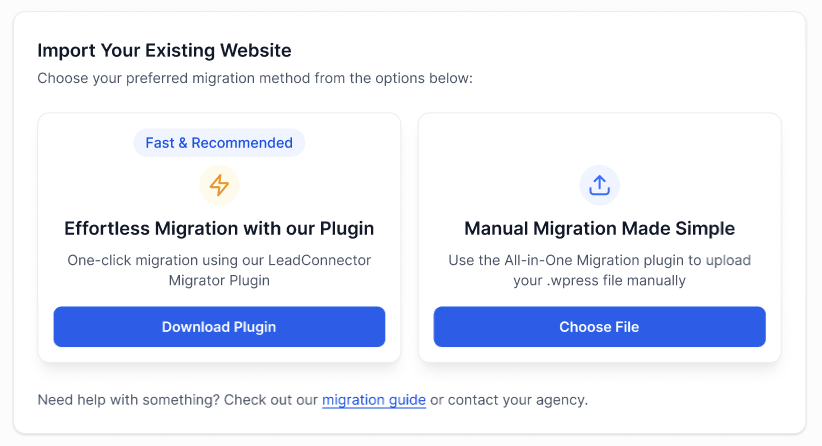
Subaccounts, which are client accounts under an agency, see only the first two options. They do not see any label indicating that a White Glove option exists, preserving the agency’s white label presentation.
The White Glove service is a premium benefit reserved for agencies, ensuring that only the agency can request specialist migration support.
03How businesses use migration view
- Digital marketing agency. The agency views all three migration methods in the dashboard, selects White Glove Migration Assistance, and submits the form so specialists migrate a client’s WordPress site on the agency’s behalf.
- Web design studio serving small businesses. When guiding a client, the studio recommends the Easy Migration plugin for a quick transfer, allowing the client to complete the migration themselves.
- Local service business using a HighLevel subaccount. The business accesses the Migration view within its subaccount and uses the Manual Migration Made Simple option to upload a .wpress file for site transfer.
04How to set up and use migration view in HighLevel
Guide a subaccount through migration
- Recommend the plugin based migration for simplicity.
- Handle the migration yourself using the White Glove option on the client’s behalf.
05What it looks like in HighLevel
06Settings that matter
- Easy Migration with our Plugin. Enables a one click transfer of a WordPress site using the LeadConnector Plugin.
- Manual Migration Made Simple. Allows uploading a .wpress file through the All in One Migration plugin.
- White Glove Migration Assistance. Provides a form for agencies to request specialist migration support.
07Things to know before you rely on it
- The White Glove Migration Assistance option is visible only to agency owners, not to client subaccounts.
- Subaccounts see only the two standard migration options and receive no indication that additional features exist.
08How it connects to the rest of HighLevel
- Guide to creating and managing WordPress sites WordPress site guide
- WordPress hosting activation and plan details Hosting specs
- WordPress plugin and theme management in HighLevel Plugin management
Michael's take

Most people assume their clients can see the White Glove Migration Assistance and get confused when they don’t. The view intentionally hides that premium service from subaccounts so the client never knows there’s a higher level option.
If I were walking a new client through a move, I’d point them to the one click plugin for speed. Then I’d quietly open a White Glove request for any complex sites, keeping the process smooth and the client’s experience clean.