Home/HighLevel/Features/Sites/Granular Permissions for WordPress in HighLevel

Funnels, Websites and Forms

Granular Permissions for WordPress in HighLevel

In short

Granular Permissions for WordPress let agency and subaccount admins assign WordPress tab access to specific team members, improving security and control.

AreaSites · Wordpress
Used forRestrict WordPress tab access, Enhance data security
Setup steps4 steps in 1 task
Last updatedNovember 3, 2026

01Granular Permissions for WordPress, explained

Granular Permissions for WordPress adds a new layer of access control to the WordPress tab inside HighLevel. Agency and subaccount administrators can decide which staff members are allowed to view or edit WordPress settings.

02How businesses use Granular Permissions for WordPress

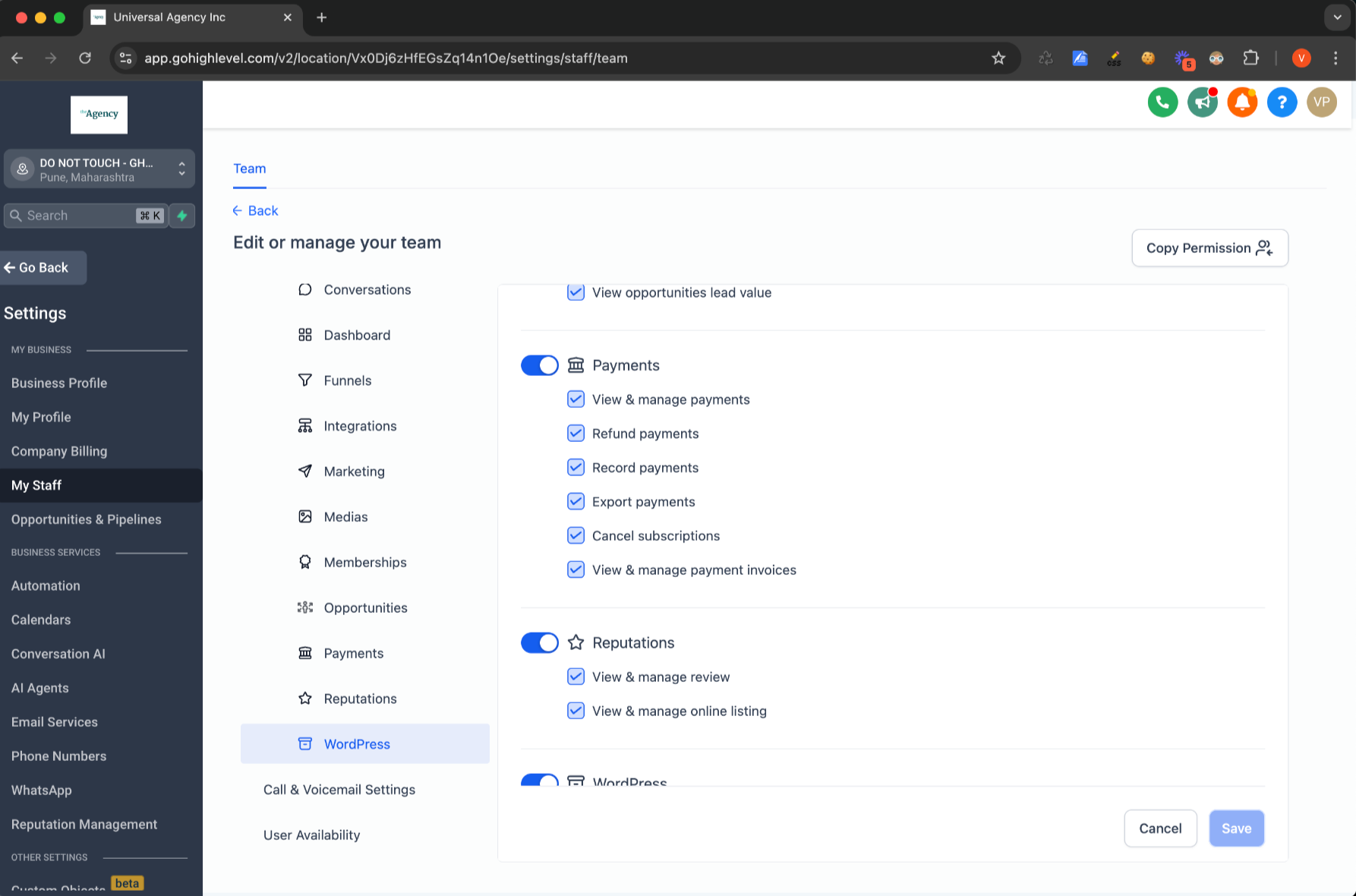
  • Restrict WordPress tab access. An agency or subaccount admin opens the staff list, edits a user, and toggles the WordPress permission off for anyone who should not see the tab. Only those with the permission can open the WordPress section.
  • Enhance data security. Limiting who can manage WordPress settings offers increased security.

03How to set up and use Granular Permissions for WordPress in HighLevel

Set user WordPress permission

  1. Go to Agency/SubAccount Settings.
  2. Select the My Staff/Team tab.
  3. Click Edit next to a specific user.
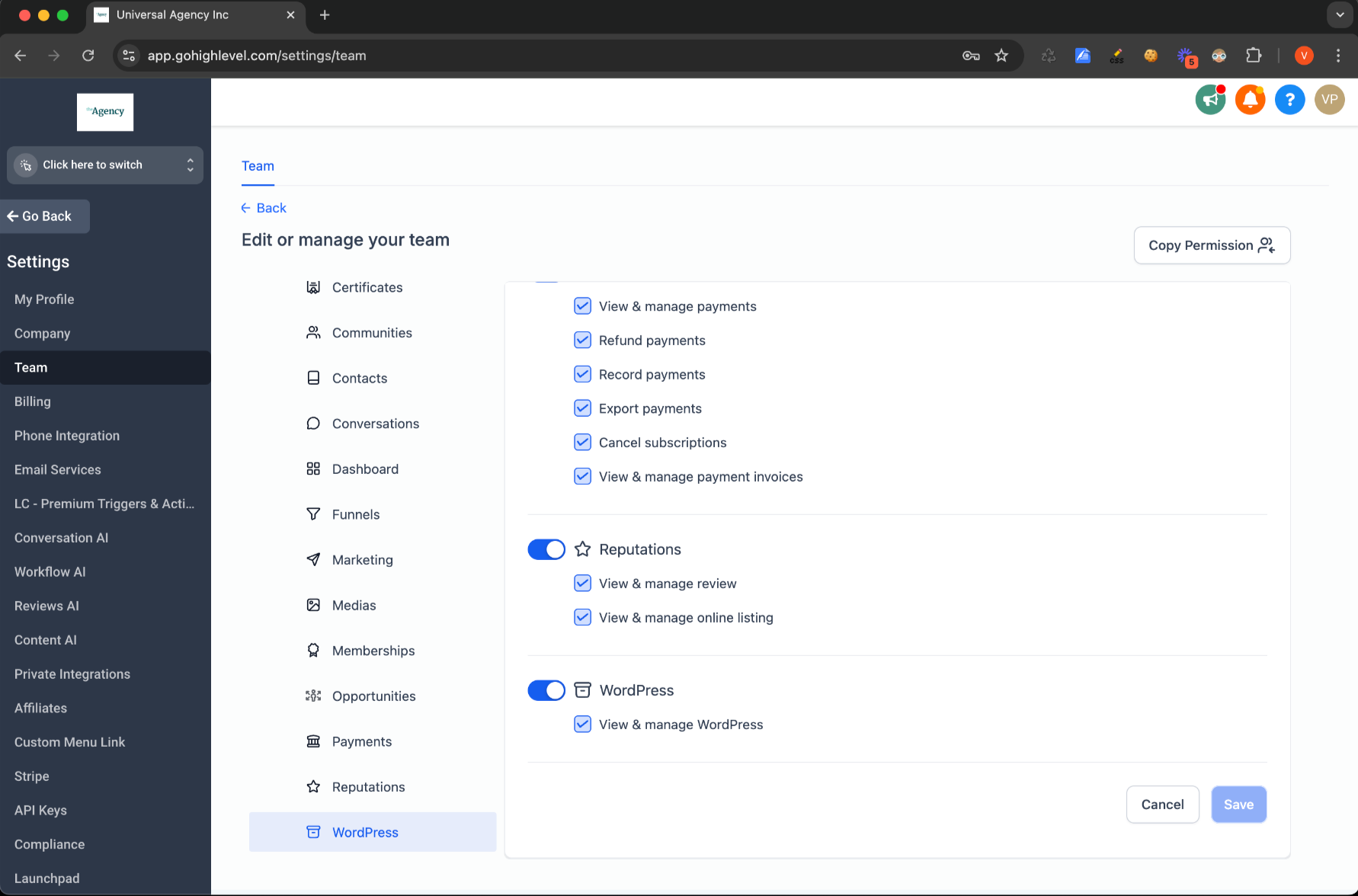
  4. Under Roles and Permissions, locate the WordPress option and adjust it.

04What it looks like in HighLevel
05Settings that matter

  • WordPress option. A toggle under Roles and Permissions that grants or revokes a user’s ability to access the WordPress tab.

Michael's take

Michael Reimer
Michael ReimerFounder of CRM Pros, HighLevel Commander and Certified Admin

Granular Permissions for WordPress lets admins decide exactly who sees the WordPress tab, which helps tighten security.

Get More InformationOpens on HighLevelPublished November 2, 2026 · Updated November 3, 2026

Common questions

Common questions about Granular Permissions for WordPress.

How do I give a team member access to the WordPress tab?

Open Agency/SubAccount Settings, go to My Staff/Team, edit the user, and turn on the WordPress option under Roles and Permissions.

Can I hide the WordPress tab from all staff members?

Yes. Turn off the WordPress option for every user in the staff list. No one will see the tab unless the permission is enabled.

What does the WordPress permission control?

It controls access to the WordPress tab.

Next step

Pick the features that matter. Then get the plan that unlocks them.

Explore the features you want, start with the five at the top, and upgrade through my link when you are ready. The bonuses and the team come with it.

The features directory explains every HighLevel feature in plain English. Browse it to see what the platform can do.

Back to the FeaturesSee the full details
⌃

Site preview

Explore the next page

This destination is reserved in the page inventory and is not built yet.