
01Who this is for
- Email marketers who see high bounce or spam rates, because reputation fixes improve inbox placement.
- SaaS Founders sending product updates, because a trusted domain reduces the chance of critical announcements being blocked.
- Non profit organizations that rely on newsletters, because clean reputations keep donor communications out of spam folders.
02Low domain reputation, explained
The domain reputation tools in HighLevel help you identify why a sending domain is being rejected or routed to spam. They let you verify SPF, DKIM, and DMARC records, run external reputation checks, and review campaign performance metrics inside the platform. All of these actions live under the Settings and Marketing sections of HighLevel.
When you follow the step by step recovery process, the platform guides you through authentication verification, blacklist removal, list cleaning, warm up scheduling, and content optimization. The outcome is a gradual improvement in delivery rates and placement in recipients' inboxes rather than spam or quarantine folders.
03How businesses use low domain reputation
- SaaS startup. The startup verifies its domain authentication in Settings > Email Services > Dedicated Domain and IP, removes any blacklist entries, and warms up the domain by sending low volume campaigns to its most engaged users. This restores inbox placement for product announcements.
- Ecommerce store. The store cleans hard bounce contacts in the Contacts area, runs daily blacklist checks, and adjusts email copy to remove spam trigger words. Consistent engagement improves the domain's reputation, helping promotional emails reach buyers.
- Non profit organization. The organization monitors its domain score with Google Postmaster Tools and Sender Score, conducts seed tests to Gmail and Outlook accounts, and schedules a gradual increase in send volume. This rebuilds trust for fundraising newsletters.
04The numbers and rules that matter
- Domain reputation score ranges 0, 100.
- 85, 100 Excellent. High inbox placement.
- 70, 84 Good. Mostly inbox, some promotions tab.
- 50, 69 Fair. Mixed inbox/spam placement.
- Below 50 Poor. Mostly spam folder or blocked.
- Delivery Rate should be >95%.
- Open Rate should be >20%.
- Bounce Rate should be <2%.
- Unsubscribe Rate should be <2%.
- Sender Score below 70 indicates reputation issues.
- Google Postmaster spam rate above 0.1% is a warning.
- Domain age less than 3 months is viewed with suspicion.
05How to set up and use low domain reputation in HighLevel
Reputation recovery
- Log into your HighLevel account.
- Open Settings > Email Services > Dedicated Domain and IP.
- Click Verify Domain and confirm that all six DNS records pass validation; if any fail, follow the DNS setup instructions.
- Wait 2 minutes for DNS propagation before re checking.
- Set up Google Postmaster Tools at postmaster.google.com.
- Check your Sender Score at senderscore.org and note any score below 70.
- Run an MXToolbox Blacklist Check for current listings.
- Review recent campaign metrics in Marketing > Email > Statistics (delivery >95%, open >20%, bounce <2%, unsubscribe <2%).
- Open Settings > Email Services > Bounce Classification to spot reputation related error messages.
- Send test emails to personal Gmail, Outlook, Yahoo, and Apple Mail accounts and document inbox vs. spam placement.
- Use Mail Tester.com or GlockApps to evaluate spam scores and inbox placement.
- Delete or suppress contacts with hard bounces or no activity for over 90 days in Contacts.
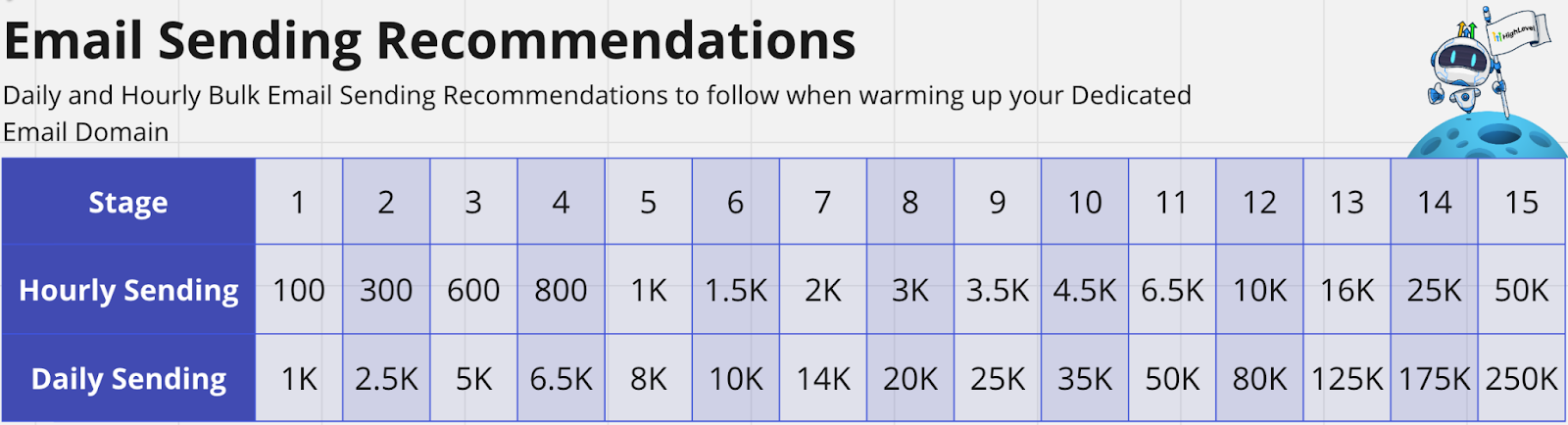
- Begin a warm up schedule by sending a minimal volume to your most engaged subscribers and increase gradually only if open rates stay above 20%.
- Edit campaign content to remove spam trigger words, include a clear physical address, and ensure an easy unsubscribe link.
06What it looks like in HighLevel
07Settings that matter
- Settings → Email Services → Dedicated Domain and IP. Controls verification of SPF, DKIM, and DMARC records for the sending domain.
- Settings → Email Services → Bounce Classification. Shows categorized bounce reasons, including those tied to domain reputation.
- Marketing → Email → Statistics. Displays delivery, open, bounce, and unsubscribe rates for recent campaigns.
08Things to know before you rely on it
- New domains younger than three months are treated with suspicion by ISPs.
- Domain reputation scores below 50 are considered poor and lead to most mail landing in spam or being blocked.
- Google Postmaster Tools no longer provides a direct reputation score, so reliance on performance metrics is required.
09How it connects to the rest of HighLevel
- Learn how to fix a low IP reputation, which also affects deliverability. Low IP reputation guide
- Set up a dedicated sending domain to ensure proper authentication. Dedicated sending domains
- Follow the email warm up and DMARC guide for reliable delivery. Email warm up guide
Michael's take

When my domain keeps landing in spam, the time I spend cleaning lists, fixing authentication, and warming up feels like a necessary investment to get my messages delivered again.
If I’m only sending a few newsletters a month to a small list, the ongoing monitoring and list hygiene can start to feel like a disproportionate effort compared to the limited volume I’m sending.