
01Who this is for
- Marketing agencies benefit by quickly qualifying inbound leads and tailoring outreach with a ready made audit.
- Sales teams gain instant insight into a contact’s marketing health, speeding up the preparation of personalized proposals.
- Business owners can see an immediate snapshot of a prospect’s online presence, helping them decide which leads to pursue.
02Generate marketing audit reports, explained
The action pulls information from a contact’s profile, business name, website URL, address, email and phone, and runs the Prospecting Tool’s audit engine. The result is a Marketing Audit Report that evaluates listings accuracy, website metrics, Google Business profile data, SEO rankings and online reputation.
When the workflow runs, the audit is generated without any manual steps and is attached to the prospect record inside the Prospecting Tool. Users can open the report directly from the Prospecting tab to review findings, export PDFs or share a multilingual version.
The feature lives within the platform’s Marketing > Prospecting Tool area. It requires an active Prospecting Tool subscription and must be added to a workflow that triggers when a contact becomes available, typically the Contact Created trigger.
03How businesses use generate marketing audit reports
- Marketing agency. An agency adds the Generate Marketing Audit Report action to a Contact Created workflow. Each new lead, no matter its source, receives an audit that the team reviews in the Prospecting Tool before crafting a proposal.
- Sales team. The team includes the action in its lead capture workflow. When a new prospect is added, the system creates an audit of the prospect’s online presence, allowing reps to discuss specific marketing gaps during calls.
- Business owner. The owner’s intake form adds contacts to HighLevel. The workflow automatically generates an audit, which the owner views in the Prospecting tab and exports as a PDF for internal analysis.
04Before you start
- A subaccount must have an active Prospecting Tool subscription.
- The Prospecting Tool must be enabled in the account settings.
05How to set up and use generate marketing audit reports in HighLevel
Set up automatic marketing audit generation
- Confirm the subaccount has an active Prospecting Tool subscription and that the tool is enabled.
- Create a new workflow with the Contact Created trigger.
- Add the Generate Marketing Audit Report action to the workflow and publish it.
Locate the generated audit report
- Navigate to Marketing > Prospecting Tool.
- Open the Prospecting tab.
- Search for the specific prospect or contact.
- Open the contact record to view the attached Marketing Audit Report.
Prevent duplicate audits
- If the contact was originally created by the Prospecting Tool, the system automatically blocks a second audit.
- The workflow will not re run for that contact, ensuring clean data.
06What it looks like in HighLevel
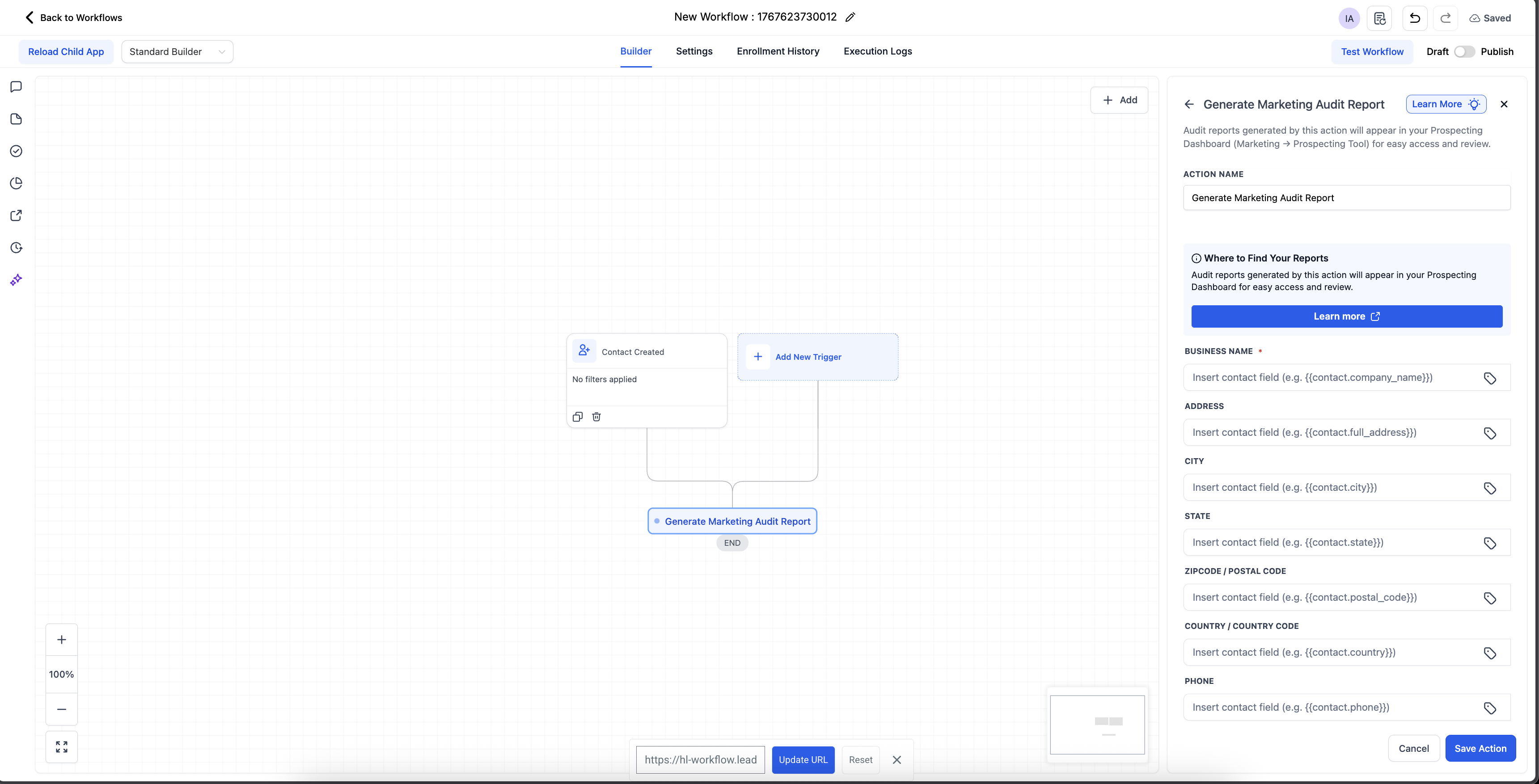
07Settings that matter
- Generate Marketing Audit Report. When triggered, this action creates a Marketing Audit Report for the contact using any available business details.
08Things to know before you rely on it
- Duplicate audits are prevented for contacts originally created by the Prospecting Tool; the system will not generate another report or re run the workflow for those leads.
- The detail of the audit depends on how complete the contact’s information is; missing fields reduce report accuracy.
09How it connects to the rest of HighLevel
- Learn how to customize sections of the audit report. Customize audit sections
- Find out how HighLevel grades the audit findings. Audit grading
- See how to share a multilingual version of the audit report. Multilingual sharing
Michael's take

Don’t forget to keep the Prospecting Tool subscription active; without it the workflow won’t run.