
The short answer
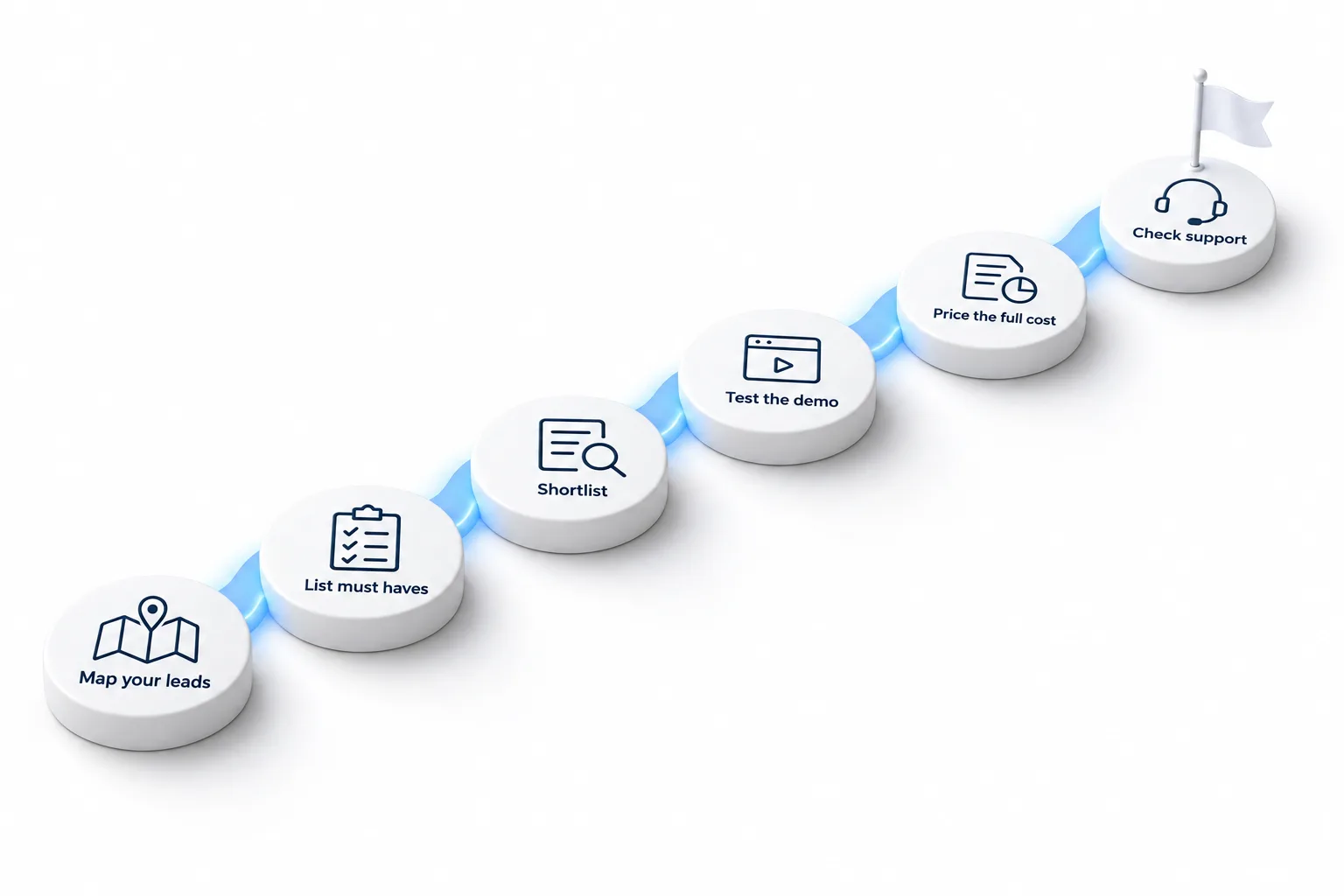
To choose a CRM: map how leads arrive today, list five must haves, count the tools it would replace, price the plan you really need plus usage, test it with live leads for two weeks, and check what help is available for setup. Decide on the total cost and daily use, not the feature list.
Michael is a sponsored HighLevel affiliate. Links to HighLevel use his partner link at no extra cost to you. HighLevel prices and product facts on this page come from HighLevel's own pricing page and help center, checked on the date above.
The steps
Six steps.
- Map where leads come from: calls, forms, ads, referrals, walk ins.
- List your five must haves, such as texting, booking or a mobile app.
- Count the tools the CRM would replace and add up what they cost.
- Price the plan you would really need, plus usage such as texts and calls.
- Run a real workflow with live leads for two weeks.
- Check setup help, training and support before you commit.
Questions
Ask every vendor.
- What is limited by contacts, users or sends?
- Are texting and calling included or extra?
- Can it book appointments itself?
- Is there a mobile app my team will use?
- How do I get my data out if I leave?
HighLevel
If you test HighLevel.
Use the 30 day trial you get through Michael's link to build one complete system: a form, an instant text, a booking and a pipeline. Signing up through Michael's link includes setup help from the CRM Pros team in your first 7 days.
| HighLevel plan | Monthly | Best for |
|---|---|---|
| Starter | $97 | One business, up to three subaccounts |
| Unlimited | $297 | Agencies with many clients |
| Founder Plan | $497 | Selling HighLevel under your own brand |
Usage such as calls, texts, email and AI is billed separately.
Step five in detail
How do you run a two week CRM test?
The test is the step people skip, and it is the one that prevents regret. Here is a plan that fits around a normal working fortnight.
- Day one: build one system. A lead form, an instant text, a booking link and a pipeline with four or five stages.
- Day two: send it real leads. Point one live lead source at the new form. Do not test with pretend contacts.
- Week one: work from it. Answer every lead from the CRM inbox, on desktop and on your phone. Move each deal through the pipeline.
- End of week one: note the friction. Write down anything that took too many clicks or that your team avoided.
- Week two: add one thing. A reminder workflow or a review request. See how easy it is to extend.
- Last day: check three numbers. How quickly leads got a reply, how many booked and what the usage cost.
If you are testing HighLevel, the 30 day trial you get through Michael's link gives this two week plan room to spare, and the plan picker tells you which plan to start it on.
Avoid
What mistakes do people make when choosing a CRM?
- Choosing on the longest feature list. You will use a fraction of it. Choose on the five things you do every day.
- Choosing on plan price alone. The plan is one line of the bill. The CRM pricing guide shows the rest.
- Choosing without the team. The people who will use it daily should try it during the test.
- Shortlisting too many. Two or three is enough. More than that and you never finish testing.
- Ignoring the exit. Ask how you get your data out before you put your data in.
- Planning to do everything. Pick the CRM that makes your first system easy. The rest can wait.
After the decision
What should you do once you have chosen?
Choosing is the start. The next thirty days decide whether the CRM gets used. Name one owner, clean your contact list before you import it and launch one core system before anything else. The CRM implementation checklist lays that out week by week.
If you chose a platform that replaces several tools, cancel the old ones one at a time as each job moves over. What is an all in one CRM explains how to make that switch without disruption. Agencies weighing the same decision can read why agencies choose HighLevel.
If AI is on your list, read what an AI CRM is first. Selling to other businesses? Read CRM for B2B sales. Running a nonprofit? Read the best CRM for nonprofits.

Test with a real lead, not a pretend one. You learn more in one live day than a week of demos.
Through my link
Start HighLevel through my link and the CRM Pros team comes with it.
Same HighLevel price. The difference is who is in your corner for the first ninety days.
- Setup help in your first 7 days
- Your onboarding call with Michael’s team
- Three live calls every week: tech, sales and Michael’s own call
- The private affiliate community
- Snapshots, templates and email swipes
- Four apps: Prompt, Demo, A2P and Sales On Demand
The Founder Plan is HighLevel’s top plan at $497 a month. It is the former Agency Pro plan with an exclusive feature set, rebilling with markup and the Founders Club. The full breakdown is here.
The Founder PlanWhat it includes and who it is for
Questions
Common questions.
How do I choose a CRM?
Choose a CRM in six steps: map how leads arrive today, list five must haves, count the tools it would replace, price the plan you really need plus usage, test it with live leads for two weeks, and check what setup help is available. Decide on total cost and daily use.
What is the most important CRM feature?
Automatic follow up, because it turns leads into conversations. A CRM that replies to every new lead within moments does more for a small business than a long feature list. Check that the follow up can run by text and email, and that it starts without anyone pressing a button.
How long should I test?
Test for about two weeks with live leads. Build one system on day one, send it real leads on day two and work from it every day. At the end, look at how quickly leads got a reply and at the friction your team wrote down.
Can I get help testing HighLevel?
Yes. Setup help is included when you start HighLevel through Michael's link, which also gives you a 30 day trial. The CRM Pros team helps in your first 7 days, so you can build one real system and send it live leads while the test is running.
How many CRMs should I shortlist?
Shortlist two or three. That is enough to compare and few enough to test properly. A longer list means you compare feature tables and never run a real test. Pick the finalists on your five must haves, then run the same workflow in each.
Should I choose a CRM on price?
Not on plan price alone. Choose on total cost and daily use. Add the plan, usage and add ons, then subtract the tools it replaces. A cheaper plan that needs three extra tools, or that your team avoids opening, costs more in the end.
Who should be involved in choosing a CRM?
The people who will use it every day. Have them work real leads in it during the test, and listen to what slows them down. A CRM chosen without the team often goes unused, however good the demo looked. Their daily use decides whether it works.
Next step
See it in your own account. Thirty days, every feature.
Start a trial, build the first system and test it before the first invoice. Usage fees for phone, SMS, email and AI can apply during the trial.
HighLevel has three plans at a flat monthly price, each with unlimited users and contacts. See what each one includes and what it costs.
Compare the PlansStarter, Unlimited and Founder