
CRM guide · AI
What is an AI CRM? The AI features that save a real task.
Most CRMs now advertise AI. This guide explains what the label means, which AI features are useful today, what to check when you compare, and what GoHighLevel includes and what it bills by usage.

The short answer
An AI CRM is a customer relationship manager with AI built into the customer record, so it can reply to messages, answer calls, summarize conversations, rank leads and draft content. The useful ones save a real task. GoHighLevel is one example: AI assistants are included for agency users, and AI agents are billed by plan or usage.
Michael is a sponsored HighLevel affiliate. Links to HighLevel use his partner link at no extra cost to you. HighLevel prices and product facts on this page come from HighLevel's own pricing page and help center, checked on the date above.
Definition
What makes a CRM an AI CRM?
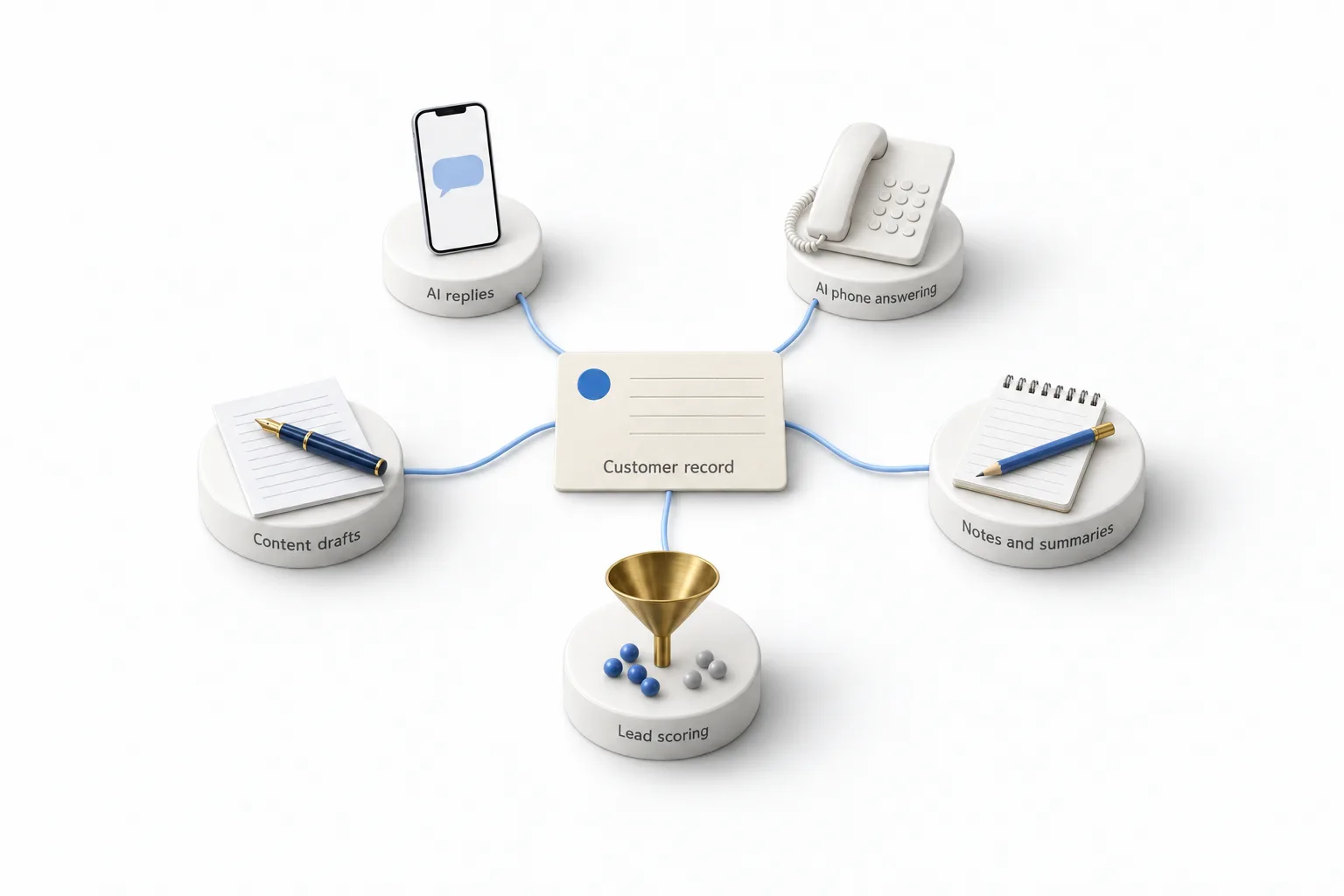
A CRM earns the AI label when the AI works from the customer record, not beside it. A chat window that writes a paragraph on request is a writing tool. AI inside the CRM reads the contact, the conversation history and the calendar, then acts on them. It sends the reply, books the appointment, writes the call summary or flags the lead.
An AI powered CRM means the same thing. Neither label is a standard, so judge the product by the work it removes.
This guide uses one plain test for every feature: does it save a real task? A real task is something a person on your team does today, by hand, again and again. If a feature takes that work over and the result is good enough to use, it passes. If a person has to redo the result, it fails.
If you are still deciding whether you need a CRM at all, start with the CRM guide for small business and come back.
Five features
Which AI features in a CRM are useful today?
Five AI features are useful in a CRM today: AI replies, AI phone answering, AI notes and summaries, lead scoring and content help. Each one has to pass the same test.
- AI replies. An AI agent answers texts, web chat and social messages, asks qualifying questions and books the appointment. The test: does a new lead get a correct answer and a booking without a person typing? Check what it does when it does not know the answer. It should hand the conversation to a person, not guess.
- AI phone answering. A voice agent picks up the call, holds a conversation, books and transfers. The test: would someone who called after hours end up on your calendar? Listen to real calls before you trust it with every caller.
- AI notes and summaries. The AI turns a call or a long thread into a short summary. The test: can a teammate pick up the conversation without listening to the recording? This is the lowest risk feature to switch on, because nothing goes to the customer.
- Lead scoring. The CRM ranks contacts by how engaged they are, so your team calls the warmest people first. The test: does your team's call list change because of the score?
- Content help. The AI drafts emails, texts, social posts and pages inside the tool where you send them. The test: is editing the draft faster than writing it? Treat every draft as a first version and check each fact, price and claim before it goes out.
Buyer table
What should you look for in an AI powered CRM?
Look for the task each AI feature should save, then check the one detail that decides whether it will work for you. The table lists both.
| AI feature | The task it should save | What to check |
|---|---|---|
| AI replies | Typing the first reply to every new lead | Which channels it covers and how it hands off to a person |
| AI phone answering | Picking up every call, including after hours | Booking and transfer on a live call, and what each minute costs |
| AI notes and summaries | Writing up calls and long threads | Where the summary is saved and who can see it |
| Lead scoring | Deciding who to call first | Whether you can see and change the rules behind the score |
| Content help | Writing first drafts | Whether it follows your brand voice and who approves before sending |
Three more questions apply to the whole product, whatever the feature list says.
- Does the AI work from the same record? The reply, the call and the summary should all land on one contact. If the AI lives in a separate tool, you are back to copying things across.
- How is the AI billed? It can be included in the plan, a monthly add on or charged by use. Ask which before you compare prices.
- Can you cap the spend? Look for a setting that pauses usage when an allowance runs out, so a busy month does not surprise you.
The CRM feature checklist covers everything else a CRM should do, from pipelines to mobile access.
Try before you buy
How do you test AI in a CRM before you pay?
Test one task with your real information during a free trial, then read the bill. These six steps cover it.
- Pick one task. Choose the one that costs your team the most time this week.
- Write down what good looks like. A reply you would be happy to send, and the things the AI must never say.
- Set it up with your real information. Your services, hours, service area and booking calendar.
- Run real scenarios. Use messages and calls your customers actually sent, including the awkward ones. Michael's rule for his own builds is twenty real scenarios before an agent talks to a lead.
- Check the handoff. Ask something it should not answer and confirm the conversation reaches a person.
- Read the bill. Look at what the test used, then estimate a normal month.
The 30 day trial through Michael's link gives you 30 days to run these steps in a HighLevel account. Usage fees for phone, SMS, email and AI can apply during the trial.
Example
What does GoHighLevel include, and what is billed by usage?
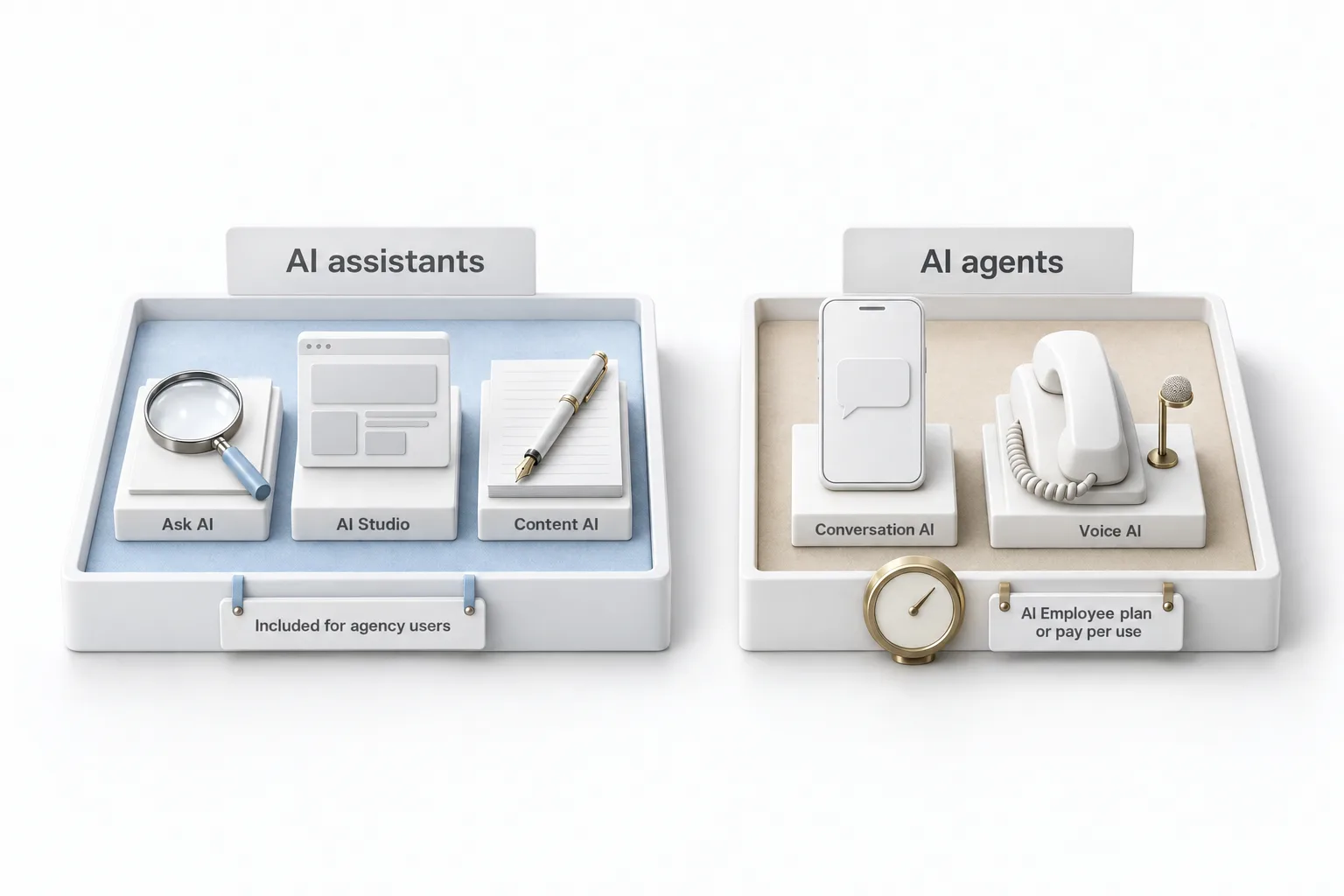
GoHighLevel includes its AI assistants for agency users on every plan and bills its AI agents by plan or by use. HighLevel, which is how the company writes its name, is an all in one platform with the CRM, messaging, calling and AI working from one contact record. It sorts its AI into two groups, and the pricing follows that split. AI assistants such as Ask AI, AI Studio and Content AI help you build and write. They are free for agency users, subject to fair use. AI agents such as Conversation AI and Voice AI work on the business's behalf. They are paid, through an AI Employee plan per subaccount or pay per use.
| AI feature | HighLevel tool | How it is billed |
|---|---|---|
| AI replies | Conversation AI | AI Employee Growth includes 1,000 responses a month. Unlimited removes the cap under fair use. Without a plan, pay per use by tokens. |
| AI phone answering | Voice AI | Growth includes 100 minutes a month. Unlimited removes the cap under fair use. Without a plan, pay per use by the minute. Phone system charges apply to every call. |
| AI notes and summaries | Voice AI call logs with transcripts and summaries, plus a summarize action in workflows | Call summaries come with Voice AI. The summarize text workflow action is $0.01 per execution on any AI plan. |
| Lead scoring | Contact engagement score with a workflow trigger, plus your own points | Part of the CRM and its workflows. It is not an AI Employee plan item. |
| Content help | Content AI | Free for agency users under fair use. Unlimited under fair use on every AI Employee plan. Otherwise subaccount usage is pay per use. |
Prices match this site's AI pricing pages, which cite HighLevel's AI Product Pricing article, November 2026.
AI Employee plans are billed monthly per subaccount. Starter is $20, covers the AI assistants only and is sold to Founder Plan agencies only. Growth is $50. Unlimited is $97. These sit on top of the platform plan, which starts at $97 a month for HighLevel Starter. A subaccount without an AI Employee plan can still use supported AI products on pay per use billing, with no monthly fee. When a plan allowance runs out, usage pauses by default until Extra Usage is turned on.
The GoHighLevel AI plans overview has the full plan table, GoHighLevel pricing covers the platform plans, and GoHighLevel AI explained maps every AI tool to the work it does. For scoring, the guide on how to set up lead scoring in GoHighLevel walks through the engagement score and custom points.
Honest view
When is AI in a CRM not worth paying for?
It is not worth paying for when there is no repeated task for it to save, when nobody will review its work, or when the work needs human judgment.
- The task does not exist yet. AI saves work you already do. If leads are not coming in, fix that first.
- Nobody will read the transcripts. An agent that is never reviewed keeps making the same mistake.
- The work is judgment, not pattern. AI agents should not give legal, medical or financial advice, handle emergencies, negotiate or make guarantees. Those stay with people.
To see how HighLevel and the other common options stack up beyond AI, read the best CRM for small business comparison.

Do not buy a CRM because it says AI on the box. Pick the one task that eats your week, test that and read the bill. If it saves the task, keep it.
Through my link
Start HighLevel through my link and the CRM Pros team comes with it.
Same HighLevel price. The difference is who is in your corner for the first ninety days.
- Setup help in your first 7 days
- Your onboarding call with Michael’s team
- Three live calls every week: tech, sales and Michael’s own call
- The private affiliate community
- Snapshots, templates and email swipes
- Four apps: Prompt, Demo, A2P and Sales On Demand
The Founder Plan is HighLevel’s top plan at $497 a month. It is the former Agency Pro plan with an exclusive feature set, rebilling with markup and the Founders Club. The full breakdown is here.
The Founder PlanWhat it includes and who it is for
Questions
Common questions.
What is an AI CRM?
It is a customer relationship manager with AI built into the customer record. It can reply to messages, answer calls, summarize conversations, rank leads and draft content, using each contact's history. The label is not a standard, so judge each feature by the task it saves.
Is an AI powered CRM different from a regular CRM?
Yes, in what it does without you. A regular CRM stores contacts and deals and waits for a person to act. An AI powered CRM can act on the record itself, such as sending the first reply or writing the call summary. The contact list and pipeline underneath are the same.
Which AI features in a CRM are worth paying for?
The ones that save a task your team does by hand today. For most small businesses that starts with AI replies to new leads and AI phone answering, because those are the tasks that get missed when the team is busy. Summaries, lead scoring and content drafts save team time and carry less risk.
Is GoHighLevel an AI powered CRM?
Yes. GoHighLevel, also written HighLevel, is an all in one platform with a CRM and AI built in: Conversation AI for text channels, Voice AI for phone calls, Reviews AI, Content AI, workflow AI actions and Managed Agents. Each one works from the same contact record. Plans start at $97 a month. AI assistants are free for agency users, and AI agents are billed by plan or by use.
How much does AI cost in GoHighLevel?
AI assistants such as Ask AI, AI Studio and Content AI are free for agency users on every plan, subject to fair use. AI Employee plans are $20, $50 or $97 a month per subaccount, and AI agents such as Conversation AI and Voice AI are included from the $50 Growth plan up, or billed pay per use. Phone system charges apply to every Voice AI call.
Can AI in a CRM replace my front desk or sales team?
No. It takes the pattern based work off their plate: answering common questions, booking, qualifying and summarizing. People still handle upset customers, negotiation, exact quotes on complex work and anything that needs legal, medical or financial judgment. Every AI agent needs a rule for when to hand the conversation to a person.
Next step
See it in your own account. Thirty days, every feature.
Start a 30 day trial through Michael's link, build the first system and test it before the first invoice. Usage fees for phone, SMS, email and AI can apply during the trial.
HighLevel has three plans at a flat monthly price, each with unlimited users and contacts. See what each one includes and what it costs.
Compare the PlansStarter, Unlimited and Founder