
01Who this is for
- Agency owners who need to verify tax charges for compliance with state regulations.
- Finance managers in SaaS companies who must track usage based tax liabilities.
- Tax advisors supporting clients that operate on the HighLevel platform.
02Sales & use taxes, explained
The feature records sales and use tax that HighLevel applies to qualifying subscription and usage sales. Tax amounts appear as separate line items in the agency wallet and can be reviewed at any time.
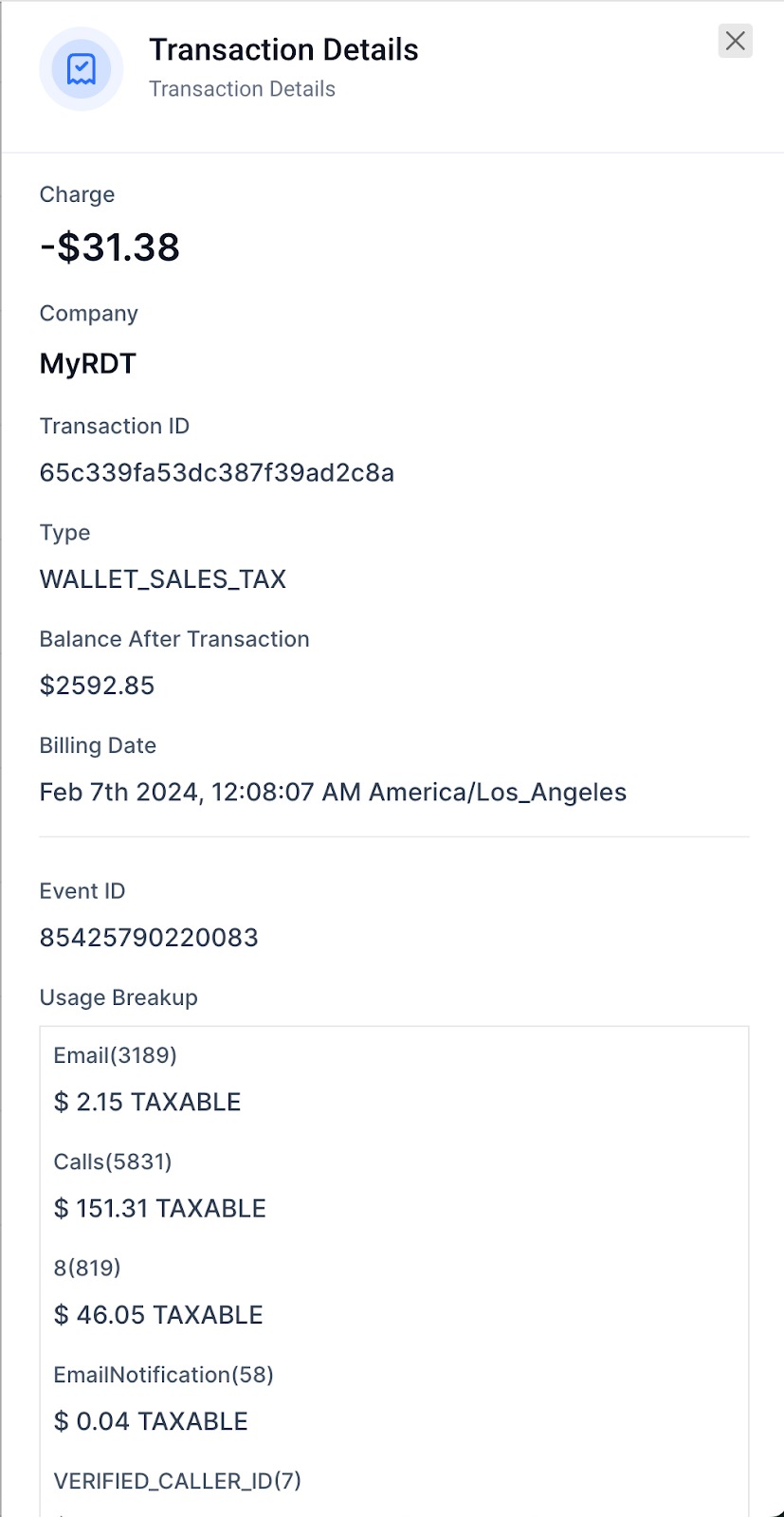
Tax details are displayed under the Wallet & Transactions area of the Settings menu. Users can expand a transaction to see the exact tax calculated for that period.
The system follows two billing schedules: for monthly usage under $10k tax is billed on the first of the following month; for usage over $10k tax is split, with half billed on the 16th and the remainder on the first of the next month (per HighLevel's help center, checked November 2026).
03How businesses use sales & use tax
- SaaS startup. The startup logs into its HighLevel agency, navigates to Settings > Billing > Wallet & Transactions, and expands each transaction to confirm the tax applied to its subscription fees.
- Marketing agency. The agency reviews the wallet to see tax charges on usage based services, then uploads a valid exemption certificate to avoid future tax billing.
- Ecommerce consulting firm. The firm checks the wallet for tax entries, ensures they match its sales volume thresholds, and contacts the tax team if it needs clarification.
04The numbers and rules that matter
- August 1, 2022, HighLevel started collecting sales tax on applicable subscription based product sales.
- January 1, 2023, HighLevel started collecting sales tax on applicable usage product sales billed in app via the wallet system.
- Customers with usage product sales < $10k per month. Tax billed on the 1st of the following month (per HighLevel's help center, checked November 2026).
- Customers with usage product sales > $10k per month. Tax billed on the 16th for sales 1st 15th, and on the 1st of the following month for sales 16th end (per HighLevel's help center, checked November 2026).
- Exemption certificates must be submitted before January 29, 2024.
05Before you start
- User must be logged into a HighLevel agency account.
- The account must be for a United States customer.
06How to set up and use sales & use tax in HighLevel
View tax details in wallet
- Sign in to the HighLevel agency dashboard.
- Select Settings from the main navigation.
- Open the Billing section.
- Click on Wallet & Transactions.
- Locate the Detailed Transactions list.
- Press the chevron (>) next to a transaction to see tax information.
07What it looks like in HighLevel

08Things to know before you rely on it
- If monthly usage sales are under $10k, tax is billed on the 1st of the next month (per HighLevel's help center, checked November 2026).
- If monthly usage sales exceed $10k, tax for the first half of the month is billed on the 16th and the remainder on the 1st of the following month (per HighLevel's help center, checked November 2026).
- Tax collection applies only to United States customers.
09How it connects to the rest of HighLevel
- Review all notification options for tax alerts All Notifications features
- Start a trial to explore tax reporting tools 30 day trial
- Check pricing plans that include wallet access HighLevel pricing
Michael's take

Most people assume that once they receive a tax invoice they can ignore it because they are already paying tax elsewhere. In reality, HighLevel only stops charging tax when it has a valid resale or exemption certificate on file. Without that paperwork, the tax will keep appearing on each invoice.
If I were a HighLevel customer, I would locate the exemption form, fill it out with HighLevel, Inc as the seller, and email it to salestax@gohighlevel.com before the deadline. I’d also double check the wallet transaction view to confirm that the tax line disappears after the certificate is processed.