
01Who this is for
- Agency owners who manage multilingual teams can set a common default language to simplify navigation for all staff.
- Customer support reps working in different regions benefit from choosing personal language preferences without altering the account default.
02Platform languages, explained
Platform Language is a preference that tells HighLevel which translation to display in supported parts of the platform. A subaccount can set a default language that applies to every user unless the user selects a different language in their profile. System notifications and email subjects follow each recipient’s chosen language, and any untranslated text appears in English.
The setting lives under Settings > Business Profile for the subaccount default and under Settings > My Profile for each user’s personal choice. HighLevel supports English plus twelve additional languages, with regional variants for French and Portuguese. When a translation is missing, the interface shows the English version instead of a blank field.
03How businesses use platform language
- Digital marketing agency. The agency sets Spanish as the subaccount default so all team members see menus and notifications in Spanish. An English speaking manager changes their personal language to English in My Profile, keeping their interface in English while the rest of the team works in Spanish.
- Ecommerce store with international staff. The store configures French (Canada) as the default platform language. A German based employee opens Settings > My Profile and selects German, overriding the default so their dashboard and alerts appear in German.
- Consulting firm serving multilingual clients. The firm keeps English as the default but allows consultants to pick their preferred language, such as Italian, in My Profile, ensuring they receive system messages and email notification titles in Italian while client facing communications remain unchanged.
04The numbers and rules that matter
- English (default) and 12 additional languages are supported.
- Supported languages: Spanish, German, French (France), French (Canada), Portuguese (Portugal), Portuguese (Brazil), Italian, Dutch, Swedish, Danish, Finnish, Norwegian.
05Before you start
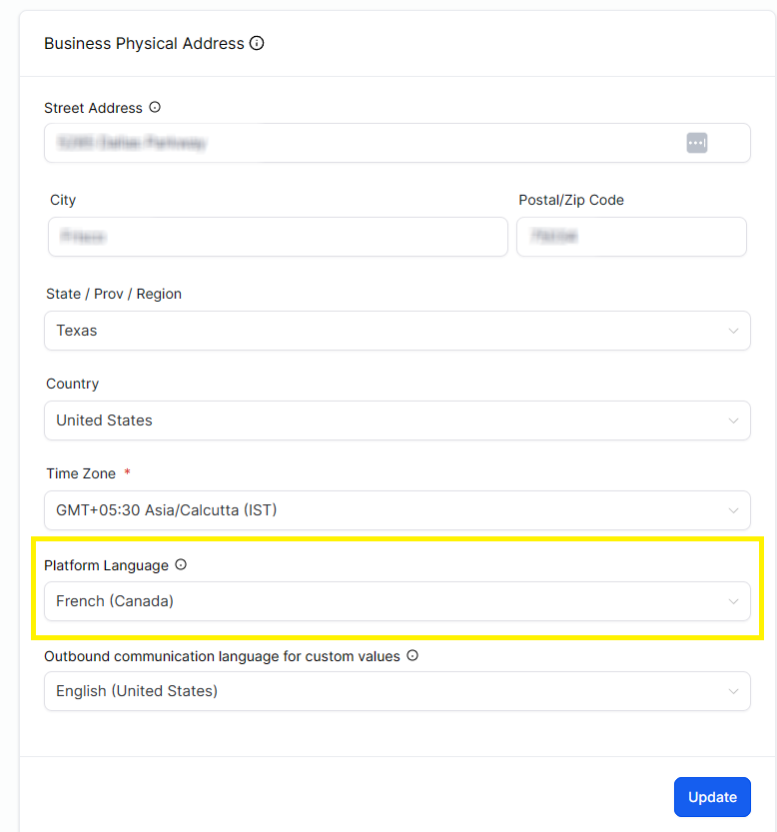
- Platform Language is separate from Outbound Communication Language for Custom Values in the Business Profile.
06How to set up and use platform language in HighLevel
Set the default language for a subaccount
- Open the desired HighLevel subaccount.
- Navigate to Settings > Business Profile.
- Locate Platform Language and choose the preferred language from the list.
- Click Update in the Business Physical Address section.
Set an individual user's language
- Open Subaccount View > Settings > My Profile.
- Find Platform Language and select the desired language.
- The chosen language now overrides the subaccount default for that user.
07What it looks like in HighLevel
08Settings that matter
- Platform Language. Determines which translation HighLevel shows in supported screens, system messages, notifications and email templates for the selected user or subaccount.
09Things to know before you rely on it
- HighLevel provides English plus twelve additional languages, including regional options for French and Portuguese.
- If a specific string lacks a translation, the system displays the English version instead of leaving the field empty.
10How it connects to the rest of HighLevel
- Internationalization for Client Portal & Child Apps Client Portal language settings
- Report translation feedback from the HighLevel interface Submit translation issues
- All Internationalization features View full i18n coverage
Michael's take

When a team speaks several languages, switching the whole CRM into one language can slow down work and cause confusion. Getting the interface into a language people understand right away removes that friction. The first setting I would lock in is the subaccount default Platform Language, so the majority of screens and notifications appear in the language most of the team uses.
From there, I’d let each user pick their own language in My Profile if they need a different one. It’s a quick way to keep everyone on the same page without reconfiguring the whole account.