
01Who this is for
- Founders who run email campaigns using an external SMTP service; they need matching sender data to avoid delivery failures.
- Agency owners configuring client SMTP integrations; a mismatched sender blocks test emails.
02SMTP email mismatches, explained
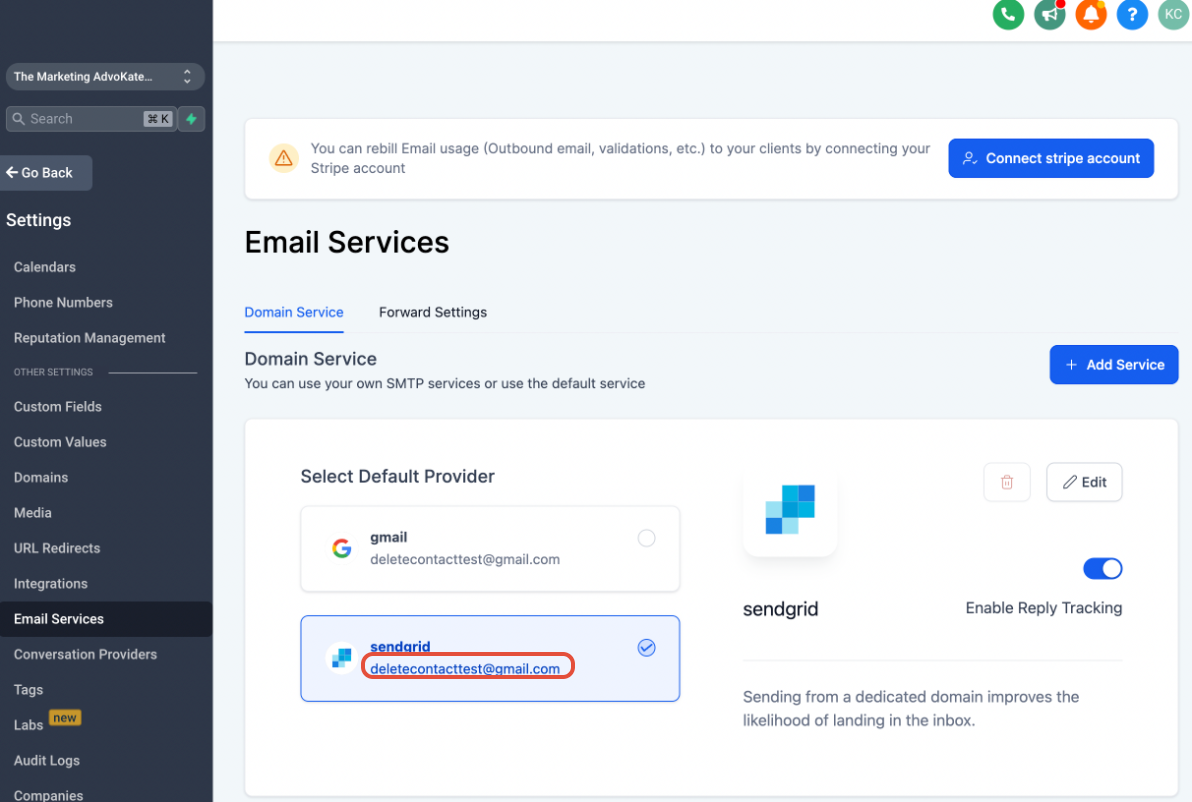
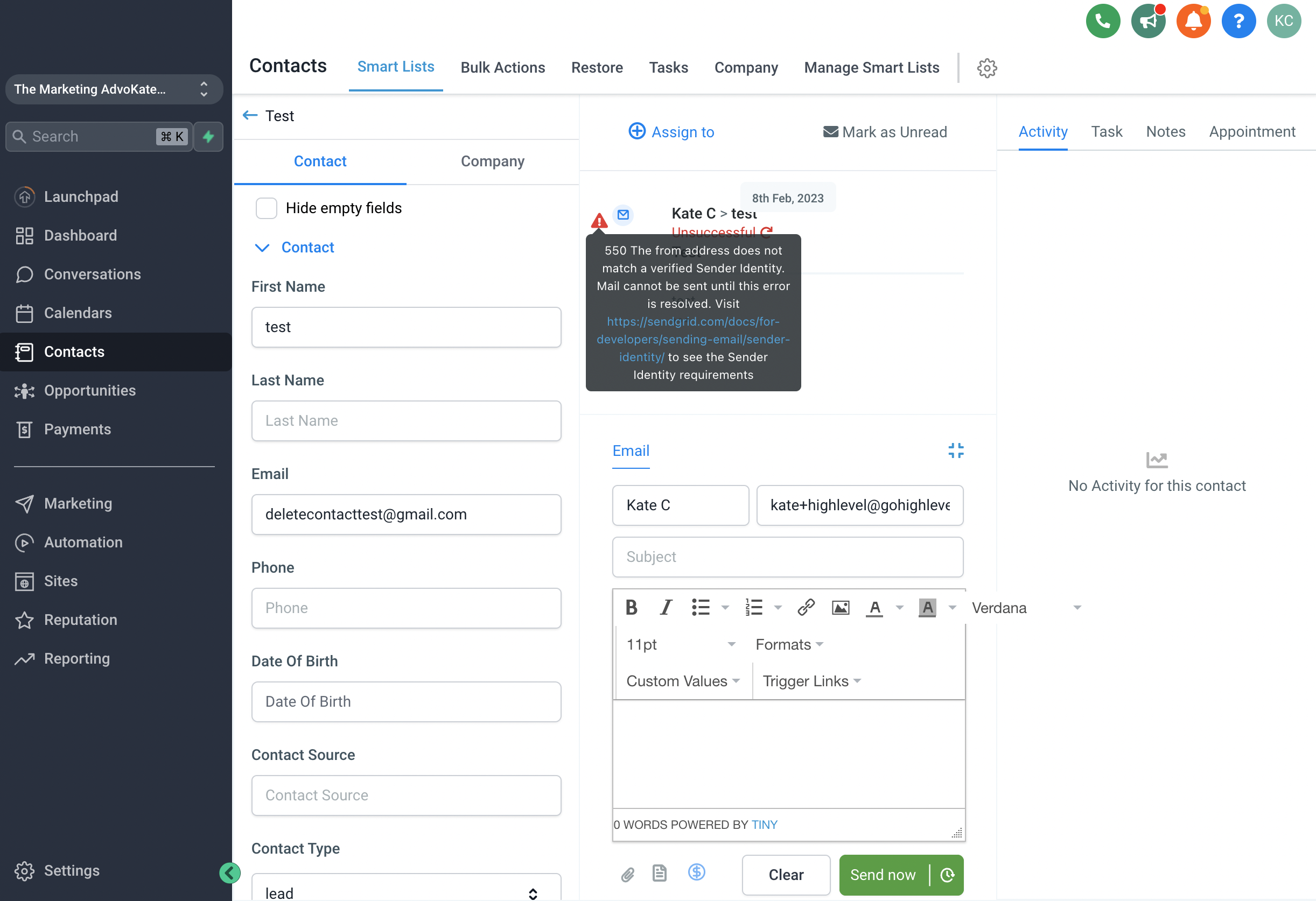
HighLevel lets you connect an SMTP provider to send outbound email. When you send a test or live message, the platform forwards the email to the provider using the credentials you entered. If the provider detects that the From address does not match the authenticated address, it returns an error that HighLevel displays in the Conversation view. The error appears as a red triangle icon next to the failed send. Clicking the icon expands the provider’s exact error message, which usually points to a mismatched or unverified sender. Each SMTP service (Google Workspace, SendGrid, Zoho) has its own method for verifying a sender address, and you must follow that method to align the From address with the authenticated one.
03How businesses use the limitation of using SMTP when emails are not sending
- Ecommerce store. The store sends order confirmation emails through SendGrid. When a test email fails, the staff clicks the red triangle in the Conversation screen, reads the provider’s mismatch error, and then follows SendGrid’s sender identity steps to verify the store’s From address.
- Dental practice. The practice uses Google Workspace SMTP for appointment reminders. After spotting a sender mismatch error in a conversation, the admin opens Google’s alias settings, creates an alias that matches the configured SMTP address, and saves it, ensuring future reminders deliver.
- Online course platform. The platform relies on Zoho SMTP for course enrollment emails. When a delivery failure appears, the instructor clicks the red triangle, notes the unverified sender message, and uses Zoho’s verification flow to add the platform’s email as a verified sender.
04The numbers and rules that matter
- Google Workspace uses email aliases for verification. Help.gohighlevel.com/support/solutions/articles/48001184605 setting alias for Google smtp.
- Zoho verifies through account credentials. Help.gohighlevel.com/support/solutions/articles/48001173743 using zoho as your smtp provider.
05Before you start
- An SMTP provider must already be connected in HighLevel.
- A test email must be sent from the Conversation interface to generate an error.
06How to set up and use the limitation of using SMTP when emails are not sending in HighLevel
Check SMTP error in a conversation
- Send a test email from the Conversation view.
- Click the red triangle (⚠️) icon that appears beside the failed message.
- Read the detailed error information returned by the SMTP provider.
Verify sender address with provider
- Open the verification guide for the connected SMTP provider.
- Complete the provider’s process to add or confirm the sender address.
- Confirm that the verified address matches the one configured in HighLevel.
07What it looks like in HighLevel
08Things to know before you rely on it
- The most common reason for failed SMTP sends is a sender email mismatch.
- Error details are pulled directly from the SMTP provider; they are not generated by HighLevel.
- Verification steps differ between providers; follow the specific guide for Google Workspace, SendGrid, or Zoho.
09If something goes wrong
- Sender email does not match the SMTP email. Update the sender email in HighLevel so it matches the authenticated address, or verify the sender separately with the provider.
- Error persists after fixing the mismatch. Open a support ticket with the SMTP provider to obtain the delivery status and further guidance.
10How it connects to the rest of HighLevel
- Set up SendGrid as your SMTP provider SendGrid setup
- Use Zoho SMTP for email sending Zoho setup
- Why HighLevel requires a domain email, not a free address Domain email requirement
Michael's take

This fix is worth the time for any small business that relies on email outreach.
Avoid the mistake of assuming the provider connection alone guarantees delivery.