
Home/HighLevel/AI/Voice agent prompt framework
HighLevel AI · Voice prompts
A Voice AI prompt framework for natural phone agents.
Writing for a voice agent is different from writing for a chat bot. People interrupt, mishear and wander. Long sentences sound robotic out loud. This Voice AI prompt framework, built for GoHighLevel, structures the prompt so the agent sounds natural, stays on task and knows when to hand off.
The short answer
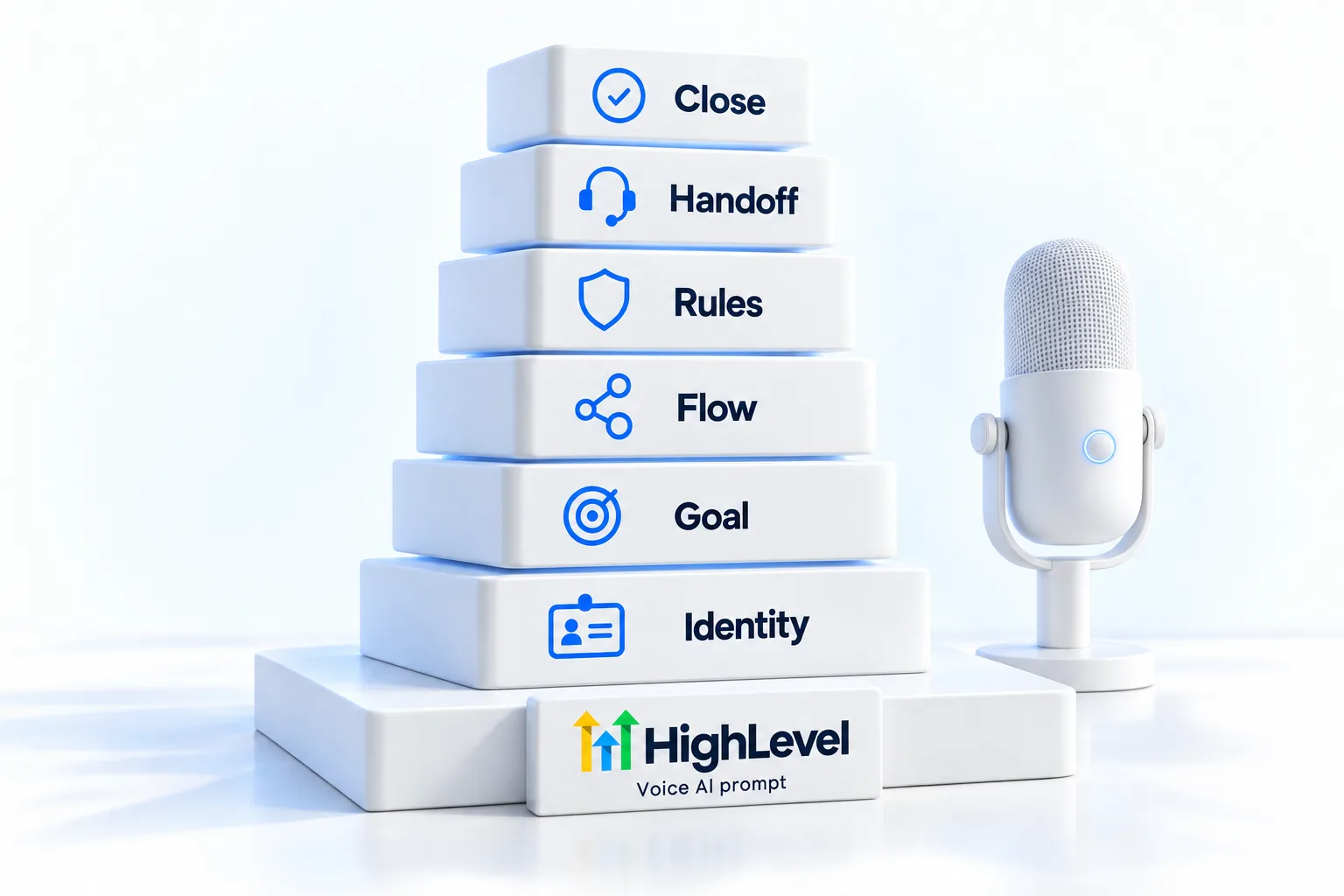
A Voice AI prompt framework has six sections: identity, goal, flow, rules, handoff and close. Identity says who the agent is and that it is an AI assistant. Flow sets the questions in order, one at a time. Write it for speech: short sentences, one question per turn and no lists read aloud.
Michael is a sponsored HighLevel affiliate. Links to HighLevel use his partner link at no extra cost to you. HighLevel prices and product facts on this page come from HighLevel's own pricing page and help center, checked on the date above.
The six sections
The framework, section by section.
| Section | What to write |
|---|---|
| Identity | Name, business, role, and that it is a virtual assistant |
| Goal | The one outcome: book, qualify or route |
| Flow | The questions in order, asked one at a time |
| Rules | Tone, length of replies, topics to avoid, what never to promise |
| Handoff | The exact situations that trigger a transfer, and what to say first |
| Close | Confirm the outcome, mention the text confirmation, thank them |
Speech
Write for the ear.
- Keep replies to one or two short sentences
- Ask one question per turn
- Never read a list longer than two options
- Spell out how to say numbers, times and your business name
- Tell the agent how to recover if it mishears
HighLevel tools
Tools that help.
HighLevel Voice AI includes a prompt optimizer and supports versioning, so you can create, test and compare a new prompt against the current one before you publish it. The Voice AI guide covers the rest of the agent settings.
Worked example
What does a finished voice prompt look like?
Here is the framework filled in for a plumbing company. Read it out loud and you will hear why the sentences are short.
- Identity. You are the virtual assistant for a local plumbing company. Say so in your greeting.
- Goal. Book a service visit, or connect urgent calls to the team.
- Flow. Ask what is going on. Ask for the address. Ask whether water is leaking right now. Offer two appointment times. Confirm the name and the phone number.
- Rules. Keep each reply to one or two sentences. Ask one question at a time. Do not quote exact prices. Do not give repair advice.
- Handoff. If the caller mentions flooding, a gas smell or no water at all, say you are connecting them now and transfer. If the caller asks for a person, transfer.
- Close. Repeat the day and the time. Say a text confirmation is on its way. Thank them.
The facts, such as service areas, hours and price ranges, are not in the prompt. They sit in the knowledge base, where you can change them without touching the agent. If you want a draft built from a few answers, try the voice prompt generator.
Testing
How do you test a voice prompt?
You cannot judge a voice prompt by reading it. You have to hear it, and you have to be a difficult caller.
- Read it aloud. Anything that sounds like a memo will sound like a memo on the phone.
- Run web test calls. Do the simple booking first.
- Interrupt it. Talk over the agent and change your mind halfway through.
- Mumble a detail. Give an unclear address and see whether it asks again.
- Go off script. Ask something unrelated, then return to the booking.
- Trigger the handoff. Say the urgent words and confirm the transfer happens.
- Compare versions. Make one change in a new version and test it against the current one before you publish.
AI receptionist setup covers the full launch sequence around the prompt.
Voice AI is one of the five pillars in the Five Pillar framework guide. Minutes by plan are in the GoHighLevel AI plans overview, and a 30 day trial through Michael's link gives you a number to run test calls on.
Avoid
What mistakes make a voice agent sound robotic?
- Long replies. People stop listening after two sentences.
- Stacked questions. Name, address and problem in one breath gets one answer back.
- Reading lists. Offer two options, never five.
- No recovery line. Tell the agent what to say when it did not catch something.
- Hiding that it is AI. Say it in the greeting. AI compliance and consent explains why.
- Chat wording. Phrases that read well on a screen can sound stiff aloud. AI receptionist scripts has spoken wording to borrow.

Read your voice prompt out loud before you publish it. If it sounds like a memo, the agent will too.
Questions
Common questions.
How do I write a Voice AI prompt?
Write a Voice AI prompt in six sections: identity, goal, flow, rules, handoff and close. Identity says who the agent is and that it is an AI assistant. Flow sets the questions in order, one at a time. Write it for speech: short sentences, one question per turn and no lists read aloud.
How long should voice replies be?
One or two short sentences. Long sentences sound robotic out loud, and callers interrupt them. Tell the agent in its rules to keep each reply short, ask one question per turn and never read a list aloud. Then listen to test calls and shorten anything that drags.
Can I test a new prompt safely?
Yes. HighLevel Voice AI supports versions, so you can test and compare a new prompt before publishing it. Run test calls where you interrupt, mumble and go off script, and confirm the handoff triggers. Publish the new version only when it handles those calls well.
Should the agent say it is AI?
Yes. Put it in the identity section and in the greeting, so the agent says it is an AI assistant at the start of every call. It is honest, it sets the caller's expectations and some places require it. Never instruct an agent to claim it is a person.
Where do prices and hours go in a voice prompt?
They do not go in the prompt. Keep facts in the knowledge base and keep the prompt about behavior.
Does this framework work for outbound calls?
Yes. The six sections stay the same and the goal changes. Outbound AI calls also need the consent the law requires.
How do I know the prompt is ready?
Read it aloud, run test calls where you interrupt, mumble and go off script, and confirm the handoff triggers before you publish.
Can GoHighLevel do outbound calls?
Yes. GoHighLevel Voice AI places outbound calls from workflows, up to 5,000 calls per location per day, between 8 AM and 8 PM in the contact's time zone. The business is responsible for consent. The six section framework stays the same for outbound calls, and only the goal changes.
Next step
See it in your own account. Thirty days, every feature.
Start a trial, build the first system and test it before the first invoice. Usage fees for phone, SMS, email and AI can apply during the trial.
HighLevel has three plans at a flat monthly price, each with unlimited users and contacts. See what each one includes and what it costs.
Compare the PlansStarter, Unlimited and Founder