

November 2026
WhatsApp button and list replies now follow the right workflow branch
When a contact taps a button or picks a list option in a WhatsApp message, your workflow now reliably continues down the branch for the option they chose. Booking, confirmation and service selection flows run the way you built them, so you stop losing contacts to the Timeout branch after they've alr
Read the breakdown →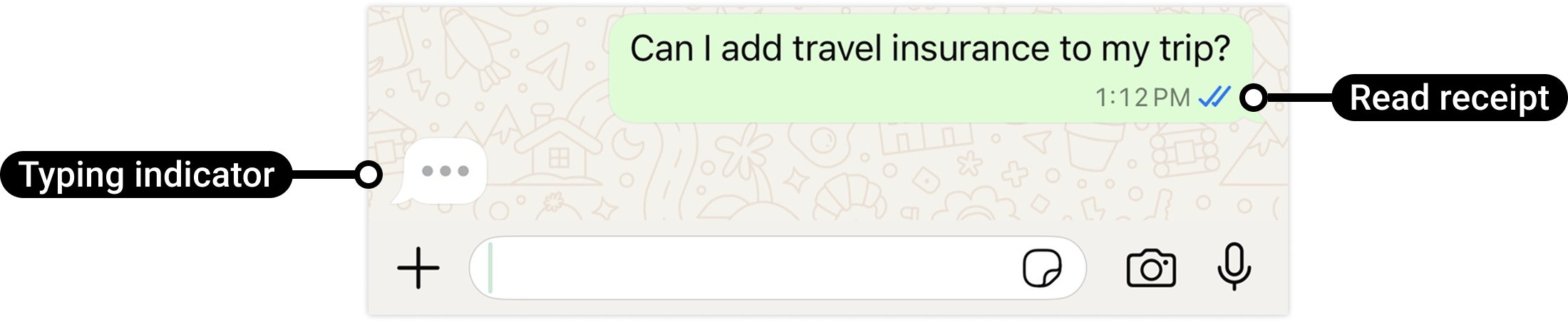
WhatsApp typing indicator action for workflows
Show your customers the familiar "typing..." bubble while your workflow or AI agent prepares a reply. Instead of silence after they message you, customers see straight away that their message landed and an answer is on the way, so automated WhatsApp conversations feel personal and fewer customers gi
Read the breakdown →WhatsApp workflows now send your latest templates and snippets
Edits you make to WhatsApp templates and snippets now flow straight into the messages your workflows send. Update the content once and every WhatsApp workflow step using it sends the new version, so your automations stay accurate without anyone reopening and resaving steps.
Read the breakdown →How this page works
Read the release. Then build it.
Each entry starts as the official HighLevel release note and is restructured the same way every time: a short summary, what changed, the setup steps, why it matters and the notes. The source link is on every page. Michael and the CRM Pros team test the ones that change what a Founder should build next, and those get a guide, a video and a mention on the weekly calls.
Next step
Pick the updates that matter. Then get the plan that unlocks them.
Explore the updates you want, start with the newest at the top, and upgrade through my link when you are ready. The bonuses and the team come with it.
GoHighLevel release notes translated for Founders: what is live, what is beta and what to build next, starting with the LevelUp 2026 feature guide.
Back to the UpdatesSee the full details