
Home/HighLevel/Integrations/n8n
Integrations · n8n
HighLevel n8n integration. Automation, now importable.
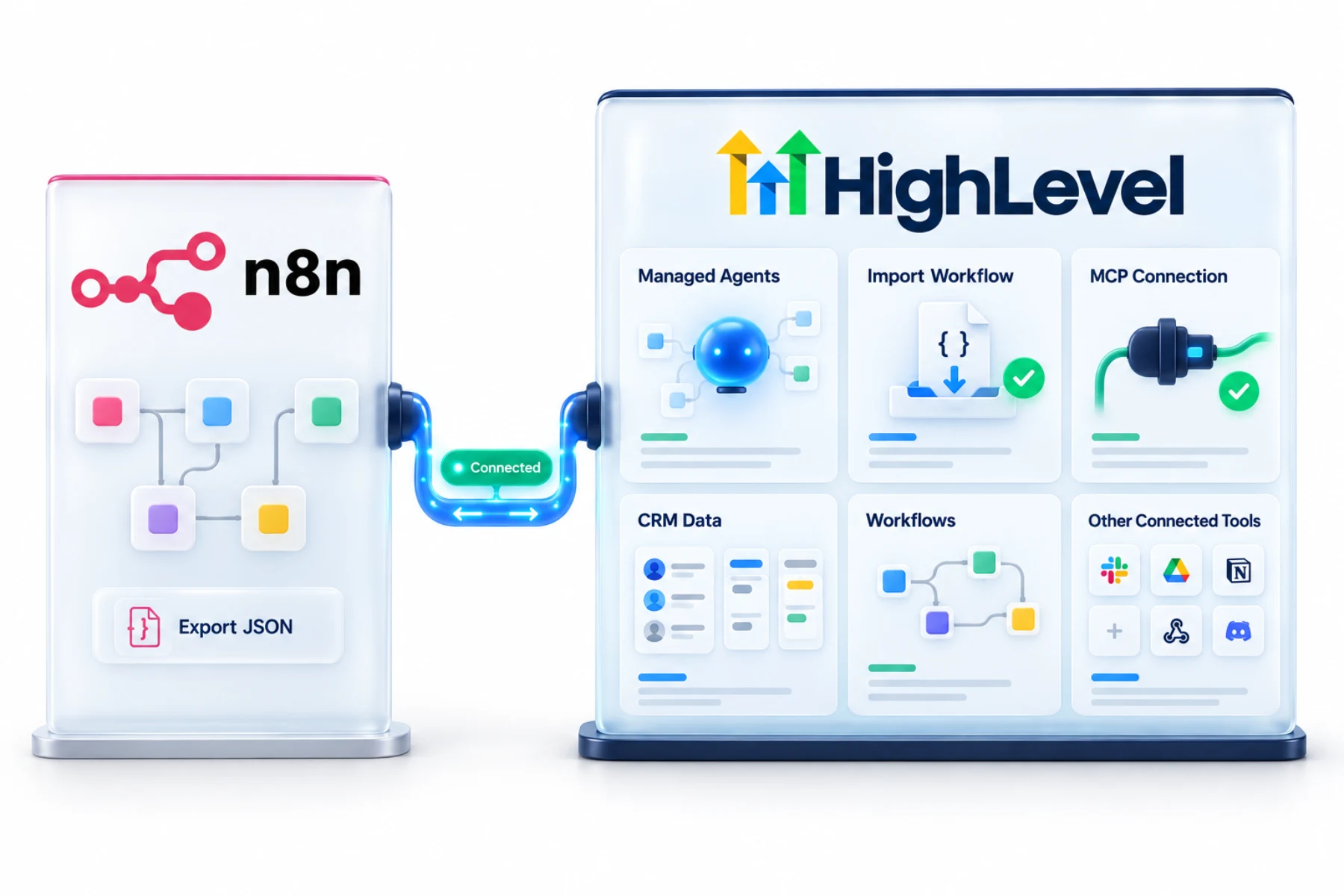
The GoHighLevel n8n integration works in two ways: the HighLevel MCP connection for n8n workflows, and a tool that converts an exported n8n workflow into a HighLevel Managed Agent.
The short answer
The GoHighLevel n8n integration runs through the HighLevel MCP connection, so n8n workflows can read and act on CRM data without custom plugins, and HighLevel can also import an exported n8n workflow JSON into a Managed Agent, showing what carries over, what is adapted and what needs attention.
Michael is a sponsored HighLevel affiliate. Links to HighLevel use his partner link at no extra cost to you. HighLevel prices and product facts on this page come from HighLevel's own pricing page and help center, checked on the date above.
Connect
How do you connect n8n to HighLevel?
There are two different jobs here, so decide which one you want. The first keeps n8n running and lets its workflows use your CRM through the HighLevel MCP connection. The second moves a workflow out of n8n and into HighLevel as a Managed Agent. Most teams start with the first and try the second when a workflow has proved itself. If you know the platform as GoHighLevel, both routes are the same.
- For live automation, connect n8n to the HighLevel MCP server and authorize the account.
- Build n8n workflows that use HighLevel tools.
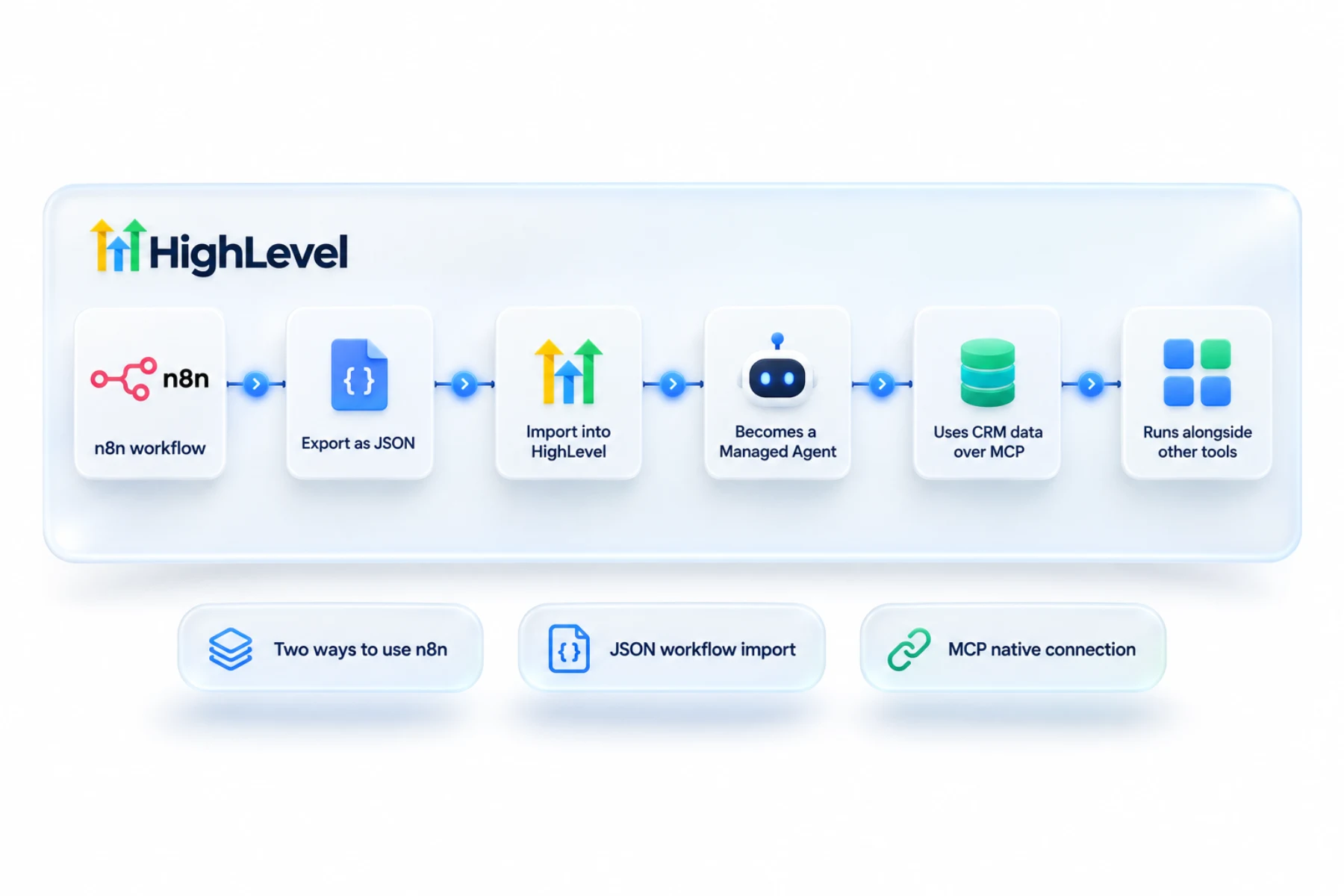
- To migrate, export your n8n workflow as JSON.
- In HighLevel, use the n8n import for Managed Agents and upload the file.
- Review what was carried over or adapted, finish setup and save.
Uses
What can you do with n8n and HighLevel?
With the MCP connection, an n8n workflow can read and act on CRM data without a custom plugin. That means n8n can sit between HighLevel and the other tools it already connects to. An event in another app can lead to a contact, a note or a moved deal in HighLevel.
With the import, you export a workflow from n8n as JSON and upload it into HighLevel's Managed Agents. HighLevel reads the file and builds an agent from it, then tells you what carried over, what it adapted and what needs your attention.
- Use HighLevel data in n8n workflows
- Turn n8n workflows into Managed Agents
- Combine HighLevel with other n8n connected tools
Data
What carries over and what does not?
The MCP connection does not copy data. Each step in n8n asks HighLevel for what it needs at that moment, within the access you authorized.
The import is a conversion, not a copy. A workflow in n8n is a chain of fixed steps. A Managed Agent is an AI agent built from a description of a job. So HighLevel reports three groups after an import: steps that carried over, steps it adapted and steps that need attention. Read that report before you trust the result. I could not verify which n8n nodes fall into which group, so treat every import as a draft to review.
Limits
What are the limits to know about?
Managed Agent runs count toward your AI plan. AI Employee Growth at $50 a month includes 100 runs, and AI Employee Unlimited at $97 a month includes 1,000. Pay per use is also available. See AI usage costs before you move a workflow that runs hundreds of times a day.
n8n is also a separate tool to run and maintain, and a broken step there does not show up in HighLevel's workflow history. Someone has to watch both.
In practice
When should you import and when should you connect?
Connect when n8n is doing work across many tools and HighLevel is one of them. Import when the workflow is mostly about the CRM, for example a daily summary of yesterday's pipeline or a lead researcher that adds notes to new contacts. Those are jobs Managed Agents do well, and moving them means one less system to maintain.
Give each agent one job and clear limits on what it may change. For the bigger picture, read the Managed Agents complete guide and HighLevel AI agents. For simpler links between tools, webhooks are often enough, and HighLevel and Make covers a similar tool.
To test the n8n connection in your own account, use the 30 day trial through Michael's link. GoHighLevel pricing lists what each plan costs, and the Founder Plan hub explains the top tier.
Choosing between the two instead of connecting them? Read GoHighLevel vs n8n.

If you already built it in n8n, try the import before you rebuild it by hand.
Questions
Common questions.
Does HighLevel work with n8n?
Yes, through MCP and an n8n workflow import for Managed Agents. The HighLevel MCP connection lets n8n workflows read and act on CRM data without custom plugins. The import takes a workflow exported from n8n as JSON and builds a HighLevel Managed Agent from it. You can use either one alone.
Can I import n8n workflows?
Yes, as Managed Agents. Export the workflow from n8n as JSON, then use the n8n import for Managed Agents in HighLevel and upload the file. HighLevel reads it and builds an agent, then tells you what carried over, what it adapted and what needs your attention before you save.
Does everything import?
The import shows what carries over, what is adapted and what needs attention. It is a conversion, not a copy. A workflow in n8n is a chain of fixed steps, while a Managed Agent is an AI agent built from a description of a job. Treat every import as a draft to review.
Do I need custom plugins?
Not with the MCP connection. You connect n8n to the HighLevel MCP server and authorize the account, and n8n workflows can then use HighLevel tools. Each step asks HighLevel for what it needs at that moment, within the access you authorized. The connection does not copy data.
Do Managed Agent runs cost extra?
Runs count toward your AI plan. AI Employee Growth at $50 a month includes 100 runs, and AI Employee Unlimited at $97 a month includes 1,000, with pay per use also available. Check AI usage costs before you move a workflow that runs hundreds of times a day.
What file does the n8n import need?
The workflow exported from n8n as JSON. In HighLevel, use the n8n import for Managed Agents and upload that file. After the upload, review what was carried over or adapted, finish the setup and save. Read the import report before you trust the result with real records.
Should I connect n8n or import the workflow?
Connect when n8n works across many tools and HighLevel is one of them. Import when the workflow is mostly about the CRM, such as a daily summary of yesterday's pipeline. Moving those jobs into Managed Agents means one less system to maintain. Give each agent one job and clear limits.
Keep reading
Related pages.
Next step
See it in your own account. Thirty days, every feature.
Start a trial, build the first system and test it before the first invoice. Usage fees for phone, SMS, email and AI can apply during the trial.
HighLevel has three plans at a flat monthly price, each with unlimited users and contacts. See what each one includes and what it costs.
Compare the PlansStarter, Unlimited and Founder