
01Who this is for
- Affiliate marketers who promote HighLevel services, because the page tells them which referrals are earning commissions.
- Agency owners managing multiple affiliate partners, as they can monitor each partner's referral status at a glance.
02Affiliate referral page, explained
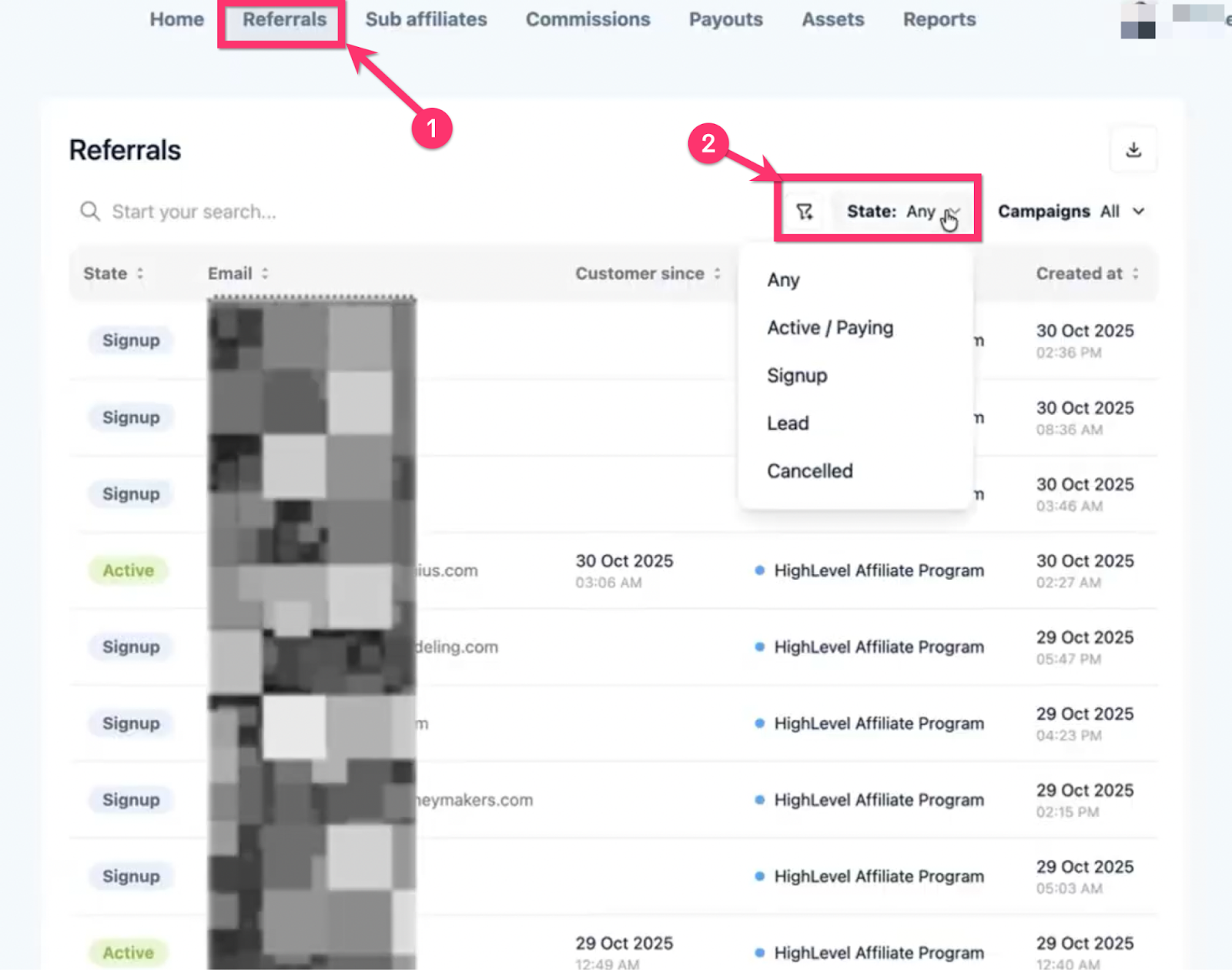
The Referral page lives inside the Affiliate Portal. It lists every referral you have sent and assigns one of several categories, Any, Active/Paying, Signup, Lead (also called Subscribed), or Cancelled. The category reflects the referral’s current relationship with HighLevel, such as whether they are on a free trial, paying subscription, or have ended their account.
When a referral is Active/Paying, you earn a commission each time the subscription renews. Leads and Signups indicate early stages of the sign up flow and do not generate commissions until they become paying customers. Cancelled referrals stop earning commissions until they resume payment and move back to the Active category.
03How businesses use affiliate referral page
- Marketing agency. The agency clicks into the Affiliate Portal and opens Referrals to see which client introductions are still in trial, which have converted to paying accounts, and which have cancelled. This lets the agency track which campaigns are yielding commissionable customers.
- SaaS consultant. The consultant checks the Referral page to identify Lead contacts that started but did not finish the free trial sign up. They can then follow up within HighLevel to encourage completion and potentially earn commissions.
- Online education platform owner. The owner views the Cancelled category to understand which referred educators have ended their subscriptions, helping them decide whether to re engage those contacts before commissions resume.
04Before you start
- Access to the Affiliate Portal is required.
05How to set up and use affiliate referral page in HighLevel
Open the Affiliate Referral page
- Click on Affiliate Portal.
- Click on Referrals at the top of the dashboard.
06What it looks like in HighLevel
07Things to know before you rely on it
- Commissions are only earned on customers who pay their subscriptions; paused, cancelled, or refunded accounts do not generate commissions.
- A known bug can temporarily label a Marketplace Service cancellation as Cancelled; the status updates to Active once payment is made again.
- The Affiliate Portal UI is being updated, so some screenshots or videos may not match the current view.
08If something goes wrong
- Cancelled customers sometimes appear as cancelled due to a Marketplace Service bug.. Contact Support for clarification; the issue is being addressed.
09How it connects to the rest of HighLevel
- Use the Affiliate Portal to view referral statuses Affiliate portal
- Set up payout methods to receive commissions Affiliate payouts
- Configure postbacks for automation of referral tracking Affiliate postbacks
Michael's take

The Affiliate referral page is essential for anyone who wants to see exactly which referrals are paying and which are not.
If you don’t need to track commission status or manage affiliate payouts, you can skip this feature.