
Home/HighLevel/AI/Outbound Voice AI
HighLevel AI · Outbound Voice AI
AI outbound calling in GoHighLevel. What Voice AI can call, and the rules.
GoHighLevel Voice AI does more than answer the phone. It can also place the call. This page explains how outbound AI calling works in HighLevel, the limits the platform enforces, what it costs, where it works well and why pointing it at strangers is a legal risk.
The short answer
AI outbound calling means an AI voice agent places the call and holds the conversation. GoHighLevel Voice AI does this from the Voice AI Outbound Call action in a workflow. HighLevel only places calls between 8:00 AM and 8:00 PM in the contact's time zone, once per number per day. Consent for every contact stays with the business placing the calls.
Michael is a sponsored HighLevel affiliate. Links to HighLevel use his partner link at no extra cost to you. HighLevel prices and product facts on this page come from HighLevel's own pricing page and help center, checked on the date above.
The definition
What is AI outbound calling?
AI outbound calling is when software, not a person, dials a contact and an AI voice agent holds the conversation. The agent listens, decides what to say and answers in a synthetic voice. It can ask questions, book an appointment, take a message or hand the call to a person.
Every AI outbound call has the same four parts, whatever platform places it.
- A trigger. Something decides the call should happen: a form request, a booking, a date or a tag on the contact.
- The call. The system dials from a business phone number, inside the hours and limits it enforces.
- The conversation. The agent follows its instructions, answers from the knowledge it was given and stays on the goal of the call.
- The outcome. The result is logged, and the next step runs: a summary, a task for the team or a follow up message.
In HighLevel those four parts are a workflow trigger, the Voice AI Outbound Call action, the voice agent you built and the workflow steps after the call. The rest of this page covers each one. New to the agent itself? Start with what an AI receptionist is, which covers the inbound side.
The difference
How is AI outbound calling different from a robocall or a dialer?
An AI outbound call is a two way conversation, a robocall plays a recording and a dialer connects a human rep. The law does not treat the AI call more gently for that. The FCC ruled on February 8, 2024 that calls made with AI generated voices are artificial under the Telephone Consumer Protection Act.
| Type of call | Who speaks | What to know |
|---|---|---|
| AI outbound call | An AI voice agent, in a live two way conversation | Counts as an artificial voice call under the TCPA. Consent comes first |
| Prerecorded robocall | A recording. Nobody listens to the answer | The same consent rules apply to prerecorded voice calls |
| Power dialer | A human rep. The software only dials the next number | Good for sales teams that want a person on every call. See the GoHighLevel power dialer guide |
| Phone menu | A recorded menu the caller steers with the keypad or voice | Mostly used on inbound calls to route the caller |
So the question is never whether the voice sounds human. It is whether the person agreed to get the call.
Setup
How does GoHighLevel start an outbound AI call?
HighLevel starts an outbound AI call from a workflow, not from the agent. You add one action, called Voice AI Outbound Call, at the point where the call should happen. The action needs three things: a name, the AI Agent that will speak and the From Phone Number the call is placed from. When a contact reaches that step, HighLevel places the call, as long as it passes the safeguards below.
Because the call is a workflow step, everything a workflow can do sits around it. You can text first and call only if nobody replies. You can wait for a set time. You can send a summary and create a task when the call ends.
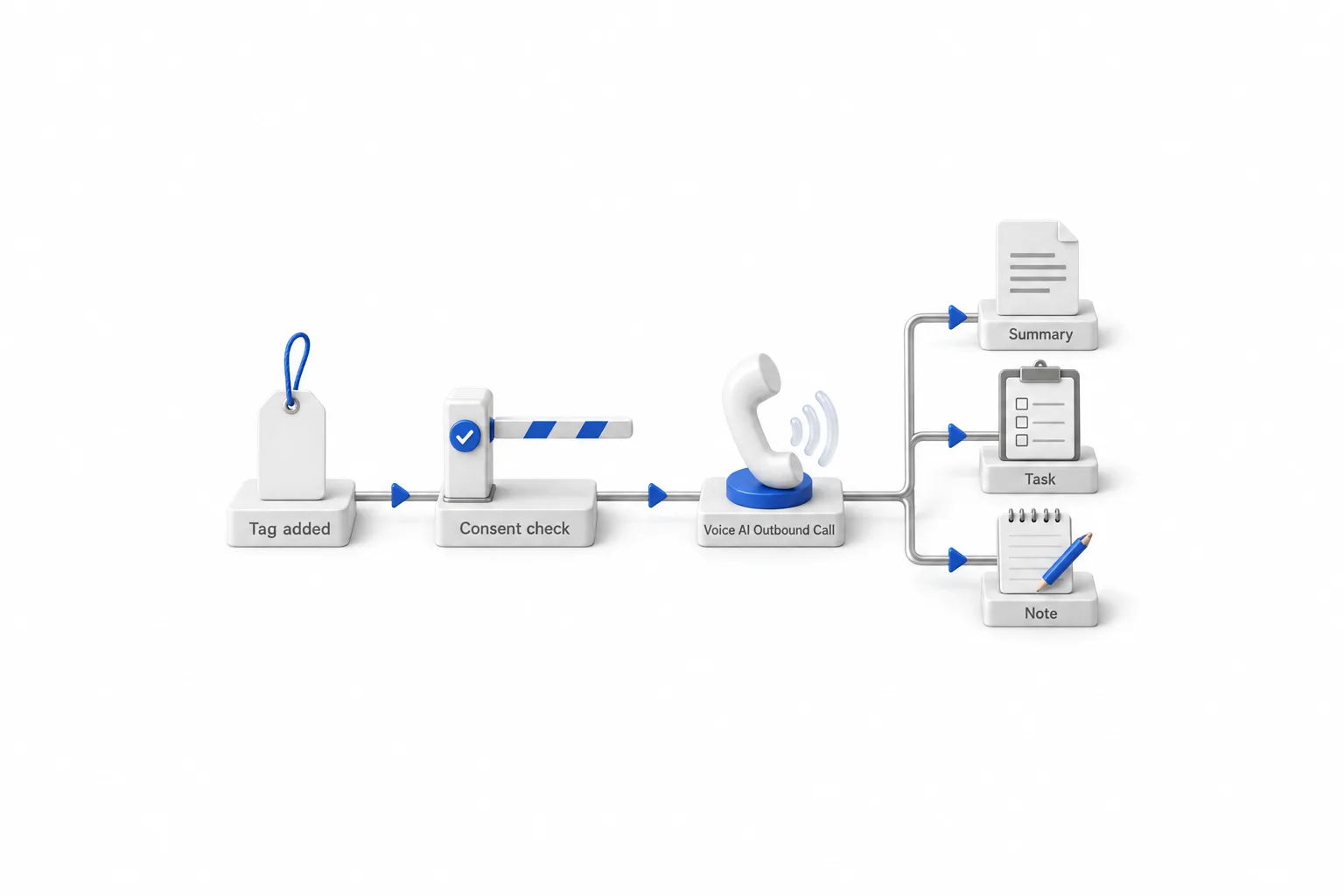
- Build and test the voice agent. Create the agent under AI Agents, Voice AI, and test it before it calls anyone. How to set up a Voice AI agent covers the build.
- Decide who is cleared to be called. Only contacts with recorded consent for AI calls should ever reach the call step. A tag that your team adds after checking consent and do not disturb status is a simple gate.
- Create the workflow and its trigger. Go to Automation, Workflows, and add the trigger that should start the call. A tag added to a cleared contact is the simplest one.
- Add the Voice AI Outbound Call action. Search for it in the workflow builder, name it, then choose the AI Agent and the From Phone Number.
- Accept the outbound calling terms. HighLevel asks the location to accept its outbound terms inside the action. That is a location level step. It is not consent from your contacts.
- Publish and test with an internal contact. Call yourself or a teammate first, and listen to the whole call.
- Check the result. Open AI Agents, Voice AI, Dashboard and Logs, then Outbound. Each call shows an outcome: Connected, Voicemail, No Answer or Failed.
If you have not built an agent yet, start with the complete guide to GoHighLevel Voice AI, then come back to the outbound workflow.
The limits
What are the rules and limits on GoHighLevel outbound Voice AI calls?
HighLevel limits outbound Voice AI calls by hour, by rate, by daily volume and by phone number. You cannot switch these safeguards off, and they apply to the location as a whole. A call that falls outside them is delayed, rescheduled, blocked or marked as failed.
| Safeguard | What HighLevel documents | What it means for you |
|---|---|---|
| Calling hours | 8:00 AM to 8:00 PM in the time zone of the contact's phone number | A call triggered at night waits for the next eligible time |
| Call rate | Up to 10 outbound calls per minute per location | Large lists go out over time, not all at once |
| Daily location limit | Up to 5,000 outbound calls per location per day, not per agent | Calls above the limit move to the next eligible day |
| Attempts per number | One call per number per day, and up to 14 calls within 14 days | Build retries with a gap of at least a day |
| Country | Supported numbers in the same country as the location | International destinations are not eligible |
| Location requirements | Outbound terms accepted, any KYC or location verification complete, within Acceptable Use Policy thresholds | Outbound calling may be paused automatically until a restriction is resolved |
Source: HighLevel help center, Voice AI Outbound Calling and Voice AI Outbound Calling Compliance Checks, checked November 11, 2026. These limits can change.
One note on older material. The limits were tighter when the outbound action first appeared, so videos from 2025, including my own client check in walkthrough, quote smaller numbers and a shorter calling window. The table above is what HighLevel documents today.
Consent
Is AI outbound calling legal, and does it need consent?
It can be legal, and yes, it needs consent. The FCC ruled on February 8, 2024 that AI generated voices are artificial voices under the Telephone Consumer Protection Act. So an outbound AI call needs the consent the TCPA requires for artificial voice calls. For telemarketing calls, the FCC says its rules require prior express written consent. The business placing the call is responsible for having it, for each contact.
HighLevel is direct about its own role. It does not check contact consent before a call goes out. Accepting the outbound terms in the workflow action is a location level step, and it does not give you permission to call any individual person. The calling hours and attempt limits are a safety net. They do not create consent.
- Collect consent where the number is given. Put clear language on the form, survey or calendar, and say calls may come from an AI assistant.
- Keep the record. Store when and how each contact agreed.
- Honor opt outs and do not disturb settings immediately. That applies on every channel, not only calls.
- Have the agent say it is an AI assistant. Put the disclosure in the greeting.
- Check the National Do Not Call Registry for sales calls. The FTC's telemarketing guidance says sellers and telemarketers are prohibited from calling any consumer whose number is in the registry. Ask your attorney which exceptions, if any, apply to you.
- Get the wording reviewed. Have a qualified attorney look at your consent language and scripts.
Cold calling
Can you use GoHighLevel Voice AI for AI cold calling?
The software will not stop you, but I do not recommend it. HighLevel places a call to any contact that passes its safeguards. It does not tell you whether that call is legal. The idea behind AI cold calling is tempting: load a list, press go and let an agent dial all day. The law is the problem.
Cold calling strangers with an AI voice carries real legal risk, because those people have not given the consent the law requires for artificial voice calls. Purchased lists and old lists collected for another purpose are the riskiest place to point an outbound agent. There is an account risk too. A location that goes over HighLevel's Acceptable Use Policy thresholds can have outbound calling paused.
The uses that work are calls to people who already know the business and have agreed to hear from it.
Cost
What does GoHighLevel outbound Voice AI cost?
Outbound calls are billed the same way as every other Voice AI call. Usage is measured in AI agent minutes, with inbound, outbound and widget calls combined. There is no single per minute price to quote, because the rate depends on the voice technology the agent uses. A subaccount either pays per use or has an AI Employee plan.
| Option | Voice AI minutes | Price per subaccount |
|---|---|---|
| Pay per use | Billed by usage, mostly per minute | No monthly fee |
| AI Employee Growth | 100 a month | $50 a month |
| AI Employee Unlimited | Unlimited, fair use | $97 a month |
Phone system charges apply to every call regardless of plan. Source: AI Product Pricing, November 2026.
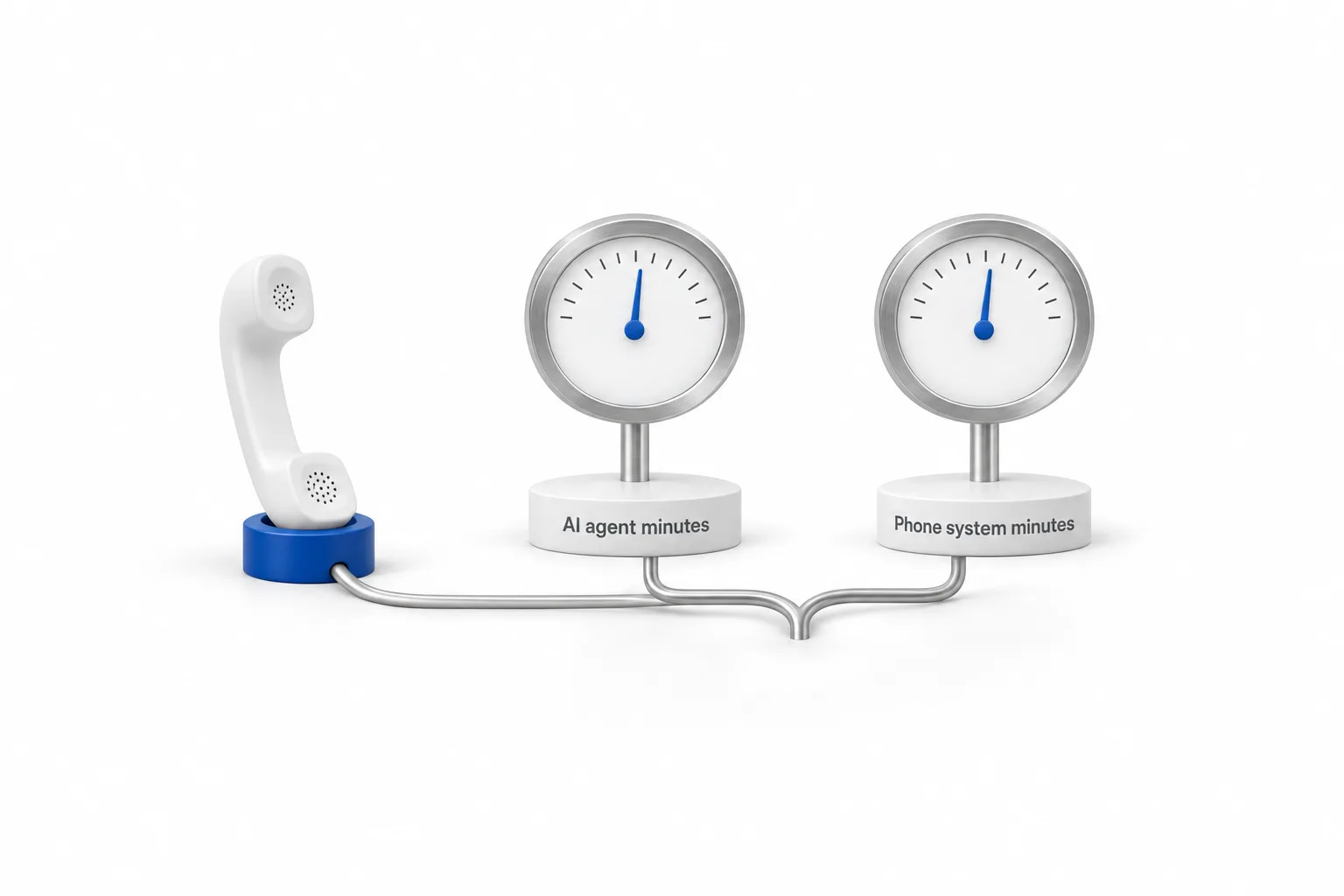
Every outbound call has two bills. The AI plan covers the AI minutes, and the call itself is billed on the phone system, roughly a cent and a half a minute in the US. An outbound campaign also adds up faster than inbound, because you decide how many calls go out. GoHighLevel AI usage costs explains the two charges, and the full plan picture is on the GoHighLevel pricing hub.
Use cases
What are good uses for outbound AI calls?
The best outbound calls go to people who expect to hear from the business and have a reason to pick up. This table sorts the common ideas by how safe and useful they are.
| Use | Who gets the call | How it tends to go |
|---|---|---|
| Appointment confirmation | A contact with a booking on the calendar | Works when the call offers more than a reminder. A bare reminder adds little |
| Client check in | An existing client with a service need that is due | Strong, because the call is about something specific to them |
| Requested callback | A lead who asked for a call on a form with clear consent language | Strong, and fast follow up is the point |
| Past customers | People who bought before | Depends on the consent record. Check it before any call |
| Purchased or scraped lists | Strangers | Legal risk and account risk. Leave it alone |
I learned the difference the hard way. In my first days with outbound calling I loaded 100 contacts from my own client list and ran a generic appointment reminder. Clients asked to opt out, and there were no real conversations. The call sounded like every other automated reminder.
What worked was calling fewer people with a better reason. Pick clients by service history or last contact date. Write the prompt around something that helps them. Send a text and an email first, and call only if they have not replied. Then connect the result to a workflow that sends a summary, creates a task for your team or adds a note to the contact.
How do you know it is working? Open the Outbound view in Dashboard and Logs and read the outcomes: Connected, Voicemail, No Answer or Failed. Then count what matters to the business: conversations that reached the goal of the call, appointments booked, tasks created for the team and requests to opt out. A rising opt out count is the signal to stop and fix the reason for the call.
Outbound is one piece of the wider toolset covered in the HighLevel AI hub.
Troubleshooting
Why did my outbound Voice AI call not go out?
Usually a safeguard held it. Check the time where the contact is. Check whether that number was already called today. Confirm the action has an AI Agent and a From Phone Number selected, and that the contact has a valid number in the same country as the location. Then open the Outbound view in Dashboard and Logs to see the outcome.
The full walk through is in why a Voice AI outbound call is delayed or blocked. To test all of this on your own number, a 30 day trial through Michael's link gives you time to build the agent, set up consent properly and place the first calls to your own team. Quick answers to related questions are under GoHighLevel Voice AI answers.

Outbound AI works when every contact has a real reason for the call. Treat it as a relationship tool, not a cheap notification system.
Questions
Outbound Voice AI questions.
What is AI outbound calling?
AI outbound calling is when software dials a contact and an AI voice agent holds the conversation. The agent can ask questions, book an appointment or hand the call to a person. In GoHighLevel it runs from the Voice AI Outbound Call action in a workflow.
Can GoHighLevel Voice AI make outbound calls?
Yes. GoHighLevel Voice AI places outbound calls through the Voice AI Outbound Call action in a workflow. You choose the AI agent and the From Phone Number, and the call goes out when a contact reaches that step. HighLevel applies calling hours and call limits, and the business stays responsible for each contact's consent.
How do I set up outbound Voice AI calls in GoHighLevel?
Build and test a voice agent first. Then open Automation, Workflows, add a trigger, and add the Voice AI Outbound Call action. Name it, choose the AI Agent and the From Phone Number, accept the outbound calling terms when prompted, publish the workflow and test it with an internal contact.
How many outbound Voice AI calls can I make?
HighLevel lists up to 10 outbound Voice AI calls per minute and up to 5,000 per day for each location, not for each agent. Each phone number can be called once per day and up to 14 times within 14 days. Calls above the daily limit move to the next eligible day.
What hours can GoHighLevel Voice AI place outbound calls?
Between 8:00 AM and 8:00 PM, based on the time zone of the contact's phone number, not yours. A call triggered outside that window does not fail. HighLevel schedules it for the next eligible time. If a call seems late, check the clock where the contact is first.
Can I use GoHighLevel Voice AI for cold calling?
The tool does not stop you, but the law may. The FCC ruled in February 2024 that AI generated voices are artificial voices under the TCPA, so outbound AI calls need the consent that law requires. HighLevel does not check consent for you. Calling strangers who never agreed carries real legal risk. This is not legal advice.
Do the Voice AI minutes on an AI Employee plan cover outbound calls?
Yes. Voice AI usage is measured in AI agent minutes, with inbound, outbound and widget calls combined. AI Employee Growth at $50 a month includes 100 Voice AI minutes, and Unlimited at $97 a month is unlimited under fair use. Phone system charges still apply to every call on any plan.
Next step
See it in your own account. Thirty days, every feature.
Start a trial, build the first system and test it before the first invoice. Usage fees for phone, SMS, email and AI can apply during the trial.
HighLevel has three plans at a flat monthly price, each with unlimited users and contacts. See what each one includes and what it costs.
Compare the PlansStarter, Unlimited and Founder