
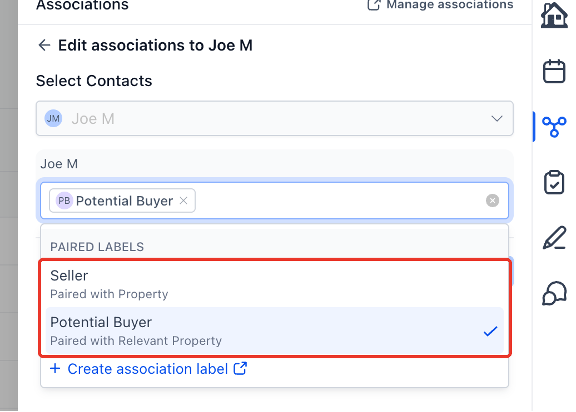
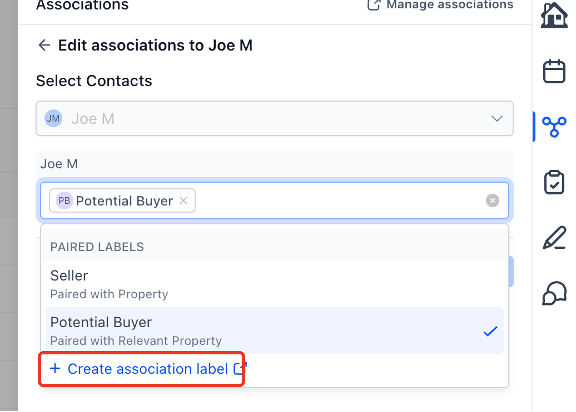
The association label picker on records is clearer and quicker to work with. Each label now shows the label it is paired with on the other record, so similar labels are easy to tell apart. Admins also get a Create association label shortcut at the bottom of the picker, which opens the right settings
Michael's take
My first take is that this feels like a modest but solid usability bump. The label picker now shows the partner label right there in the list. It doesn’t rewrite the whole system but it does cut down a lot of guesswork.
If you’re already tagging contacts, companies, opportunities or custom objects, you’ll now see the paired label underneath each option. That means you can pick the right side of a pair without opening a separate record. Admins also get a shortcut at the bottom to spin up a missing label instantly.
I would give the new picker a quick spin on a few different objects. Check that the paired with text matches what you expect on both sides. Verify that the create shortcut opens the form with the correct other object preselected and that it respects any label limits.
In a real business I would use it when I need to relate a new lead to an existing account. I could open the lead, hit Add, see “Owned company, Paired with Owner” and select it in one tap. If the label didn’t exist I’d hit the shortcut, create it, and continue without leaving the page.
I believe tools should shave friction, not add it. Showing the partner label at a glance removes a tiny but annoying step that adds up over many records.
If you spend time managing associations, give this a look and see if it speeds up your workflow.
The association label picker on records is clearer and quicker to work with. Each label now shows the label it is paired with on the other record, so similar labels are easy to tell apart. Admins also get a Create association label shortcut at the bottom of the picker, which opens the right settings page with the form ready, so a missing label no longer means a hunt through Settings.
What changed
- Paired labels at a glance: Each label in the picker shows the label it is paired with on the other record, for example Owned company, Paired with Owner.
- Create association label shortcut: A new row at the end of the label list opens the Create association form with the other object already selected.
- Everywhere you link records: Contacts, Companies, Opportunities and Custom Objects, in the side panel and on the full record page.
Why it matters for Founders
Pick the right side of a paired label the first time, and add a missing label as soon as you need it instead of searching through Settings.
How to turn it on
- Open a record and go to Associations.
- Click Add, or choose Edit label on an association card.
- Open the label dropdown and read the Paired with text under each label.
- Admins: Click Create association label at the bottom of the list to add a new label, then return to the record and select it.
Pro Tips
- Admins only: The shortcut appears for users who can manage associations.
- Label limits apply: The shortcut is hidden when the two objects have reached their label limit or cannot be associated.
- Keep your place: Use the arrow icon to open settings in a new tab and keep your unsaved picks.
Questions Founders ask
What did HighLevel release in "Association Labels: See Each Label's Pair and Create a New Label from the Picker"?
The association label picker on records is clearer and quicker to work with. Each label now shows the label it is paired with on the other record, so similar labels are easy to tell apart. Admins also get a Create association label shortcut at the bottom of the picker, which opens the right settings
What should a Founder do with Association Labels: See Each Label's Pair and Create a New Label from the Picker?
Open any record, go to Associations, and try adding a label to see the paired view and the create shortcut in action. It’s worth checking out for any Founder or agency owner who relies on record associations in HighLevel.
How do I turn on Association Labels: See Each Label's Pair and Create a New Label from the Picker in HighLevel?
In HighLevel: Open a record and go to Associations. Then Click Add, or choose Edit label on an association card. Then Open the label dropdown and read the Paired with text under each label. Then Admins: Click Create association label at the bottom of the list to add a new label, then return to the record and select it.
Why does Association Labels: See Each Label's Pair and Create a New Label from the Picker matter?
Pick the right side of a paired label the first time, and add a missing label as soon as you need it instead of searching through Settings.
How do I get this feature with setup help?
Start a free HighLevel trial through Michael Reimer's link and the CRM Pros team helps with setup in your first 7 days, with an onboarding call, three live calls every week and the affiliate community included.
Get More InformationOpens in a new tab Published November 10, 2026. Screenshots belong to HighLevel.