
01Who this is for
- Marketers who build funnels need faster pages to keep visitors moving toward conversion.
- Coaches with online courses rely on smooth video and form loading to maintain engagement.
- Local service businesses benefit from quicker mobile page loads that improve user experience and SEO.
02Page speed optimizations, explained
The page speed feature set reduces the amount of data a browser downloads and the work it must do before the page becomes interactive. It includes Image Optimization, which compresses images, and Optimize JavaScript, which delays nonessential scripts. Lazy loading is applied automatically to every image, so only images in view load immediately.
These controls live in the funnel or website settings accessed from Sites > Funnels or Sites > Websites. When enabled, they work together with HighLevel’s CDN and reduced HTML payload to deliver lighter pages. The settings do not guarantee a specific score but can improve loading behavior across desktop and mobile devices.
03How businesses use page speed optimizations
- Digital marketing agency. The agency opens each client funnel in the Page Builder, compresses oversized hero images, disables unnecessary video backgrounds, and enables Image Optimization and Optimize JavaScript. After publishing, they run PageSpeed Insights to verify improvements before launching campaigns.
- Health coach membership site. The coach reviews membership landing pages, removes extra animation widgets, and keeps only essential form fields above the fold. They keep the performance toggles on, then test the published page on mobile to ensure quick access to sign up forms.
- Restaurant with online reservations. The restaurant’s staff trims large map embeds, places the reservation calendar below the fold, and enables lazy loading for menu images. They publish the page, run GTmetrix, and adjust based on the tool’s recommendations while confirming that the booking button still works.
04The numbers and rules that matter
- Above the fold images should aim for under 200 KB as a best practice.
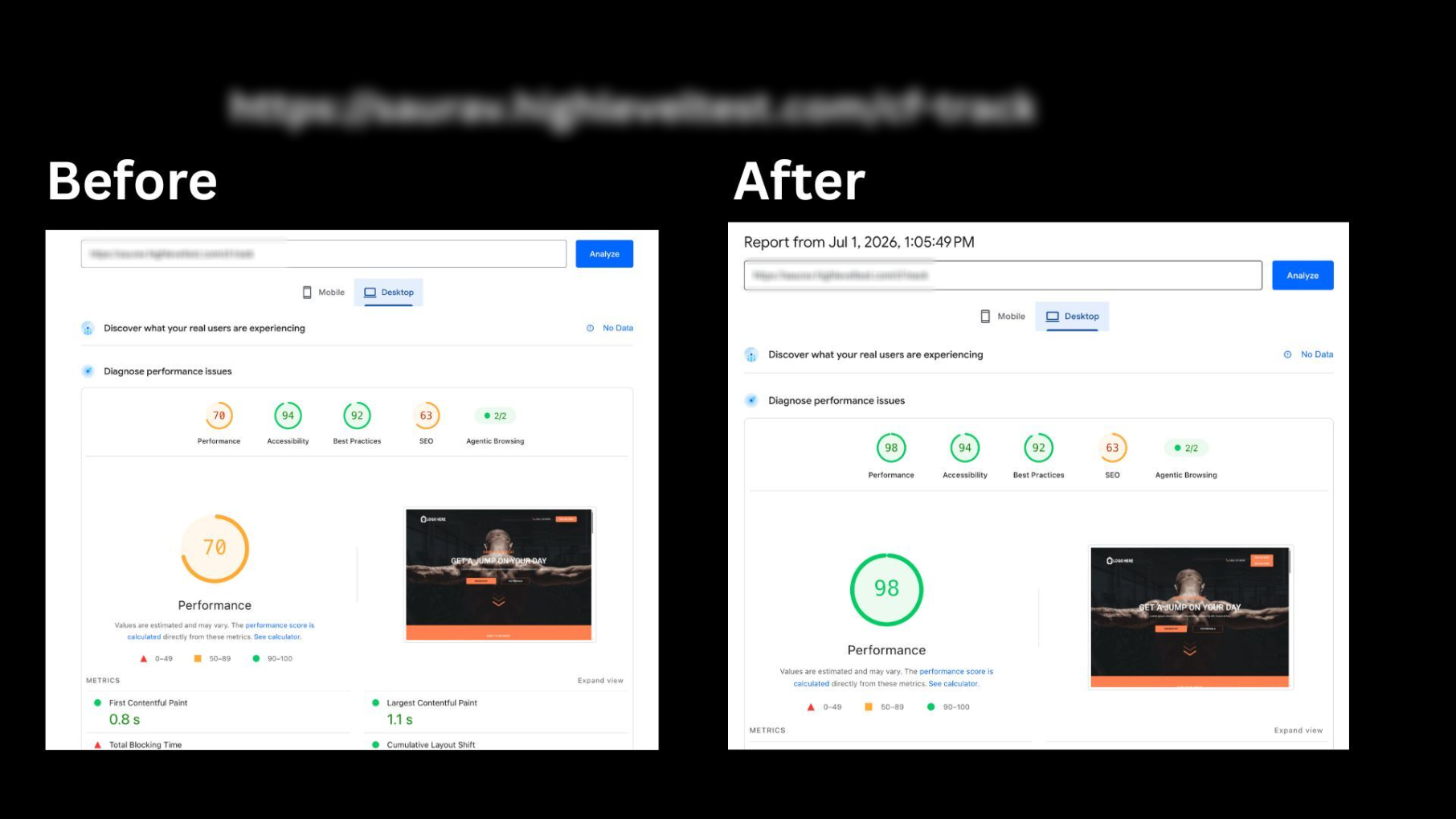
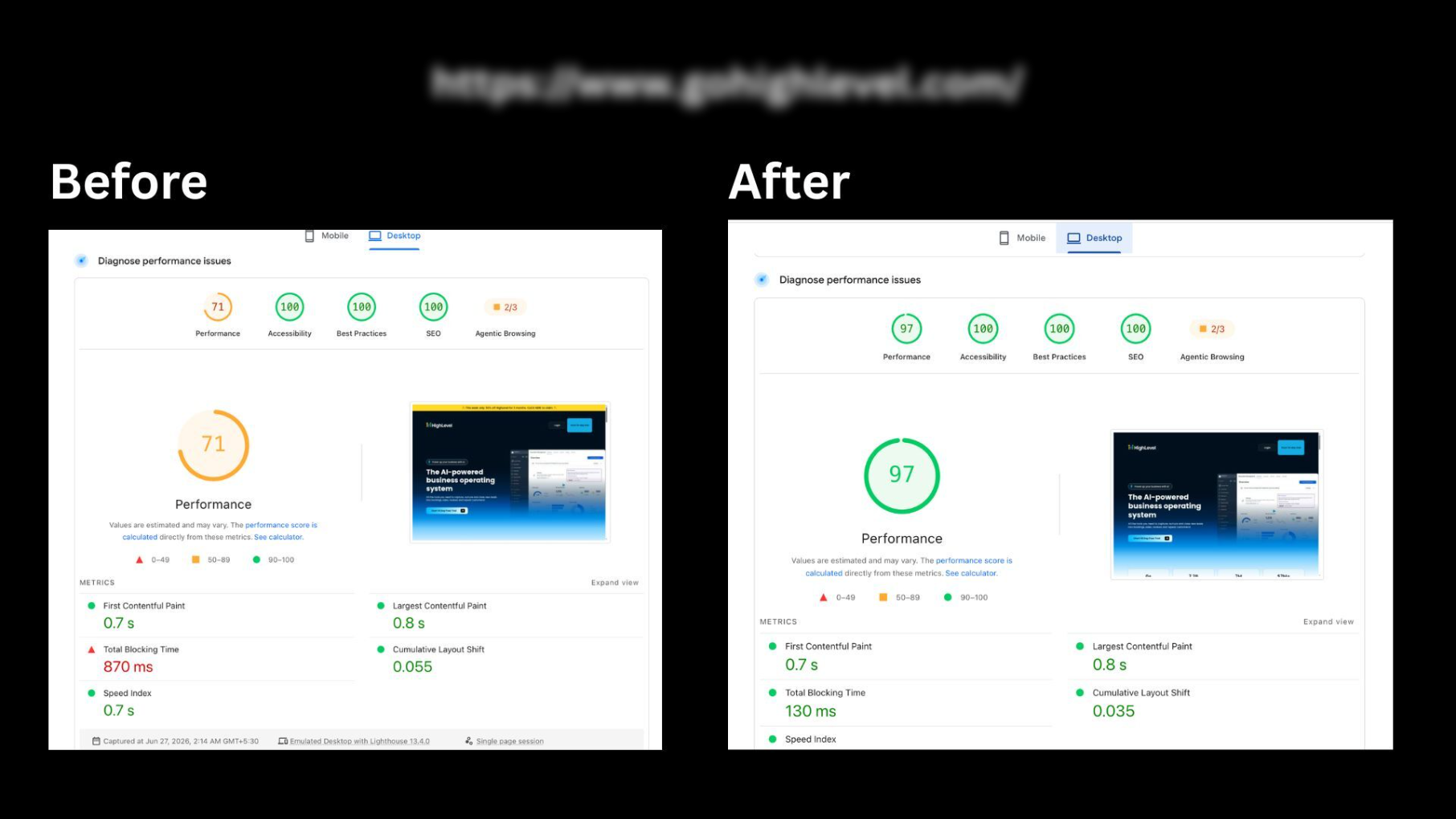
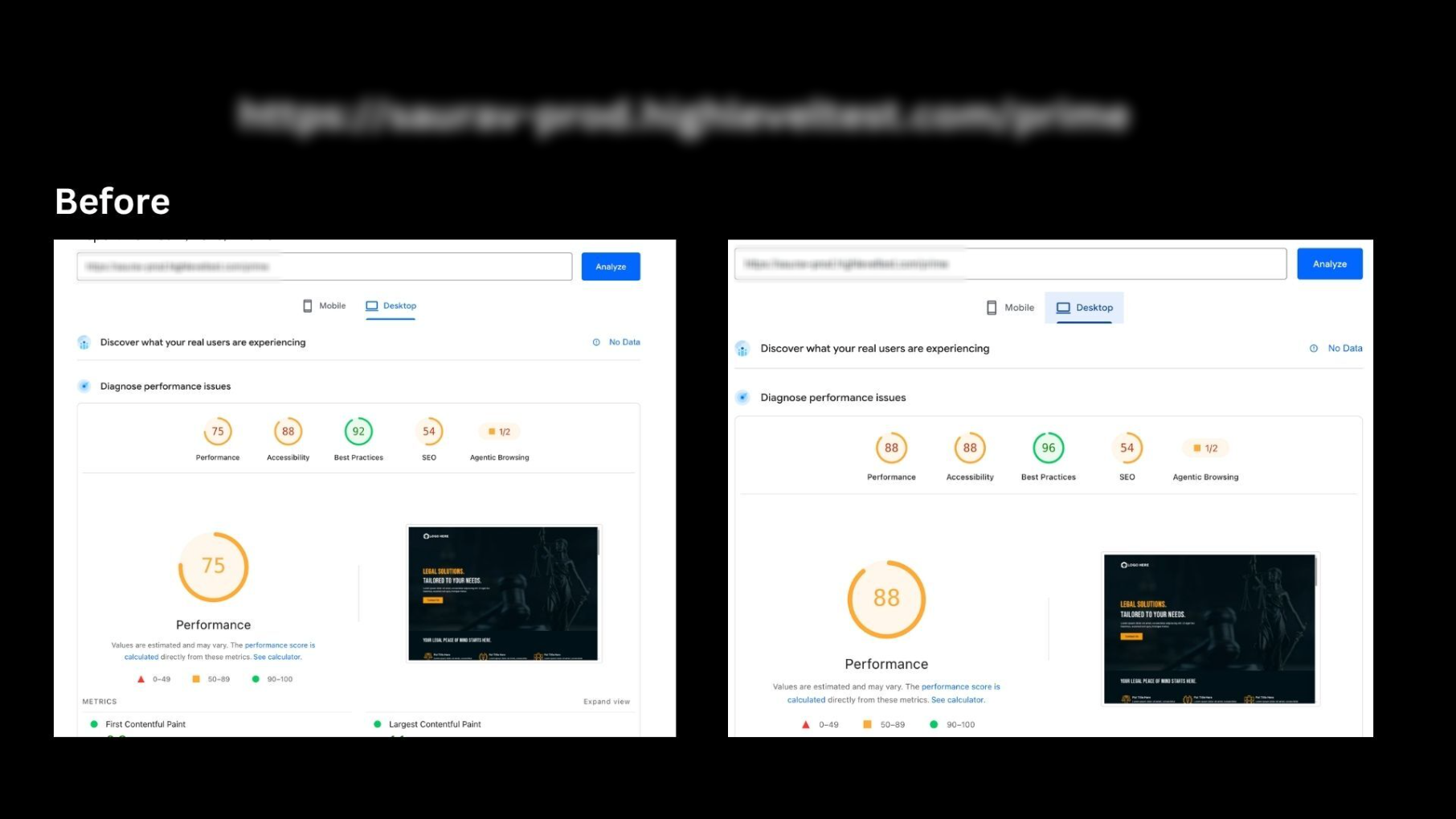
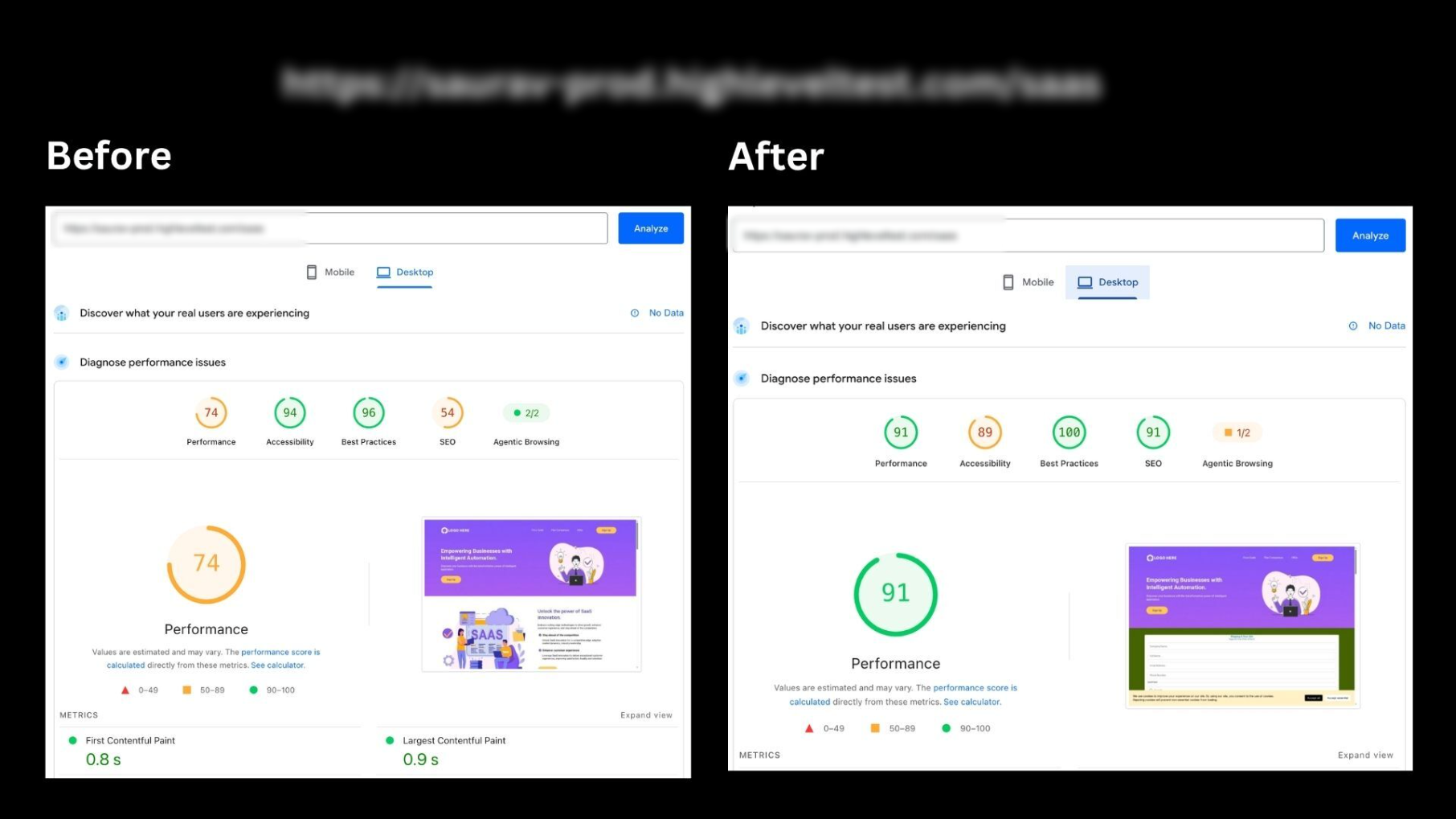
- Builder preview tracking script optimization reports a 15, 25 point PageSpeed improvement.
- CF Track example: Desktop Performance score increased from 70 to 98 (28 point).
- HighLevel website example: Score increased from 71 to 97 (26 point).
- Prime example: Score increased from 75 to 88 (13 point).
- SaaS example: Score increased from 74 to 91 (17 point).
- Reduced initial HTML size averages a 10% reduction.
05How to set up and use page speed optimizations in HighLevel
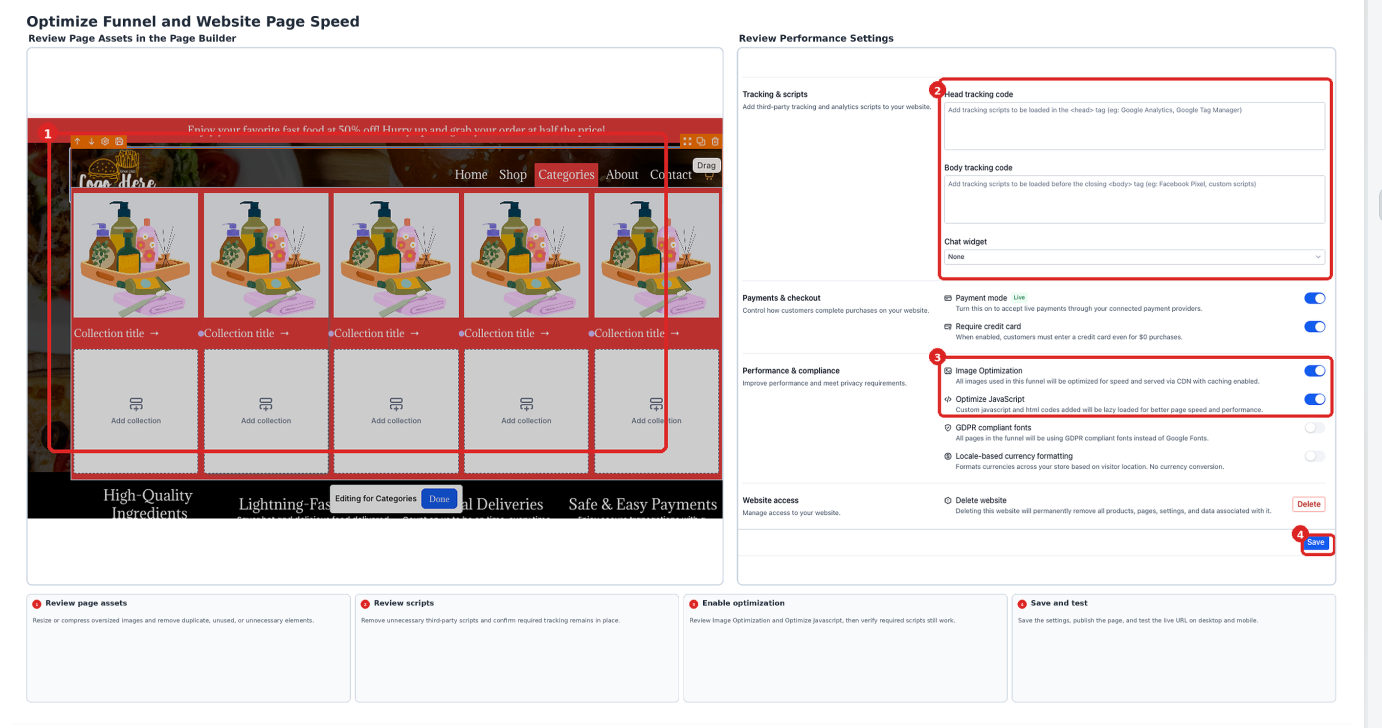
Optimize funnel and website page speed
- In your HighLevel subaccount, navigate to Sites > Funnels or Sites > Websites.
- Select the funnel or website you want to optimize.
- Open the desired page in the Page Builder.
- Examine every image; resize, compress, or replace any that are larger than needed.
- Delete unnecessary videos, animations, embedded widgets, duplicate elements, and third party scripts.
- Simplify the layout by removing unused sections and extra nested rows or columns.
- Open the funnel or website settings and locate the Image Optimization and Optimize JavaScript controls.
- Keep the performance toggles enabled where appropriate and verify that required custom scripts still function.
- Save or publish your changes and copy the published page URL.
- Run a speed test using PageSpeed Insights or GTmetrix.
- Review desktop and mobile results, then adjust the page based on the tool’s recommendations.
- Retest the page and confirm that forms, buttons, tracking scripts, navigation, and other key interactions work correctly.
06What it looks like in HighLevel
07Settings that matter
- Image Optimization. Compresses uploaded images so they load faster while preserving visual quality.
- Optimize JavaScript. Delays nonessential JavaScript and tracking code hydration to reduce blocking work during page load.
08Things to know before you rely on it
- Lazy loading runs independently of the Image Optimization toggle; disabling Image Optimization does not stop lazy loading.
- Optimize JavaScript may need to be turned off for custom code that must run immediately on page load.
- The reported 15 to 25 point PageSpeed improvement applies only to pages that contain tracking scripts and is not guaranteed for every page.
- Reduced HTML document size is automatic and averages about a 10 % decrease, but exact savings vary per page.
09How it connects to the rest of HighLevel
- Basic troubleshooting steps for funnels, websites, and webinars Basic troubleshooting
- How to add canonical tags to fix Google Ads rejections Canonical tags
- HighLevel pricing and plans Pricing
Michael's take

Fast page loads are valuable for any small business that relies on funnels or websites to capture leads and sales. The built in optimizations and simple clean up steps help improve loading speed.
The biggest mistake is to tweak settings without retesting the page, which can break forms or tracking scripts.